




Accelerating Fitness App Development: Intelligent Requirements Management with AI Tree Diagram Maker
Streamline fitness app requirements and WBS with Visual Paradigm's AI Tree Diagram Maker. Manage user stories, risk, and timelines in one visual tool.
Managing the lifecycle of a modern software application—such as a comprehensive fitness tracker app—requires more than just a simple to-do list. It demands a sophisticated structure that links high-level epics to granular user stories, all while tracking status, priority, and dependencies. For product managers and developers, the challenge often lies in visualizing these complex relationships without getting lost in spreadsheets. This is where the Visual Paradigm AI Tree Diagram Maker revolutionizes the workflow, transforming static planning into a dynamic, AI-powered strategy session.
By leveraging advanced artificial intelligence, this online diagramming tool allows teams to instantly generate detailed work breakdown structures (WBS) and requirements hierarchies. Whether you are outlining user authentication protocols or mapping out activity tracking features, the software provides a seamless bridge between text-based brainstorming and professional visual structuring.
Quick Summary: Why Professionals Choose This Tool
- Instant Structure Generation: Convert rough ideas into organized tree diagrams automatically using intelligent prompts.
- Deep Data Management: Go beyond drawing by assigning rich metadata like priority, status, and assignees to every node.
- AI-Driven Analysis: Consult an integrated chatbot to estimate timelines and analyze project risks based on your specific data.
- Real-Time Synchronization: Enjoy a dual-view interface where text edits instantly update the visual model.
Bridging the Gap Between Planning and Execution
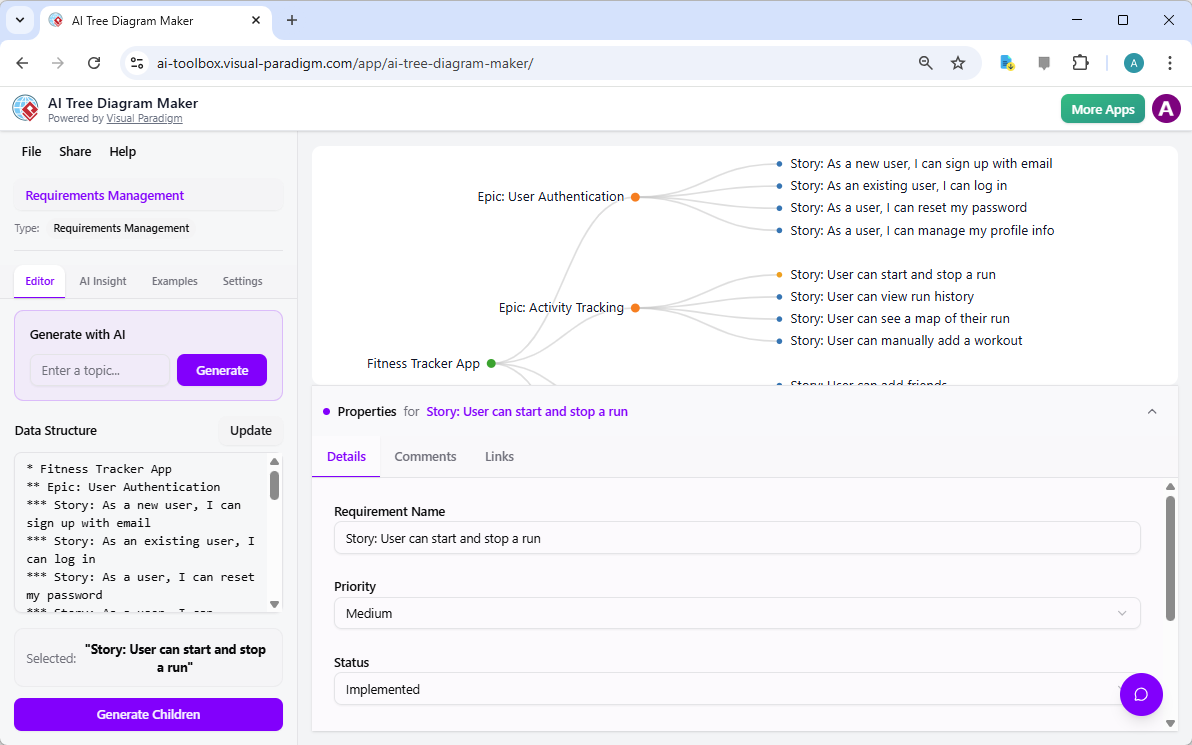
The foundation of any successful app development project is a clear, detailed roadmap. In the context of building a fitness tracker, this means breaking down massive goals into manageable units. The AI Tree Diagram Maker simplifies this by offering a “Requirements Management” blueprint that standardizes how you capture data. As seen in the workflow below, the interface provides a powerful dual-view experience: a text editor for rapid hierarchy definition and a visual canvas for structural clarity.
What sets this requirements management software apart is its ability to treat every node in the diagram as a data-rich object. In our example, the team is detailing the “Activity Tracking” epic. By selecting the user story “User can start and stop a run,” the manager can utilize the Property Editor at the bottom of the screen. Here, critical project details such as “Priority” (set to Medium) and “Status” (marked as Implemented) are tracked directly within the visual structure. This ensures that the diagram serves not just as an illustration, but as a living project database.
Turning Static Diagrams into Interactive Advisors
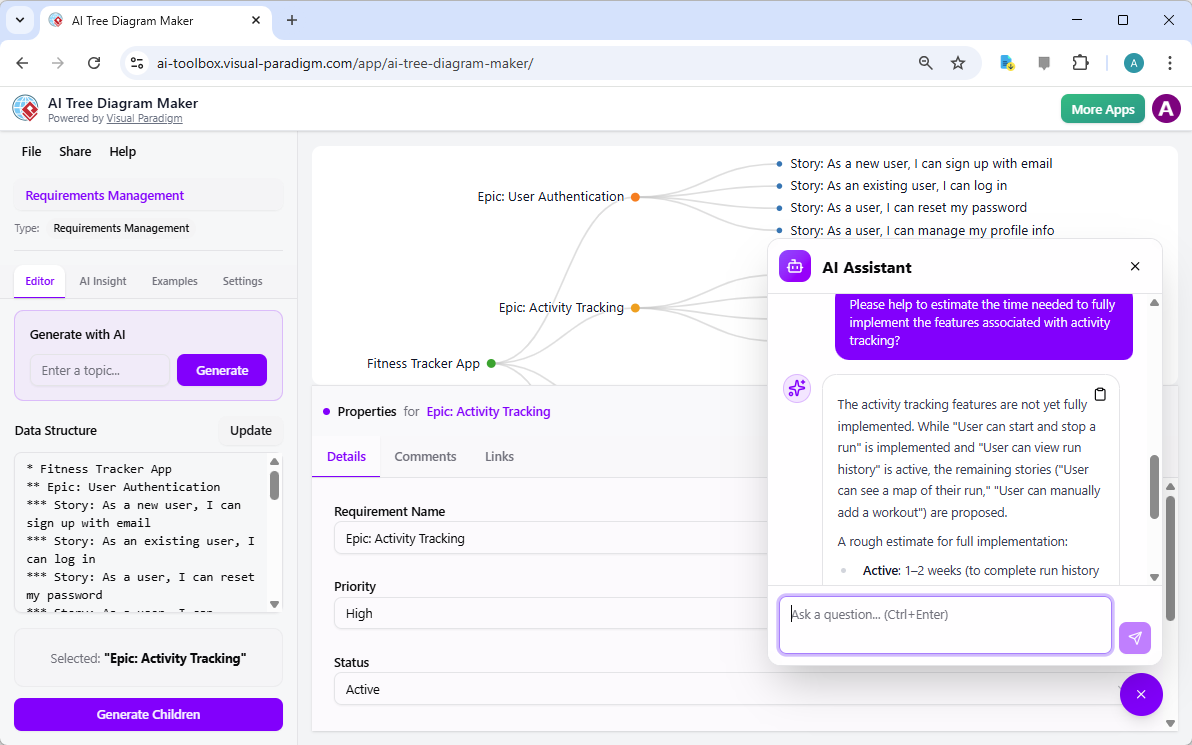
Once your project structure is populated with data, the role of the AI-powered project assistant becomes pivotal. Traditional diagrams are static; they show you what you wrote, but they cannot help you understand the implications of that data. Visual Paradigm changes this dynamic by embedding a context-aware AI chatbot directly into the diagramming environment. This assistant reads the structure of your tree, understands the properties you have assigned (like “Active” or “Proposed” statuses), and offers intelligent insights.
In the scenario below, the project manager needs to gauge the timeline for the remaining work under the “Activity Tracking” epic. Instead of manually tallying tasks and guessing durations, they simply ask the AI Assistant: “Please help to estimate the time needed to fully implement the features…”. The AI analyzes the specific user stories, notes which are already implemented versus those that are merely proposed, and provides a reasoned, fair estimation (e.g., “1–2 weeks”). This capability turns the online tree diagram maker into a strategic partner, helping teams make informed decisions based on the actual state of their requirements.
Empowering Agile Teams with Smart Visualization
The ability to instantly visualize complex hierarchies and then interrogate that data using natural language is a game-changer for agile teams. By centralizing requirements management within a visual interface, stakeholders can spot bottlenecks in the “Fitness Tracker App” development cycle before they become critical issues. The combination of the AI Insight features and robust property editing ensures that every decision is backed by data and clearly communicated to the entire organization.
From initial brainstorming to final sprint planning, the Visual Paradigm AI Tree Diagram Maker offers a streamlined, intelligent path to project success. It eliminates the friction of manual formatting and provides the analytical depth required for professional software development.
Ready to transform how you manage requirements?
Start your next project with the power of AI assistance today. Try the AI Tree Diagram Maker Now.
Related Links
Visual Paradigm offers an AI-powered tree diagram maker, which is designed to transform natural language descriptions into structured, professional hierarchical diagrams. These tools enable users to visualize complex hierarchical data instantly, covering a wide range of applications such as mind maps, organizational charts, and Work Breakdown Structures (WBS). Features like the Symbol tool further streamline the process by allowing users to rapidly convert hierarchical text into clean, editable diagrams through an intuitive editing interface. Additionally, the platform provides specialized support for decision trees, family trees, and risk registers, ensuring that users can effectively map outcomes, genealogy, or risk hierarchies.
- AI Tree Diagram Maker – Visualize Hierarchical Data Instantly: An overview of the AI-driven tool that generates mind maps, org charts, and WBS diagrams from text descriptions.
- From Text to Diagram: How Symbol Makes Hierarchy Editing Fast and Intuitive: A guide on using the Symbol feature to convert hierarchical text into editable tree diagrams.
- Visualizing Complex Ideas with AI-Powered Tree Diagrams: An exploration of how AI-driven tree diagrams help break down complex concepts into clear visual structures.
- Comprehensive Tutorial: Mastering the AI Tree Diagram Maker (IntelliTree): A detailed tutorial on transforming natural language into professionally formatted hierarchical diagrams.
- Risk Register Template with Tree Diagram Visualization: Details on using tree diagrams to visualize risk hierarchies and mitigation plans within a risk register.
- Decision Tree Software for Visual Modeling: A resource for building and analyzing decision trees to improve structured problem-solving.
- Family Tree Maker for Visual Documentation: A tool specifically designed for creating detailed genealogical structures with customizable relationships.
- Free Tree Chart Tool – Visual Paradigm Smart Board: An intuitive, web-based platform for creating and customizing various hierarchical tree structures.