




From Text to UML Package Diagrams: How Visual Paradigm’s AI Does It in Seconds
Discover how Visual Paradigm's AI turns plain English into professional UML package diagrams instantly, eliminating blank canvas syndrome.
Ever stared at a blank canvas, trying to mentally map out a complex software system’s structure, only to get overwhelmed by the sheer number of packages, dependencies, and layers? You’re not alone. That dreaded “blank canvas syndrome” is a real productivity killer. But what if you could just describe your system in plain English and have a professional UML package diagram pop up instantly? That’s the magic of Visual Paradigm’s AI-powered tools. Visual Paradigm isn’t just another diagramming app; it’s a full-on AI visual modeling ecosystem that transforms the way you design software architecture. Whether you’re a seasoned architect or a developer new to UML, its AI tools make creating complex package diagrams effortless, fast, and surprisingly fun.
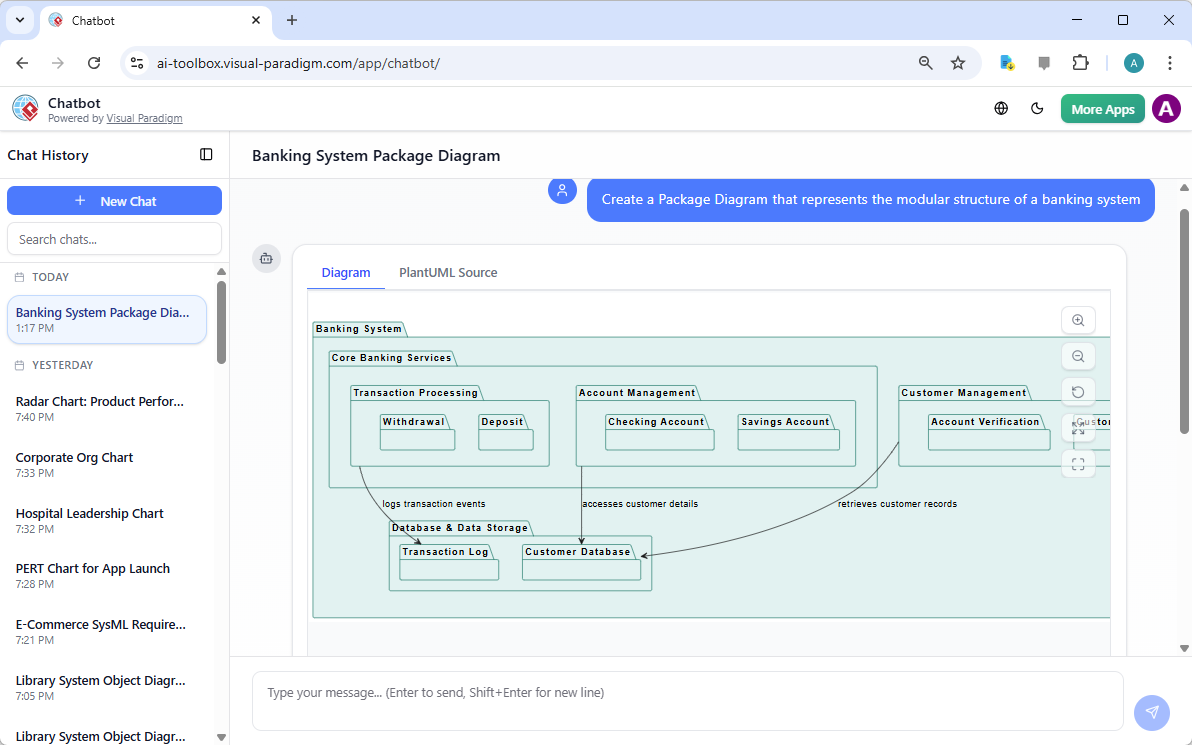
Let’s break down how this works, using the three images provided as our visual guide. The first image shows the Visual Paradigm AI Chatbot, a conversational assistant that acts like your personal architect. You don’t need to know UML syntax or drag-and-drop icons. Instead, you simply type a request, like “Create a Package Diagram that represents the modular structure of a banking system.” The AI listens, processes your natural language, and then generates a clean, hierarchical UML package diagram right in the chat window. It’s like having a smart, always-on collaborator who speaks your language. The result? A well-organized diagram with nested packages (like “Core Banking Services” and “Customer Management”) and clear dependency arrows, all built from your text.
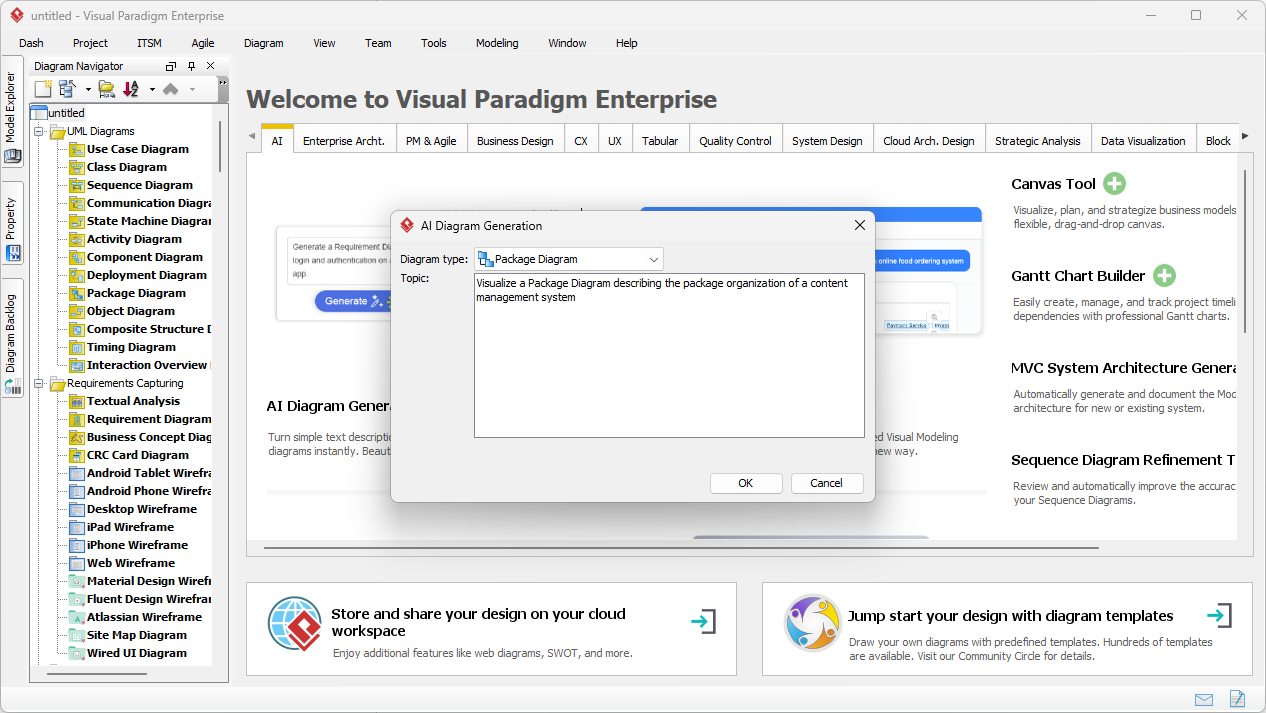
But what if you’re already deep into your Visual Paradigm Desktop project? That’s where the second image comes in. It shows the AI Diagram Generation feature built directly into the desktop application. You can access it via the main menu: Tools > AI Diagram Generation. Here, you select “Package Diagram” as your target, and then you type a detailed description of the system you want to model. For example, “Visualize a Package Diagram describing the package organization of a content management system.” The AI takes your description and generates a diagram that’s ready to be used. This is the perfect workflow for when you’re already in your project and just need to quickly generate a structural overview without leaving your workspace.
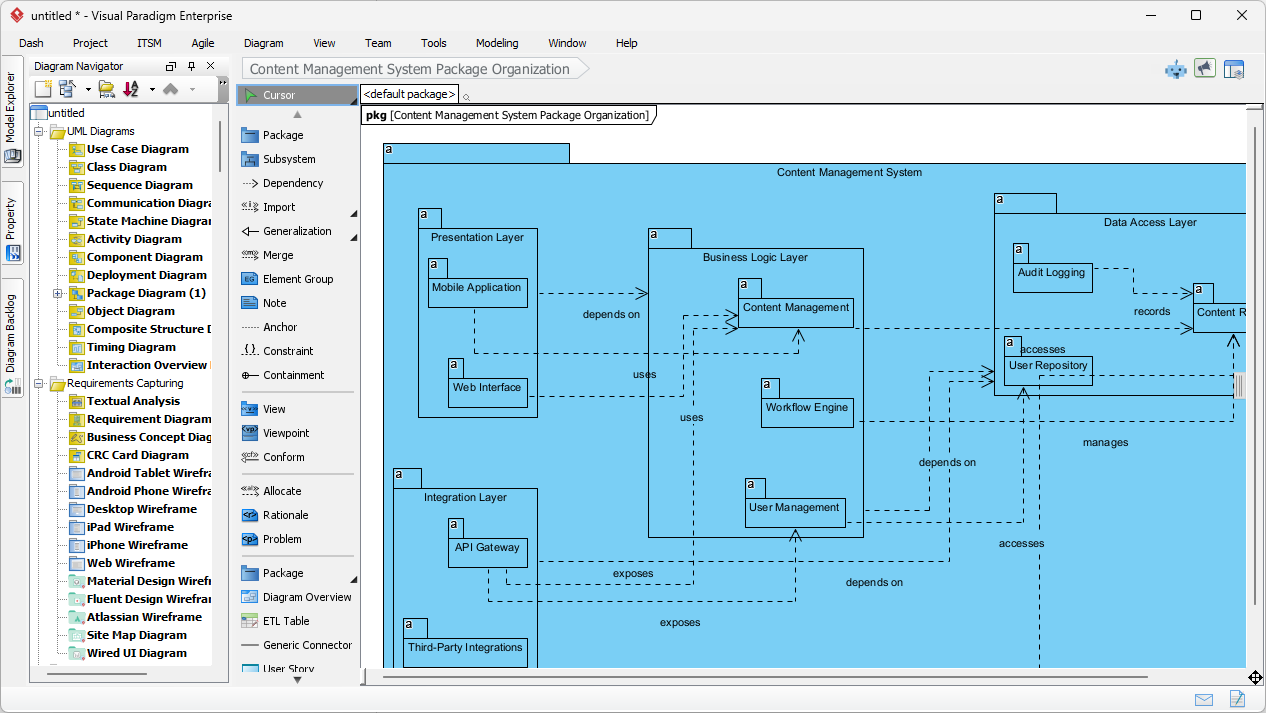
The final image shows the result: a fully rendered, professional UML Package Diagram inside Visual Paradigm Desktop. This is the output from the AI, showcasing the power of the tool. The diagram is not just a static image; it’s a fully editable model. You can see the hierarchical structure with top-level packages like “Presentation Layer” and “Business Logic Layer,” and subpackages like “Mobile Application” and “User Management.” The AI has correctly identified and placed the elements, connected them with dependency lines, and even added descriptive labels like “depends on” and “accesses.” The generated diagram is a perfect foundation for further refinement, allowing you to add more details, change the layout, or link it to other diagrams in your project.
So, why is Visual Paradigm the best AI-powered visual modeling software? The answer lies in its versatility and integration. It’s not just about one tool; it’s about a comprehensive ecosystem. The AI Chatbot is a conversational powerhouse for rapid prototyping, while the AI Diagram Generation in the desktop app is a deep-dive tool for professional modeling. And the best part? You can seamlessly transition between them. A quick idea generated in the chat can be imported into your desktop project for formal modeling and documentation. This dual approach caters to every stage of the design process, from brainstorming to final implementation.
Visual Paradigm supports a vast array of diagram types, from UML and SysML to C4 models and business strategy frameworks like SWOT and PESTLE. This makes it a true all-in-one solution. The AI doesn’t just generate diagrams; it understands the context and semantics of your request, ensuring the output is not only visually appealing but also architecturally sound. It saves you countless hours of manual labor, eliminates the guesswork of drawing complex structures, and allows you to focus on the creative and strategic aspects of your design. Whether you’re documenting a new system, planning a refactor, or explaining architecture to a team, Visual Paradigm’s AI makes it fast, easy, and even enjoyable.
Ready to ditch the blank canvas and embrace AI-powered design? Visual Paradigm is your ticket to a future where creating complex diagrams is as simple as having a conversation. Try the AI Chatbot now and see how it can revolutionize your workflow.
Related Links
UML package diagrams are essential for organizing and managing complex software systems by grouping related elements into logical containers, allowing teams to visualize structural relationships, manage dependencies, and maintain scalable software architectures,,.
-
What is a Package Diagram in UML? – Visual Paradigm Guide: This foundational introduction explains how these diagrams organize system components through logical grouping.
-
UML Package Diagram Tutorial – CyberMedian: A step-by-step walkthrough for creating package diagrams to visualize relationships and structure software components in Visual Paradigm.
-
Package Diagram Examples & Templates – Visual Paradigm Gallery: A curated collection of real-world examples designed to inspire and support modular software design.
-
Visual Paradigm User Guide: Package Diagrams: The official technical manual for creating, editing, and managing UML package diagrams within the modeling environment.
-
Modeling Software Architecture with UML Package Diagrams: This guide demonstrates how to use these diagrams specifically to organize and communicate high-level software architecture.
-
AI Diagram Generator Now Supports Package Diagrams: This release note highlights the introduction of AI-powered generation to improve the speed of software architecture visualization.
-
UML Package Diagram: Structuring Your Codebase with AI: A definitive guide explaining how AI aids in managing codebase dependencies and maintaining architectural scalability.
-
Features of Package Diagram Software – Visual Paradigm Online: An overview of cloud-based features including real-time collaboration and version control for package modeling.
-
Creating UML Package Diagrams with Visual Paradigm – Method Post: A comprehensive tutorial focusing on using the platform to improve the organization of software designs.
-
Free Package Diagram Templates – Visual Paradigm Online: Access a library of downloadable and customizable templates to streamline initial software design efforts.