




Creating UML Object Diagrams from Text: A Visual Paradigm AI Guide
Learn how Visual Paradigm's AI tools generate UML object diagrams from text descriptions, simplifying software modeling for developers and architects.
Imagine describing a complex software system in plain English and instantly seeing a detailed UML object diagram that visualizes its runtime state. This isn’t a futuristic dream; it’s the reality offered by Visual Paradigm’s AI-powered tools. For software developers, architects, and analysts who need to illustrate concrete examples of object interactions, the process of manually creating UML object diagrams can be tedious and error-prone. Visual Paradigm’s AI capabilities, both in its desktop software and its online chatbot, transform this challenge into a simple, conversational task. By providing a natural language description of objects, their attributes, and relationships, users can generate accurate, professional UML object diagrams in seconds. This article explores how Visual Paradigm’s AI tools, particularly its AI Diagram Generation and AI Chatbot, streamline the creation of object diagrams, making complex modeling accessible and efficient for everyone.
What is an Object Diagram and Why Does it Matter?
Before diving into the AI tools, let’s understand the core concept. An Object Diagram is a UML structural diagram that shows a snapshot of the objects and their relationships at a specific point in time. It’s the concrete counterpart to a class diagram, which shows the abstract blueprint. While a class diagram defines the structure of a system (e.g., a ‘Customer’ class with ‘name’ and ’email’ attributes), an object diagram illustrates a specific instance of that structure (e.g., a ‘customer’ object named ‘Alice Johnson’ with the email ‘[email protected]’). This makes object diagrams invaluable for illustrating real-world scenarios, such as a specific user’s shopping cart, a test case setup, or a sample configuration in a system.
Traditionally, creating these diagrams requires manually drawing each object as a rectangle, labeling it with its instance name and class, filling in its attribute values (slots), and drawing the links between them. This process is time-consuming and can be a barrier for beginners or those who need to generate many examples quickly. This is where Visual Paradigm’s AI-powered tools shine, eliminating the manual effort and allowing users to focus on the conceptual design rather than the graphical representation.
How to Generate an Object Diagram with AI: Two Powerful Approaches
Visual Paradigm offers two primary, powerful ways to generate UML object diagrams using AI: the AI Diagram Generation feature within the desktop application and the conversational AI Chatbot. Both methods leverage natural language input to create professional diagrams, but they cater to slightly different workflows.
Method 1: AI Diagram Generation in Visual Paradigm Desktop
The first approach is to use the built-in AI Diagram Generation feature directly within the Visual Paradigm Desktop application. This method is ideal for users who are already working within a project and want to generate a diagram as part of a larger modeling effort. The process is straightforward:
-
Open your Visual Paradigm project.
-
Navigate to Tools > AI Diagram Generation.
-
In the dialog box, select Object Diagram as the diagram type.
-
Enter a detailed natural language description of the scenario. For example: “Generate an Object Diagram to visualize a snapshot of objects and their relationships in an online shopping system.”
-
Click OK to generate the diagram.
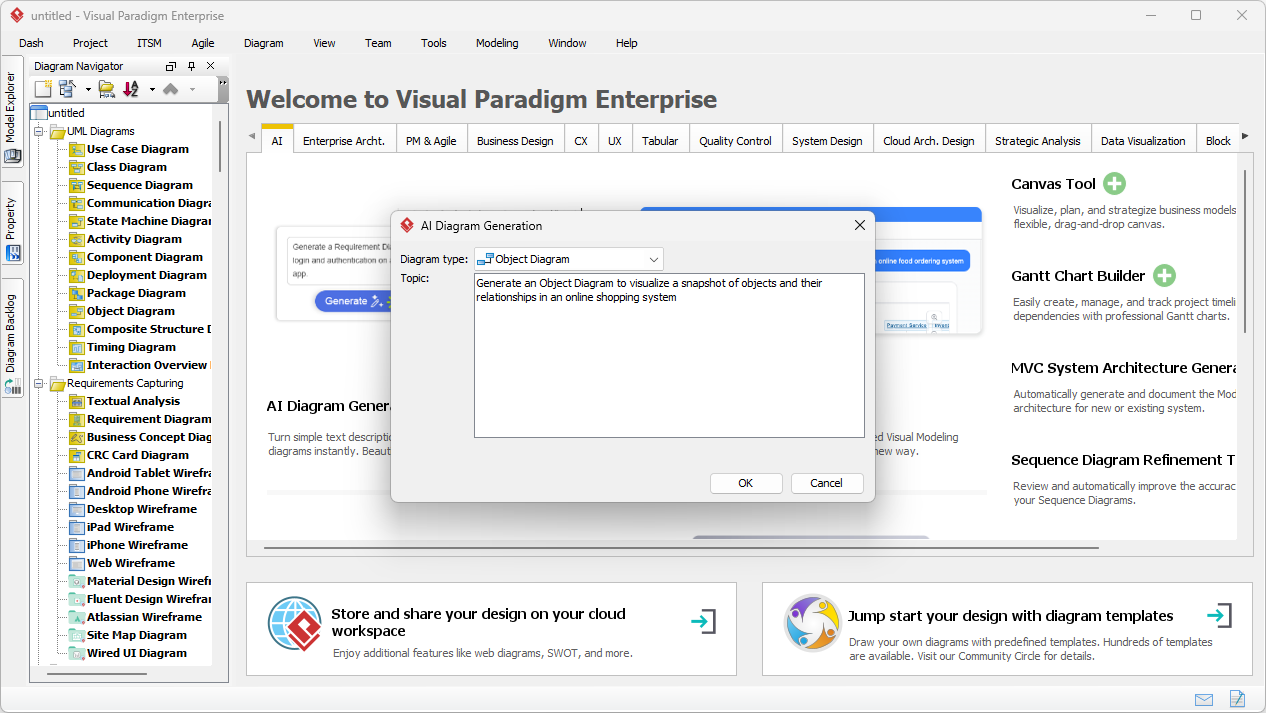
The result is a fully generated UML object diagram, ready for further editing and refinement within the Visual Paradigm environment. This diagram is not just a visual output; it is a living model that you can open and edit in the Visual Paradigm Desktop. You can add new objects, modify attribute values, change relationships, add notes, and link the object diagram to other UML diagrams like a class diagram or a sequence diagram. This allows for a smooth workflow from rapid prototyping with AI to detailed, professional modeling.
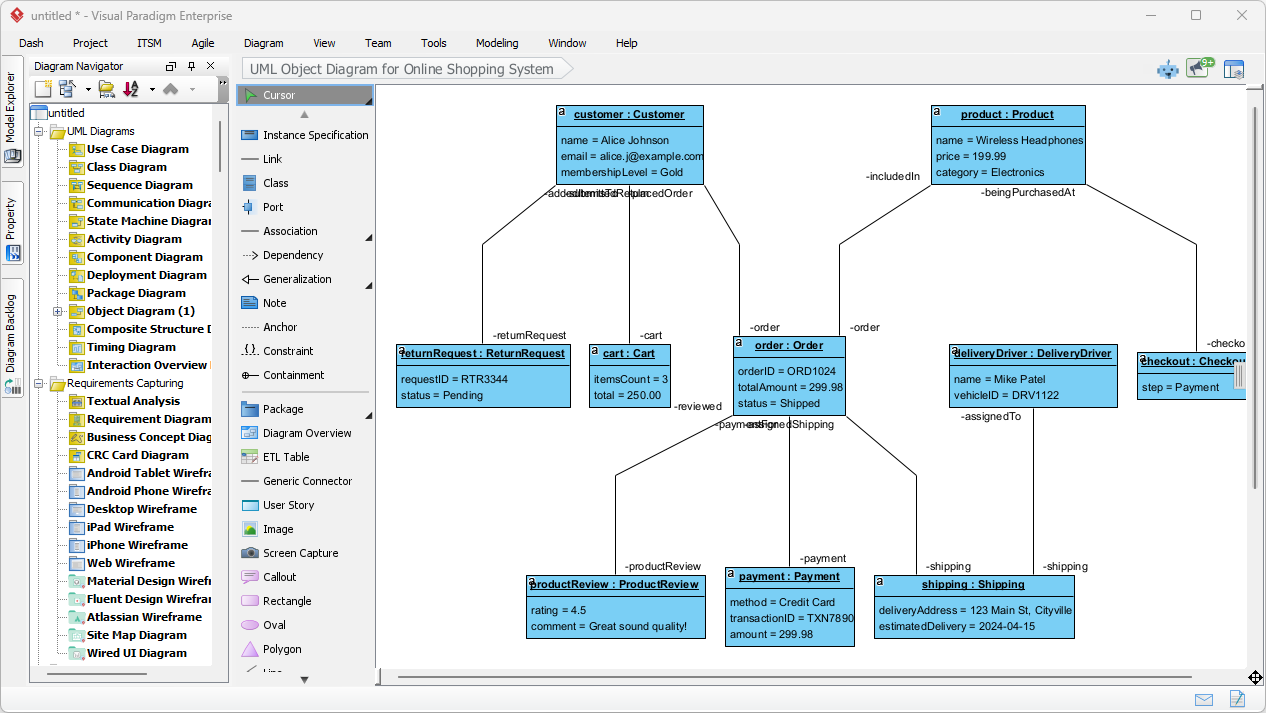
Method 2: The Visual Paradigm AI Chatbot
The second approach is to use the Visual Paradigm AI Chatbot, a dedicated conversational assistant available online. This tool is perfect for quick prototyping, brainstorming, or when you need to generate a diagram without opening the full desktop application. The process is simple and intuitive:
-
Open the AI Chatbot interface at chat.visual-paradigm.com.
-
Start a new chat session.
-
Simply type your request in plain language. For example: “Create an Object Diagram that represents the state of objects in a library system.”
-
The AI will process your request and generate the diagram directly in the chat window.
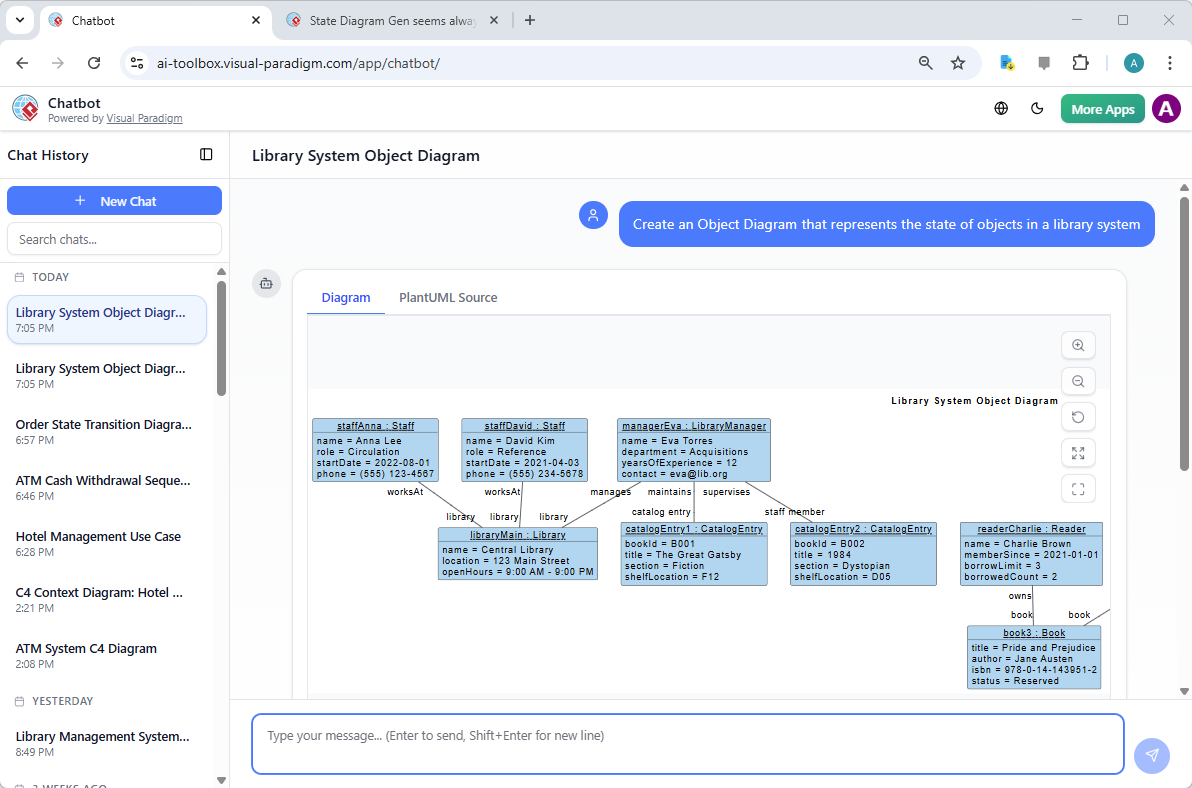
The user has typed a request, and the AI has generated a “Library System Object Diagram” with various objects (e.g., staff, library, book) and their relationships. The chatbot interface allows for iterative refinement, letting you ask follow-up questions like “Add a new book with the title ‘The Great Gatsby’ and status ‘Available’.” This conversational approach makes the tool highly interactive and user-friendly.
Key Benefits of AI-Powered Object Diagram Generation
Using AI to generate object diagrams offers several significant advantages that enhance productivity and improve the quality of your work.
-
Save Time and Effort: The most obvious benefit is the massive time savings. Instead of spending 15-30 minutes manually drawing and labeling objects and links, the AI creates a complete diagram in seconds.
-
Ensure UML Accuracy: AI tools are trained on UML standards. They automatically use the correct syntax for object notation (e.g.,
customer : Customer), properly place attribute values in slots, and create instance links with the correct role names and multiplicity, reducing the risk of errors. -
Clarify Complex Scenarios: By visualizing a concrete example, you can make abstract system designs much more understandable for stakeholders, team members, or students. A diagram of a specific customer’s shopping cart is far more tangible than a general description of the e-commerce system.
-
Enhance Communication and Collaboration: These diagrams serve as excellent tools for explaining use cases, test scenarios, or design walkthroughs. You can easily share the generated diagram with colleagues for feedback or include it in documentation.
-
Democratize Modeling: Beginners in object-oriented programming or UML can create meaningful object diagrams without needing to master the intricate syntax of instance-level modeling, lowering the barrier to entry.
From AI Generation to Professional Modeling
While the AI-generated diagrams are a powerful starting point, they are not the final product. The true power of Visual Paradigm lies in its seamless integration. The generated object diagram is not a static image; it is a fully editable, native diagram file within the Visual Paradigm ecosystem.
Creating UML object diagrams from text is no longer a complex, time-consuming task. With Visual Paradigm’s AI-powered tools, it has become a simple, conversational process. Whether you prefer the structured workflow of the desktop application or the instant, interactive nature of the AI Chatbot, you can quickly generate accurate, professional object diagrams from a simple description. This capability revolutionizes how software developers, architects, and analysts model and communicate system behavior, making the process more efficient, accurate, and accessible. By leveraging AI, you can focus on the critical thinking and strategic design of your systems, not the tedious mechanics of diagramming.
Ready to experience the power of AI in visual modeling? Try the Visual Paradigm AI Chatbot today and see how it can transform your workflow.
Related Links
Object diagrams depict a static snapshot of class instances and their relationships at a specific moment in time, utilizing AI-driven solutions to enhance structural visualization and documentation within the software modeling lifecycle.
-
AI-Powered Object Diagrams in Visual Paradigm: This guide explores how artificial intelligence enhances the creation of object diagrams for better structural visualization.
-
What is an Object Diagram in UML? A Complete Guide: This foundational resource explains how object diagrams depict class instances and their relationships at a specific point in time.
-
Class Diagrams vs Object Diagrams in UML: Key Differences: This article clarifies the purposes, structures, and appropriate use cases for both diagram types in software modeling.
-
How to Draw Object Diagrams in Visual Paradigm: A step-by-step guide covering the tools, notation, and best practices for creating accurate object models.
-
Object Diagram in UML: Bridging the Gap Between Classes and Instances: This resource details how these diagrams serve as a concrete view of system structure by connecting abstract definitions to runtime instances.
-
Object Diagram Examples in Visual Paradigm Gallery: A curated collection of real-world object diagram examples intended for learning and design inspiration.
-
Understanding Classes and Objects in UML: This article discusses how object diagrams bridge the gap between abstract class definitions and runtime objects.
-
Visual Paradigm User Guide: Object Diagrams: The official documentation provides technical instructions on creating and using object diagrams within the modeling environment.
-
UML and SysML: Object Diagrams (PDF Guide): A downloadable guide that explains object diagrams within the context of both UML and SysML modeling standards.
-
Mastering UML Object Diagrams: A Comprehensive Guide: This guide provides an in-depth comparison of UML structures to help designers select the appropriate modeling tool for their projects.