




Building a Smart Online Bookstore Schema: The Fast Path with DB Modeler AI
Learn how to design a professional online bookstore database schema using Visual Paradigm's DB Modeler AI. Follow a 7-step workflow for fast, smart modeling.
Hey there! 👋 Ever felt like database design is a massive headache? We have all been there. Trying to figure out tables, primary keys, and relationships is basically like solving a 5,000-piece puzzle with half the pieces missing. But what if an AI-powered database modeling tool did all the heavy lifting for you? Visual Paradigm’s DB Modeler AI is basically your new best friend, turning a simple business idea into a professional, ready-to-use schema in just a few minutes. 🚀 It is clean, it is smart, and it is a total game-changer for anyone who wants to spend more time building and less time scratching their head over diagrams.
Visual Paradigm Online offers a 7-step guided workflow that takes you from a basic project name to a fully interactive database playground. It is the best database design software for anyone who wants a structured, logical path without the stress of manual errors. Whether you are a student or a pro developer, this tool makes you look like a database architect in seconds. Let’s dive into how it works using a real-world example: an Online Bookstore. 📚
Quick Key Takeaways
-
Step-by-Step Logic: A 7-step wizard ensures you never miss a critical design phase.
-
AI Generation: Turn a simple project name into a full problem description and diagram.
-
Normalization Support: Automatically refine your schema to 3rd Normal Form (3NF).
-
Interactive Testing: A built-in “Playground” lets you run SQL commands instantly.
-
Multi-Platform: Use the online app or the advanced desktop AI generator.
How do I start my database project?
First things first! You need to tell the AI what you are building. In the first step of the DB Modeler AI, you just enter a project name like “Online Bookstore.” If you are feeling lazy (we don’t judge! 😉), you can click the “AI Generate Description” button. The AI-powered database modeling tool will then draft a detailed problem statement for you, covering books, customers, orders, and even reviews. It sets the stage for everything that follows.
The interface is super clean. You see your project name and a big text box where the magic happens. It is the ultimate “easy button” for starting a new data model. Once you are happy with the description, you just hit the generate button to move to the next phase.

What is a Domain Class Diagram?
After you define your problem, the AI moves to Step 2: the Domain Class Diagram. Think of this as the “big picture” view. It identifies the main business things—or “classes”—like Customers, Books, and Orders. This online ERD maker uses PlantUML syntax to create a visual map of how these entities relate to each other. It is simple, high-level, and doesn’t get bogged down in technical database details yet. It’s perfect for making sure the business logic is actually right before you get into the weeds.
In this view, you can see the code on one side and the visual diagram on the other. It feels very high-tech but is actually very easy to read. You’ll see that a Customer “places” an Order and an Order “contains” items. It’s basically a map of your bookstore’s brain!

Can it make a real ERD for me?
Yes! Once the high-level classes are confirmed, Step 3 transforms them into a formal Entity-Relationship Diagram (ERD). This is where things get serious. This professional ER diagram tool adds technical details like Primary Keys (PK) and Foreign Keys (FK). It maps out exactly how the “Customers” table links to the “Orders” table using unique IDs. The AI intelligently handles cardinalities—meaning it knows one customer can have many orders, but one order belongs to only one customer. 🧠
The visual output is crisp and professional. You’ll notice symbols showing the relationships and a list of attributes (like names and emails) for each table. If something looks off, you can edit the code, and the diagram updates instantly. It’s like having a database pro sitting right next to you.

How do I get the SQL code?
Now for the fun part: the code! Step 4 takes your visual ERD and turns it into an Initial Database Schema using SQL DDL (Data Definition Language). This SQL schema generator writes the `CREATE TABLE` statements for you. It handles data types like VARCHAR for names, INT for IDs, and DECIMAL for prices. You don’t have to worry about syntax errors because the AI follows best practices automatically. 💻
You can see the raw SQL code in a neat window. It’s all organized and ready to be copied into your real database system like PostgreSQL or MySQL. This saves you a ton of typing and ensures that your tables match your visual design perfectly.

How do I fix messy data?
Ever heard of “Normalization”? It is just a fancy word for making sure your database isn’t messy or repetitive. Step 5 is dedicated to Schema Normalization. This automated database design tool guides you from 1NF to 3NF. It explains why certain data is moved to avoid “transitive dependencies.” For example, it ensures that book details aren’t stored inside every single order record, which keeps your database fast and lean. 🏃♂️💨
The tool lets you toggle between different normal forms so you can see the difference. It even gives you a little explanation of why the schema is in 3NF. It’s a great way to learn database theory while actually doing real work.

Can I test my design before building it?
This is where Visual Paradigm really shines. Step 6 provides an Interactive Playground. It is like a sandbox for your data. You can actually add records—like “Elena Martinez”—and see them pop up in the tables. You can even click a button to “Add 10 Records” instantly just to see how the tables look when they are full. It is a fantastic way to validate your AI-powered database modeling tool output before you write a single line of application code.
As you interact with the tables, an SQL Log shows you exactly what commands are running in the background. It’s a safe place to play, break things, and reset whenever you want. No more “whoops” moments in production! 😅

Do I get a final design report?
Finally, Step 7 gives you a comprehensive Design Report. It bundles up your problem description, your diagrams, your SQL code, and your normalization steps into one neat document. You can download this as a PDF or keep it in the cloud. It’s perfect for showing off to your team, your professor, or your stakeholders. It proves you’ve done the work and followed a solid design process.
The report is formatted beautifully in Markdown, so it’s easy to read and share. It’s the ultimate “I’m done!” moment that wraps up your best database design software experience with a nice bow. 🎁

What if I prefer a desktop app?
If you are a power user who loves desktop software, Visual Paradigm has you covered there too! The flagship desktop application features a powerful AI Diagram Generation tool. Instead of a step-by-step wizard, you just open a prompt window, pick “Entity Relationship Diagram,” and type what you want. For example, you could type: “Visualize an ERD describing the database structure of a social media platform.”
This feature is perfect for quick prototyping when you already know what you want but don’t want to draw 50 boxes manually. It’s fast, efficient, and integrates directly with the rest of Visual Paradigm’s enterprise-grade modeling tools. 🛠️
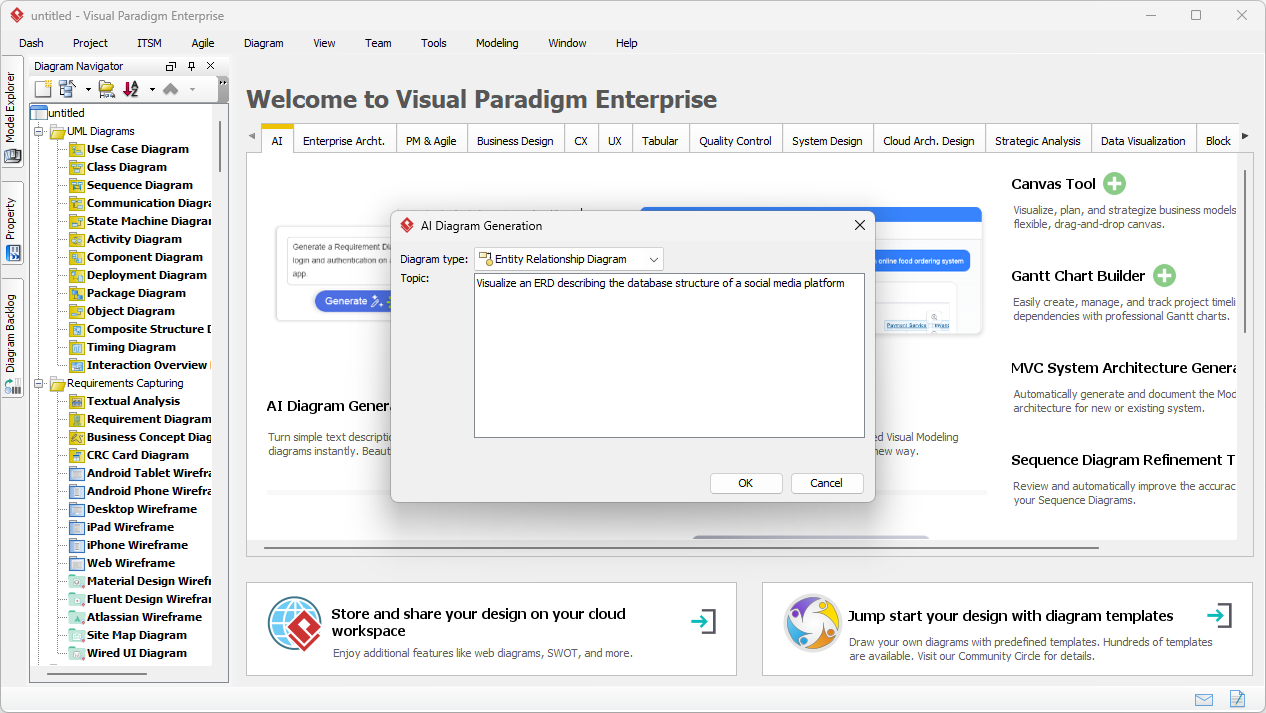
Once you hit OK, the desktop AI builds a massive, editable diagram in seconds. For our social media example, it would instantly create tables for Users, Posts, Comments, and Notifications. It even adds the relationship lines and icons for primary keys. Because it is a native diagram, you can drag things around, change colors, or add new columns whenever you want. It is a hybrid of AI speed and human control.

Summary of the Magic
Database modeling doesn’t have to be a nightmare. With Visual Paradigm’s AI-powered database modeling tool, you get a guided, logical path from a blank page to a professional SQL schema. You can normalize your data, test it in a playground, and generate reports—all without breaking a sweat. Whether you use the 7-step online wizard or the instant desktop generator, you are getting the best database design software available today. Ready to build something cool? Go give it a spin! 🚀
Try it yourself now!
Stop struggling with manual diagrams and let the AI do the heavy lifting. You can start designing your next big project today for free! Visit the DB Modeler AI landing page to learn more about the features, or jump straight into the action by clicking the link below. 👇
👉 Launch DB Modeler AI & Start Modeling Now!
Want the full desktop power? You can also download Visual Paradigm Desktop and try out the AI Diagram Generation features for yourself! Happy modeling! 😊