




Transforming Healthcare Requirements into Class Models: AI Textual Analysis Guide with Visual Paradigm
Learn how to use Visual Paradigm's AI Textual Analysis to transform healthcare requirements into structured UML Class Models quickly and accurately.
In the complex world of systems analysis—particularly within sensitive sectors like healthcare—the journey from a stakeholder’s problem description to a structured technical model is often fraught with challenges. Analysts frequently spend hours dissecting interview notes, trying to isolate key entities from unstructured text, and worrying about missing critical requirements. Visual Paradigm Desktop changes this dynamic with its AI Textual Analysis Generation.
This tutorial walks through a real-world scenario: taking a raw problem description regarding fragmented patient data in a healthcare clinic and using AI to instantly generate a structured Class Diagram. By leveraging this professional AI-powered design tool, you can move from ambiguity to clarity in a matter of seconds, ensuring that your requirements engineering process is both accurate and highly productive.
Quick Summary: Improving Analysis Productivity
-
Automated Extraction: Instantly identify functional requirements, actors, and candidate classes from raw text.
-
Seamless Modeling: Convert text directly into UML diagrams (Class, Use Case, etc.) without manual drawing.
-
Gap Detection: Let the AI highlight critical entities like “Patient Records” or “Audit Trails” that might be overlooked.
-
Time Savings: Skip the manual transcription phase and move straight to refinement and logic checking.
Step 1: Inputting the Problem Description
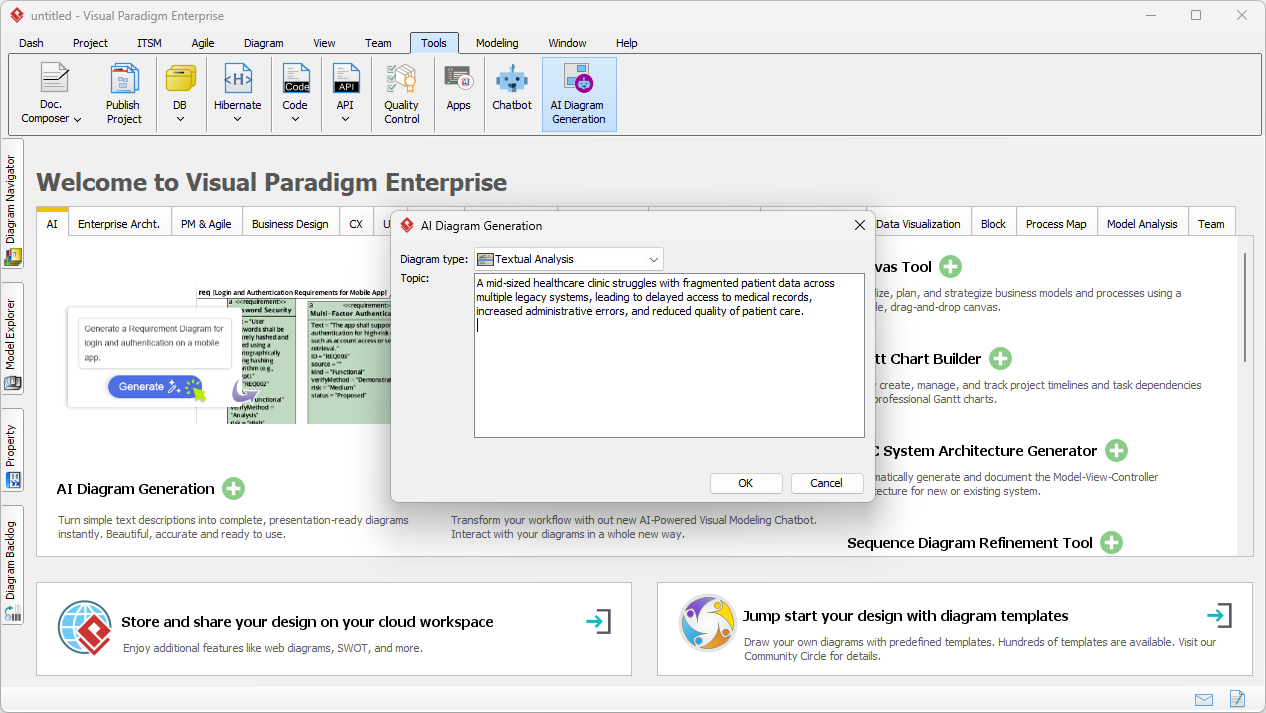
The process begins with a common starting point for any Business Analyst: the problem statement. Whether it comes from an email, a meeting transcript, or a project brief, this unstructured text holds the keys to your system design. To start, navigate to the “Tools” menu in Visual Paradigm and select AI Diagram Generation.
In this example, we are addressing a specific issue: “A mid-sized healthcare clinic struggles with fragmented patient data across multiple legacy systems…” Instead of manually highlighting this on paper, you simply paste this narrative into the topic field. This easy-to-use analysis feature accepts natural language, meaning you don’t need to format the text beforehand. You simply tell the AI what the problem is.
Step 2: AI-Driven Analysis and Candidate Identification
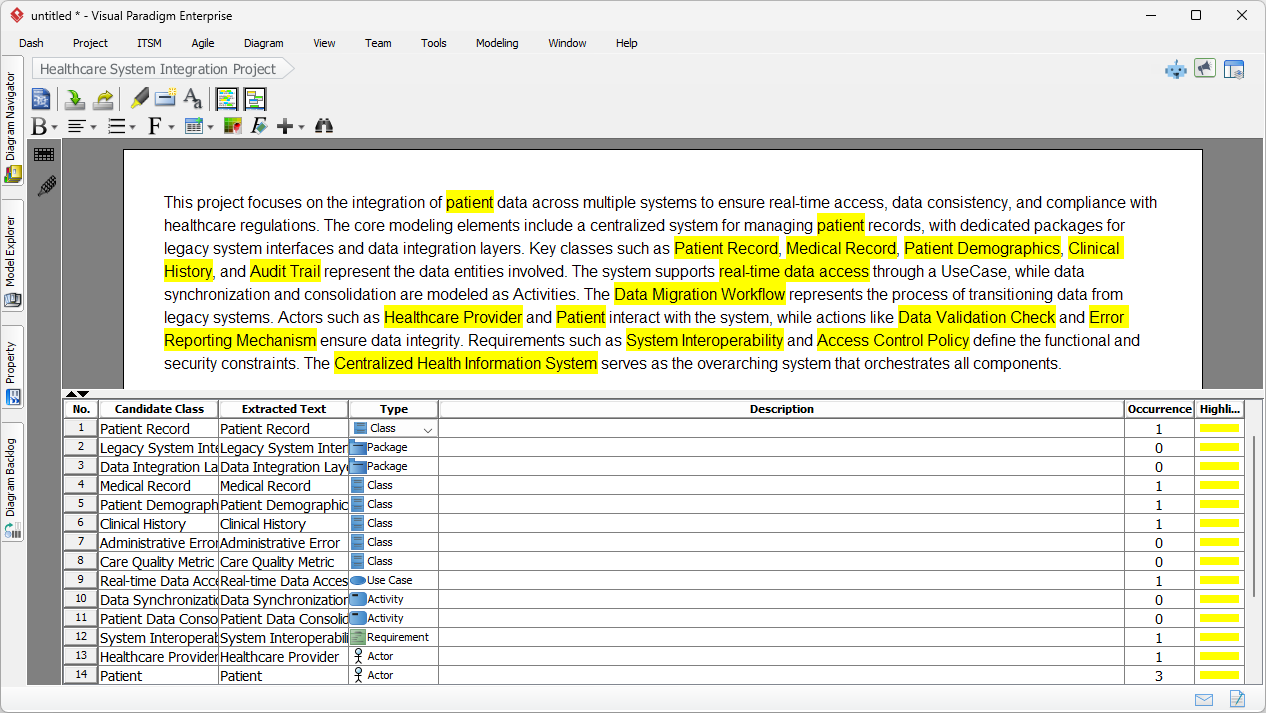
Once you click “OK,” the AI engine analyzes the text. It performs intelligent requirement extraction, identifying nouns, verbs, and phrases that represent potential system components. The result is a dual-pane view: your original text is preserved and highlighted, while a structured grid lists “Candidate Elements.”
The AI automatically categorizes items. In our healthcare scenario, it has correctly identified “Patient Record,” “Medical Record,” and “Clinical History” as Candidate Classes. It has also spotted “Healthcare Provider” as an Actor and “System Interoperability” as a Requirement. This comprehensive breakdown serves as an immediate check for completeness, ensuring no critical data entity is left behind during the elicitation phase.
Step 3: Transitioning from Text to Model Elements
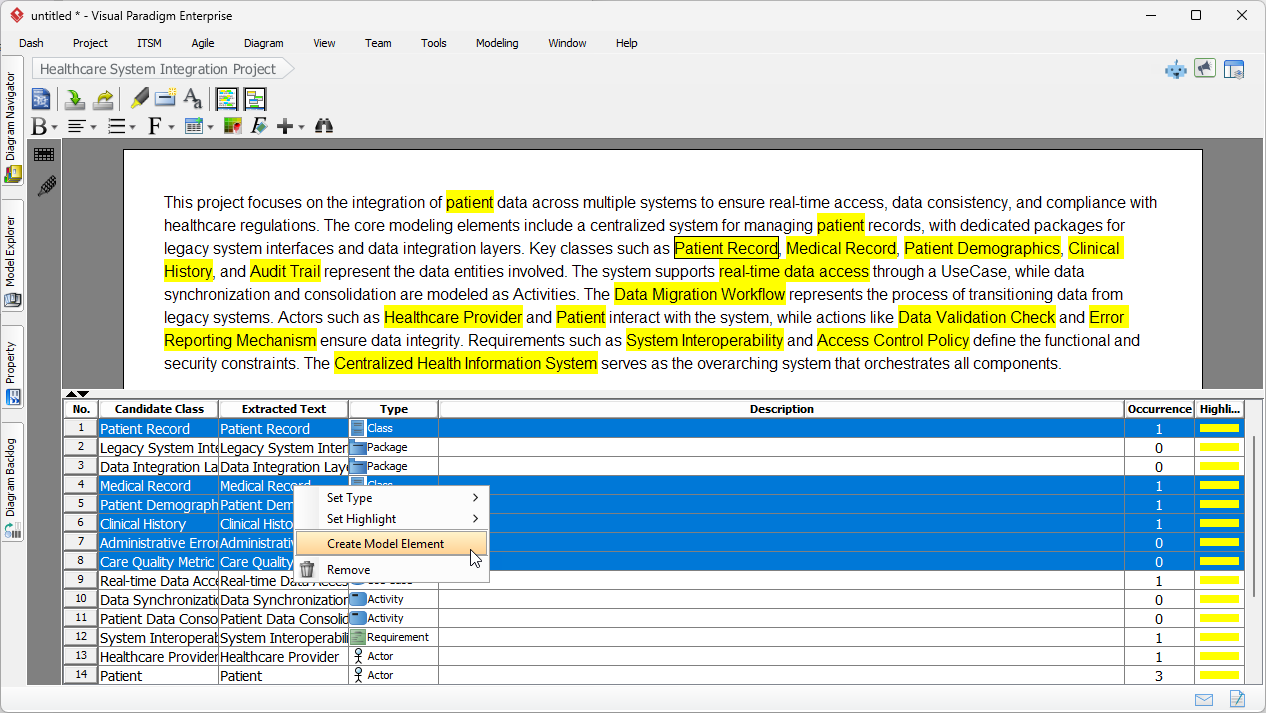
The true power of this professional modeling software lies in its ability to bridge the gap between text and diagram. You do not need to manually drag shapes onto a canvas. Instead, you review the list of candidate classes generated by the AI. If the AI suggests a class that fits your domain model, you simply select it.
In the screenshot below, we have selected key entities like “Patient Record,” “Audit Trail,” and “Administrative Error.” By right-clicking these selections, you can choose “Create Model Element.” This workflow transforms the AI textual analysis output directly into semantic model elements, effectively automating the most tedious part of initial diagramming.
Step 4: Visualizing the Domain Structure
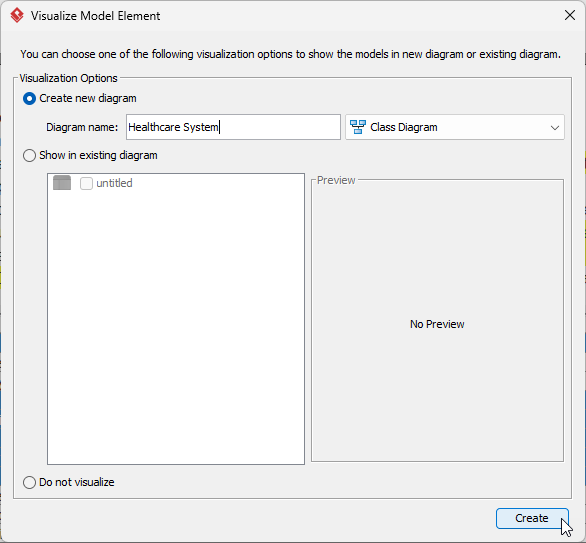
After selecting your elements, Visual Paradigm prompts you to visualize them. This step allows you to define the context of the new model. You can add these elements to an existing view or, as we are doing here, create a brand-new diagram dedicated to the “Healthcare System.”
This dialog ensures that your project structure remains organized. By explicitly naming the diagram, you are creating a dedicated artifact that can be shared with stakeholders for validation. It turns a list of abstract concepts into a concrete visual asset.
Step 5: The Generated Class Diagram
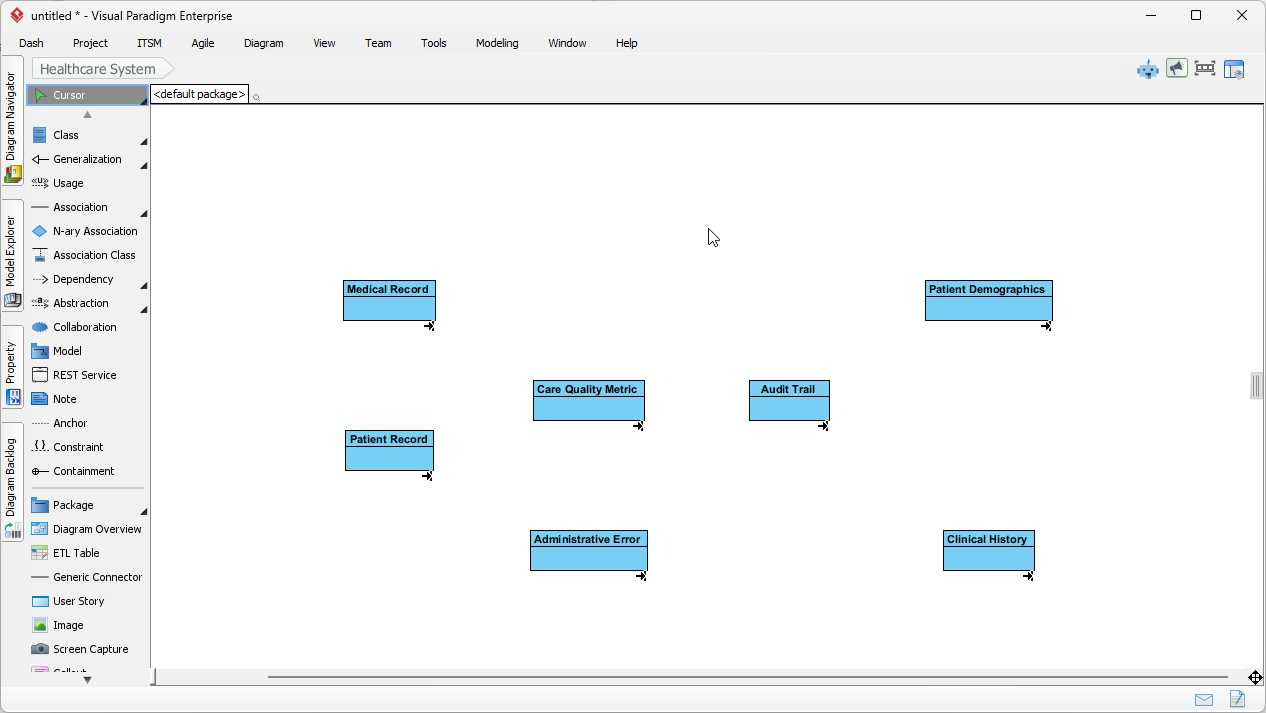
The final result is an initial Class Diagram populated with the domain classes extracted from your original text. Entities like Medical Record, Patient Demographics, and Care Quality Metric are now visualized on the canvas. This provides an immediate structural view of the system’s data requirements.
From here, your productivity accelerates. Because the base classes are already created, you can focus your energy on high-value tasks: defining relationships, adding attributes, and refining operations. The AI has handled the “blank page” problem, providing a solid foundation for your requirements capturing and system design workflow.
Why AI Textual Analysis Matters for Requirements Engineering
Accelerating Elicitation
One of the biggest bottlenecks in software development is the time it takes to translate stakeholder interviews into technical requirements. By automating the identification of actors and classes, Visual Paradigm allows teams to move from “concept” to “model” in minutes rather than days. This is particularly valuable for agile teams that need to refine backlogs quickly.
Enhancing Accuracy and Traceability
Human error often leads to missed requirements. An analyst might skip a sentence mentioning “Audit Trails,” leading to compliance issues later. The AI Textual Analysis tool scans the entire input impartially, flagging every potential requirement or constraint. Furthermore, because these elements are generated within the Visual Paradigm ecosystem, they can be easily traced back to the original problem statement, ensuring full traceability from the initial business need to the final software design.
Conclusion
Integrating AI into your requirements engineering workflow effectively removes the friction between understanding a problem and modeling the solution. By using Visual Paradigm’s AI Textual Analysis, you can turn a paragraph of text regarding healthcare data challenges into a functional Class Diagram with minimal effort. This not only saves time but also ensures a more rigorous, consistent, and professional approach to system analysis.
To experience how AI can revolutionize your diagramming and analysis workflow, download the software today.
Try Visual Paradigm Desktop Now
Related Links
Visual Paradigm provides a robust textual analysis toolset that automates the transition from written descriptions to structured visual models. These tools analyze text documents to identify entities, relationships, and candidate patterns, which are then used to generate UML, BPMN, and ERD diagrams. By extracting and organizing software requirements directly from natural language problem descriptions, teams can significantly improve traceability and documentation clarity. Advanced techniques within the platform also support sentiment analysis and keyword extraction, ensuring that unstructured data is converted into actionable system designs.
-
AI Textual Analysis – Transform Text into Visual Models Automatically: An overview of the AI feature that automatically generates UML, BPMN, and ERD diagrams from documents for faster modeling.
-
From Problem Description to Class Diagram: AI-Powered Textual Analysis: A specialized guide on converting natural language problem descriptions into accurate class diagrams.
-
Textual Analysis in Visual Paradigm: From Text to Diagram: The official user guide for transforming written descriptions into structured diagrams.
-
AI Textual Analysis Tool by Visual Paradigm: A dedicated tool interface for turning natural language input into structured software design components.
-
Visual Paradigm Textual Analysis Tool Features: A comprehensive list of capabilities that enable users to derive meaningful insights from large volumes of text.
-
Documenting Requirements Using Textual Analysis: Explains how to extract and organize system requirements from existing documentation to improve project clarity.
-
What is Textual Analysis? – Visual Paradigm Circle: A resource hub covering the purpose, applications, and benefits of textual analysis in project workflows.
-
AI-Powered Textual Analysis Tutorial for Software Design: A hands-on tutorial demonstrating the extraction of software design elements from natural language requirements.
-
Case Study: AI-Powered Textual Analysis for UML Class Diagram Generation: A real-world look at how AI-driven analysis enables the efficient generation of diagrams from unstructured requirements.
-
Textual Analysis in Use Case Modeling: Highlights how textual analysis extracts key system elements to support effective use case development.