




Visualizing Online Purchase Flows: How AI Generates UML Communication Diagrams in Seconds
Visual Paradigm's AI creates UML Communication Diagrams from natural language, enabling quick, accurate modeling for developers and architects.
Imagine describing a complex software interaction in plain English and instantly receiving a clean, professional UML Communication Diagram. That’s the power of Visual Paradigm’s AI Diagram Generation. This AI-powered visual modeling tool transforms natural language into structured diagrams, making it the best choice for developers, architects, and analysts who need to quickly model object collaboration. With the ability to generate over 40 diagram types, including UML, SysML, C4, and enterprise architecture models, Visual Paradigm stands out as a comprehensive, all-in-one solution. The process is intuitive: you provide a description, and the AI handles the layout, connections, and sequencing, giving you a polished diagram ready for refinement. This article explores how Visual Paradigm’s AI makes creating communication diagrams effortless, using real-world examples to demonstrate its capabilities.
What is AI Communication Diagram Generation?
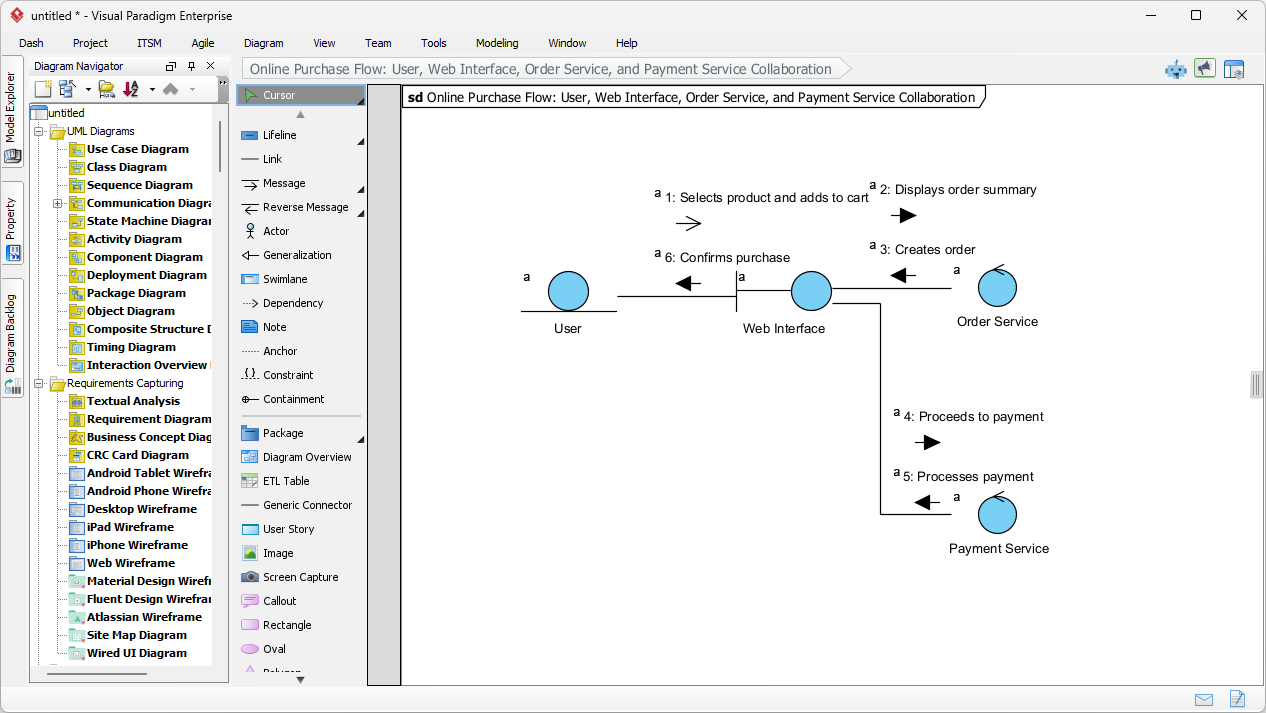
AI Communication Diagram Generation is a feature within Visual Paradigm Desktop that automatically creates UML Communication Diagrams from your natural language descriptions. Instead of manually drawing objects, links, and messages, you simply describe the interaction scenario. The AI then identifies the participating objects (like a User, Web Interface, Order Service, and Payment Service), establishes their structural relationships (links), and sequences the messages in the correct order. This feature is particularly useful for visualizing both the structure and behavior of a system in a single diagram. Unlike sequence diagrams that emphasize time, communication diagrams highlight the relationships between objects while still showing the flow of messages. The result is a clear, numbered representation of how different components collaborate during a specific use case, such as an online purchase.
How It Works: A Step-by-Step Guide
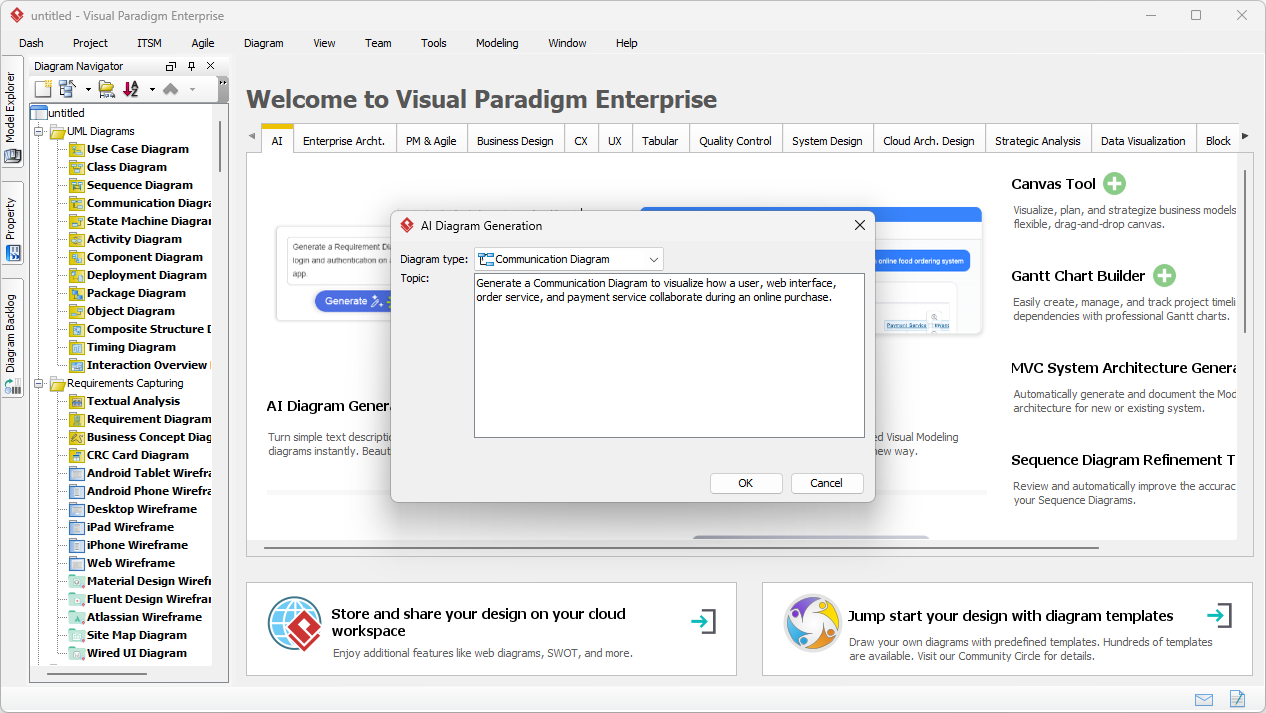
The process is straightforward and designed to be user-friendly. First, open Visual Paradigm Desktop and navigate to Tools > AI Diagram Generation. A dialog box appears, allowing you to select the diagram type—choose Communication Diagram. Next, you enter your description. For instance, you might write: “A user selects a product and adds it to a cart. The web interface displays the order summary. The user confirms the purchase. The system creates an order, proceeds to payment, and processes the payment through the payment service.” Clicking OK triggers the AI to analyze your text and generate the diagram. The output is a fully editable communication diagram, complete with lifelines, links, and numbered messages, ready for further customization.
Image 1: The AI Diagram Generation dialog in Visual Paradigm Desktop, where users select the diagram type and enter a natural language description to generate a Communication Diagram.
Why Choose Visual Paradigm for AI-Powered Diagramming?
Visual Paradigm is not just a tool; it’s a comprehensive ecosystem for AI-powered visual modeling. Its strength lies in its versatility and depth. The desktop application offers a robust environment for creating and refining diagrams, while the AI Chatbot provides a conversational interface for rapid prototyping. This dual approach caters to both deep, detailed modeling and quick, iterative design. The AI can generate over 40 types of diagrams, including UML, SysML, C4, ArchiMate, and business strategy models like SWOT and PESTLE analyses. This makes it the best all-in-one visual modeling software for teams working across different domains, from software development to enterprise architecture. The ability to generate diagrams from text ensures that even those without deep modeling expertise can produce accurate, professional diagrams quickly.
Key Benefits of AI Diagram Generation
One of the primary benefits is the significant time savings. Manually creating a communication diagram with multiple objects and messages can be tedious and error-prone. The AI handles the complex layout, minimizing crossing lines and ensuring readability. This allows users to focus on the design and functionality rather than the visual arrangement. Another advantage is the ability to model from scenario descriptions, making it ideal for documenting complex interactions. The generated diagrams are fully editable, so you can refine them to meet specific requirements. This feature is especially valuable for teams that need to align on system behavior, as the diagrams provide a clear visual representation of how different components interact.
Image 2: The AI-generated UML Communication Diagram showing the collaboration between User, Web Interface, Order Service, and Payment Service during an online purchase.
Getting Started with AI Communication Diagrams
To start using AI Communication Diagram Generation, simply launch Visual Paradigm Desktop and open or create a new project. Navigate to Tools > AI Diagram Generation, select Communication Diagram, and enter your description. The AI will process the text and generate the diagram, which opens directly in the editor. From there, you can review the objects, links, and message sequences, making any necessary adjustments. The diagram can then be exported to various formats, including PNG, JPEG, and PDF, for sharing with team members or stakeholders. This seamless workflow makes it easy to integrate AI-generated diagrams into your design process.
Key Takeaways
-
AI-powered visual modeling transforms natural language into professional diagrams in seconds.
-
Visual Paradigm supports over 40 diagram types, making it a versatile, all-in-one solution.
-
AI Communication Diagram Generation saves time by automating layout, connections, and sequencing.
-
Generated diagrams are fully editable and can be refined for detailed design.
-
The tool is ideal for developers, architects, and analysts who need to visualize object collaboration.
Experience the power of AI in visual modeling. Download Visual Paradigm Desktop today and start creating professional communication diagrams from simple text descriptions.
Related Links
Communication diagrams are essential UML models that illustrate how objects interact through message sequencing, offering a clear view of system collaboration and structural relationships within a software architecture.
-
What is a Communication Diagram? A Complete Guide to UML Modeling: This guide provides a comprehensive overview of the structure, components, and specific use cases for communication diagrams in object-oriented design.
-
Understanding Communication Diagrams in Visual Paradigm: This technical resource explains how to interpret and use these diagrams for effective system modeling and software engineering.
-
How to Draw a Communication Diagram – Step-by-Step Tutorial: A beginner-friendly guide that walks users through the process of creating professional interaction models from scratch.
-
Communication Diagram Gallery – Visual Paradigm: This collection features real-world examples and interaction models that serve as inspiration and a reference for complex designs.
-
Advanced Guide to Communication Diagrams in Visual Paradigm: A detailed tutorial focusing on advanced modeling techniques and best practices for representing sophisticated system architectures.
-
Configuring Communication Diagrams in Visual Paradigm Projects: This resource details how to adjust project settings to improve the clarity and consistency of interaction models across a team.
-
What Is a UML Collaboration Diagram?: An explanatory article that defines the collaboration diagram and highlights its role in visualizing message exchanges between system objects.
-
Community Shared: Communication Diagram Example – RFS System: A practical case study demonstrating a user-submitted communication diagram for an RFID-based system interaction.
-
How to Draw a Communication Diagram in UML (PDF Guide): A downloadable technical guide providing step-by-step instructions for creating UML-compliant interaction diagrams.
-
Communication Diagram Example: Crutches Interface: This community resource showcases a specific example of modeling object interactions within a crutches interface system.