




Automate Complex Purchase Flows with an AI Sequence Diagram Generator
Automate complex purchase flows with Visual Paradigm's AI sequence diagram generator. Convert natural language into professional UML models in seconds.
In the contemporary landscape of software engineering and systems analysis, the demand for architectural precision often conflicts with the necessity for rapid delivery. Traditionally, documenting the dynamic behavior of a system—specifically the intricate exchange of messages between components—required hours of manual labor in a modeling environment. However, the advent of the AI sequence diagram generator within Visual Paradigm Desktop has fundamentally altered this paradigm. By leveraging advanced natural language processing, this professional UML sequence diagram software allows architects and developers to bypass the tedious aspects of manual drafting, transforming textual requirements into sophisticated visual models in mere seconds.
The efficiency of this transition is clearly demonstrated in the user interface of Visual Paradigm Desktop. When a user initiates the AI generation process, they are presented with a streamlined “AI Diagram Generation” dialog. Here, the user selects the “Sequence Diagram” type and provides a natural language prompt that describes the desired interaction. In the provided example, the user has entered a prompt to “illustrate the interaction flow between a customer, web application, payment gateway, and order system during an online purchase.” This simple input serves as the blueprint for a complex behavioral model that would otherwise require significant manual effort to construct.
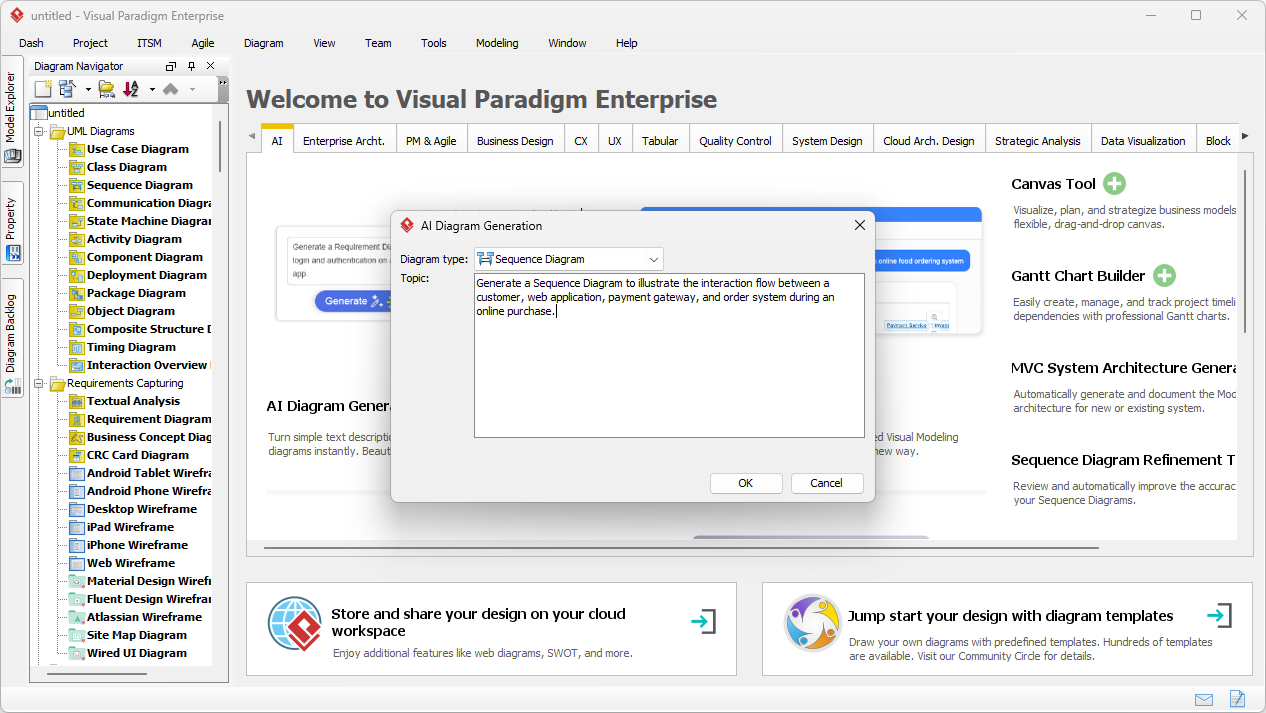
The AI-powered diagramming tool analyzes the provided text to identify key participants—known as lifelines—and the chronological order of messages exchanged between them. This capability is not merely a cosmetic shortcut; it is a profound enhancement to the requirements engineering process. By inputting a step-by-step description of a user story or system behavior, the AI infers the necessary execution semantics, including synchronous calls and return messages, ensuring that the resulting diagram adheres to the rigorous standards of the Unified Modeling Language (UML).
Transforming Requirements into Visual Logic
The true value of an easy-to-use AI sequence diagram generator lies in its ability to handle logical complexity. Beyond simple linear flows, the AI is capable of detecting fragments such as loops and alternatives. When the user clicks “OK” in the generation dialog, the system processes the narrative to determine where the “happy path” diverges into exception handling or optional steps. This results in a diagram that is not only visually accurate but also logically sound, providing a robust foundation for further technical design or immediate stakeholder communication.
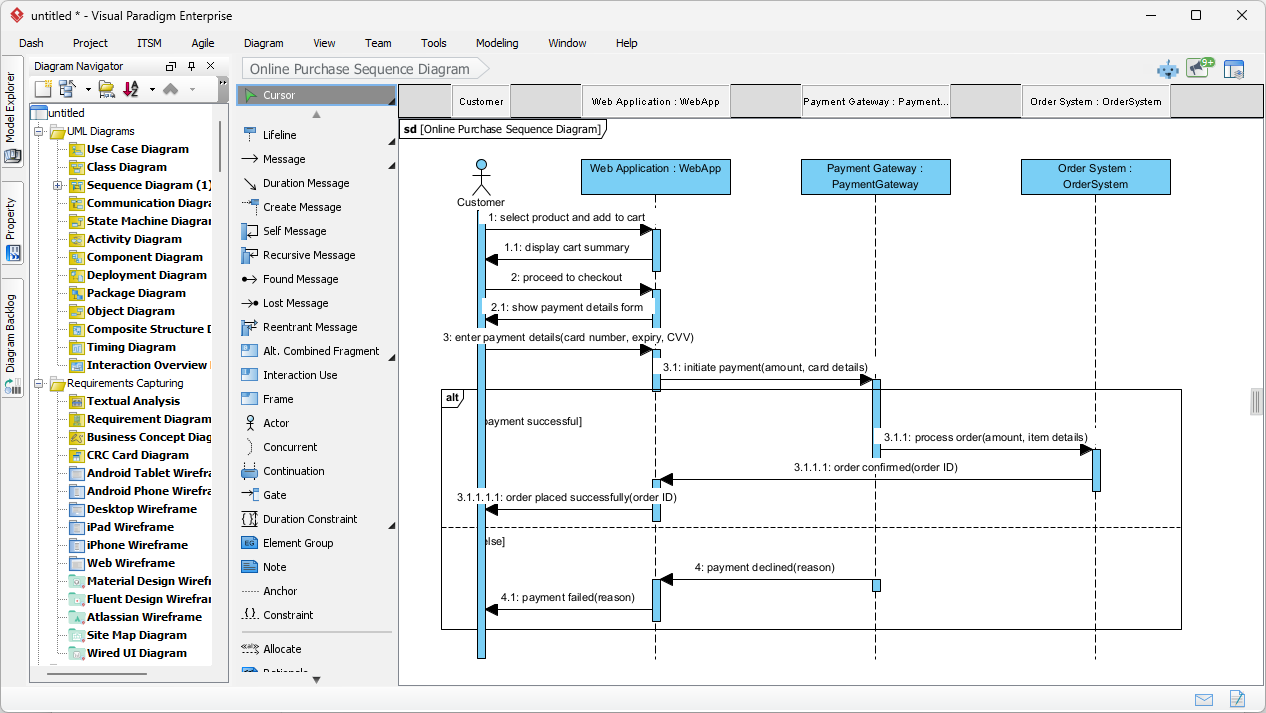
Upon completion of the generation process, the software renders a fully editable UML Sequence Diagram within the Visual Paradigm editor. As seen in the second visual reference, the AI has successfully interpreted the “online purchase” prompt. It has established lifelines for the “Customer,” “Web Application,” “Payment Gateway,” and “Order System.” Crucially, it has incorporated an “alt” (alternative) combined fragment to manage the conditional logic of the payment process—handling both “payment successful” and “payment failed” scenarios with distinct message paths. This level of automated detail ensures that the best AI-powered modeling app delivers a production-ready asset from the outset.
Key Takeaways for System Architects
-
Unprecedented Speed: Generate comprehensive interaction flows in seconds rather than hours, significantly reducing manual drawing time.
-
Semantic Accuracy: The AI automatically applies correct UML notations, including lifelines, activations, and combined fragments like alt and loop.
-
Natural Language Processing: Bridge the gap between business requirements (text) and technical design (diagrams) using simple English descriptions.
-
Full Editability: Unlike static image generators, Visual Paradigm produces native diagrams that can be refined, extended, or linked to other project models.
-
Enhanced Communication: Rapidly produce clear visual models that align developers, testers, and stakeholders early in the lifecycle.
The Strategic Advantage of AI-Driven Modeling
Utilizing a professional AI sequence diagram generator provides a strategic advantage during the requirements analysis and design phases. For business analysts, it allows for the immediate visualization of stakeholder conversations, ensuring that no detail of the interaction flow is lost in translation. For software architects, it facilitates the rapid exploration of alternative interaction patterns. If a specific architectural approach proves insufficient, a new variation can be generated by simply modifying the text prompt and re-running the AI process.
The resulting diagram in Visual Paradigm is not a static artifact. It is a dynamic component of the larger project ecosystem. Users can refine the AI-generated sequence diagram by adjusting message types from synchronous to asynchronous, adding detailed constraints, or linking the diagram to specific use cases and class models. This seamless integration ensures that the initial speed provided by AI does not come at the cost of long-term model integrity. The tool serves as a “smart assistant” that handles the foundational structure, allowing the human expert to focus on high-level design decisions and edge-case refinement.
Core Workflows for AI Sequence Diagramming
To maximize the utility of the AI sequence diagram generator, users should follow a structured approach to generation and refinement. The process is designed to be intuitive yet powerful enough for enterprise-grade documentation.
1. Initial Generation and Prompt Engineering
The quality of the output is directly proportional to the clarity of the input. When describing a scenario, it is advisable to use clear, active verbs and identify participants explicitly. For example, instead of saying “The order is processed,” specify “The Order System processes the transaction and returns a confirmation.” This precision allows the AI to accurately place messages and return arrows between the correct lifelines.
2. Refining Combined Fragments
While the AI is adept at detecting “if/else” logic, system designers may wish to further refine the professional UML sequence diagram by manually adjusting the boundaries of combined fragments. Visual Paradigm allows for the granular control of “alt,” “opt,” and “loop” frames, enabling the modeler to add complex guard conditions or nested interactions that might be too detailed for a preliminary text prompt.
3. Exporting for Documentation
Once the diagram is polished, it can be exported in various high-resolution formats, including PNG, JPEG, or PDF. This is essential for incorporating technical models into project wikis, design documents, or presentation decks for executive review. The easy-to-use AI diagramming software ensures that the visual quality remains consistent with industry standards, regardless of the complexity of the underlying interaction.
Conclusion: The Future of Interaction Modeling
The integration of artificial intelligence into Visual Paradigm’s modeling suite represents a significant leap forward in productivity. The AI sequence diagram generator removes the barrier to entry for complex UML modeling, making advanced behavioral documentation accessible to all team members. By automating the alignment of lifelines, the spacing of messages, and the creation of logical fragments, the tool allows professionals to spend less time “drawing” and more time “designing.” Whether you are a student learning the nuances of UML or a veteran architect managing a global system, this AI-powered feature provides the clarity and speed required in today’s fast-paced development environments.
As systems grow more interconnected and interaction flows become increasingly complex, the ability to rapidly visualize and iterate on these designs becomes a critical competency. The best AI-powered sequence diagram tool is no longer a luxury but a fundamental necessity for teams striving for excellence in system documentation and communication.
Experience the power of automated modeling today. We invite you to explore the capabilities of Visual Paradigm and see how artificial intelligence can transform your design workflow. Download the latest version of the software and begin converting your textual scenarios into professional UML models with ease.
To get started with the AI sequence diagram generator, please visit the official download page: Download Visual Paradigm.
Related Links
AI-powered sequence diagram tools enable the instant transformation of natural language prompts and use-case descriptions into precise interaction models while offering intelligent refinement capabilities to enhance architectural clarity and accuracy.
-
Visual Paradigm – AI-Powered UML Sequence Diagrams: This resource explains how users can generate UML sequence diagrams instantly using AI within a professional modeling suite.
-
AI-Powered Sequence Diagram Refinement in Visual Paradigm: This guide details the process of transforming use-case descriptions into professional sequence diagrams using AI-powered automation.
-
Mastering Sequence Diagrams with Visual Paradigm: AI Chatbot Tutorial: A comprehensive beginner’s tutorial that demonstrates how to build sequence diagrams for an e-commerce system using a conversational AI interface.
-
AI-Powered Sequence Diagram Refinement Tool | Visual Paradigm: This feature overview highlights how intelligent suggestions can improve the accuracy and readability of complex system interactions.
-
Comprehensive Tutorial: Using the AI Sequence Diagram Refinement Tool: A step-by-step guide focused on leveraging AI refinement to maintain high diagram quality and architectural consistency.
-
Simplify Complex Workflows with Visual Paradigm AI Sequence Diagram Tool: This article explores how AI-enhanced tools simplify the modeling of complex workflows and system interactions.
-
Beginner’s Tutorial: Create Your First Professional Sequence Diagram in Minutes: A practical guide for new users to quickly generate professional diagrams using an AI chatbot without manual drawing.
-
From Simple to Sophisticated: AI-Powered Sequence Diagram Refinement Tool: This guide shows how AI transforms basic sequence sketches into sophisticated, accurate models with minimal input.
-
Refining Sequence Diagrams with AI: A Smarter Way to Design Systems: An exploration of how intelligent refinement helps developers design better systems by improving model clarity.
-
Mastering MVC Architecture with Sequence Diagram Refinement: This article explains how to use refinement tools to validate and optimize Model-View-Controller (MVC) system behaviors and interactions.