




Turn Your Ideas into UML Class Diagrams in Seconds with Visual Paradigm
Create professional UML Class Diagrams instantly from plain English using Visual Paradigm's AI-powered tools.
Ever stared at a blank canvas, wondering where to start with your software design? What if you could skip the tedious sketching and instantly generate a professional UML Class Diagram from just a few lines of plain English? That’s exactly what the AI-powered Class Diagram Generator in Visual Paradigm does. Whether you’re a developer, architect, or student, this tool transforms your vision into a structured, ready-to-use model in seconds. With Visual Paradigm, creating a UML Class Diagram is no longer a time-consuming chore—it’s a breeze. Let’s walk through how it works, using real examples from the desktop app and the web-based AI Chatbot.
Quick summary
- Visual Paradigm’s AI-powered tools generate UML Class Diagrams instantly from natural language descriptions.
- Two main pathways: the desktop app’s AI Diagram Generation and the web-based AI Chatbot.
- Both support iterative refinement, professional layouts, and seamless integration with full modeling workflows.
- From simple e-commerce systems to complex library management apps, AI handles the heavy lifting.
Imagine you’re tasked with designing a system for an online shopping platform. You know the core components—users, products, carts, orders—but the details are fuzzy. You could spend hours mapping out classes and relationships. Or you could let AI do the work. That’s where Visual Paradigm’s AI Diagram Generator shines. It’s not magic, but it feels like it.
How the AI Class Diagram Generator Works in Visual Paradigm Desktop
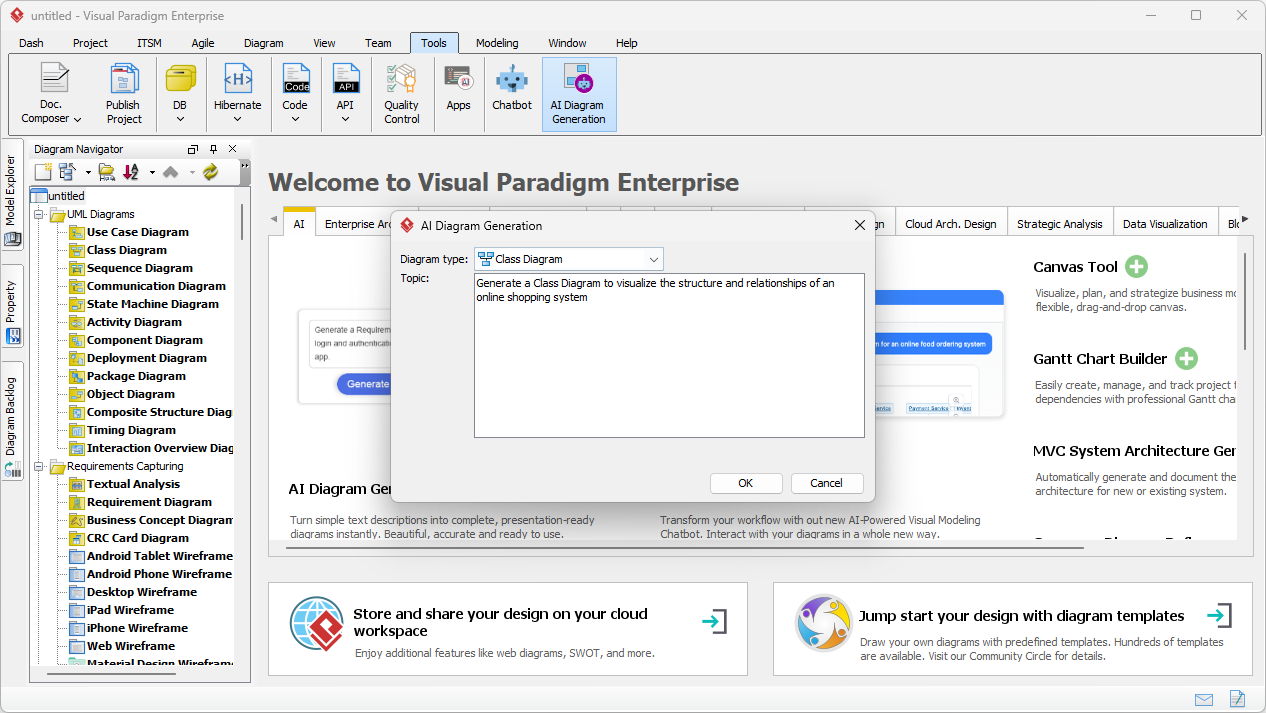
First, let’s look at the desktop version. The process is straightforward and intuitive. In the screenshot below, you can see the AI Diagram Generation dialog box, where you select the diagram type—here, a Class Diagram—and input your system description. The prompt is simple: “Generate a Class Diagram to visualize the structure and relationships of an online shopping system.”
Once you hit OK, the AI processes your input and produces a structured diagram. The result? A clean, professional UML Class Diagram with all the key classes—Product, Customer, Order, Cart, Warehouse, and more—already defined with attributes and methods. Relationships like “owns,” “adds items to,” and “depends on” are automatically mapped. The layout is optimized, so you can see the big picture without any clutter.
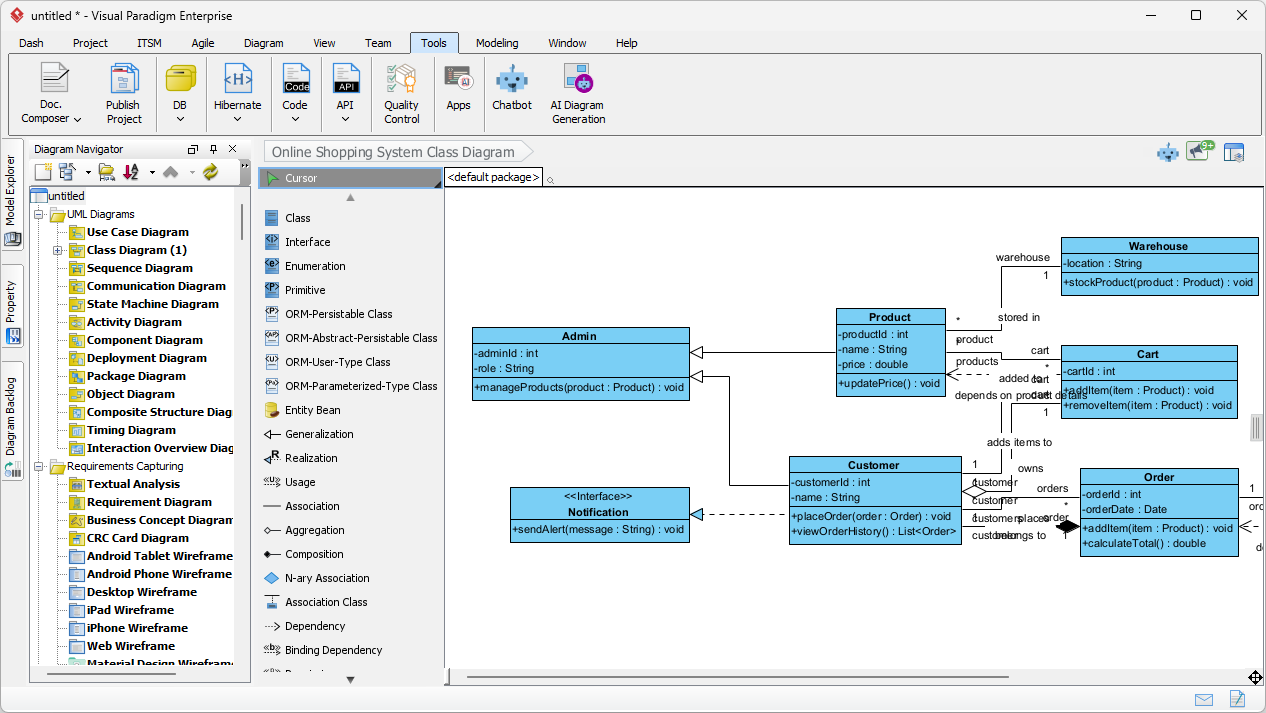
But here’s the kicker: the AI-generated diagram isn’t the final product. It’s a powerful starting point. You can edit every element—rename classes, add new attributes, tweak relationships—using Visual Paradigm’s full suite of modeling tools. This means you spend less time on the initial draft and more time on refinement and validation.
From Chat to Class Diagram with Visual Paradigm AI Chatbot
Now, what if you don’t want to open the desktop app? Or maybe you’re brainstorming on the go. That’s where the Visual Paradigm AI Chatbot comes in. It’s a conversational interface that turns your text prompts into diagrams instantly. In the screenshot below, you can see a chat session where a user asks the AI to “Create a Class Diagram that represents the core components and interactions of a library management system.”
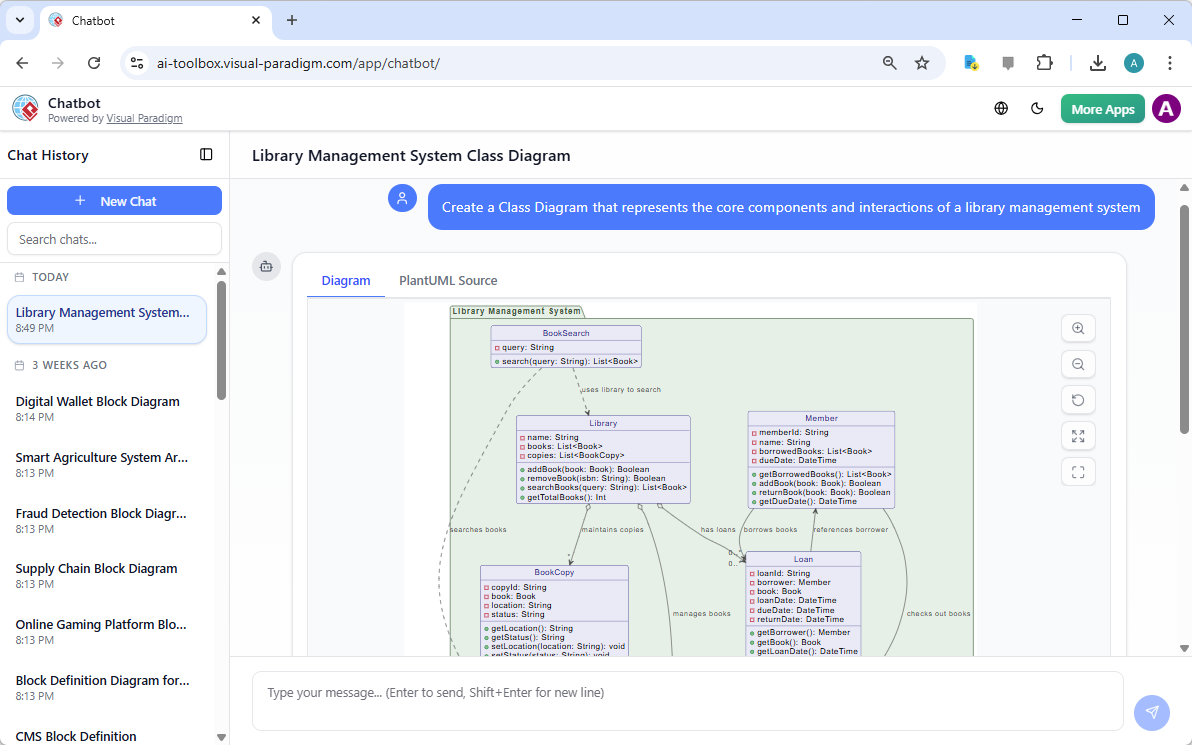
Within seconds, the AI generates a complete UML Class Diagram with classes like Library, Book, Member, Loan, BookCopy, and their respective methods and attributes. The relationships—such as “borrows books,” “maintains copies,” and “checks out books”—are clearly illustrated. The diagram is not only accurate but also visually clean, making it easy to understand and present.
What makes the AI Chatbot powerful is its ability to iterate. If the first result isn’t quite right, you can refine it with follow-up messages. For example, you could say, “Add a Reservation class that links to Member and Book.” The AI adjusts the diagram on the fly, allowing you to evolve your model in real time.
Why Visual Paradigm’s AI Class Diagram Generator Stands Out
So, what makes Visual Paradigm’s AI tools better than the rest? It’s not just about generating diagrams—it’s about creating a complete AI-powered visual modeling ecosystem. Unlike generic AI tools that produce static images, Visual Paradigm’s AI integrates with the full modeling workflow. You can generate a diagram in the chatbot, then export it to the desktop app for deeper analysis, code generation, or collaboration.
Moreover, the AI supports a wide range of diagram types beyond just UML Class Diagrams. Whether you’re working on a Use Case Diagram, System Context Diagram, or Business Process Model, the AI can handle it. This versatility makes Visual Paradigm a one-stop solution for all your visual modeling needs.
And the best part? It’s not just for experts. The AI simplifies complex modeling tasks, making it accessible to anyone who can describe their system in plain English. No need to memorize UML notation or spend hours learning syntax—just describe what you want, and let the AI do the rest.
Ready to Build Your First AI-Powered Class Diagram?
Whether you’re using the desktop app or the AI Chatbot, Visual Paradigm’s AI Class Diagram Generator is a game-changer. It saves time, reduces errors, and helps you focus on the creative aspects of design. The technology is powerful, but the results are simple: a clear, professional model that accurately reflects your system.
If you’re ready to stop guessing and start building, try the Visual Paradigm AI Chatbot today. Or, if you prefer a more integrated experience, explore the AI Diagram Generator in the desktop app. Either way, you’ll be amazed at how quickly you can turn your ideas into reality.
Related Links
- AI-Assisted UML Class Diagram Generator – Visual Paradigm: An interactive, step-by-step tool to help users create UML class diagrams with AI-powered suggestions, validation, PlantUML export, and design analysis.
- From Problem Description to Class Diagram: AI-Powered Textual Analysis: Explore how Visual Paradigm uses AI to convert natural language problem descriptions into accurate class diagrams for software modeling.
- How AI Enhances Class Diagram Creation in Visual Paradigm: This blog explores how Visual Paradigm leverages AI to automate and improve the creation of class diagrams, making software design faster and more accurate.
- AI-Powered UML Class Diagram Generator by Visual Paradigm: An advanced AI-assisted tool that automatically generates UML class diagrams from natural language descriptions, streamlining software design and modeling.
- Real-Life Case Study: Generating UML Class Diagrams with Visual Paradigm AI: A detailed case study showcasing how Visual Paradigm’s AI assistant successfully transformed textual requirements into accurate UML class diagrams in a real-world project.
- Creating a UML Class Diagram for a Library System Using AI and Visual Paradigm: A practical blog post that walks through building a UML class diagram for a library management system using Visual Paradigm’s AI assistant.
- Interactive AI Chat for UML Class Diagram Generation: A conversational AI interface that allows users to generate UML class diagrams through natural language interaction directly in the browser.
- AI-Assisted UML Class Diagram Generator – Visual Paradigm AI Toolbox: A dedicated AI-powered application that enables developers to generate UML class diagrams from text descriptions with minimal manual input.
- Building a Hotel Reservation System Class Diagram with Visual Paradigm AI: A hands-on tutorial guiding users through the creation of a comprehensive UML class diagram for a hotel reservation system using Visual Paradigm’s AI capabilities.
- MVC System Architecture Generator Archives – Visual Paradigm AI: A Controller Class Diagram is a specialized diagram used in MVC (Model–View–Controller) architecture to represent the controller layer of a system.
- Enroll in Course Example | AI MVC System Architecture Generator – Visual Paradigm AI: See how the Enroll in Course use case in an e-learning platform is expanded into MVC architecture. Generate controller class diagrams and MVC sequence …
- AI-Powered UML Modeling: Online Shopping System: Below is a step-by-step walkthrough of how a developer used AI-powered modeling software to build a complete UML Class Diagram for an online …