




Designing a Dynamic Boxing Training Scene using AniFuzion Animation Maker
Learn how to design a dynamic 3D boxing training scene using AniFuzion Animation Maker. Use drag-and-drop tools and 3D libraries to create professional scenes.
Have you ever tried to explain a physical concept, like a martial arts technique or a fitness routine, using only static text? It often falls flat. Visual storytelling is essential for these dynamic subjects, and creating engaging content is now easier than ever with Visual Paradigm Animation Maker (AniFuzion). This online animation tool empowers creators to build professional-grade 3D scenes without needing complex software or design degrees. By utilizing a robust library of 3D characters and props, you can bring a virtual dojo to life in minutes.
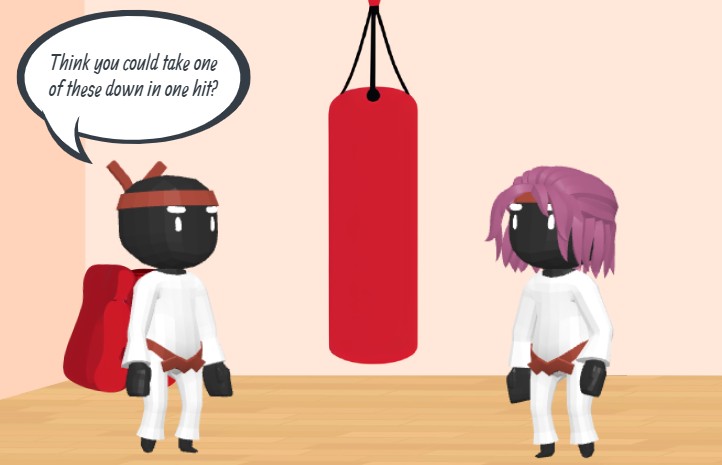
In the example below, we see a perfect snapshot of what this easy-to-use animation software can achieve. The scene features two stylized 3D characters dressed in white martial arts gi with red belts, standing in a training environment. Between them hangs a heavy red punching bag, setting the stage for a boxing drill. One character engages the other with a challenge via a speech bubble that reads, “Think you could take one of these down in one hit?” This setup isn’t just a drawing; it is a frame from a potential animated narrative created effortlessly in the browser.
Key Takeaways: Why Choose AniFuzion?
- Drag-and-Drop Interface: Assemble complex scenes like a boxing gym simply by dragging elements onto the canvas.
- Extensive 3D Libraries: Access thousands of customizable characters and props, from martial arts gear to gym equipment.
- AI-Powered Audio: Use AI Text-to-Speech (TTS) to generate voiceovers that automatically sync with character lip movements.
- No Installation Needed: Create high-quality videos directly in your web browser.
Building the Scene: From Concept to Ring
Customizing 3D Characters
The heart of any training video lies in its instructors and students. In the boxing snapshot above, the characters are distinct yet cohesive. With AniFuzion’s character customization tools, you aren’t limited to generic stock figures. You can select a base model and tweak everything from their hair color to their clothing textures. Whether you need a futuristic cyberpunk fighter or a traditional martial artist, the 3D character library allows you to mix and match body parts and accessories to fit your specific narrative requirements.
Setting the Environment with Props
A character needs context to tell a story. In our example, the inclusion of the red punching bag instantly communicates the purpose of the scene: strength training and precision. The tool provides a vast collection of ready-to-use props and scene templates. You don’t need to model a punching bag or a gym floor from scratch; you simply search for the item in the library and place it into your 3D space. This capability is invaluable for educators and marketers who need to build specific scenarios—like a safety demonstration or a product demo—without spending hours on background design.
Bringing the Action to Life
Dialogue and AI Interaction
Static images can’t speak, but your animations can. The speech bubble in the image asks a challenging question, adding personality to the training session. Visual Paradigm’s tool takes this a step further with AI Text-to-Speech (TTS) features. Instead of just displaying text, you can type your script into the TTS panel, select a voice with the appropriate emotional tone (perhaps “confident” or “aggressive” for a boxing coach), and the system generates the audio. Even more impressive is the automatic lipsync technology, which matches the character’s mouth movements to the spoken words, making the interaction feel incredibly lifelike.
Fluid Motion and Pre-Built Actions
While the image captures a frozen moment, the true power of this professional animation maker is in movement. To show a “one-hit takedown,” you wouldn’t need to manually animate every joint of the character’s arm. You would simply select the character and apply a pre-built action from the motion library, such as “Heavy Punch” or “Roundhouse Kick.” The software handles the complex rigging and physics, allowing you to focus on the timing and the storytelling aspect of the video.
Conclusion
Whether you are a fitness coach looking to illustrate proper form, an educator creating interactive lessons, or a marketer building a punchy social media ad, Visual Paradigm Animation Maker (AniFuzion) offers the tools to make it happen. By combining customizable 3D assets, intuitive drag-and-drop workflows, and smart AI features, you can transform a simple idea into a compelling visual story that captures audience attention.
Ready to step into the ring and start creating? Create animation now. Start with a template.
Related Resources
- How to Create PowerPoint Like Animation Slides on the… – AniFuzion: Creating animated PowerPoint presentations has never been easier, thanks to tools like Visual Paradigm Online’s AniFuzion. This online 2D animation maker allows you to bring your…
- Bring Your Ideas to Life with Visual Paradigm Anifuzion 3D Video Maker: Anifuzion is a web-based 3D animation tool that enables users to create immersive 3D videos and animations without requiring advanced technical skills.
- AniFuzion: The Online Ultimate Animation Maker – Content Posts: Visual Paradigm Online’s AniFuzion stands out as a leading animation video tool due to its comprehensive feature set, which caters to a wide range of users, from beginners to experienced animators.
- Introducing Visual Paradigm’s AniFuzion: The Ultimate Animated Video Maker – Cybermedian: December 19, 2024 – Part of the Visual Paradigm Online Platform, AniFuzion offers a unique blend of 2D and 3D animation techniques , making it an all-in-one solution for creating dynamic and engaging content1.
- AniFuzion: Online Animation Maker: Visual Paradigm Online. Start creating stunning 2D and 3D animations. Explore customizable character families and intuitive tools to bring …