




Animating a Circus Performer on Stage: A Step-by-Step Guide with AniFuzion
Create lifelike 3D circus performer animations in minutes with AniFuzion. Customize, animate, and sync audio effortlessly.
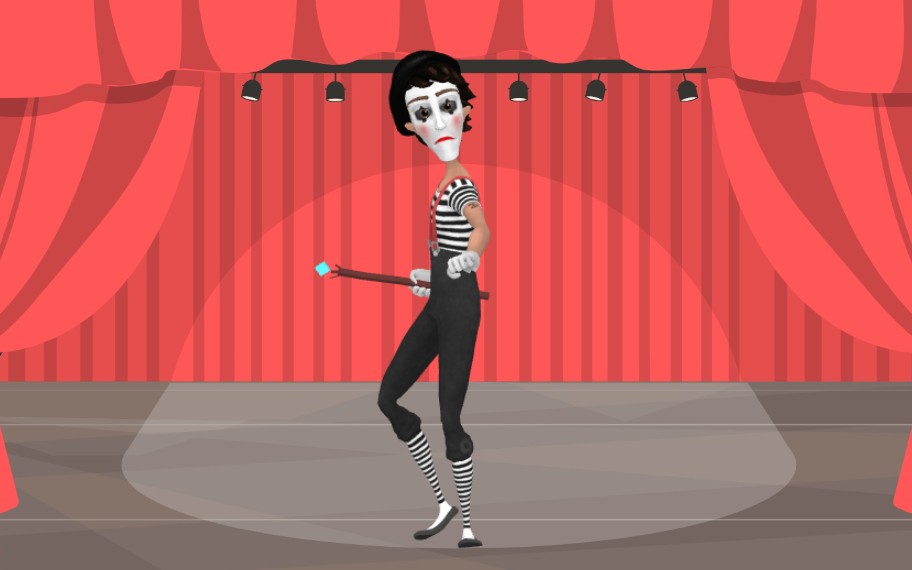
Imagine a spotlight illuminating a stage, where a stylized performer in a striped shirt and striped socks holds a wand, poised to captivate an audience. This isn’t a sketch or a static image—it’s a dynamic, 3D animated scene crafted with AniFuzion, Visual Paradigm’s AI-powered animation maker. With just a few clicks, you can transform ideas into lifelike, engaging animations that breathe life into your stories, whether for education, marketing, or entertainment. This snapshot reveals the power of AniFuzion to turn a simple concept into a cinematic moment.
What you’re seeing here is more than a character on stage—it’s the result of a seamless workflow: selecting a 3D character from a vast library, applying motion presets, syncing audio with automatic lipsync, and layering it with a theatrical backdrop. This isn’t magic. It’s the result of a tool designed for creators who want to express themselves without mastering complex animation software. Let’s break down how this scene was built and why it’s a perfect example of what AniFuzion can do for you.
How This Animated Circus Scene Was Created in AniFuzion
Step 1: Choose the Right Character and Customize It
The performer in the image is a 3D character from Visual Paradigm’s extensive library, designed to resemble a classic circus illusionist. You don’t start from scratch. Instead, you browse through categories like “Circus,” “Theater,” or “Comedy” and drag a character onto your canvas. In this case, the performer’s outfit—black and white stripes, tall socks, and a classic mask—is fully customizable. You can tweak colors, textures, and even mix body parts to create a unique look. The key here is that customization is visual and intuitive, not technical. You’re not writing code—you’re arranging a digital stage.
Step 2: Apply Pre-Built Actions for Smooth Movement
Now that the character is on stage, you need to make it move. AniFuzion offers over 2,000 pre-built actions—think “walking,” “waving,” or “holding a wand.” In this scene, the performer is likely using a “dancing” or “posing” action to create a dynamic stance. You can adjust the duration and timing of the motion, and the tool automatically handles the animation curve, so you don’t have to worry about keyframing or complex timing. This is where the “drag-and-drop” interface shines—it’s like building a digital puppet show, where every movement is a simple drag-and-drop decision.
Step 3: Add a Theatrical Backdrop and Stage Lighting
The red curtain and spotlight in the background are not just decorative—they’re essential to the scene’s mood. AniFuzion’s library of scenes and props includes theatrical backdrops, stage lights, and even spotlights that can be toggled on and off. You can also add lighting effects to enhance the dramatic atmosphere. The spotlight here isn’t just a visual element—it’s a storytelling tool that directs the viewer’s attention to the performer, making the scene feel immersive and cinematic.
Step 4: Sync Audio and Add Lipsync for Realism
Even though the image doesn’t show audio, the scene is designed for voiceover. AniFuzion’s AI Text-to-Speech (TTS) feature allows you to input a script, select a voice with an emotion (like “excited” or “mysterious”), and generate audio that automatically syncs with the character’s mouth movements. This is called “automatic lipsync,” and it’s a game-changer for creators who want their characters to “speak” naturally. In this circus scene, the performer might be delivering a monologue or a magic trick, and the lipsync ensures the animation feels alive.
Step 5: Export and Share for Maximum Impact
Once you’ve built the scene, you can export it as an MP4 video or generate a shareable flipbook link. The final product can be embedded on a website, shared on social media, or used in a presentation. The ability to create and distribute content instantly is one of the most powerful features of AniFuzion. No more waiting for a designer or hiring a voice actor. You’re the creator, the director, and the producer—all in one tool.
Why This Scene Is a Perfect Example of AniFuzion’s Capabilities
What makes this circus performer scene so compelling is how it combines simplicity with sophistication. It’s not just about making a character look good—it’s about creating a moment that feels alive, dramatic, and engaging. AniFuzion achieves this by blending 2D and 3D elements, offering a wide range of motion presets, and integrating AI tools that automate the most tedious parts of animation. This is not a tool for beginners—it’s a platform for creators who want to express themselves without being held back by technical barriers.
Key Takeaways
- This animated circus scene was created using AniFuzion’s drag-and-drop interface, allowing for quick and intuitive character placement and motion application.
- The performer’s costume and pose were customized using the 3D character library, which offers thousands of pre-made options.
- Stage lighting and theatrical backdrops were added to enhance the scene’s mood and focus.
- AI Text-to-Speech and automatic lipsync were used to sync audio with the character’s movements, creating a lifelike experience.
- Export options include MP4 video or interactive flipbooks, making it easy to share across platforms.
Whether you’re an educator creating a lesson on theater, a marketer producing a promotional video, or a content creator building an animated story, AniFuzion provides the tools to bring your vision to life. The result? A professional-grade animation that’s easy to create, customize, and share. This isn’t just animation—it’s storytelling made visual.
Ready to create your own animated scene? Start by signing up for a free account on Visual Paradigm Online. Once you’re in, head to the “New Animation” section and begin building your first project. You’ll be amazed at how quickly you can turn an idea into a dynamic, engaging visual experience.
Subscribe to Visual Paradigm Online today: https://online.visual-paradigm.com/subscribe.jsp
Related Resources
- Comprehensive Tutorial on Anifuzion: The Ultimate Animation Maker: This page provides a detailed technical guide on using Anifuzion to create high-quality animations with minimal effort.
- Solutions for Content Creators | Anifuzion: Anifuzion enables content creators to produce professional-grade animated visuals without requiring advanced animation skills.
- Comprehensive Guide to Creating Animated Videos with Anifuzion: This guide offers step-by-step technical instructions for generating animated videos using Anifuzion’s intuitive interface.
- A Beginner’s Guide to Creating Stunning 3D Animations with Anifuzion: Designed for newcomers, this guide explains how to produce visually impressive 3D animations using Anifuzion’s automated tools.
- How Anifuzion Empowers Non-Animators to Create Stunning Visuals: This article explains how Anifuzion leverages AI-driven automation to enable non-experts to produce high-quality visual content.
- Create Stunning Animations with Over 2000 Character Actions and …: Creating realistic dialogue has never been easier with AniFuzion’s automatic lipsync animation feature. Powered by AI, this tool syncs your character’s mouth …
- Discover AniFuzion: The Distinctive Animation Maker That Sets You …: What truly sets AniFuzion apart is its blend of versatility and creativity. With a rich library of customizable templates, 3D characters, and dynamic visual …