




Designing a Robust Online Bookstore Schema: A Step-by-Step Guide with DB Modeler AI
Learn how to design a robust online bookstore database schema using Visual Paradigm DB Modeler AI. Convert text to ERDs and SQL code with automated normalization.
Database design is often perceived as a daunting task reserved for seasoned architects and database administrators. The process of translating abstract business requirements into a structured, normalized SQL schema requires not only technical proficiency but also a significant investment of time. However, the emergence of AI-powered database design tools has fundamentally shifted this landscape. By leveraging DB Modeler AI by Visual Paradigm, developers and business analysts can now accelerate database design through a guided, intelligent workflow.
in this comprehensive guide, we will explore how to construct a complete database backend for an “Online Bookstore” scenario. We will utilize an advanced online AI database modeler that transforms simple text descriptions into complex Entity-Relationship Diagrams (ERDs) and fully normalized SQL code. Whether you are a student learning the ropes of data modeling or a professional seeking to prototype rapidly, this walkthrough demonstrates how to bridge the gap between conceptual ideas and technical implementation efficiently.
Quick Summary: Key Takeaways
- AI-Driven Workflow: Learn how to convert a plain text problem description into a technical schema without writing manual code.
- Visual Modeling: Understand the progression from Domain Class Diagrams to detailed Entity-Relationship Diagrams (ERDs).
- Automated Normalization: Discover how the tool automatically refines schemas up to the Third Normal Form (3NF) to ensure data integrity.
- Interactive Testing: See how to validate your design using an integrated SQL playground before deployment.
- Documentation: Learn to generate comprehensive design reports automatically for stakeholder review.
Step 1: Defining the Business Problem
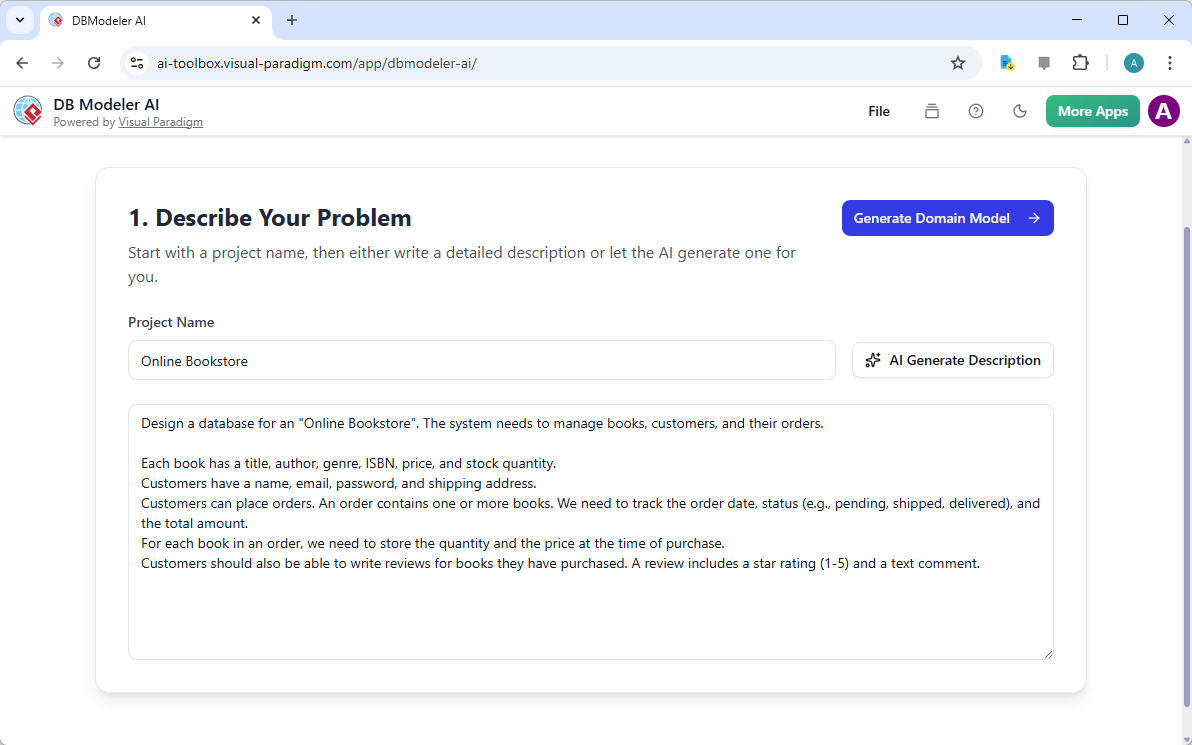
Every successful database begins with a clear understanding of the problem it intends to solve. In traditional workflows, this involves lengthy meetings and manual drafting of requirements. With a modern AI database design tool, the process starts with a simple conversation. The first stage of our journey involves inputting the project scope. For our example, we are building a system for an “Online Bookstore.”
As illustrated in the interface below, the user simply names the project and provides a natural language description. You might describe the need to manage books, customers, and orders, detailing attributes like ISBNs, shipping addresses, and review systems. Remarkably, if you are unsure of the specific requirements, the “AI Generate Description” feature can draft a comprehensive scenario for you, ensuring no critical business logic is overlooked from the start.
Step 2: Visualizing Concepts with Domain Class Diagrams
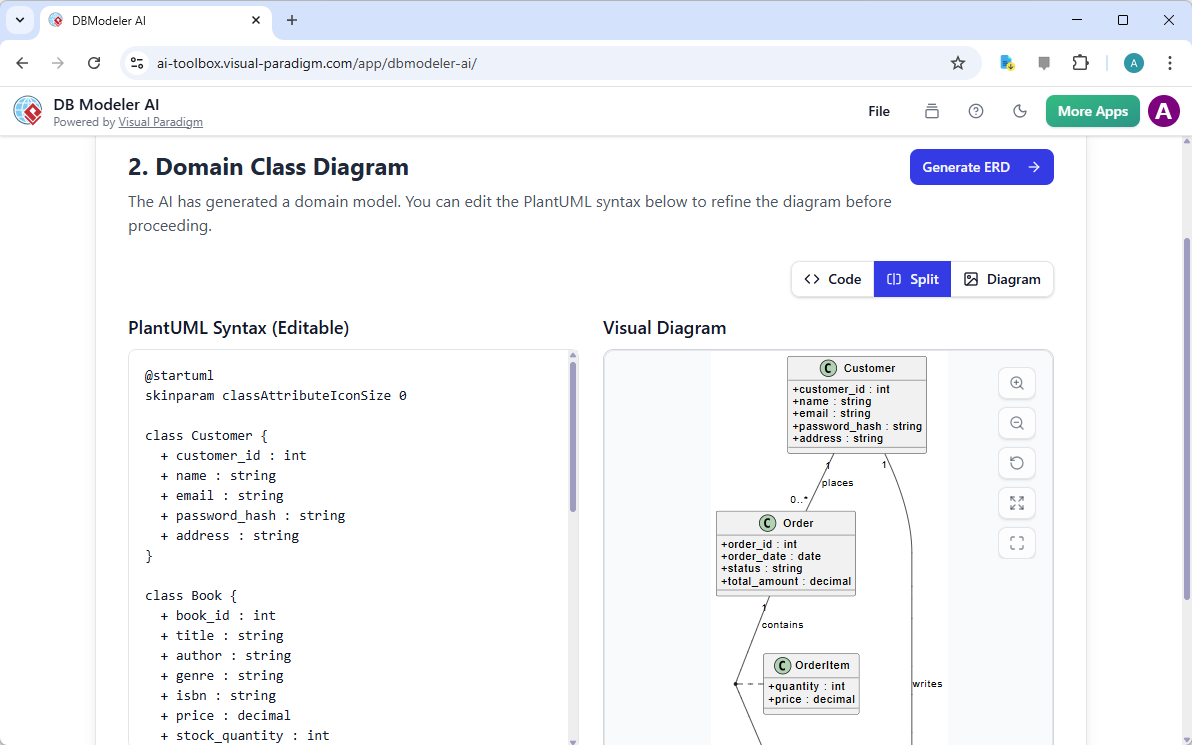
Once the problem is defined, the AI analyzes the text to identify the core “nouns” or entities involved in the system. This transition from text to visual structure is often where errors occur in manual design, but the AI schema generator handles this transition seamlessly. The result is a Domain Class Diagram, a conceptual model that outlines what data exists without getting bogged down in the technical minutiae of database keys just yet.
In our bookstore example, the tool has identified key classes such as Customer, Book, Order, and OrderItem. It has also intelligently inferred attributes—for instance, a Customer needs a name, email, and password hash. Furthermore, the diagram maps out relationships, showing that a customer “places” orders and orders “contain” items. This visual step allows stakeholders to verify that the system’s architecture matches the real-world business logic before any code is generated.
Step 3: Constructing the Entity-Relationship Diagram (ERD)
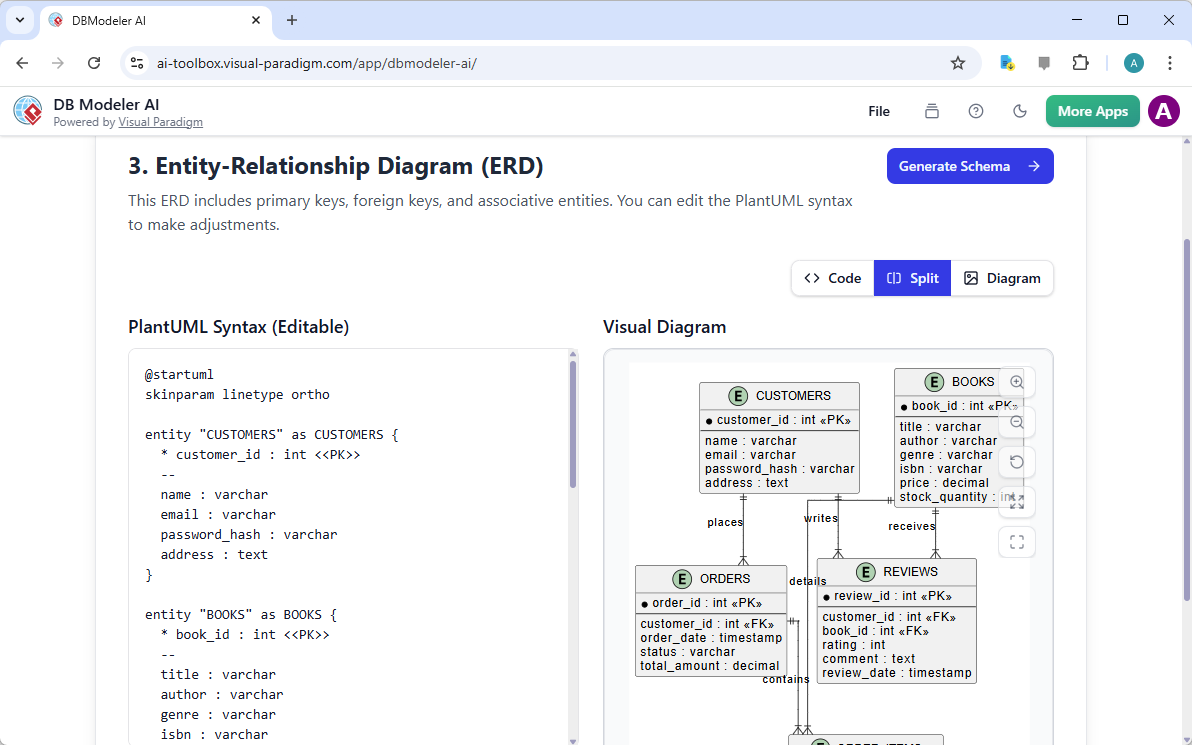
Moving from a conceptual model to a logical one requires defining exactly how data relates within a relational database structure. This is the phase where the Domain Class Diagram evolves into a formal Entity-Relationship Diagram (ERD). This step is critical for software developers and DBAs, as it introduces technical constraints like Primary Keys (PK) and Foreign Keys (FK) that enforce data integrity.
The online database diagram maker automatically converts the previous classes into entities (tables). As seen in the generated diagram, the relationships are now strictly defined. For example, the REVIEWS table is shown with Foreign Keys linking back to both CUSTOMERS and BOOKS, establishing a clear many-to-one relationship with each. The visual representation uses standard “crow’s foot” notation, making it immediately readable for technical review. This automated generation of keys and constraints saves hours of manual drawing and linking.
Step 4: Generating the Initial SQL Schema
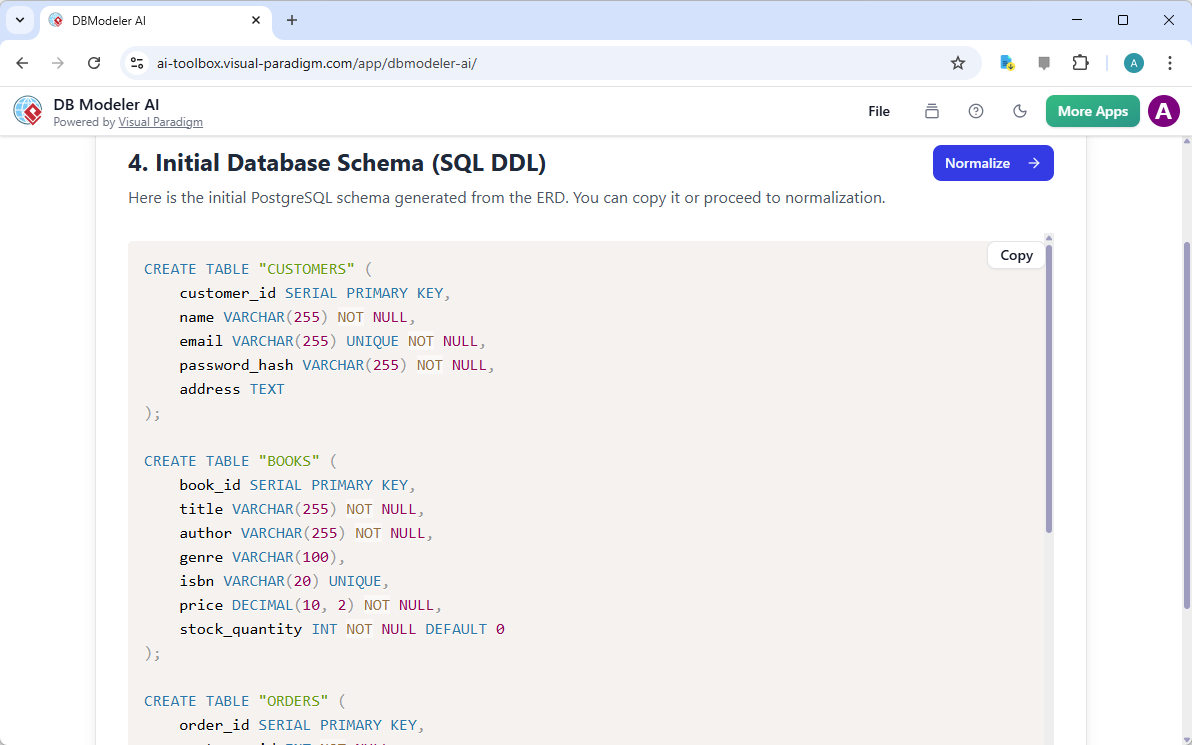
With the visual structure confirmed, the next logical step is the generation of the Data Definition Language (DDL) code—the actual SQL commands required to create the database. For many developers, writing verbose CREATE TABLE statements is a repetitive and error-prone task. DB Modeler AI automates this entirely, producing clean, syntax-correct SQL based on the ERD established in the previous step.
The output provides a complete initial schema. In the screenshot below, you can observe the generated SQL for the CUSTOMERS, BOOKS, and ORDERS tables. The tool automatically assigns appropriate data types (such as VARCHAR(255) for names or DECIMAL for prices) and constraints (like NOT NULL or UNIQUE). This code is ready to be copied for use in a development environment, or it can be further refined within the tool.
Step 5: Ensuring Data Integrity through Normalization
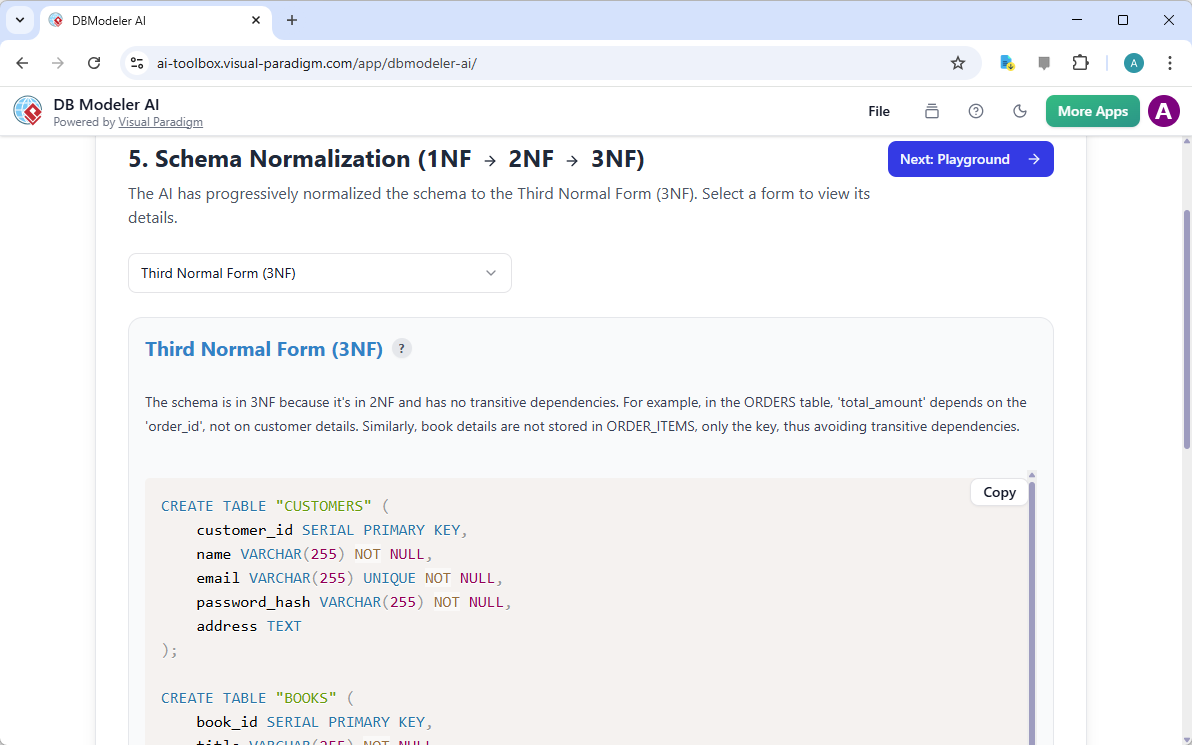
A common pitfall in database design is creating “flat” structures that lead to data redundancy and anomalies. Professional database design dictates that schemas should be “normalized.” Normalization is the process of organizing data to minimize redundancy. Typically, this is a complex academic concept involving First (1NF), Second (2NF), and Third Normal Form (3NF), which can be difficult to apply manually.
The AI database optimization features within the tool guide users through this critical phase. The application analyzes the initial schema and progressively applies normalization rules. As shown in the view below, the system confirms that the schema is in 3NF because it contains no transitive dependencies. For example, it ensures that book details are not redundantly stored in the ORDER_ITEMS table, but rather referenced via a key. This step ensures the database remains efficient and maintainable as it scales.
Step 6: Validating with the Interactive Playground
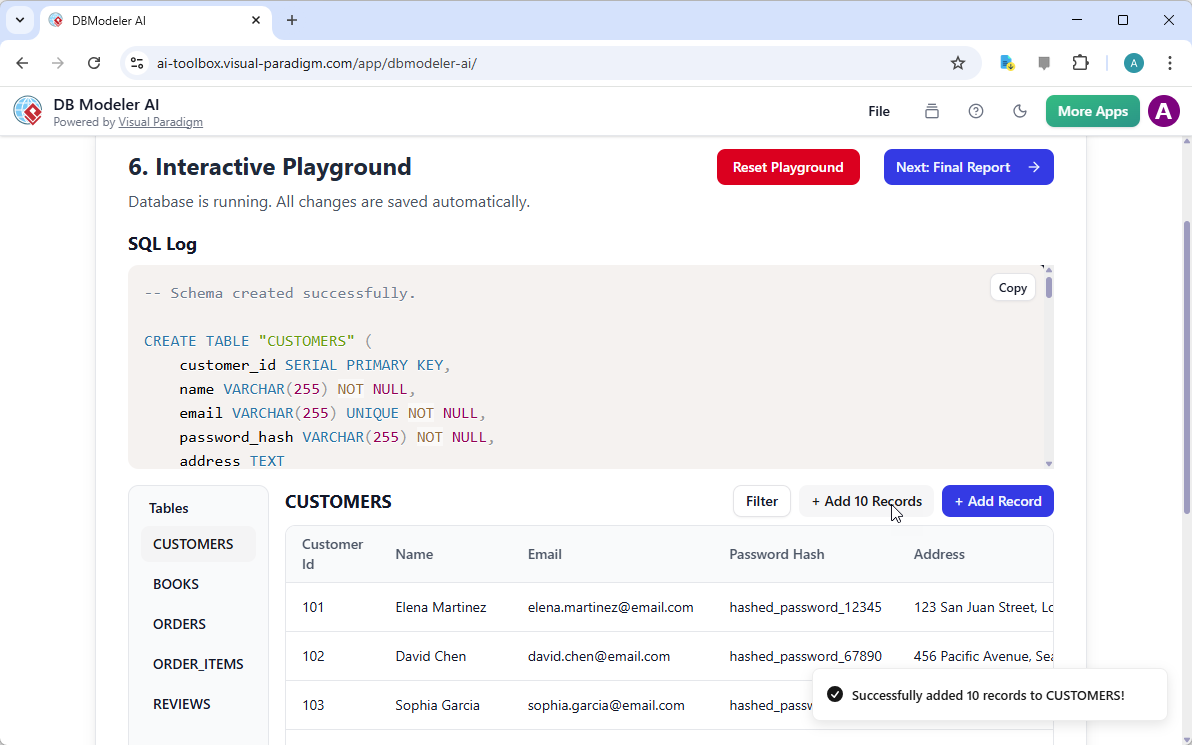
Designing a schema is theoretical; seeing it in action is practical. One of the most distinct features of this professional database modeling software is the inclusion of an Interactive Playground. This feature effectively eliminates the need to spin up a local database server just to test if your design works. It creates a sandbox environment where the generated SQL is executed immediately.
In the bookstore example, we can interact directly with the CUSTOMERS table. The interface allows users to insert sample data—either manually or by generating batch records—to test the constraints. As visible in the image, we have successfully added records for customers like “Elena Martinez” and “David Chen.” The SQL log at the top records every transaction, providing a transparent view of how the database responds to queries. This immediate feedback loop allows designers to catch logic errors before the schema is ever deployed to production.
Step 7: Finalizing Documentation and Reporting
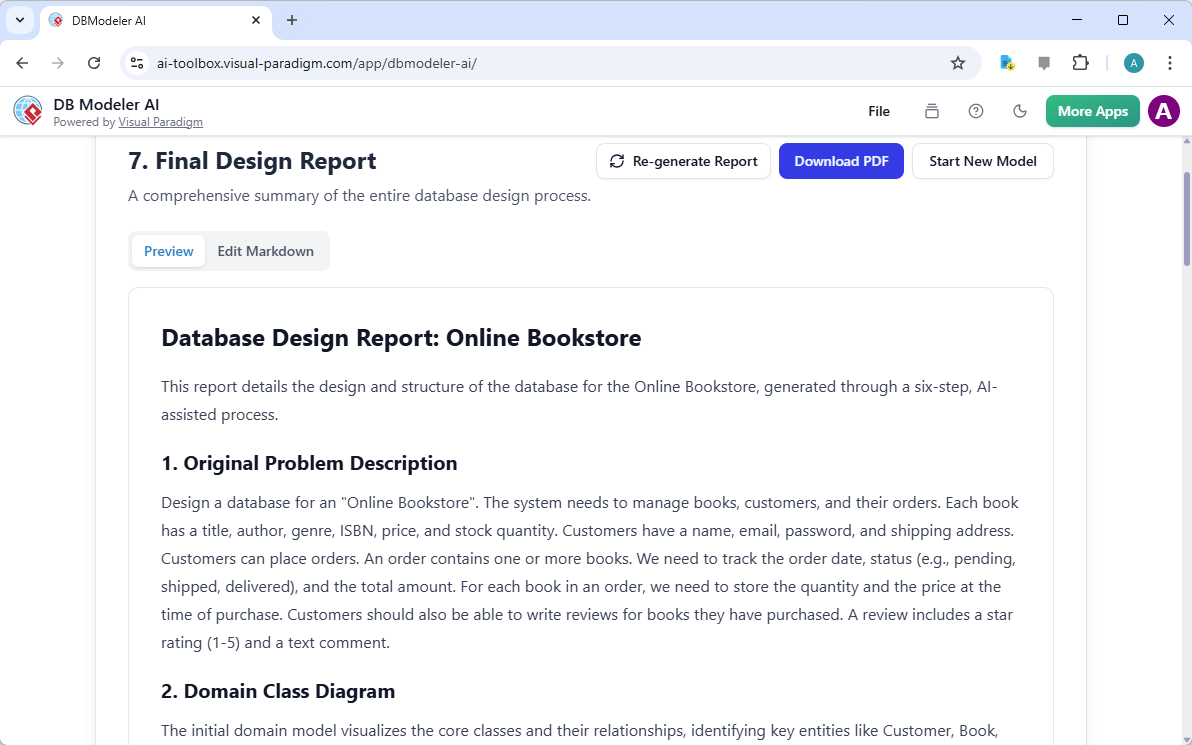
The final piece of the engineering puzzle is documentation. A database schema without documentation is difficult to maintain and hand off to other teams. The guided workflow concludes by compiling all previous steps—the problem description, the diagrams, the SQL code, and the normalization logic—into a cohesive final report.
This generated report serves as a definitive source of truth for the project. It summarizes the design decisions made throughout the process, providing a narrative that explains why the database is structured the way it is. For project managers and stakeholders, this document provides the necessary assurance that the “Online Bookstore” backend is robust, well-planned, and ready for implementation.
Conclusion
The journey from a vague idea of an “Online Bookstore” to a fully functioning, normalized database schema traditionally requires significant expertise and time. However, by utilizing Visual Paradigm’s DB Modeler AI, we have navigated this complex process through a structured, seven-step workflow. We successfully defined requirements, visualized relationships, generated production-ready SQL, and validated our design in a sandbox environment.
This approach not only democratizes database design for students and business analysts but also serves as a powerful rapid prototyping tool for experienced developers. By automating the repetitive aspects of modeling and enforcing best practices like normalization, the tool allows creators to focus on the business logic and user experience of their applications.
To experience this intelligent workflow firsthand and streamline your next database project, we invite you to explore the tool yourself.
Try DB Modeler AI Now and transform your requirements into a professional database schema in minutes.
Related Resources
- DB Modeler AI | AI-Powered Database Design Tool – Visual Paradigm: DB Modeler AI is an intelligent application that guides you through a structured, seven-step journey to transform a simple problem description into a fully normalized, production-ready database schema, complete with an interactive SQL playground.
- DB Modeler AI Review: AI-Powered Database Schema Design Tool: Visual Paradigm DB Modeler AI enters this space as an intelligent, step-by-step tool designed to bridge the gap between abstract business logic and concrete SQL implementation.
- DBModeler AI – Interactive Database Design & Normalization Tool: DB Modeler AI is an AI -powered database modeling tool designed to bridge the gap between abstract business requirements and production-ready SQL code. It automates the complex, iterative, and error-prone process of database design, guiding you from an idea to a fully normalized, tested schema in a seamless, 7-step journey. The tool’s core purpose is to accelerate development, improve data …
- Visual Paradigm Review: AI-Powered Modeling & Design Tools: Explore our in-depth review of Visual Paradigm . Discover how its new Generative AI engine transforms UML modeling, agile management, and enterprise architecture.
- Guide to AI Database Normalization & Modeling | Visual Paradigm: Master database architecture with our comprehensive guide to normalization. Learn how Visual Paradigm’s AI DB Modeler automates the transition from Class Diagrams to optimized 3NF ERDs.