




Streamlining Kitchen Renovation Projects: Building an Intelligent WBS with AI Tree Diagram Maker
Learn how to use Visual Paradigm's AI Tree Diagram Maker to create a detailed Work Breakdown Structure (WBS) for your kitchen renovation project effortlessly.
Embarking on a complex project, such as a comprehensive kitchen renovation, often feels like navigating a labyrinth without a map. The sheer volume of tasks—from securing permits to selecting the perfect backsplash—can quickly become overwhelming. However, the difference between a chaotic construction site and a seamless transformation often lies in the planning phase. Enter the AI Tree Diagram Maker by Visual Paradigm, a sophisticated tool designed to turn scattered ideas into structured, actionable plans. By leveraging advanced artificial intelligence, this online diagramming software allows homeowners, project managers, and contractors to visualize their workflows with unprecedented clarity.
Whether you are outlining a Work Breakdown Structure (WBS) for a home improvement project or mapping out a complex software architecture, having a centralized visual reference is crucial. This article explores how Visual Paradigm’s innovative solution transforms a simple concept, like a kitchen remodel, into a detailed, data-rich project plan.
Quick Summary: Key Takeaways
- Instant Structure: Generate comprehensive Work Breakdown Structures from a single topic prompt using AI.
- Data-Rich Nodes: Go beyond simple visuals by adding detailed properties like status, assignees, and due dates to every element.
- Intelligent Assistance: Use the built-in AI Chatbot to identify missing tasks and receive efficiency tips specific to your project context.
- Dual-View Editing: Seamlessly switch between a rapid text-based editor and a dynamic visual diagram.
- Professional Organization: Keep complex hierarchies, such as renovation phases or business processes, neatly organized and collapsible.
Visualizing the Scope: From Concept to Structured Plan
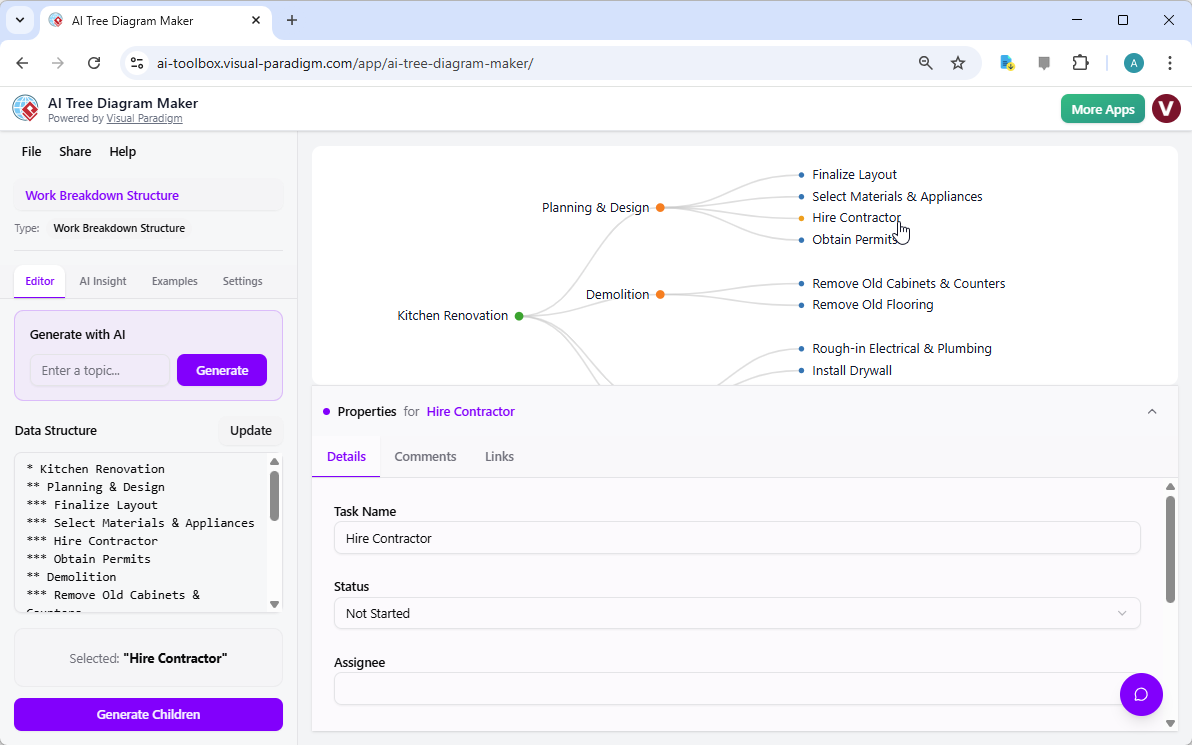
The foundation of any successful project is a clear understanding of the hierarchy of tasks. Visual Paradigm’s AI Tree Diagram Maker excels at this by providing a dual-view interface that caters to both textual and visual thinkers. On the left side of the application, users interact with a straightforward text editor where they can list tasks using simple indentation. On the right, these text inputs are instantly rendered into a beautiful, interactive tree diagram.
In the context of a kitchen renovation, as seen in our first example, the project is broken down into logical phases. The root node, “Kitchen Renovation,” branches out into critical categories such as “Planning & Design” and “Demolition.” This hierarchical approach ensures that no aspect of the project is overlooked. However, the true power of this professional diagramming tool lies in its ability to hold deep information. It is not merely a drawing; it is a database of your project’s progress.
Users can select specific nodes to access the Property Editor located at the bottom of the screen. For instance, when the “Hire Contractor” node is selected, the interface reveals fields for “Task Name,” “Status,” and “Assignee.” This feature transforms a static image into a dynamic tracking system, allowing project owners to mark items as “Not Started,” “In Progress,” or “Complete,” ensuring that accountability is maintained throughout the renovation lifecycle.
Enhancing Project Efficiency with Context-Aware AI
While organizing known tasks is essential, identifying what you might have missed is where the AI Tree Diagram Maker truly distinguishes itself. Traditional planning tools rely entirely on the user’s existing knowledge. In contrast, Visual Paradigm integrates an intelligent AI Assistant that understands the context of your specific diagram. This turns the software into a collaborative partner rather than just a drawing utility.
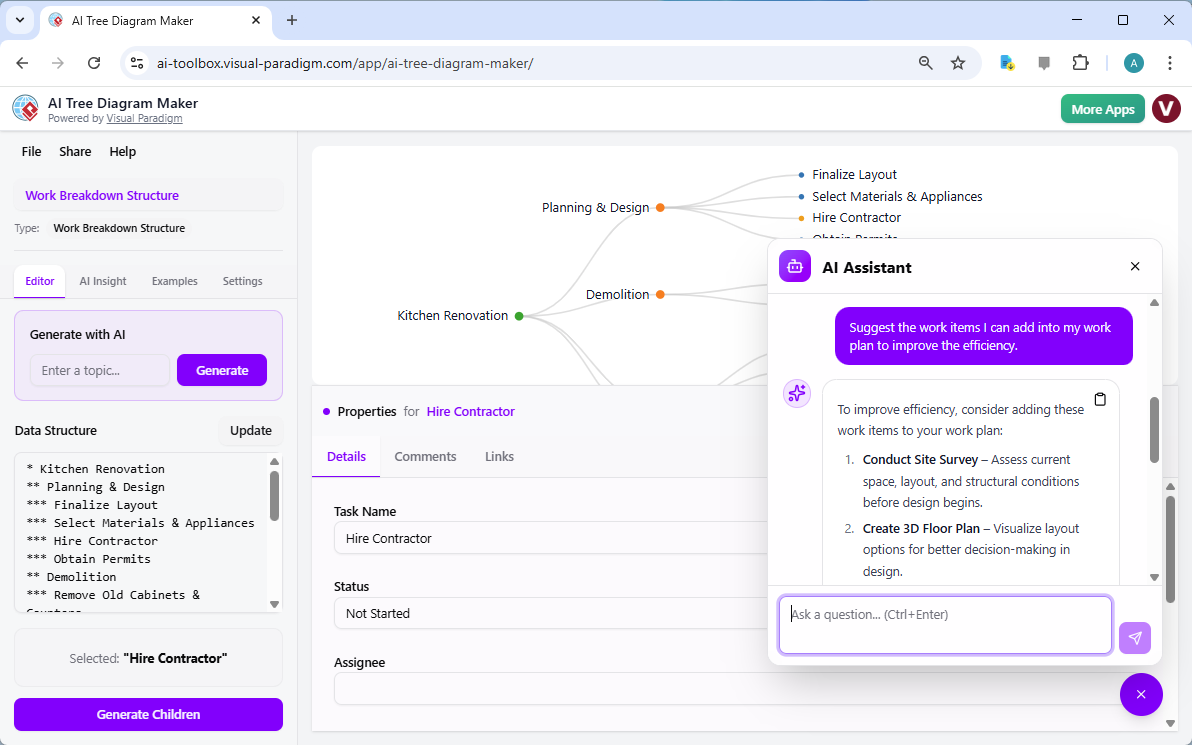
Imagine you have mapped out your renovation tasks but are concerned about potential bottlenecks or overlooked preparatory steps. Instead of searching online for generic advice, you can open the AI Chatbot directly within the application. The AI analyzes the current structure of your Work Breakdown Structure—reading nodes like “Finalize Layout” and “Obtain Permits”—to provide tailored recommendations.
As demonstrated in the second visual reference, a user can ask the AI Assistant a natural language question such as, “Suggest the work items I can add into my work plan to improve the efficiency.” The AI does not offer random advice; it looks at the existing “Kitchen Renovation” plan and suggests adding specific, high-value tasks like “Conduct Site Survey” to assess structural conditions before design begins, or “Create 3D Floor Plan” to visualize options. This capability allows users to refine their project scope instantly, ensuring a more professional and thorough approach to project management.
The Mechanics of Intelligent Planning
Understanding how to leverage these features can significantly reduce the anxiety associated with complex planning. The workflow within the AI Tree Diagram Maker is designed to be intuitive, guiding the user from a blank slate to a fully realized plan in minutes.
Starting with Blueprints
To ensure consistency, the tool offers various “blueprints” or templates. When starting a renovation plan, selecting the “Work Breakdown Structure” blueprint automatically configures the diagram to include relevant fields like “Status” and “Assignee.” If you were building an organizational chart or a family tree, different blueprints would provide the appropriate data structures for those specific needs.
Generative AI for Rapid Expansion
One of the most time-consuming parts of planning is typing out every single sub-task. The application’s “Generate with AI” feature solves this. By simply typing a broad goal, the AI can generate an entire tree structure. Furthermore, if you have a specific branch that needs more detail—for example, “Demolition”—you can select that node and use the “Generate Children” function. The AI will logically break down that single task into sub-components like “Remove Old Cabinets” or “Disconnect Plumbing,” saving valuable brainstorming time.
Beyond Renovation: A Versatile Tool for All Industries
While the kitchen renovation example highlights the tool’s capability in personal project management, the utility of the AI Tree Diagram Maker extends far into the professional realm. Business Analysts utilize it to map out decision trees to predict market outcomes, while Software Architects use it to outline system dependencies. The ability to switch between a high-level overview and deep, property-rich details makes it indispensable for anyone who needs to organize hierarchical data.
The “AI Insight” feature further enhances this versatility. Beyond the chatbot, users can generate a comprehensive written analysis of their entire tree. This feature acts as a second set of eyes, highlighting potential risks in a business plan or suggesting structural improvements in an academic curriculum. It provides a level of analytical depth that is rarely found in standard visual editors.
Conclusion
Planning a complex initiative does not have to be a solitary or stressful struggle. The AI Tree Diagram Maker by Visual Paradigm bridges the gap between simple brainstorming and professional project management. By combining an easy-to-use text editor with a powerful visualizer and a context-aware AI assistant, it empowers users to build plans that are not only visually clear but also logically sound and data-rich.
Whether you are managing a contractor for a home remodel or leading a team through a corporate restructuring, having a tool that helps you visualize, analyze, and expand your ideas is invaluable. Take control of your next project and experience the clarity of intelligent diagramming.
Ready to transform your planning process? Try the AI Tree Diagram Maker now and start building smarter projects today.
Related Resources
- Visualizing Complex Ideas with AI-Powered Tree Diagrams: Explores how AI-driven tree diagram tools help users break down complex concepts into structured, visual representations for better understanding.
- AI Tree Diagram Maker | Visualize Hierarchical Data Instantly: Effortlessly create stunning hierarchical diagrams like mind maps, org charts, and work breakdowns with our AI-powered tool. Simply describe your topic and …
- AI Tree Diagram Maker – Visual Paradigm AI: Visualize Any Idea. Build Your First Tree Diagram Instantly. Get AI-powered risk analysis and structural suggestions to perfect your project before you even start.
- AI Tree Diagram Maker: Generate Hierarchies Instantly – Visual Paradigm Product Updates: November 4, 2025 – Effortlessly create complex tree diagrams from text with Visual Paradigm’s new AI Tree Diagram Maker. Describe your structure, and let AI build the visualization for you.
- Comprehensive Tutorial: How to Master AI Tree Diagram Maker …: The AI Tree Diagram Maker from Visual Paradigm is one of the most powerful AI-assisted hierarchical diagramming tools available in 2025…
- Home – Tree Diagram Maker: Create, visualize, and analyze hierarchical data with our AI Tree Diagram Maker. Use blueprints for WBS, SWOT, org charts, and more. Start for free.
- Comprehensive Tutorial: Mastering the AI Tree Diagram Maker …: Released in late 2025, Visual Paradigm ’s AI Tree Diagram Maker completely removes that bottleneck by using generative AI to turn natural-language descriptions into fully-structured, professionally formatted tree diagrams in seconds. Instead of drawing, you now think, type, and let AI do the heavy lifting.