




Designing Interactive Classroom Welcomes: An AniFuzion Educational Animation Guide
Learn how to use Visual Paradigm AniFuzion to create engaging educational animations, 3D classroom scenes, and AI-driven character animations for better student retention.
In the realm of modern education and instructional design, capturing the attention of learners immediately is paramount. The Visual Paradigm Animation Maker (AniFuzion) serves as a robust solution for educators and content creators seeking to produce high-quality, engaging visuals without the need for complex software installations or extensive design experience. By utilizing this online animation tool, professionals can transform static introductions into dynamic, animated narratives that resonate with students and facilitate better information retention.
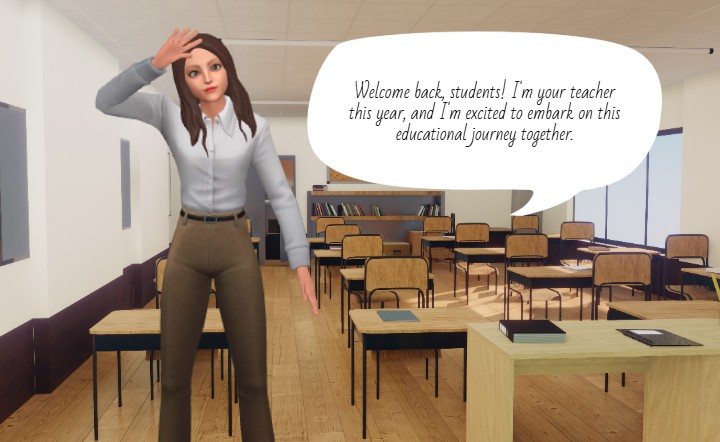
The ability to construct a virtual environment that mirrors a real-world setting allows for a seamless transition into digital learning. As demonstrated in the accompanying visual, users can effortlessly design a “back to school” scenario featuring a customizable 3D avatar acting as a teacher. This capability to simulate a classroom environment complete with desks, books, and instructional materials demonstrates the power of AniFuzion in bridging the gap between traditional teaching methods and digital innovation.
Key Takeaways
- Effortless Scene Creation: Utilize drag-and-drop functionality to build detailed environments like classrooms without technical modeling skills.
- AI-Driven Character Animation: Implement automatic lipsync and Text-to-Speech (TTS) to give voices to 3D characters instantly.
- Enhanced Engagement: Replace static text announcements with animated storytelling to boost student attention and retention.
- Professional Customization: Access a vast library of 3D assets to tailor characters and props to specific educational contexts.
Constructing Immersive Educational Environments
The core strength of the Visual Paradigm Animation Maker lies in its extensive library of pre-built assets and its intuitive drag-and-drop interface. Educators often face time constraints that make creating custom graphics from scratch impractical. AniFuzion addresses this by providing ready-to-use scenes and props. In the context of an educational welcome message, a user can select a classroom template and populate it with relevant items such as student desks, a teacher’s podium, and bookshelves to establish an authentic academic atmosphere.
The image below illustrates a prime example of this utility: a fully rigged 3D character stands in a detailed classroom setting. The character, styled as an approachable educator, is depicted waving to the audience. This specific gesture is selected from a library of over 2,000 dynamic actions. Furthermore, the inclusion of a speech bubble containing the text, “Welcome back, students! I’m your teacher this year, and I’m excited to embark on this educational journey together,” highlights the tool’s ability to combine visual and textual communication effectively.
Streamlining Communication with AI and Automation
Beyond visual layout, the AniFuzion animation software significantly enhances the auditory aspect of content creation through artificial intelligence. For the teacher character shown above to deliver her welcome message effectively, users can leverage the AI Text-to-Speech (TTS) feature. Instead of hiring voice actors or recording audio manually, creators simply input the script found in the speech bubble into the TTS panel. The system then generates a professional voiceover with options to adjust accents and emotional tones, ensuring the delivery matches the welcoming sentiment of the scene.
Crucially, the tool includes automatic lipsync technology. Once the audio is generated, the 3D character’s mouth movements are automatically synchronized to the spoken words. This adds a layer of realism and immersion that static images simply cannot achieve. For an educator creating an online course intro or a school administrator designing a digital newsletter, this feature ensures that the communication feels personal and “alive,” thereby increasing the likelihood of boosting audience engagement.
Step-by-Step: Creating a Classroom Introduction
To replicate the “Back to School” animation depicted above, users can follow a streamlined workflow designed for efficiency. This process demonstrates how accessible 3D animation creation is for beginners and professionals alike:
- Project Initiation: Log in to Visual Paradigm Online and select “New Animation.” Choose a blank canvas or a pre-made educational template to start.
- Scene Composition: From the assets library, drag a classroom background onto the canvas. Enhance the depth by adding 3D props such as desks, chairs, and books to the foreground and background layers.
- Character Customization: Select a 3D character from the library. Use the properties panel to customize clothing, hair color, and accessories to fit the persona of the teacher.
- Action and Scripting: Apply a “Waving” action from the motion library to the character. Enter the welcome message into the Text-to-Speech tool, generate the audio, and enable auto-lipsync.
- Final Polish: Add a speech bubble shape for visual reinforcement of the text. Preview the animation to ensure the character’s gestures align with the audio, then export the project as an MP4 video or interactive flipbook.
The Strategic Value for Educational Content Creators
Adopting Visual Paradigm’s animation tools creates a strategic advantage for educational institutions and corporate trainers. The platform removes the technical barriers typically associated with 3D design, allowing subject matter experts to focus on the curriculum rather than the technology. By utilizing features like motion retargeting and shape effects, creators can produce consistent, high-quality content that maintains institutional branding.
Furthermore, the versatility of the output formats—ranging from video files to shareable web links—ensures that these animated introductions can be easily embedded into Learning Management Systems (LMS), email newsletters, or presentation slides. This flexibility makes AniFuzion not just a design tool, but a comprehensive communication solution for modern education.
Conclusion
Visual Paradigm Animation Maker (AniFuzion) democratizes the process of creating sophisticated, animated content. By combining a vast asset library, intelligent automation features like TTS and lipsync, and a user-friendly interface, it empowers educators to craft compelling visual stories. The ability to quickly generate a welcoming classroom scene with a speaking 3D avatar transforms standard communication into an engaging experience, setting a positive tone for the educational journey ahead.
To start creating your own animated educational materials and explore the vast library of assets, visit the template gallery below.
Get started with an animation template
Related Links
- Mastering Anifuzion: A Comprehensive Guide to Creating Professional Animations: This in-depth guide walks users through the core features and advanced techniques of Anifuzion, empowering creators to produce polished, professional-grade animations with ease.
- Creating Seamless Animations in Anifuzion with Automatic Motion Retargeting: Discover how Anifuzion’s automatic motion retargeting enables smooth, realistic animations across different character models with minimal manual effort.
- Unlock Your Creativity with Anifuzion: What It Is and Why You Should Use It: A creative-focused overview explaining how Anifuzion empowers designers and animators to bring ideas to life with intuitive, powerful animation tools.
- Anifuzion Feature Overview: Advanced Animation Capabilities: An interactive overview of Anifuzion’s key animation features, highlighting its capabilities for creating dynamic, interactive, and professional animations.
- Anifuzion Features: Power Tools for Dynamic Animation Creation: Explore the full suite of Anifuzion’s innovative features designed to streamline and enhance the animation creation process for designers and developers.
- Getting Started with Anifuzion: Your First Steps to Animated Design: A beginner-friendly tutorial that introduces new users to Anifuzion’s interface, core functions, and foundational skills for creating engaging animations.