




Designing a Dining Reservation System: Automate Requirements with Use Case Modeling Studio
Learn how to automate requirements and UML diagrams for a dining reservation system using Visual Paradigm's AI-powered Use Case Modeling Studio.
In the complex landscape of software development, bridging the gap between a client’s vague requirements and a concrete technical architecture is often the most challenging phase. Business analysts and system architects frequently struggle to translate high-level goals into actionable specifications without getting bogged down in manual documentation. Enter Visual Paradigm’s Use Case Modeling Studio, a comprehensive, AI-powered online design tool that streamlines this exact process.
To demonstrate the capabilities of this robust software, we will walk through the creation of “GourmetReserve,” a hypothetical mobile application designed to allow diners to book tables and pre-order meals. By leveraging the advanced automation features of this professional use case editor, we can transform a simple concept into a fully documented project—complete with UML diagrams, test cases, and database schemas—in a fraction of the time usually required.
Quick Summary: Key Takeaways
- Accelerated Workflow: Transform a one-sentence goal into a full project scope using AI generation.
- Automated Visualization: Instantly create Use Case, Activity, Sequence, and Class diagrams without manual drawing.
- From Requirements to Code Structure: seamless transition from user stories to MVC architecture and Entity-Relationship Diagrams (ERDs).
- Comprehensive Documentation: Generate professional Software Design Documents (SDD) and test plans with a single click.
Defining System Scope and Identifying Actors
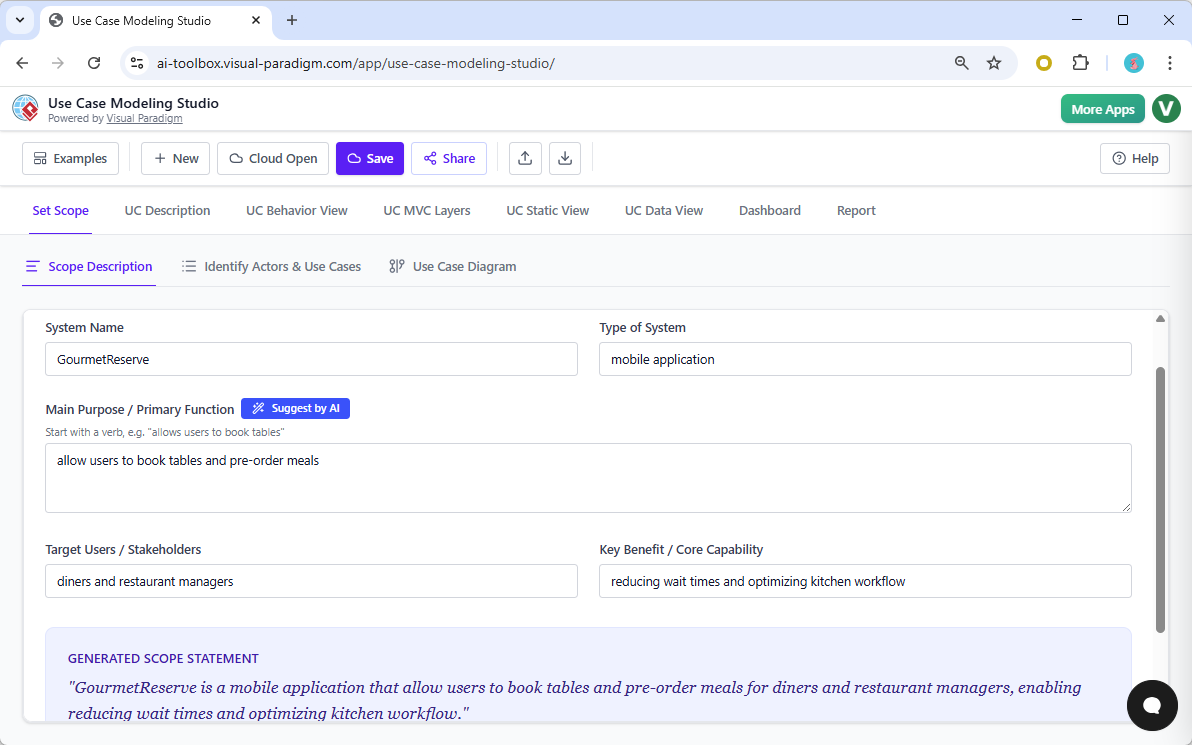
Every successful software project begins with a clearly defined scope. The Use Case Modeling Studio provides a structured environment to establish the boundaries of your system immediately. In our “GourmetReserve” example, we begin by inputting the system name and a brief description of its primary function: allowing users to book tables and pre-order meals. The AI-assisted scope generator refines this input into a professional scope statement, ensuring clarity regarding the target audience—diners and restaurant managers—and the core benefits, such as optimizing kitchen workflows.
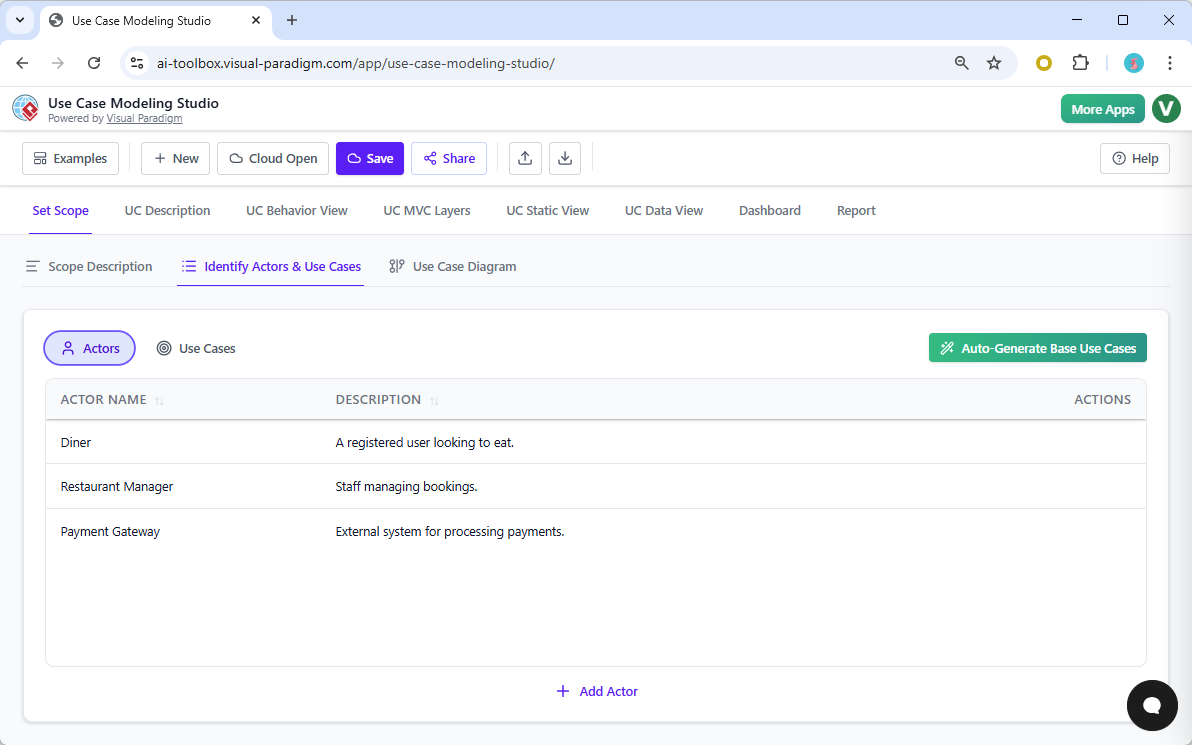
Once the scope is established, the next logical step in requirements engineering is identifying the stakeholders. Rather than manually listing every potential user, the tool’s intelligent algorithms analyze the scope description to suggest relevant actors. As shown below, the system has automatically derived key actors such as the “Diner,” “Restaurant Manager,” and external systems like the “Payment Gateway.” This automated identification ensures that no critical interaction point is overlooked during the initial planning phase.
Visualizing Requirements with Automated Diagrams
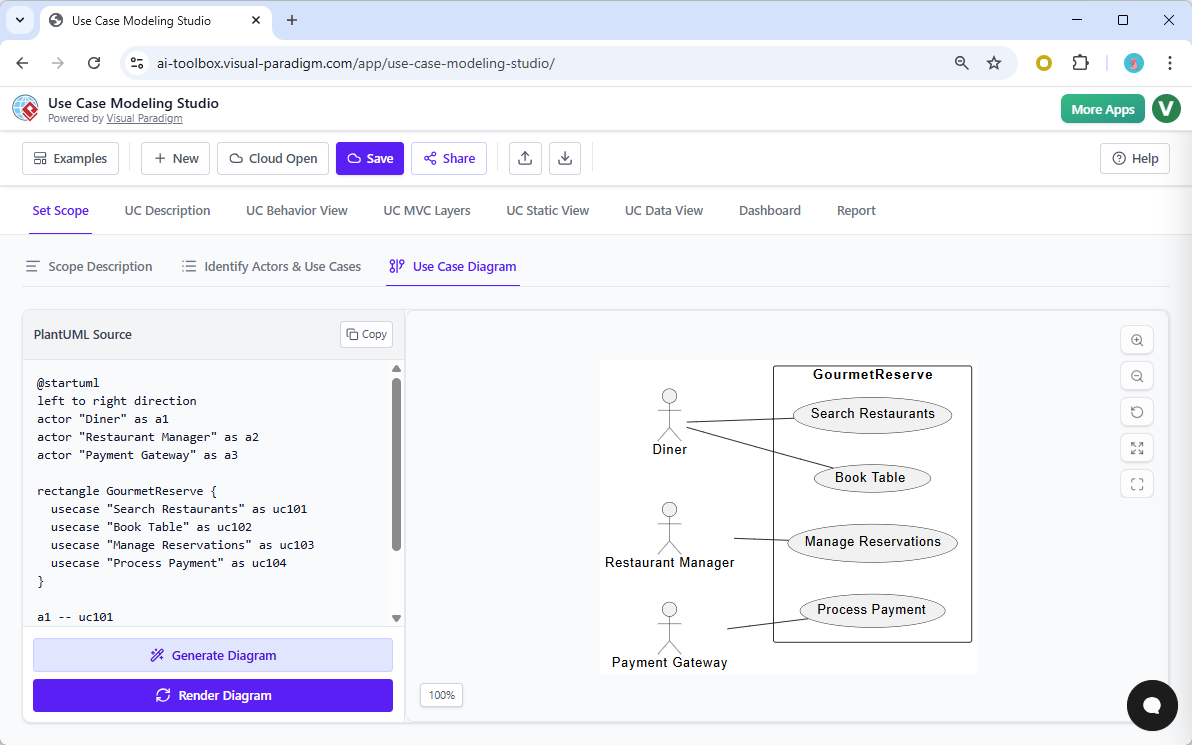
Visual communication is paramount in system analysis. Traditionally, creating a Use Case Diagram requires tedious drag-and-drop operations. Visual Paradigm revolutionizes this by generating the diagram automatically based on the textual data you have already provided. The result is a clean, standard-compliant UML diagram that visually maps the relationships between the actors (Diner, Restaurant Manager) and their goals (Search Restaurants, Book Table, Manage Reservations). This live-updating diagram serves as the “big picture” view of the GourmetReserve application.
Generating Detailed Use Case Specifications
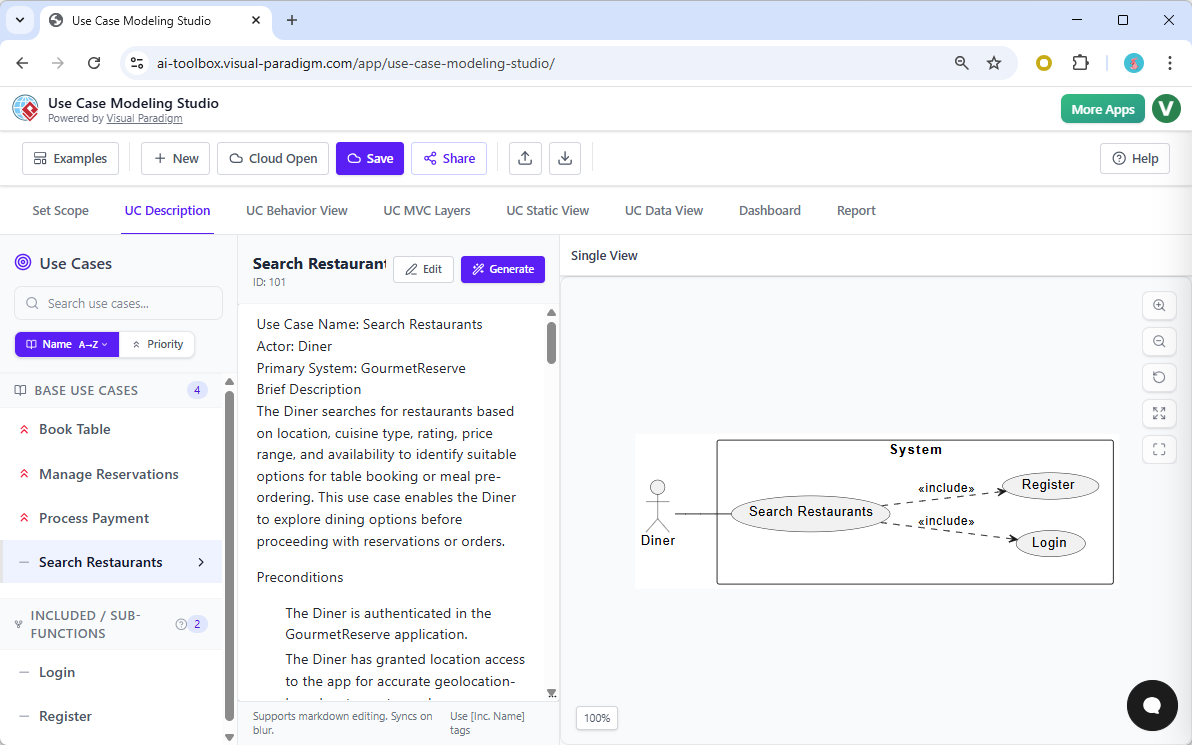
A diagram provides the overview, but the detailed logic lives in the specifications. Writing these out manually is often where projects slow down. The Use Case Modeling Studio accelerates this by using Generative AI to draft comprehensive use case descriptions. By selecting the “Search Restaurants” use case and clicking “Generate,” the tool produces a structured narrative that includes the brief description, preconditions (e.g., the Diner must be authenticated), and the flow of events. This transforms a simple label into a robust requirement specification ready for developer review.
Modeling System Behavior and Interactions
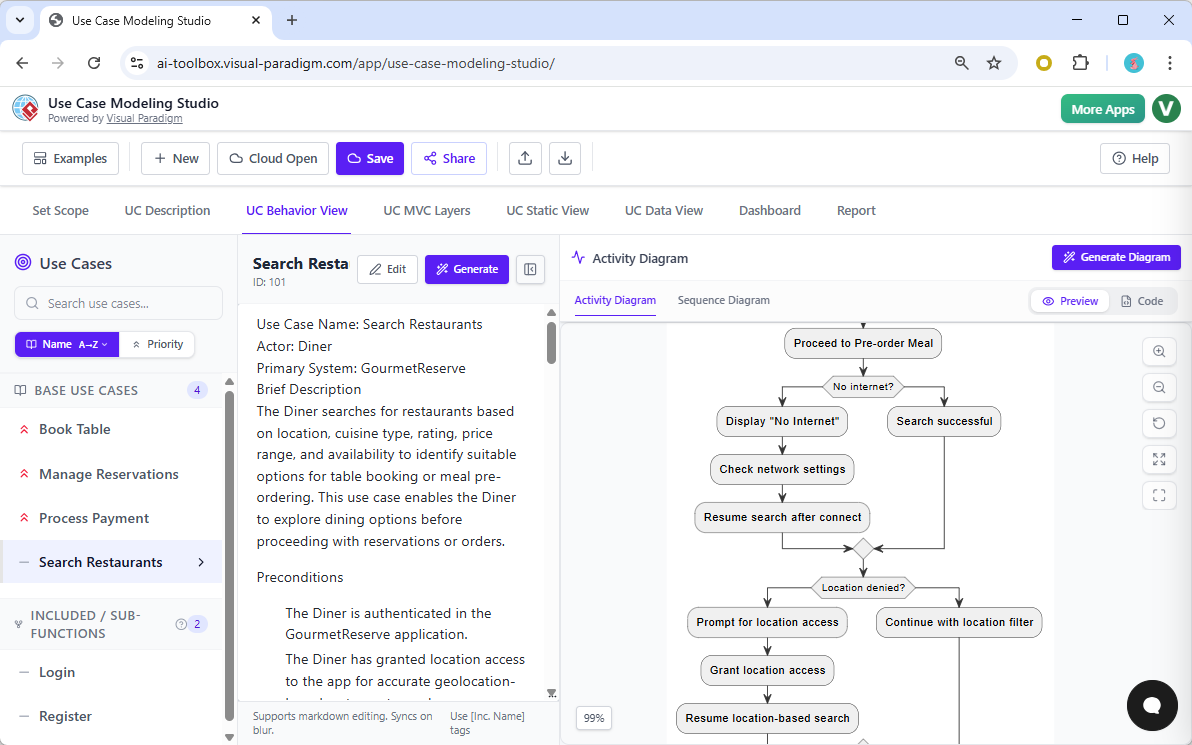
With the requirements defined, the focus shifts to behavioral modeling. How exactly does a user complete the “Search Restaurants” task? The platform allows you to instantly translate the textual description into an Activity Diagram. This flowchart visualizes the logic paths, decision points (such as checking for internet connectivity), and the sequence of steps the Diner takes to find a restaurant. This automated conversion from text to visual workflow eliminates consistency errors between your documentation and your diagrams.
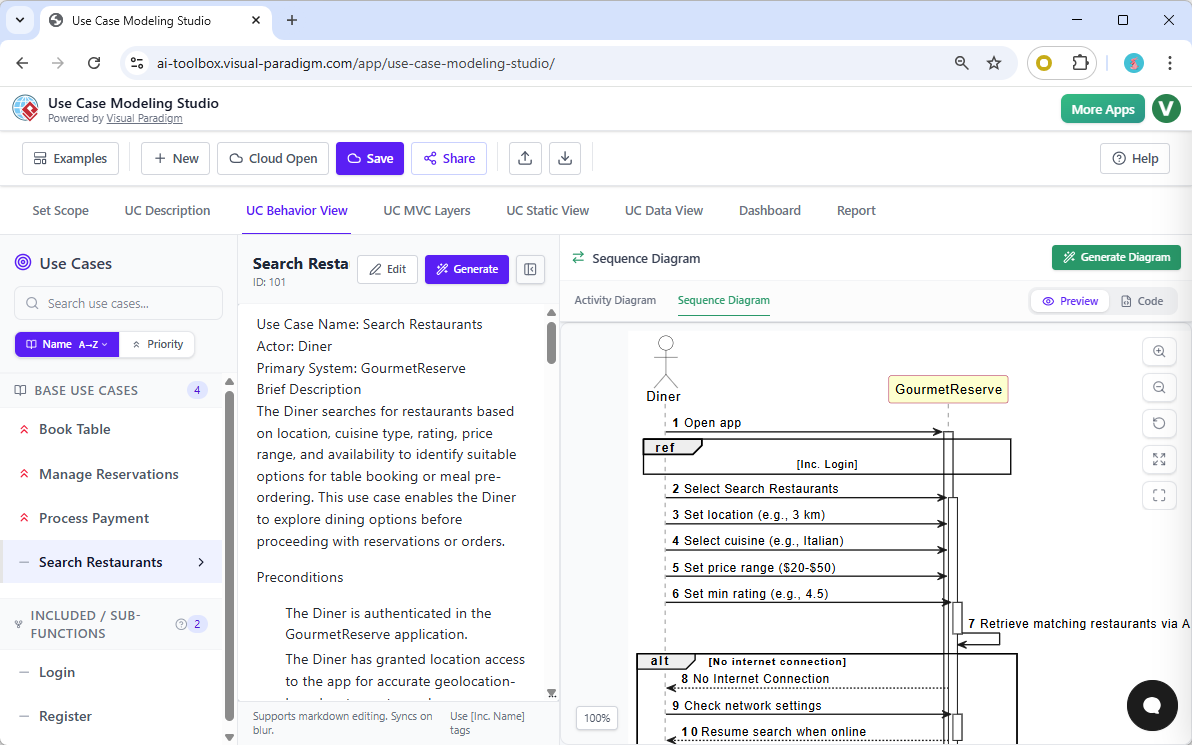
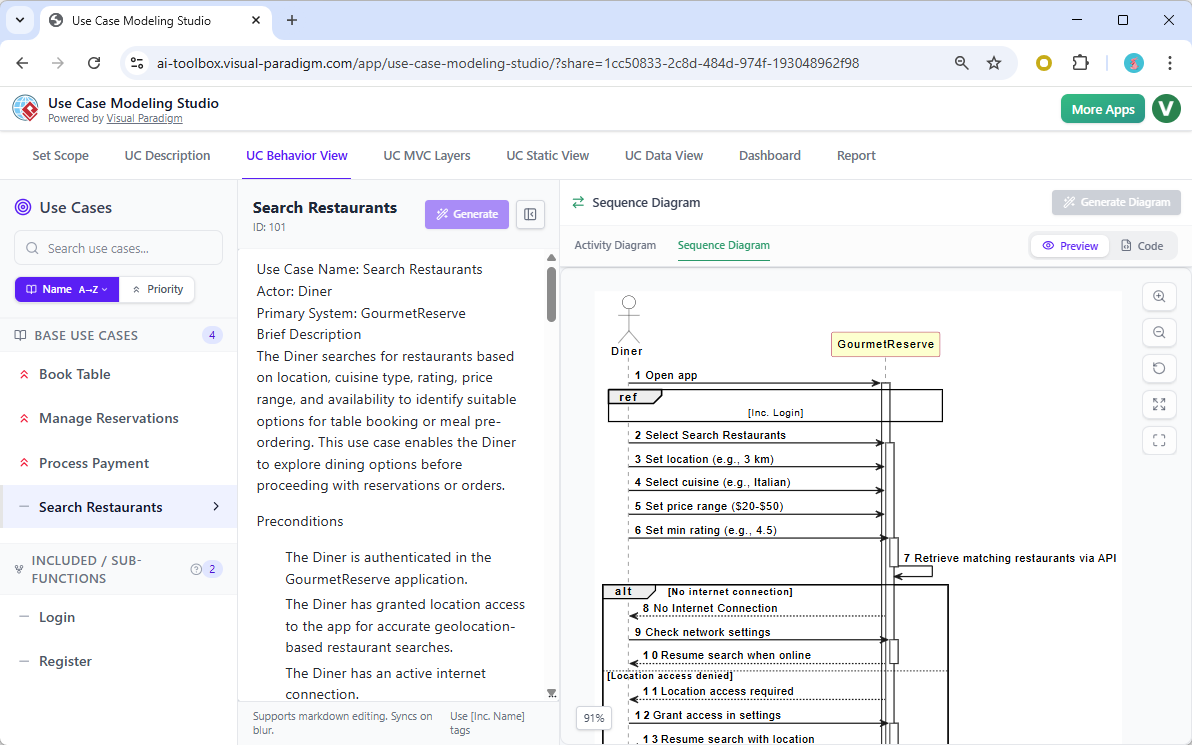
For a more technical view of the system’s execution, the tool can also generate a UML Sequence Diagram. This artifact is crucial for developers as it details the chronological exchange of messages between the actor and the system. In the GourmetReserve example, the diagram clearly illustrates the interaction flow: the Diner opens the app, the system validates the login (referencing an included use case), and the search parameters are processed. This level of detail helps identify potential logic gaps before a single line of code is written.
Bridging Requirements to Technical Architecture (MVC)
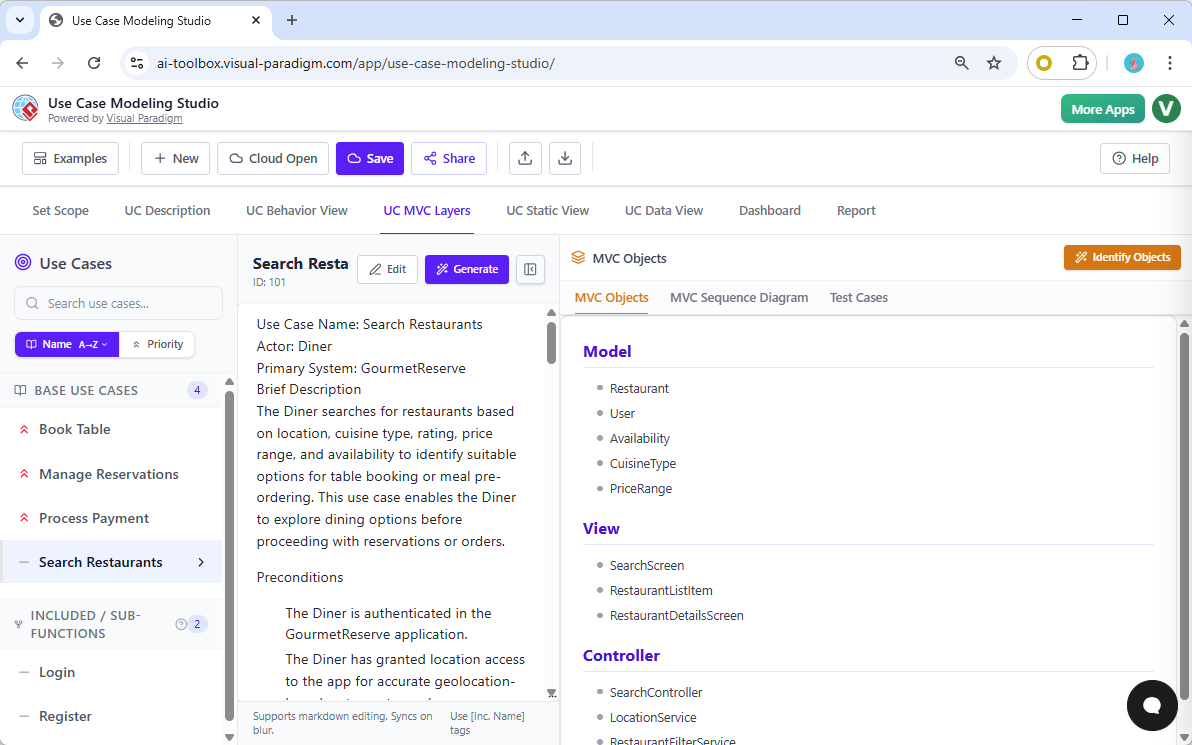
One of the most powerful features of this online design software is its ability to bridge the gap between functional requirements and technical architecture. The tool analyzes the use case description to suggest a Model-View-Controller (MVC) structure. For our dining app, the AI identifies necessary Model objects (Restaurant, User, CuisineType), View components (SearchScreen, RestaurantList), and Controller logic (SearchController). This automated architectural breakdown provides a solid foundation for the development team.
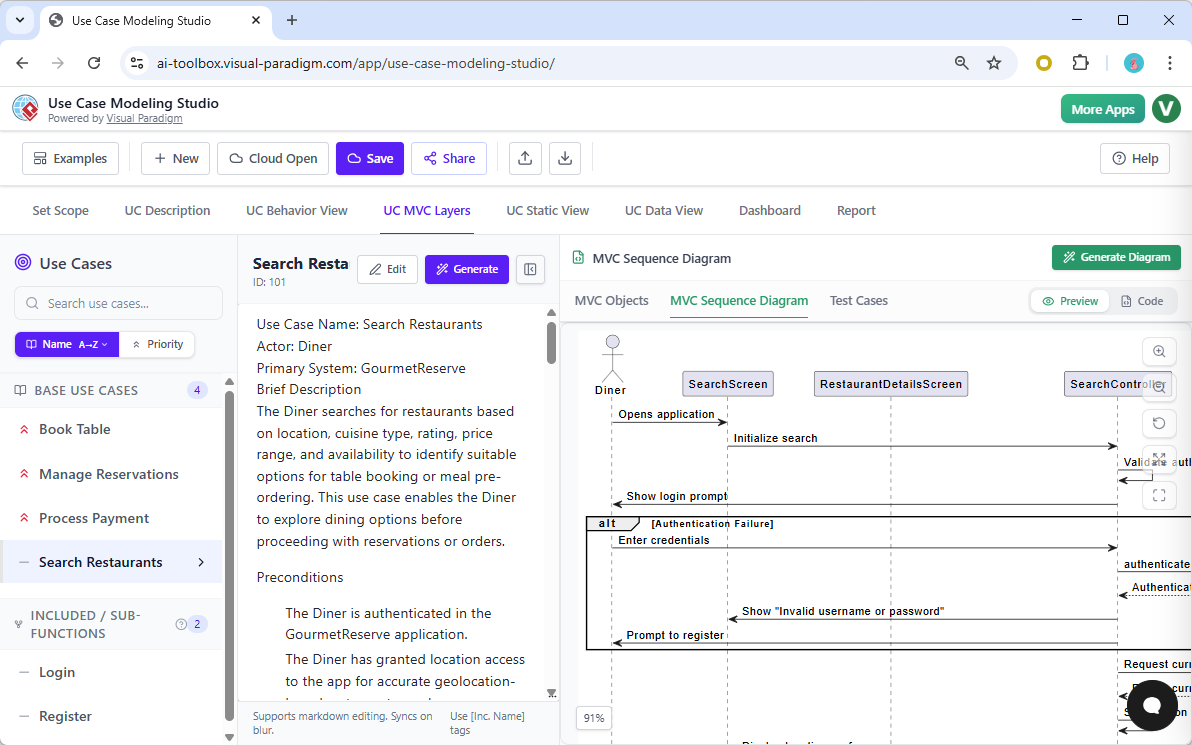
To further clarify how these architectural components interact, you can generate an MVC Sequence Diagram. Unlike the business-level sequence diagram shown earlier, this technical diagram visualizes the internal object interactions. It maps out how the SearchScreen communicates with the SearchController, and how the controller queries the database, providing a blueprint for implementation that adheres to standard software design patterns.
Ensuring Quality with AI-Generated Test Cases
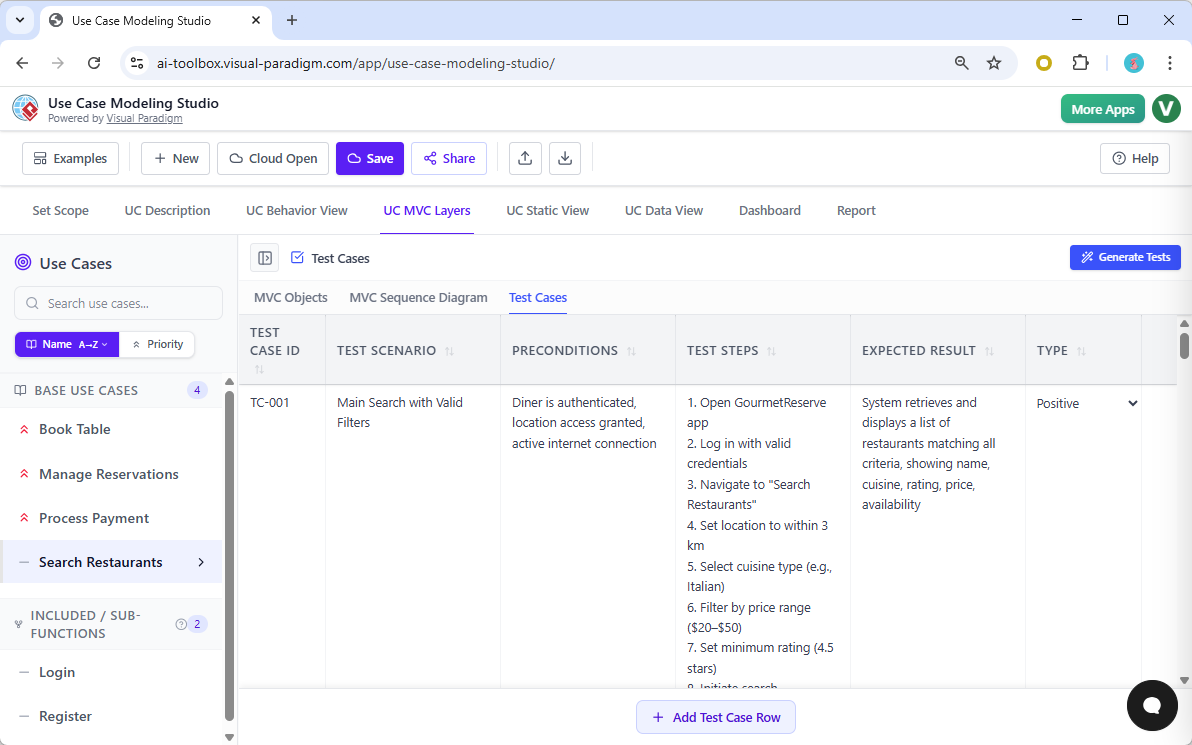
Quality assurance is often an afterthought in the design process, but the Use Case Modeling Studio integrates it directly into the workflow. Based on the flows and preconditions defined in the “Search Restaurants” use case, the tool automatically generates a comprehensive set of test cases. Each entry includes a Test ID, a specific scenario (e.g., “Main Search with Valid Filters”), preconditions, step-by-step instructions, and the expected result. This feature significantly reduces the workload for QA teams and ensures that test plans are perfectly aligned with the requirements.
Domain Modeling and Database Design
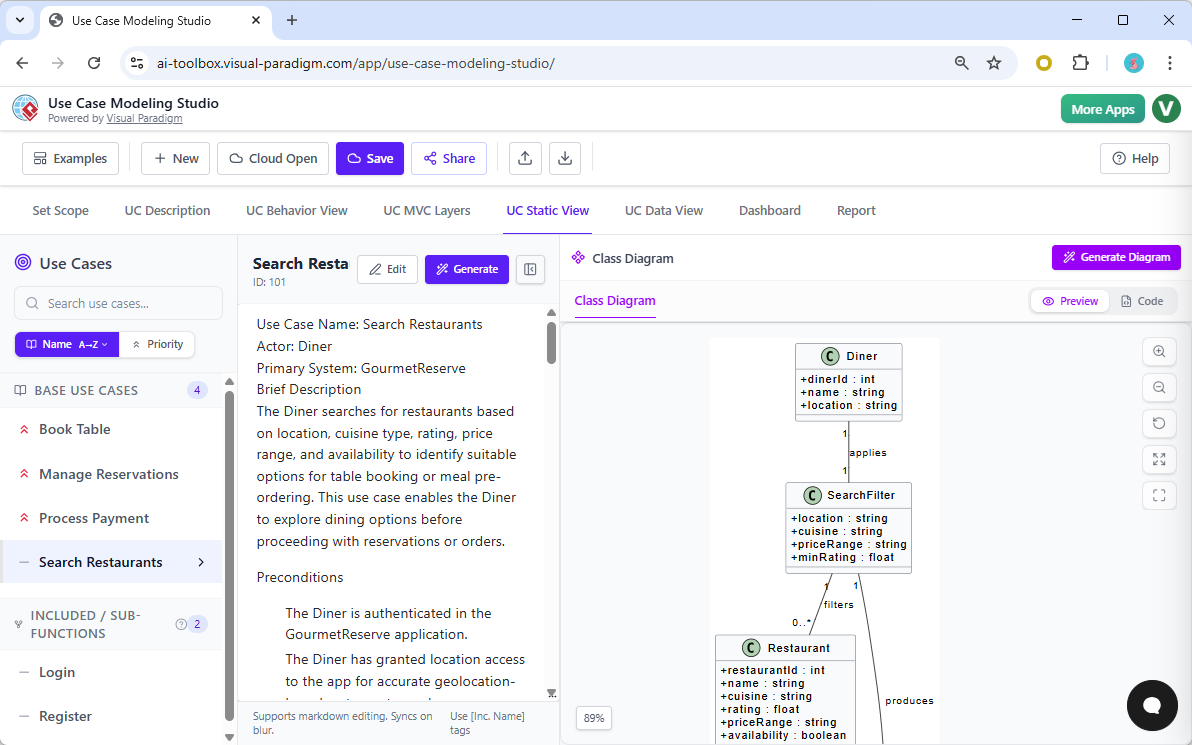
Moving from behavioral to structural modeling, the tool assists in defining the data domain. By analyzing the nouns and concepts within the use case description, the software generates a Class Diagram. This static view defines the attributes and relationships of the system’s objects, such as the relationship between a Diner and the SearchFilter they apply. This ensures that the data structure supports the required functionality defined in the earlier phases.
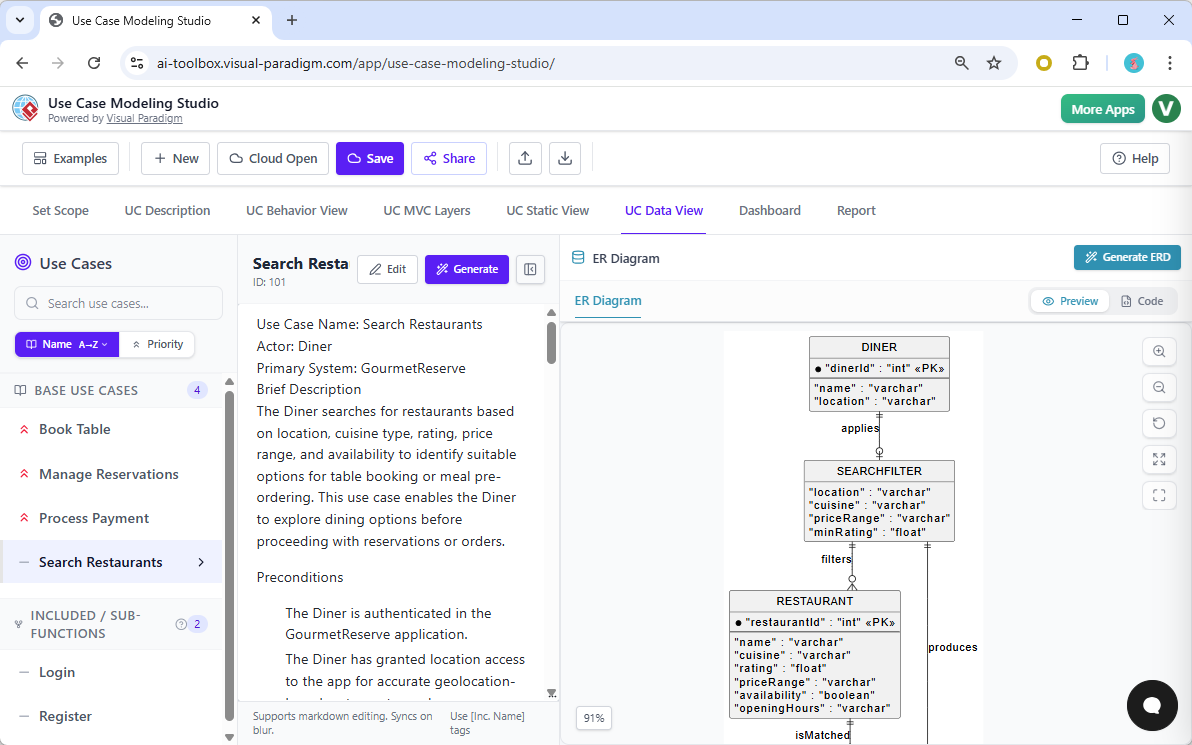
Finally, to prepare for database implementation, the Class Diagram can be transformed into an Entity-Relationship Diagram (ERD). This diagram models the database schema, defining primary keys, foreign keys, and data types (e.g., varchar for names, int for IDs). For GourmetReserve, this visualizes how the DINER table relates to SEARCHFILTER and RESTAURANT tables, providing a direct specification for database engineers to build the backend storage.
Project Management, Reporting, and Sharing
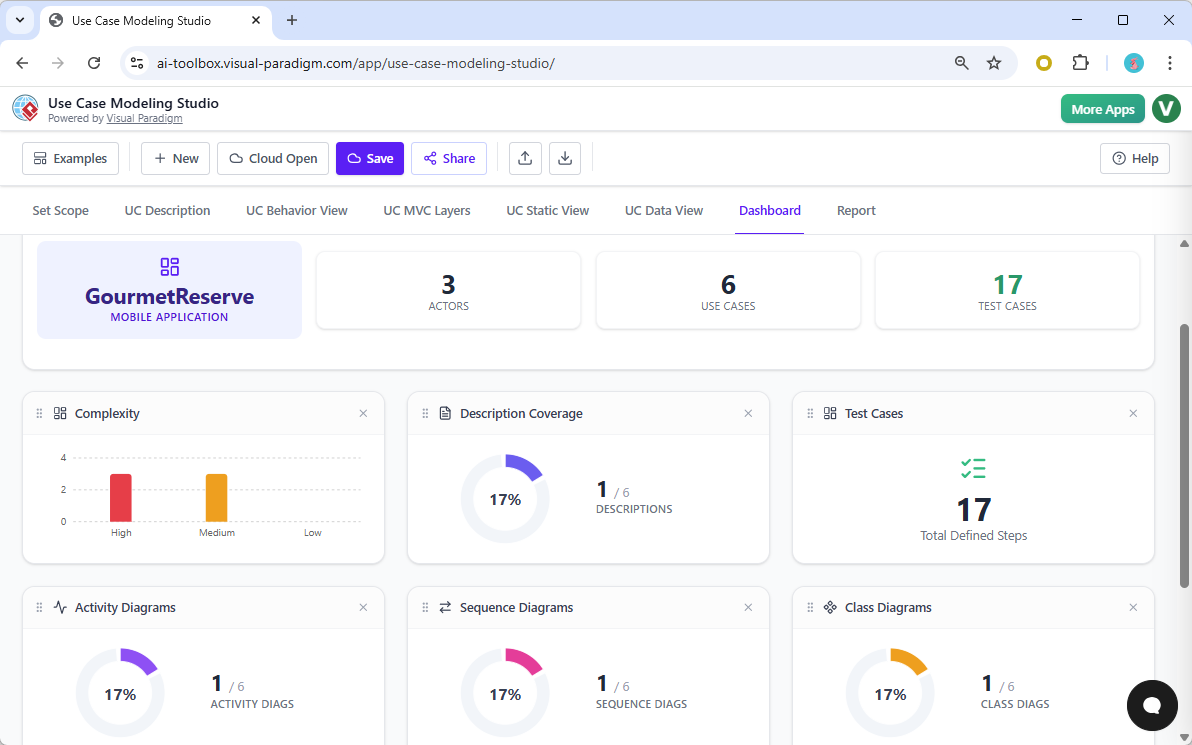
Managing a complex modeling project requires visibility into progress and complexity. The built-in Project Dashboard offers a real-time overview of the GourmetReserve project. Widgets display critical metrics such as the total number of actors and use cases, the completion status of descriptions, and the complexity distribution of the system. This high-level view is invaluable for project managers to track the health and velocity of the design phase.
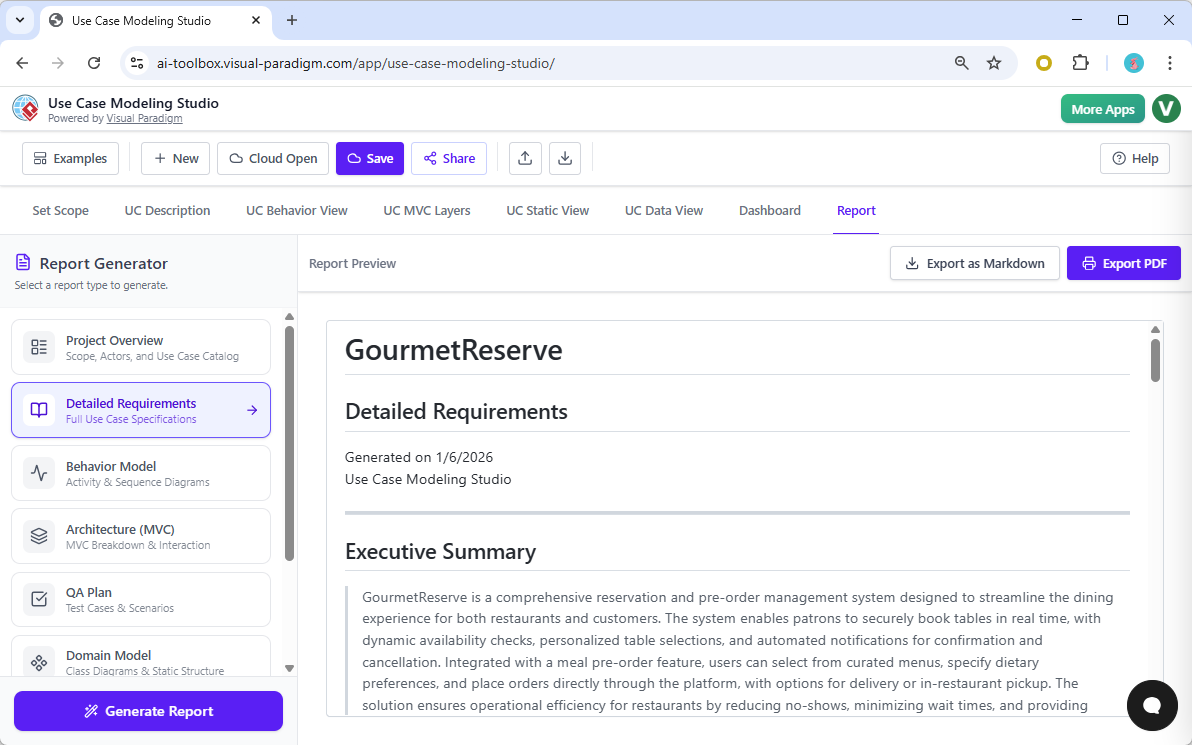
When it is time to present the design to stakeholders, manual report compilation is unnecessary. The Report Generator can compile all the created artifacts—scope, diagrams, specifications, and test plans—into a professional document. You can generate a full Software Design Document (SDD) that includes an executive summary and detailed requirements, ready for export as a PDF or Markdown file. This ensures that documentation is always up-to-date and professional.
Collaboration is central to modern software development. The tool facilitates this through a seamless Share feature, allowing you to generate a unique URL for the project. Stakeholders, clients, or remote team members can access a read-only version of the GourmetReserve model via their web browser, ensuring everyone is aligned on the system’s design without needing to install proprietary software.
Conclusion
The journey from a high-level idea like “a dining reservation app” to a fully specified technical design is typically fraught with ambiguity and manual effort. Visual Paradigm’s Use Case Modeling Studio fundamentally changes this dynamic. By automating the creation of diagrams, specifications, test cases, and database models, it allows teams to focus on the logic and quality of their system rather than the mechanics of documentation. For professionals looking to elevate their requirements engineering and system design workflow, this tool offers a compelling blend of AI power and strict UML adherence.
Ready to streamline your software design process?
Try Use Case Modeling Studio Now
Related Resources
- Release announcement: Introducing the AI-Powered Use Case Modeling Studio: The Future of Requirements Analysis
- AI-Powered Use Case Diagram Refinement Tool – Smart Diagram Enhancement: Leverage AI to automatically refine and optimize your use case diagrams for clarity, consistency, and completeness.
- Convert Use Case to Activity Diagram – AI-Powered Transformation: Automatically convert use case diagrams into detailed activity diagrams using AI to visualize system workflows.
- Mastering AI-Driven Use Case Diagrams with Visual Paradigm: A comprehensive tutorial on leveraging AI features in Visual Paradigm to create intelligent, dynamic use case diagrams for modern software systems.
- AI-Powered Sequence Diagram Refinement in Visual Paradigm: Discover how Visual Paradigm’s AI tool transforms use-case descriptions into precise and professional sequence diagrams with minimal manual effort.
- Mastering Sequence Diagrams with Visual Paradigm: AI Chatbot Tutorial: A beginner-friendly tutorial using Visual Paradigm to create sequence diagrams, illustrated through a real-world e-commerce chatbot use case.
- AI-Powered Use Case to Activity Diagram Tutorial with Visual Paradigm: A step-by-step guide demonstrating how Visual Paradigm’s AI features automatically convert use case descriptions into detailed activity diagrams.
- AI-Powered Use Case Diagram Example for Smart Home System: A community-shared AI-generated use case diagram illustrating interactions between users and a smart home system, demonstrating real-world application of AI in UML modeling.
- AI-Powered Use Case Diagram Refinement Tool by Visual Paradigm: A smart AI feature that enhances and refines existing use case diagrams by suggesting improvements, identifying missing actors, and optimizing structure.