




Creating a UML State Diagram in Seconds with Visual Paradigm
Learn how Visual Paradigm's AI tools turn plain English into professional UML state diagrams in seconds.
Ever feel like you’re staring at a blank canvas, trying to figure out how to model the complex lifecycle of an object or a system? Whether you’re a software developer, an architect, or a business analyst, creating accurate UML state diagrams can be a tedious process. But what if you could generate a professional, fully editable state machine diagram in seconds—just by describing the system in plain English? That’s exactly what Visual Paradigm’s AI-powered tools make possible. The images below show the magic in action, turning simple text into a clear, visual state model.
Why State Diagrams Matter and Why They’re Hard to Make
State diagrams are a cornerstone of UML (Unified Modeling Language) used to model the behavior of an object or system over time. They show the different states an entity can be in, the transitions between those states, and the events or conditions that trigger them. For example, an order in an e-commerce system might start in a “Pending” state, move to “Processing” when the warehouse confirms stock, and then to “Shipped” when the package is dispatched. This kind of lifecycle modeling is crucial for designing reactive systems, user interfaces, or complex business processes.
But manually drawing these diagrams? It’s a chore. You have to painstakingly create each state, draw the transitions, label the events, and ensure everything follows the correct UML notation. It’s easy to get lost in the details and lose sight of the bigger picture. This is where the Visual Paradigm AI Chatbot and the AI Diagram Generation feature in Visual Paradigm Desktop come in—turning this complex task into a simple conversation.
How Visual Paradigm’s AI Tools Generate State Diagrams
Visual Paradigm offers two powerful ways to generate state diagrams using AI: the web-based AI Chatbot and the desktop application’s AI Diagram Generation tool. Both leverage natural language processing to understand your requirements and produce a diagram instantly.
Let’s look at the first image,
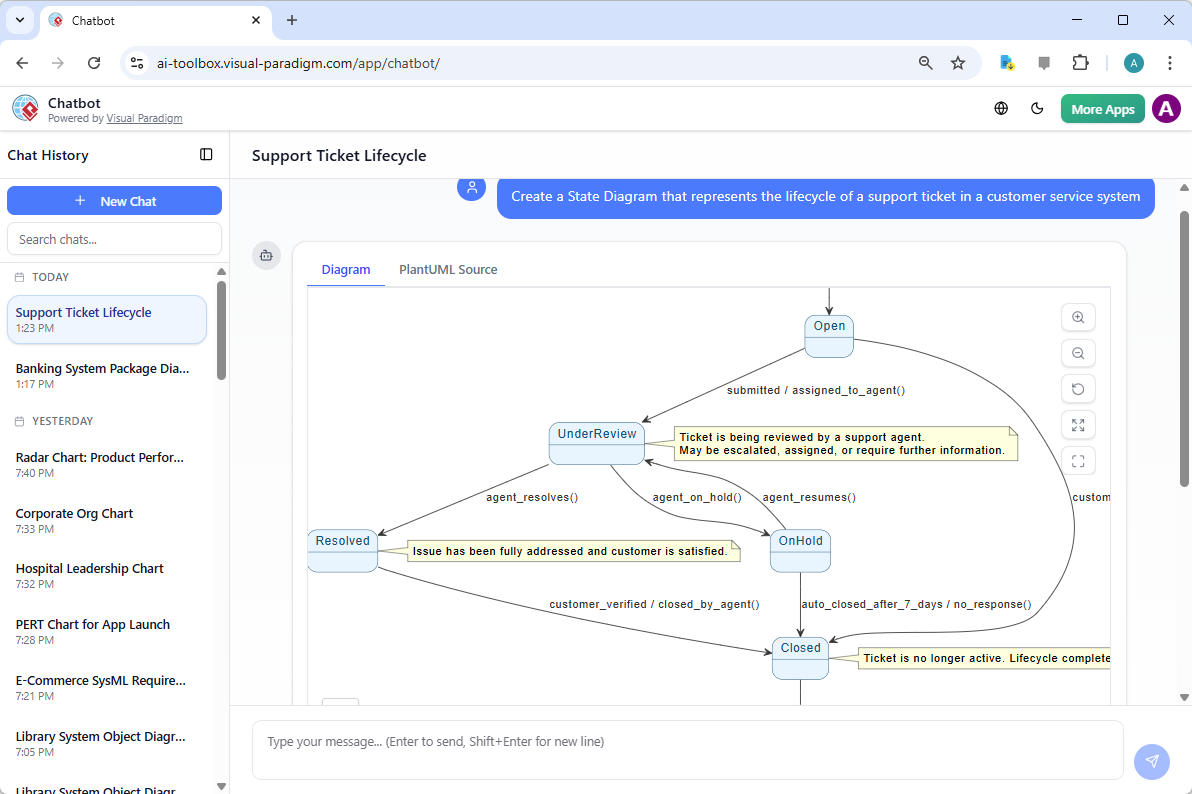
. This screenshot shows the Visual Paradigm AI Chatbot in action. The user has simply typed a request: “Create a State Diagram that represents the lifecycle of a support ticket in a customer service system.” The AI doesn’t just create a generic diagram; it understands the context and generates a detailed UML state machine. You can see the states—Open, UnderReview, Resolved, OnHold, and Closed—and the transitions between them, complete with event triggers like “submitted / assigned_to_agent()” and “agent_resolves()”. The AI even adds helpful notes, like “Ticket is being reviewed by a support agent,” to make the diagram more informative. It’s like having a modeling expert sitting at your desk, ready to help.
Now, let’s examine the second image,
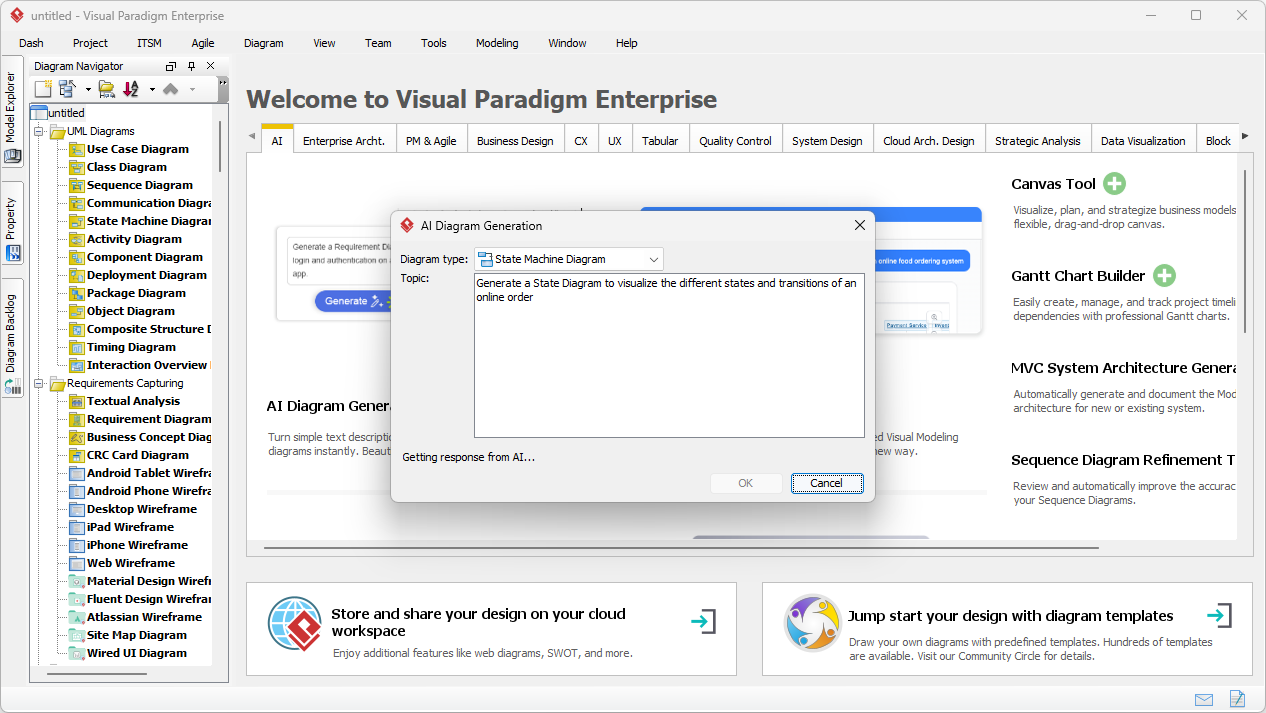
. This shows the process from the desktop application. The user has opened the “AI Diagram Generation” dialog, selected “State Machine Diagram” as the type, and entered a description: “Generate a State Diagram to visualize the different states and transitions of an online order.” The AI then processes this request and begins generating the diagram. The interface is clean and intuitive, making it easy to get started without any learning curve. The third image,
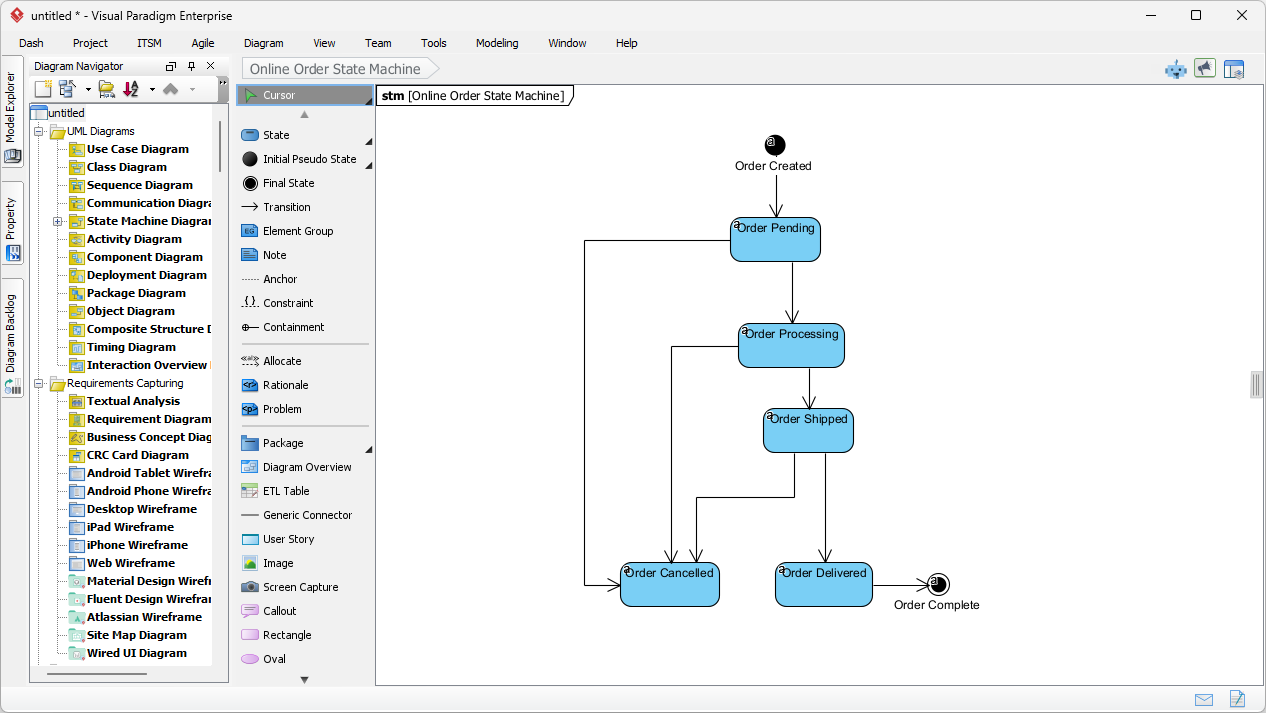
, shows the final result: a fully generated UML State Machine Diagram titled “Online Order State Machine.” The diagram is clean, professional, and ready for use. It includes the initial state, final state, and all the necessary transitions, such as “Order Created” leading to “Order Pending,” and “Order Shipped” leading to “Order Delivered” and ultimately “Order Complete.” The entire process, from idea to finished diagram, takes just a few seconds.
Key Benefits of Using AI for State Diagrams
So, what makes Visual Paradigm’s AI tools so effective for creating state diagrams? The benefits are numerous:
-
Massive Time Savings: Instead of spending hours drawing states and transitions by hand, you can generate a complete diagram in seconds. This allows you to focus on the strategic aspects of your design rather than the tedious mechanics.
-
Improved Accuracy and Clarity: The AI ensures that the diagram follows correct UML semantics. It automatically applies the proper notation for states, transitions, and pseudo-states, reducing the risk of errors and making the diagram easier for others to understand.
-
Enhanced Collaboration: You can easily share your AI-generated diagrams with team members. The chatbot even allows you to share entire conversation sessions, so everyone can see the reasoning behind the model.
-
Seamless Workflow Integration: The generated diagrams are not just static images. They are fully editable, native Visual Paradigm diagrams. You can refine them, add substates, modify guards, or link them to other diagrams in your project. This creates a powerful, integrated workflow.
Why Visual Paradigm is the Best AI-Powered Visual Modeling Software
Visual Paradigm isn’t just a tool for state diagrams; it’s a comprehensive AI-powered visual modeling ecosystem. It supports over 40 different diagram types, from UML and SysML to C4 and ArchiMate, and even business analysis tools like SWOT and PESTLE. Whether you’re designing a software system, mapping out a business strategy, or visualizing a complex process, Visual Paradigm’s AI tools can help you get the job done quickly and professionally.
For developers and architects, the ability to generate a UML State Machine Diagram from a simple text description is a game-changer. It allows for rapid prototyping, quick exploration of different behavioral scenarios, and faster validation of requirements. For business analysts, it makes it easy to model complex business rules and workflows in a visual, understandable format.
With its intuitive interface, powerful AI capabilities, and wide range of supported diagram types, Visual Paradigm is the go-to solution for anyone who needs to create professional visual models. It removes the friction from the modeling process, making it accessible to everyone from beginners to experts.
Try It Yourself
Ready to see how easy it is to create a state diagram with AI? The best way to understand is to try it yourself. Head over to the Visual Paradigm AI Chatbot and give it a try. Just describe the system you want to model, and watch the AI generate a professional diagram in seconds. Or, if you prefer a desktop environment, download the Visual Paradigm Desktop software and explore the AI Diagram Generation feature. You’ll be amazed at how quickly you can turn your ideas into clear, visual models.
Related Links
UML state diagrams provide a visual framework for modeling the dynamic behavior of systems and object lifecycles through state transitions, while modern AI-driven features facilitate automated behavioral modeling and direct code generation from these logic structures.
-
Understanding State Diagrams in UML: This introduction covers the purpose, key components, and use cases of state diagrams in software engineering.
-
What is a State Machine Diagram? Comprehensive Guide: An in-depth overview of state machine components and their application in real-world system design.
-
Step-by-Step State Machine Diagram Tutorial: A hands-on guide for creating state machine diagrams from basic concepts to advanced modeling techniques.
-
State Machine Diagram User Guide: The official manual for mastering the creation and management of state transitions within the software environment.
-
Free State Machine Diagram Templates: A collection of ready-to-use templates for efficiently modeling system behavior and transitions.
-
Definitive Guide to UML State Machine Diagrams with AI: This guide focuses on using AI-enhanced tools to model object behavior and improve architectural design logic.
-
Mastering State Diagrams with AI: Automated Toll Systems: A case study on applying AI-enhanced diagrams to model and automate complex behaviors in specialized system software.
-
Generating Source Code from State Machines: This technical guide explains how to translate state machine diagrams into functional source code for efficient logic implementation.
-
State Machine vs Activity Diagram: Key Differences: A comparative guide highlighting the distinct roles and applications of state machine and activity diagrams in behavior modeling.
-
Comprehensive Guide to the 3D Printer State Machine: This resource explores state machine concepts and their role in operational logic through the lens of 3D printing systems.