




Creating a Vibrant Rabbit Bar Scene: An AniFuzion Animation Guide
Build a vibrant rabbit bar scene in minutes with AniFuzion. Drag-and-drop, 3D characters, AI lipsync & easy exports for marketing or education.
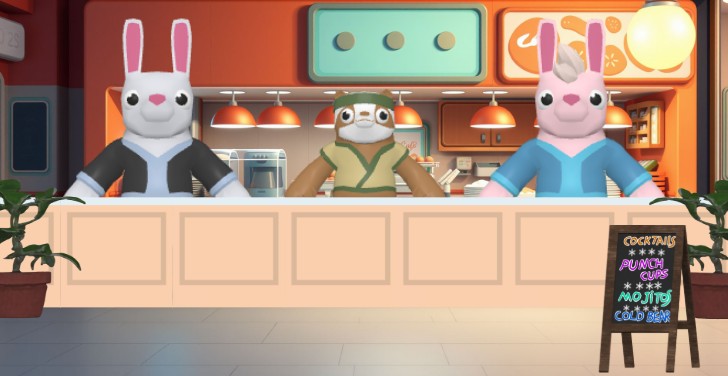
Imagine two animated bunnies behind a cozy bar counter, surrounded by warm lighting, a chalkboard menu, and a bustling retro diner vibe — all crafted in minutes with AniFuzion. This snapshot from Visual Paradigm’s animation maker shows how easy it is to build immersive, story-driven scenes without complex software. Whether you’re a marketer, educator, or content creator, this AI-powered tool lets you turn ideas into polished animations with drag-and-drop simplicity, 3D character customization, and automatic lipsync. Ready to bring your next project to life?
- Drag-and-drop interface lets you place characters and props like assembling a digital puzzle.
- 3D character library offers cartoon, cyberpunk, and realistic styles — customize colors and textures instantly.
- AI Text-to-Speech and automatic lipsync sync voiceover with character mouths for lifelike dialogue.
- Pre-built actions and shape effects let you animate gestures, text, and props with one click.
- Export as MP4 or share as an interactive flipbook — perfect for presentations, social media, or training.
How This Animation Was Built — Step-by-Step
This lively bar scene likely began with a blank canvas in AniFuzion. The two bunnies — one in a sleek black suit, the other in a blue shirt with a green vest — were dragged from the 3D character library. Their expressions, poses, and clothing were customized using the properties panel, giving them distinct personalities. The bar counter, potted plants, and hanging lamps were added from the scene templates library, instantly setting the stage.
The chalkboard menu with “Cocktails,” “Punch Cups,” and “Mojito” was likely created using the text animation presets — perhaps a “fade-in” or “bounce” effect to draw attention. Background lighting and textures were adjusted for depth, while the character animations (maybe a “waving” or “gesturing” motion) were timed to match the scene’s rhythm. The entire setup was previewed before export, ensuring everything flowed smoothly.
Why This Scene Works — The Power of AniFuzion
This isn’t just any animation — it’s a crafted, engaging moment that tells a story. The bunnies’ positioning, the menu’s design, and the ambient lighting all contribute to a cohesive narrative. AniFuzion makes this possible by combining intuitive tools with AI enhancements. No designer or animator is needed — just a few clicks and a script.
Here’s how the tool makes it happen:
- Drag-and-Drop Canvas: You place characters, props, and backgrounds like arranging toys on a table — no complex timelines or keyframing.
- 3D Character Library: Thousands of styles, from cartoon to low-poly, with customizable textures and body parts — you’re not starting from scratch.
- AI Text-to-Speech: Add voiceover to your bunnies’ dialogue — choose accent, emotion, and tone — and let AniFuzion sync it automatically.
- Pre-Built Actions: Use 2,000+ motion presets — like “walking,” “talking,” or “gesturing” — to animate characters without coding.
- Shape Effects: Apply animations to text or shapes — like “spin,” “fade,” or “bounce” — to highlight key elements like the menu items.
- Export Options: Share your scene as a video, embed it on a website, or turn it into an interactive flipbook — no downloads needed for the latter.
Why This Scene Is Perfect for Your Next Project
Whether you’re creating a marketing video for a new product, a classroom lesson for students, or a social media post for your brand, this scene demonstrates how AniFuzion can deliver professional results with minimal effort. The bunnies’ friendly demeanor, the warm lighting, and the detailed menu all work together to create a memorable, engaging moment.
Here’s how you can adapt this approach:
- For Educators: Use this scene to teach about bar culture, customer service, or even basic economics — animate the bunnies’ interactions to make concepts stick.
- For Marketers: Turn this into a product demo — animate the bunnies serving drinks, with text overlays highlighting features like “Cocktails” or “Cold Beer.”
- For Content Creators: Use this as a template for a short video — add voiceover, music, and transitions to create a full explainer or story.
- For Beginners: Start with the template, then customize characters and effects — the drag-and-drop interface makes it feel like playing with digital LEGO blocks.
What You Can Do Next — From Idea to Animation
Now that you’ve seen how this scene was created, here’s how you can build your own:
- Sign up for Visual Paradigm Online — it’s free and includes AniFuzion.
- Create a new animation project — start with a template or blank canvas.
- Drag in your characters — choose from 3D rabbit, human, or cartoon styles — and customize them.
- Apply actions — add walking, waving, or talking motions — and set timing.
- Add audio — use AI TTS to generate voiceover — choose emotion, accent, and tone.
- Enhance with effects — apply shape animations to text or props — like “fade-in” or “spin.”
- Preview and export — test your animation, then export as MP4 or generate a shareable link.
And remember — this isn’t just a tool. It’s a creative partner. You’re not just building animations — you’re building stories, experiences, and moments that connect with your audience.
Final Thoughts — The Future of Animation Is Here
With AniFuzion, you can turn any idea into a dynamic, professional animation — whether it’s a bar scene, a product demo, or a training module. The drag-and-drop interface, AI-powered features, and extensive library make it accessible to beginners and powerful for pros. You don’t need to be a designer, a coder, or a veteran animator — you just need an idea, a browser, and a willingness to experiment.
And with no installation required, no subscription locked in, and no learning curve — you can start creating right away. The best part? You’re not just building animations — you’re building moments that matter.
Try AniFuzion Today — Build Your Next Scene
Start your journey with Visual Paradigm Online — no experience needed, no setup required. Sign up for free and create your first animation in minutes. The possibilities are endless — from animated flipbooks to cinematic scenes — and you’re just one click away.
Subscribe to Visual Paradigm Online at: https://online.visual-paradigm.com/subscribe.jsp
Related Resources
- Comprehensive Tutorial on Anifuzion: The Ultimate Animation Maker: This page provides a detailed technical guide on using Anifuzion to create high-quality animations with minimal effort.
- Solutions for Content Creators | Anifuzion: Anifuzion enables content creators to produce professional-grade animated visuals without requiring advanced animation skills.
- Comprehensive Guide to Creating Animated Videos with Anifuzion: This guide offers step-by-step technical instructions for generating animated videos using Anifuzion’s intuitive interface.
- A Beginner’s Guide to Creating Stunning 3D Animations with Anifuzion: Designed for newcomers, this guide explains how to produce visually impressive 3D animations using Anifuzion’s automated tools.
- How Anifuzion Empowers Non-Animators to Create Stunning Visuals: This article explains how Anifuzion leverages AI-driven automation to enable non-experts to produce high-quality visual content.
- Create Stunning Animations with Over 2000 Character Actions and …: Creating realistic dialogue has never been easier with AniFuzion’s automatic lipsync animation feature. Powered by AI, this tool syncs your character’s mouth …
- Discover AniFuzion: The Distinctive Animation Maker That Sets You …: What truly sets AniFuzion apart is its blend of versatility and creativity. With a rich library of customizable templates, 3D characters, and dynamic visual …