




Creating a Cinematic Bar Scene: An AniFuzion Animation Guide
Build emotional bar scenes in minutes with AniFuzion. Drag, sync, export — no design skills needed.
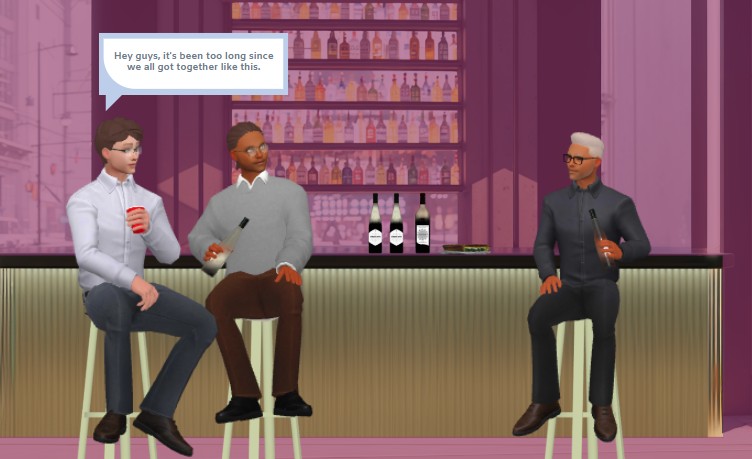
Watch two animated characters engage in a casual, emotionally resonant conversation at a bar — all crafted with Visual Paradigm’s AniFuzion tool. This snapshot showcases how the AI-powered animation maker transforms simple ideas into rich, dynamic visuals. No design skills required. No software installations. Just drag, sync, and export. Discover how to replicate this cinematic moment with AniFuzion’s intuitive interface and pre-built assets.
- Drag-and-drop interface lets you place characters, props, and backgrounds instantly — no complex setup needed.
- AI Text-to-Speech generates natural-sounding voiceovers with automatic lip-sync, making dialogue feel authentic.
- 3D Character Library offers customizable avatars — here, two distinct male characters with unique attire and expressions.
- Scene Templates provide instant environments — this bar setting includes shelves, stools, and ambient lighting.
- Timeline Control lets you adjust timing, ensuring the dialogue and actions flow naturally.
Why This Bar Scene Works: The Power of AniFuzion
Visual Paradigm’s AniFuzion isn’t just another animation tool — it’s a complete creative engine. The bar scene in this image demonstrates how users can quickly build emotionally engaging narratives. Two characters sit at a counter, their expressions and gestures conveying a sense of camaraderie and nostalgia. The background features a shelf of bottles, adding depth and realism. The dialogue bubble — “Hey guys, it’s been too long since we all got together like this.” — is rendered with clean, modern typography and subtle animation, drawing attention to the emotional core.
What makes this scene effective is how AniFuzion combines simplicity with sophistication. The tool’s drag-and-drop interface allows users to place characters and objects without learning complex animation software. The AI-driven TTS engine generates the voiceover, which syncs perfectly with the characters’ mouths — a detail that adds realism and immersion. The 3D character library gives you a wide range of avatars, textures, and poses — here, the characters are styled with modern, casual clothing and distinct accessories, making them instantly recognizable.
Step-by-Step: Rebuilding This Scene with AniFuzion
Step 1: Set Up the Environment
Begin by selecting a bar-themed template from the scene library. This instantly provides the background, lighting, and furniture. Drag in the bar stools and shelves to create the setting. Use the properties panel to adjust colors and lighting to match the mood — here, a soft purple hue creates a warm, inviting atmosphere.
Step 2: Add the Characters
Drag two 3D characters from the library onto the canvas. Customize their appearance using the properties panel — adjust clothing, hair, and accessories. In this scene, one character wears a light shirt and jeans, while the other sports a dark suit and glasses. Their distinct styles help differentiate them and add personality.
Step 3: Apply Actions and Expressions
Select each character and apply pre-built actions from the motion library. For example, one character might be animated to hold a bottle and gesture while speaking. The other might be seated, holding a glass, with subtle head movements that convey attentiveness. Use the motion mixer to retarget actions between characters for consistency.
Step 4: Add Dialogue and Sync
Enter your script into the TTS panel. Choose a voice with a natural tone — here, a warm, conversational accent. Generate the audio, and AniFuzion automatically syncs the character’s mouth movements to match the words. The dialogue bubble appears with a clean, modern design — a pre-built effect that adds polish without extra effort.
Step 5: Finalize and Export
Preview the animation in full mode to ensure timing, expressions, and audio sync are seamless. Adjust the timeline if needed. Once satisfied, export as an MP4 video or generate a shareable flipbook link. This bar scene is now ready for presentations, social media, or internal communications.
Key Benefits of AniFuzion for Real-World Use
Whether you’re an educator, marketer, or content creator, AniFuzion delivers professional results without the overhead. The tool is designed to empower users to communicate complex ideas visually — and this bar scene is a perfect example of how.
- Boost Audience Engagement — Animated scenes hold attention longer than static images. The bar scene’s emotional dialogue and visual details make it memorable.
- Save Time and Resources — No need to hire designers or voice actors. Pre-built assets and AI tools cut production time significantly.
- Enhance Creativity Without Barriers — Experiment with 2D and 3D elements, customizations, and effects — all within a browser-based interface.
- Improve Communication Effectiveness — For business or education, animated storytelling makes complex ideas simple and memorable.
- Access Anytime, Anywhere — Work on projects from any device, collaborate easily, and share outputs instantly.
- Cost-Effective Solution — Get professional results at a fraction of the cost of traditional animation software.
Who Should Use AniFuzion?
This bar scene is ideal for users who need to communicate ideas visually — whether for education, marketing, HR, or creative media. It’s perfect for:
- **Educators** — Create interactive lessons that capture students’ attention.
- **Marketers** — Craft promotional videos, product demos, or social media clips.
- **Business Professionals** — Build onboarding materials, training modules, or internal communications.
- **Content Creators** — Produce YouTube videos, explainer animations, or personal storytelling projects.
- **Beginners or Hobbyists** — Experiment with 3D characters and effects for fun or small-scale projects.
Conclusion
Creating a cinematic bar scene with AniFuzion is not just possible — it’s intuitive, efficient, and powerful. With drag-and-drop tools, pre-built libraries, and AI enhancements, you can transform simple ideas into dynamic, emotionally resonant animations. Whether you’re crafting a product demo, a training module, or a personal story, AniFuzion delivers professional results without the complexity.
Try Now CTA
Subscribe to Visual Paradigm Online at: https://online.visual-paradigm.com/subscribe.jsp
Related Resources
- Comprehensive Tutorial on Anifuzion: The Ultimate Animation Maker: This page provides a detailed technical guide on using Anifuzion to create high-quality animations with minimal effort.
- Solutions for Content Creators | Anifuzion: Anifuzion enables content creators to produce professional-grade animated visuals without requiring advanced animation skills.
- Comprehensive Guide to Creating Animated Videos with Anifuzion: This guide offers step-by-step technical instructions for generating animated videos using Anifuzion’s intuitive interface.
- A Beginner’s Guide to Creating Stunning 3D Animations with Anifuzion: Designed for newcomers, this guide explains how to produce visually impressive 3D animations using Anifuzion’s automated tools.
- How Anifuzion Empowers Non-Animators to Create Stunning Visuals: This article explains how Anifuzion leverages AI-driven automation to enable non-experts to produce high-quality visual content.
- Create Stunning Animations with Over 2000 Character Actions and …: Creating realistic dialogue has never been easier with AniFuzion’s automatic lipsync animation feature. Powered by AI, this tool syncs your character’s mouth …
- Discover AniFuzion: The Distinctive Animation Maker That Sets You …: What truly sets AniFuzion apart is its blend of versatility and creativity. With a rich library of customizable templates, 3D characters, and dynamic visual …