




Realistic 3D Bar Dialogues with AniFuzion Animation Maker | Visual Paradigm
Create immersive 3D bar scenes and customer dialogues with Visual Paradigm AniFuzion. Use AI text-to-speech and character customization for professional animations.
Creating Realistic 3D Customer Dialogues in a Bar Setting with AniFuzion
Visual storytelling has evolved significantly, allowing creators to produce immersive scenarios without requiring years of technical training. Whether you are developing training materials for the hospitality industry or crafting a narrative for a marketing campaign, the ability to construct detailed 3D environments is invaluable. With the Visual Paradigm Animation Maker, also known as AniFuzion, you can transform abstract concepts into vivid, animated realities directly within your web browser. This online animation software empowers users to build professional-quality scenes, such as the interaction between a customer and a bartender, using intuitive tools that streamline the creative process.
Quick Summary: Key Takeaways
-
Effortless Scene Building: Learn how to utilize drag-and-drop features to construct detailed environments like a stocked bar.
-
Character Customization: Discover how to personalize 3D characters to fit specific roles, such as service staff or patrons.
-
Seamless Dialogue Integration: Understand the application of AI Text-to-Speech and automatic lipsync for realistic interactions.
-
Professional Animation Tools: Explore how pre-built actions and motion libraries bring static characters to life.
-
Accessible to All Levels: See how this easy-to-use animation maker removes barriers for beginners and professionals alike.
Deconstructing the Bar Scene Animation
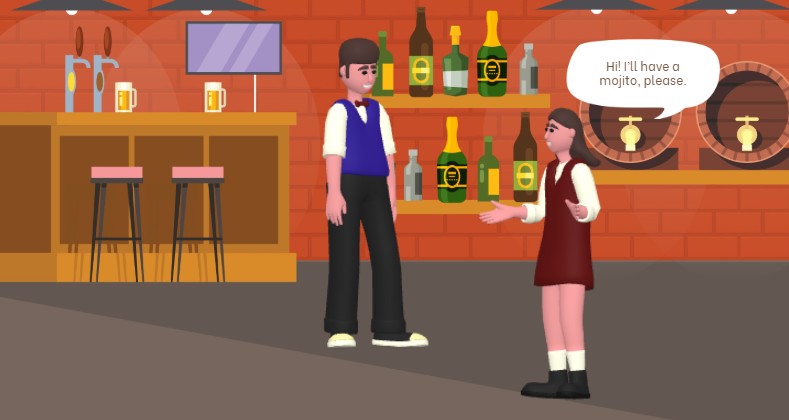
To understand the capabilities of AniFuzion, let us examine a specific scenario created with the tool. The visual below demonstrates a fully realized 3D environment depicting a bar setting. In this scene, we observe a bartender dressed in a professional blue vest and bowtie standing behind a wooden counter. Opposite him, a customer in a maroon dress is gesturing while placing an order. The background is rich with detail, featuring a textured brick wall, shelves lined with various bottles of spirits, beer taps, and wooden barrels, establishing a convincing atmosphere.
The interaction is highlighted by a speech bubble appearing above the customer, reading, “Hi! I’ll have a mojito, please.” This simple visual cue implies a narrative flow, suggesting that audio or text-based dialogue is driving the scene. The characters are not merely static; their poses suggest active engagement—the customer’s open-hand gesture indicates she is speaking, while the bartender’s attentive posture shows he is listening. This level of detail transforms a simple image into a dynamic story segment.
Building Detailed Environments with Drag-and-Drop Tools
Creating a setting as detailed as the bar scene shown above does not require complex 3D modeling skills. The Visual Paradigm Animation Maker utilizes a drag-and-drop interface that simplifies environmental design. You can access a vast library of ready-to-use props and background elements to construct your scene piece by piece.
-
Scene Templates: You might start with a pre-built template that provides the basic layout of a room, saving time on structural design.
-
Prop Placement: Elements such as the wooden counter, the beer taps, and the specific bottles on the shelves are dragged from the library onto the canvas. This allows for precise arrangement, ensuring the environment looks lived-in and authentic.
-
Texture and Depth: The tool allows for the mixing of 2D and 3D elements. In this example, the 3D depth of the barrels and the counter contrasts effectively with the brick wall background, creating a visually rich perspective.
Character Customization and Rigging
A scene is only as compelling as its actors. In the provided example, the distinction between the bartender and the customer is achieved through the extensive 3D character library available in AniFuzion. This feature addresses the challenge of character design by offering customizable figures that can be tailored to fit the narrative requirements.
Personalizing Appearance
You have the ability to modify character attributes to suit the context. For the bartender, selecting a formal vest and bowtie immediately communicates his role to the viewer. For the customer, choosing casual yet neat attire helps differentiate her from the staff. You can tweak colors, textures, and body parts via the properties menu, ensuring that every character in your animation has a unique look that serves the story.
Applying Dynamic Actions
Static characters can make a video feel lifeless. To counter this, AniFuzion offers a pre-built actions and motion library containing over 2,000 movements. In the bar scene, the customer is not just standing; she is utilizing a “talking” or “explaining” gesture. The bartender is likely assigned an “idle” or “listening” pose. These actions are applied simply by selecting the character and choosing the desired motion, eliminating the need for manual keyframing and rigorous rigging processes.
Enhancing Communication with AI Audio Tools
The speech bubble in the image represents a critical component of animated storytelling: dialogue. AniFuzion integrates advanced audio features that elevate the production value of your projects without requiring external recording equipment or voice actors.
AI Text-to-Speech (TTS)
The text “Hi! I’ll have a mojito, please” can be instantly converted into spoken audio using the AI Text-to-Speech feature. You simply input your script into the panel, select a voice that matches the character’s persona—perhaps a cheerful tone for the customer—and generate the audio. This ensures clear, professional narration or dialogue.
Automatic Lipsync
One of the most powerful features for creating realism is automatic lipsync. Once the audio is generated or uploaded, the software automatically synchronizes the character’s mouth movements to the words. This adds a layer of immersion that makes the interaction between the customer and bartender feel genuine, as the visual cues match the auditory information perfectly.
Step-by-Step: Recreating this Scenario
If you wish to create a similar training video or narrative scene, the workflow within this online animation maker is straightforward. By following a logical sequence, you can produce high-quality content efficiently.
-
Initialize the Project: Log in to the workspace and select “New Animation” to open a blank canvas.
-
Set the Scene: Browse the background library for a “Pub” or “Restaurant” setting, or build one manually by dragging in brick wall textures and flooring.
-
Populate with Props: Search for specific items like “Bar Counter,” “Bottles,” and “Stools.” Drag them into position to create the foreground and background layers.
-
Add Characters: Select two 3D characters from the library. Customize one to look like staff and the other as a patron.
-
animate Interactions: Apply a “Listening” action to the bartender and a “Talking” gesture to the customer from the motion library.
-
Generate Dialogue: Type the customer’s order into the TTS engine, generate the voiceover, and enable lipsync. You can also add a speech bubble shape for visual reinforcement.
-
Preview and Export: Use the timeline to adjust the timing of the speech and gestures. Once satisfied, export the final result as an MP4 video.
Why Use Animated Scenarios for Business?
Creating scenes like this bar interaction is not just for entertainment; it serves practical business purposes. By using a professional animation tool, organizations can communicate complex ideas more effectively than through text alone.
For the hospitality industry, creating animated training modules allows staff to visualize correct service protocols, such as how to greet a customer or take an order, in a risk-free environment. For marketers, these dynamic visuals boost audience engagement by presenting products or services in a relatable context. The ability to rapidly produce these videos saves time and resources, making high-quality visual communication accessible to departments ranging from HR to sales.
Conclusion
The bar scene demonstrated here illustrates the versatility and power of the Visual Paradigm Animation Maker. By combining an intuitive drag-and-drop interface with sophisticated features like AI voice synthesis and 3D character customization, AniFuzion enables you to create rich, narrative-driven content with ease. Whether you are a beginner looking to make your first video or a professional aiming to streamline your workflow, this tool provides the necessary assets to bring your creative visions to life.
Ready to start building your own animated stories? Explore the possibilities today.
Get started with an animation template
Related Links
-
Mastering Anifuzion: A Comprehensive Guide to Creating Professional Animations: This in-depth guide walks users through the core features and advanced techniques of Anifuzion, empowering creators to produce polished, professional-grade animations with ease.
-
Creating Seamless Animations in Anifuzion with Automatic Motion Retargeting: Discover how Anifuzion’s automatic motion retargeting enables smooth, realistic animations across different character models with minimal manual effort.
-
Unlock Your Creativity with Anifuzion: What It Is and Why You Should Use It: A creative-focused overview explaining how Anifuzion empowers designers and animators to bring ideas to life with intuitive, powerful animation tools.
-
Anifuzion Feature Overview: Advanced Animation Capabilities: An interactive overview of Anifuzion’s key animation features, highlighting its capabilities for creating dynamic, interactive, and professional animations.
-
Anifuzion Features: Power Tools for Dynamic Animation Creation: Explore the full suite of Anifuzion’s innovative features designed to streamline and enhance the animation creation process for designers and developers.
-
Getting Started with Anifuzion: Your First Steps to Animated Design: A beginner-friendly tutorial that introduces new users to Anifuzion’s interface, core functions, and foundational skills for creating engaging animations.