




Building Interactive Educational Explainers: An AniFuzion Animation Guide
Learn how to create engaging educational explainers using Visual Paradigm AniFuzion's AI-powered animation tools, 3D avatars, and drag-and-drop interface.
Imagine a training scenario where complex definitions need to be delivered to a large team. Traditional slide decks often fail to retain attention, leading to poor information retention. This is where the Visual Paradigm Animation Maker (also known as AniFuzion) changes the landscape of digital communication. By combining structured information with dynamic 3D avatars, this online animation tool transforms static content into engaging visual narratives. Whether you are an educator explaining linguistic concepts or a business professional outlining technical processes, the ability to create professional animated videos directly in your browser is a game-changer.
Quick Summary: Why Choose AniFuzion?
- Effortless Creation: Drag-and-drop interface requires no prior design experience.
- AI-Powered Tools: Features like automatic lipsync and text-to-speech streamline production.
- Versatile Output: Create MP4 videos or interactive flipbooks for any device.
- Professional Assets: Access thousands of 3D characters, props, and pre-built templates.
- Cost-Effective: Achieve high-end results without expensive software or outsourcing.
Transforming Static Definitions into Dynamic Lessons
The transition from text-heavy documents to animated explainers significantly boosts audience engagement. Consider the example of teaching a technical definition. In the snapshot below, a customized 3D character stands beside a clear, structured presentation board. The topic, “What is transcription?”, is broken down into digestible bullet points regarding language understanding and dialect comprehension. The character does not merely stand there; she actively gestures toward the content, guiding the viewer’s eye and adding a human element to the digital lesson. This is the core strength of using a professional animation creator: it bridges the gap between raw data and human connection.
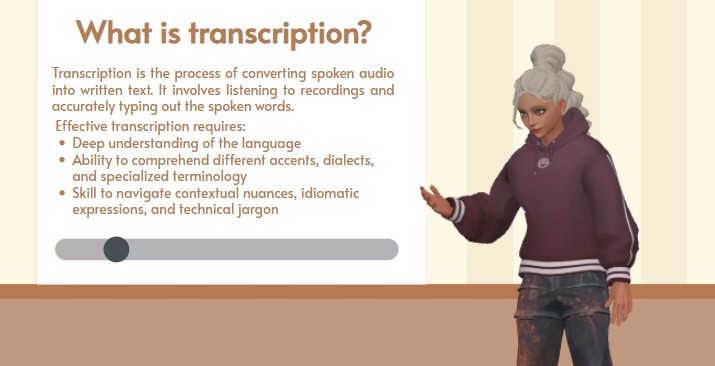
This scene illustrates how easily users can mix 2D informational elements with 3D assets. The presentation board uses clean typography and a progress bar to indicate flow, while the avatar—dressed in a casual hoodie and styled with a modern aesthetic—makes the content feel approachable. This balance is crucial for modern educational animation software. It allows creators to maintain professional rigor while ensuring the delivery is visually stimulating. The character’s presence suggests that a voiceover is likely explaining the text, utilizing automatic lipsync technology to match mouth movements to the script perfectly.
Key Features for Educational and Corporate Content
Creating a scene like the transcription example above relies on several powerful features integrated into the AniFuzion platform. These tools are designed to remove barriers to creativity.
Extensive 3D Character Library
One of the standout features is the ability to choose from thousands of characters. Users can select avatars that match the tone of their message, whether it is a corporate executive for a board meeting or a casual student for a classroom setting. The character in the example features specific clothing and hair textures, all of which are customizable. This flexibility ensures that the visual identity of the video aligns with the brand or subject matter.
Smart Action and Motion Library
Static characters do not hold attention. AniFuzion provides over 2,000 pre-built actions. You can drag a “presentation gesture” or a “thinking pose” onto the timeline, and the character creates the movement instantly. This eliminates the need for complex keyframing. In the transcription explainer, the character’s open-hand gesture invites the viewer to read the text, a subtle but effective psychological cue driven by the software’s motion engine.
AI Text-to-Speech and Lipsync
For an explainer video to be effective, audio is essential. The AI text-to-speech tool allows creators to type their script directly into the editor. The system generates a natural-sounding voiceover in various accents and emotional tones. Furthermore, the automatic lipsync feature ensures the character’s mouth moves in rhythm with the generated audio. This creates a lifelike presentation experience without the need for recording equipment or voice actors.
Step-by-Step: Creating Your Own Explainer Video
Replicating a professional scene like the transcription overview is straightforward. The workflow is designed to be intuitive, allowing you to go from concept to final export in minutes.
- Select a Template or Blank Canvas: Start by choosing a layout that suits your content density.
- Insert Your Content: Use the text tools to type out your definitions or bullet points, just like in a slide editor.
- Add a 3D Presenter: Drag a character from the library onto the canvas. Customize their outfit to fit the context.
- Apply Actions: Select the character and choose a gesture, such as “Point to Board” or “Explain,” from the action library.
- Generate Audio: Input your script into the TTS panel. Select a voice that matches the character’s persona and apply auto-lipsync.
- Enhance with Effects: Add entrance animations to your text so bullet points appear in sync with the voiceover.
Who Benefits from AniFuzion?
This easy-to-use animation maker serves a broad spectrum of users. Educators use it to turn dry syllabus material into interactive lessons that students actually watch. Marketing teams utilize the tool to create product demos that explain features clearly and quickly. HR departments find it invaluable for onboarding new hires, as animated characters can walk employees through company policies in a friendly, non-intimidating manner. By democratizing access to high-end animation tools, Visual Paradigm ensures that anyone with an idea can communicate it effectively.
Conclusion
Visual Paradigm’s Animation Maker offers a robust solution for anyone looking to elevate their communication strategy. By moving beyond static text and embracing dynamic, avatar-led presentations, creators can ensure their message is not just seen, but understood and remembered. The combination of easy drag-and-drop mechanics and advanced AI features makes professional animation accessible to everyone.
Ready to bring your ideas to life? Get started with an animation template today:
https://explainer.visual-paradigm.com/templates/
Related Links
- Mastering Anifuzion: A Comprehensive Guide to Creating Professional Animations: This in-depth guide walks users through the core features and advanced techniques of Anifuzion, empowering creators to produce polished, professional-grade animations with ease.
- Creating Seamless Animations in Anifuzion with Automatic Motion Retargeting: Discover how Anifuzion’s automatic motion retargeting enables smooth, realistic animations across different character models with minimal manual effort.
- Unlock Your Creativity with Anifuzion: What It Is and Why You Should Use It: A creative-focused overview explaining how Anifuzion empowers designers and animators to bring ideas to life with intuitive, powerful animation tools.
- Anifuzion Feature Overview: Advanced Animation Capabilities: An interactive overview of Anifuzion’s key animation features, highlighting its capabilities for creating dynamic, interactive, and professional animations.
- Anifuzion Features: Power Tools for Dynamic Animation Creation: Explore the full suite of Anifuzion’s innovative features designed to streamline and enhance the animation creation process for designers and developers.
- Getting Started with Anifuzion: Your First Steps to Animated Design: A beginner-friendly tutorial that introduces new users to Anifuzion’s interface, core functions, and foundational skills for creating engaging animations.