




Creating a SaaS Product Website in Minutes with AI-Powered Page Editor
Create professional SaaS websites in minutes using AI-powered page editor with drag-and-drop tools and instant publishing.
Visual Paradigm’s AI-Powered Page Editor is a revolutionary tool for building professional websites without coding. This online, visual website maker enables users to rapidly construct multi-page sites, such as a SaaS product landing page, by dragging and dropping pre-designed content blocks. The editor’s AI-assisted features help generate compelling text for key sections, significantly accelerating the design and content creation process. For entrepreneurs, marketers, and designers, this tool offers a powerful solution to launch a polished, responsive website with minimal effort. The ability to instantly apply themes and publish to a unique, shareable URL makes it an ideal choice for creating a professional online presence quickly.
Key Takeaways:
- Build professional websites without writing code using a visual, drag-and-drop interface.
- Accelerate content creation with AI-powered text generation for specific sections.
- Manage multi-page sites with ease, including navigation and theme application.
- Instantly publish your site to a live URL with a single click.
- Access a rich library of responsive, pre-designed sections for diverse website types.
What is the AI-Powered Page Editor?
The AI-Powered Page Editor is a sophisticated web page builder designed for users who want to create stunning websites quickly and without technical expertise. At its core, it is a visual, drag-and-drop editor that allows users to assemble pages using a wide array of pre-designed content sections, or “blocks.” These blocks include essential components like hero banners, text blocks, image galleries, pricing tables, and contact forms. The editor is built to be intuitive, transforming the complex task of web development into a simple, engaging process of assembling digital building blocks.
One of its most powerful features is the integration of AI for content generation. Users can leverage AI to create compelling headlines, descriptions, and other text elements for specific fields within any section of their page. This capability is particularly useful for overcoming writer’s block and ensuring that each part of the website is filled with relevant, engaging copy. The editor also supports multi-page site management, allowing users to create, edit, and organize multiple pages within a single project, which is essential for building comprehensive websites like a SaaS product platform.
Key Features for Building a Professional SaaS Website
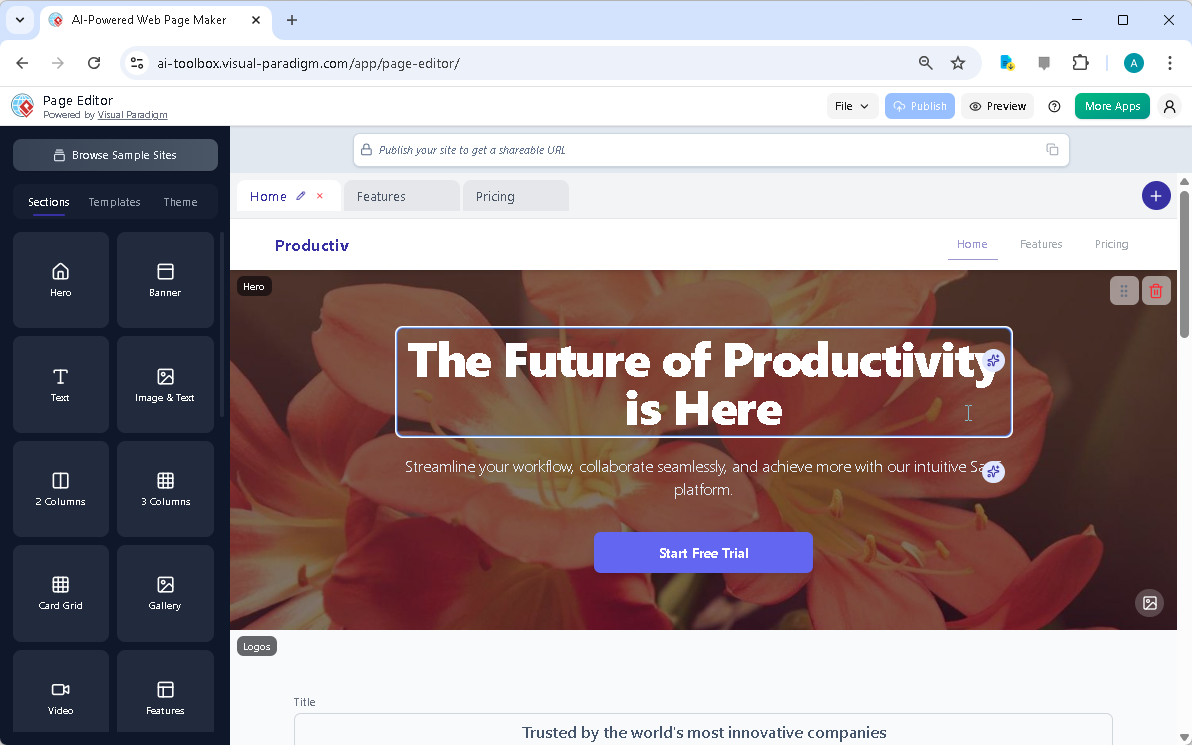
Creating a high-converting SaaS website requires a combination of strong design and compelling content. The AI-Powered Page Editor provides the necessary tools to achieve both. The visual drag-and-drop editor allows for the effortless assembly of a page layout. For instance, a user can start by dragging a “Hero” section onto the canvas, then customize the headline and subtext. The AI can be used to generate a powerful headline like “The Future of Productivity is Here” and a persuasive subtext, as seen in the provided screenshot.
After the hero section, the user can add other sections such as “Features,” “Testimonials,” and “Pricing.” Each of these sections can be customized with relevant content, and the AI can assist in generating detailed descriptions for product features or compelling testimonials. The editor’s library includes a vast array of sections, such as “Image & Text,” “Card Grid,” and “Logos,” which are perfect for showcasing a SaaS product’s capabilities and credibility. The ability to reorder sections with a simple drag-and-drop action ensures that the content flows logically and effectively.
How to Build a SaaS Website with the Page Editor
Step 1: Launch the Editor and Add a Hero Section
The first step is to launch the Page Editor. Upon opening, users are presented with a blank site or a default template. To begin creating a SaaS product website, the user should navigate to the “Sections” tab on the left-hand sidebar. Here, they can browse a library of pre-designed components. The user would then select the “Hero” section and drag it onto the page canvas. This section typically includes a large background image and prominent text, which is ideal for making a strong first impression.
Step 2: Customize Content and Leverage AI
Once the “Hero” section is on the page, the user can click on it to access its properties. In the properties panel, they can edit the text fields. This is where the AI-powered content generation shines. By clicking the “AI Generate” button, the user can prompt the AI to write a compelling headline and subtext based on the product’s name and core value proposition. For a SaaS product, the AI might generate a headline like “Streamline Your Workflow with Our Intuitive Platform” and a subtext that highlights key benefits.
Step 3: Add Supporting Sections
Next, the user should add sections that provide more detail about the product. This might include a “Features” section to list the software’s capabilities, a “Testimonials” section to build trust, and a “Pricing” section to outline the subscription plans. Each of these sections can be added from the “Sections” tab and then customized. The AI can be used again to generate persuasive descriptions for each feature, ensuring the content is both informative and engaging.
Step 4: Apply a Theme and Publish
After all the content is in place, the user can apply a theme to ensure the entire site has a cohesive and professional look. The “Theme” tab on the sidebar offers a selection of predefined themes that control colors, fonts, and spacing. Choosing a theme is a simple way to give the website a polished, brand-aligned appearance. Finally, the user can save the project to the cloud and publish it to a unique, shareable URL. This makes the website instantly accessible to potential customers and stakeholders.
Figure 1: A screenshot of the AI-Powered Page Editor in action, showcasing a SaaS product website with a hero section, a “Start Free Trial” button, and a clean, modern design.
Who Benefits from the AI-Powered Page Editor?
The AI-Powered Page Editor is designed for a wide range of users who need a professional website but lack the time, budget, or technical skills to build one from scratch. Entrepreneurs and small business owners can use it to launch a professional website, landing page, or online portfolio quickly. Marketers can create targeted campaign-specific landing pages or product showcases with rapid iteration. Freelancers and consultants can build stunning online portfolios to showcase their work and services. Designers can use it to quickly prototype website layouts and content, focusing on visual design and user experience. Essentially, anyone who needs a beautiful and functional web presence without coding can benefit from this tool.
Conclusion
Visual Paradigm’s AI-Powered Page Editor is a game-changer for anyone looking to create a professional website, especially for a SaaS product. By combining a powerful visual drag-and-drop interface with AI-assisted content generation, it allows users to build a comprehensive, multi-page website in a fraction of the time it would take with traditional methods. The ability to manage multiple pages, apply themes, and publish to a live URL with a single click makes the process efficient and accessible. For those who want to launch a high-converting SaaS website without the complexity of coding, this tool offers a fast, professional, and effective solution.
Ready to create your own professional SaaS website? Try the AI-Powered Page Editor now and experience the future of web design.
Related Links
- AI -Powered Site Builder | Visual Paradigm: The AI Powered Site Builder block-based visual editor, showing a user dragging and dropping a component onto the page . Build pages by dragging and dropping pre-designed blocks like Hero sections, Feature Grids, and Testimonials.
- Visual Paradigm Review: AI-Powered Modeling & Design Tools: Explore our in-depth review of Visual Paradigm . Discover how its new Generative AI engine transforms UML modeling, agile management, and enterprise architecture.
- Introducing the AI-Powered Website Builder: Create Stunning Websites in …: Discover Visual Paradigm’s new AI Website Builder . Describe your desired website, and our AI will generate a stunning, fully-functional site for you. Customize it with our intuitive drag-and-drop editor. Try it now!
- Visual Paradigm AI Platform: A Comprehensive ArchiMate Guide: Explore the Visual Paradigm AI Visual Modeling Platform through the ArchiMate perspective. Learn how its standardized intelligence, persistent visual structures, and context-aware tools outperform generic LLMs.
- AI Website Builder: Create Stunning Sites in Minutes: Page Editor is a dynamic, all-in-one website creation platform built around the concept of modular, section-based design. It is your visual interface for web development, allowing you to drag, drop, edit, and publish multi- page sites directly in your browser.
- AI-Powered Page Editor – Visual Paradigm: The Page Editor is an intuitive web-based tool designed for both beginners and professionals to create stunning, responsive websites quickly. Enhanced with AI content generation, it streamlines the web design process with an easy drag-and-drop interface.
- AI-Powered Site Builder – ai-toolbox.visual-paradigm.com: Build and deploy websites instantly with AI -powered site builder . Generate content automatically, customize designs, and publish online. Free AI website builder with fast deployment.