




Animating the Perfect Swing: Create Dynamic Baseball Scenes with AniFuzion
Learn how to create dynamic baseball scenes and perfect swings using Visual Paradigm AniFuzion, the AI-powered animation tool for professional 2D and 3D sports visuals.
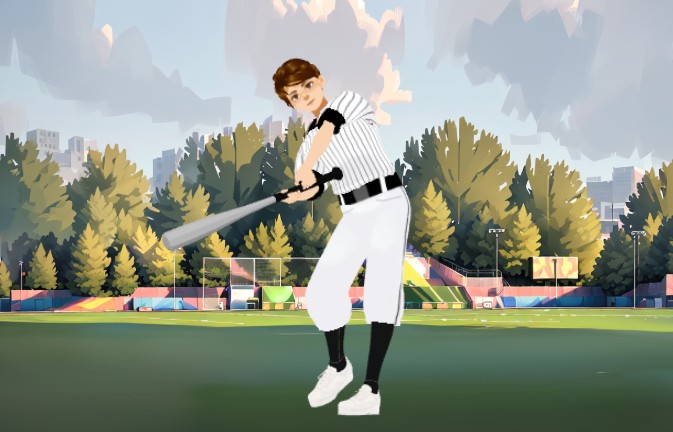
Creating a high-impact sports sequence used to require a massive budget and a team of specialists. Not anymore. If you look at the visual below, you see a crisp, stylized baseball scene created entirely within a browser-based environment. This isn’t just a static image; it is a freeze-frame of a potential home run, built using the Visual Paradigm Animation Maker (AniFuzion). Whether you are an educator explaining the physics of a swing or a content creator building a sports narrative, this AI-powered animation tool gives you the horsepower to produce professional 2D and 3D visuals without the headache of traditional software.
The workflow here is straightforward. You are not modeling that bat from scratch, and you certainly aren’t hand-stitching those pinstripes. By leveraging this online animation editor, you bypass the steep learning curve. We are going to break down exactly how this scene comes together, from the atmospheric background to the character’s athletic stance, showing you why this is the best animation software for creators who value efficiency and quality.
Quick Summary: Key Takeaways
- Zero Experience Needed: Utilize a drag-and-drop interface to build complex scenes without coding or rigging skills.
- Instant 3D Assets: Access thousands of customizable characters, including sports figures, ready for instant animation.
- Automated Motion: Use pre-built action libraries to apply complex movements like swinging or running instantly.
- Browser-Based Workflow: Edit, preview, and render your projects entirely in the cloud with AniFuzion.
- Professional Output: Export high-definition MP4s or interactive flipbooks suitable for commercial and educational use.
Setting the Diamond: Scene Construction and Atmosphere
Let’s look closely at the environment in this project. The background isn’t just a flat color; it is a stylized, lush baseball field complete with bleachers, trees, and a dynamic sky. In AniFuzion, you don’t paint this pixel by pixel. You utilize the ready-to-use scenes and props library. You drag the stadium environment onto your canvas, and boom—you have context. This sets the stage immediately. The lighting and the art style provide a “painted” aesthetic that feels premium, distinct from generic stock footage.
In the snapshot, notice the batter. He is fully decked out in a classic pinstripe uniform, gripping the bat with intent. The shadows fall correctly on his face and clothing, grounding him in that environment. This level of visual cohesion is critical. When you use this easy-to-use animation maker, you are assembling these high-quality assets like a digital puzzle. You place the background, you drop in the character, and the engine handles the rendering. It is serious power at your fingertips.
The Roster: Customizing Your 3D Character
Now, let’s talk about the player. You need a specific look. Maybe your team colors are red and white, or maybe you need a specific jersey number. With the extensive 3D character library inside Visual Paradigm, you aren’t stuck with defaults. You pull a base character onto the canvas—let’s say, a young athletic male model—and then you hit the properties panel. This is where the magic happens.
You can swap out body parts, change textures, and adjust colors instantly. For this baseball player, you would select the “sportswear” category, apply the pinstripe texture, and tweak the cap color. It is a professional animation tool feature that feels like a video game character creator. You get to define the identity of your subject without needing to know a single thing about 3D mesh topology. You want him to look focused? Adjust the facial expression. You want realistic proportions? It is all adjustable sliders. This allows for diverse storytelling, whether you are making an explainer video about rules or a dramatic short film.
Action and Physics: The “Swing” Mechanics
Static characters are boring. The whole point of using AniFuzion is the movement. In the image, the batter is mid-preparation, eyes locked on the pitcher. To get from a standing pose to a full swing, you do not manually move the elbows and knees frame by frame. That is the old way. Here, you use the Pre-Built Actions and Motion Library.
Applying Smart Motions
You select your batter, open the actions library, and search for “baseball swing” or “batting stance.” The software applies the motion data to your character’s skeleton automatically. This is called retargeting. The smart animation engine ensures the hands stay on the bat and the feet stay planted on the ground. You can then tweak the timing on the timeline—slow down the wind-up for dramatic effect, or speed up the swing for impact. It is precise control without the grunt work.
Enhancing with Audio and Effects
A silent swing lacks impact. To truly sell this scene, you utilize the integrated audio features. You can drag in the sound of a “crack” of the bat or the roar of the crowd from the asset library. If you need an announcer calling the play, use the AI Text-to-Speech (TTS) feature. You type the script, pick an excited commentator voice, and the system generates the audio. If the character speaks, the automatic lipsync matches the mouth movement perfectly. This layering of visual motion and audio is what creates engagement.
Finalizing the Play: Exporting Your Project
Once your batter is swinging and the crowd is cheering, you need to get this content out there. You are not restricted to a proprietary format. You can export this scene as a high-quality MP4 video to upload directly to YouTube or social media. If this is for a presentation, you might create an interactive flipbook. The cloud-based rendering means your computer doesn’t need to be a supercomputer to process the 3D graphics; the server does the heavy lifting.
This tool democratizes high-end animation. You have the scene, the custom character, and the complex action, all assembled in a fraction of the time it takes in traditional suites. Whether for marketing, education, or personal projects, you are producing top-tier visual content.
Ready to step up to the plate? Start creating your own animated scenes today using a professional template.
Get started with an animation template
Related Links
- Mastering Anifuzion: A Comprehensive Guide to Creating Professional Animations: This in-depth guide walks users through the core features and advanced techniques of Anifuzion, empowering creators to produce polished, professional-grade animations with ease.
- Creating Seamless Animations in Anifuzion with Automatic Motion Retargeting: Discover how Anifuzion’s automatic motion retargeting enables smooth, realistic animations across different character models with minimal manual effort.
- Unlock Your Creativity with Anifuzion: What It Is and Why You Should Use It: A creative-focused overview explaining how Anifuzion empowers designers and animators to bring ideas to life with intuitive, powerful animation tools.
- Anifuzion Feature Overview: Advanced Animation Capabilities: An interactive overview of Anifuzion’s key animation features, highlighting its capabilities for creating dynamic, interactive, and professional animations.
- Anifuzion Features: Power Tools for Dynamic Animation Creation: Explore the full suite of Anifuzion’s innovative features designed to streamline and enhance the animation creation process for designers and developers.
- Getting Started with Anifuzion: Your First Steps to Animated Design: A beginner-friendly tutorial that introduces new users to Anifuzion’s interface, core functions, and foundational skills for creating engaging animations.