




Animating Corporate Strategy Pitches: A Guide to Professional Storytelling with AniFuzion
Learn how to transform dry corporate strategy pitches into engaging visual narratives using AniFuzion. Create professional 3D animated business assets easily.
In the fast-paced world of corporate communication, capturing attention is half the battle. We have all sat through presentations that felt stagnant, relying on walls of text to convey dynamic ideas. But imagine transforming a dry quarterly update into an engaging visual narrative. With the Visual Paradigm Animation Maker, also known as AniFuzion, you can turn abstract business concepts into compelling stories without needing a degree in graphic design. By utilizing accessible tools, you can create a professional environment where digital avatars deliver your message with precision and personality.
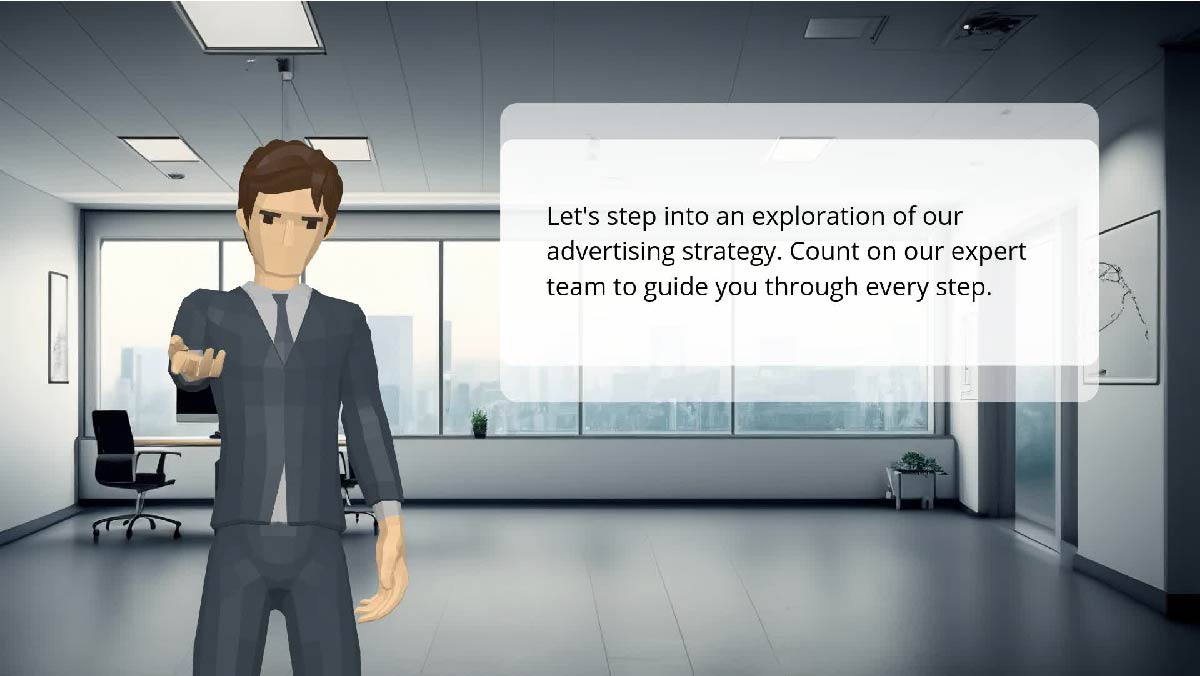
Let’s look at a specific example of how this comes to life. Picture a sleek, modern office setting—clean lines, bright lighting, and a view of the city skyline through the window. Standing confidently in the center is a 3D animated character, dressed sharply in a suit, extending a hand as if inviting the viewer into a conversation. A speech bubble floats beside him, clearly stating: “Let’s step into an exploration of our advertising strategy. Count on our expert team to guide you through every step.” This isn’t just a cartoon; it is a polished business asset created to introduce a complex marketing plan with warmth and authority. This is the power of using an online animation software designed for professionals.
Quick Summary: Key Takeaways
- Effortless Professionalism: Create high-quality business animations using drag-and-drop tools that require no prior design experience.
- Automated Audio: Utilize AI Text-to-Speech and automatic lipsync to give your characters a voice without hiring recording artists.
- Instant Scene Building: Access thousands of pre-built office templates, props, and 3D characters to build your world in minutes.
- Engaging Storytelling: Replace static slides with dynamic movement and gestures to boost audience retention and understanding.
- Versatile Exporting: Share your strategy as an MP4 video or an interactive flipbook viewable on any device.
Why Choose Animation for Business Strategy?
You might be wondering, “Why go through the trouble of animating a character when I could just write an email?” It is a valid question, but the answer lies in human psychology. We are wired to respond to faces, movement, and storytelling. When you use a tool like Visual Paradigm Animation Maker to create a character—like our marketing expert in the image above—you are humanizing your data. The inviting gesture of the character’s hand and the direct eye contact creates a psychological bridge between the presenter and the audience.
Furthermore, this approach significantly reduces the anxiety often associated with public speaking or video production. You do not need to set up lights, buy a camera, or memorize a script yourself. The AniFuzion tool acts as your digital production studio. It allows you to craft the perfect delivery every time. Whether you are explaining an advertising strategy or onboarding new employees, the message remains consistent, clear, and engaging. It creates a “safe” distance where the message is delivered flawlessly by your digital proxy.
How Do I Create a Scene Like This Without Experience?
The Magic of Drag-and-Drop
If the idea of “animation” summons fears of complex coding or frame-by-frame drawing, let me put your mind at ease. Modern animation software for beginners has evolved significantly. The interface you would use to create the office scene above is surprisingly intuitive. It functions much like a digital puzzle. You simply select a background—in this case, a corporate office—from a vast library and drag it onto your canvas.
Next, you browse the 3D character library. You can choose a character that fits your brand’s tone, whether that is a casual creative or a suit-clad executive. Once the character is on the screen, you don’t need to draw their movements. You use pre-built actions. To make the character in our example extend his hand, you would simply search for a “presenting” or “welcoming” gesture in the action library and apply it. The software handles the complex mechanics of movement for you, leaving you free to focus on the message.
Customizing Your Environment
Perhaps your company branding isn’t a grey suit; maybe it’s a blue polo, or perhaps your office has more plants. The beauty of this easy-to-use animation maker is the depth of customization. You can tweak the textures, colors, and props within the scene. If the “Advertising Strategy” text needs to be more prominent, you can apply shape effects to the speech bubble, making it bounce or fade in to catch the viewer’s eye at the exact right moment on the timeline.
Giving Your Character a Voice
A silent presentation is rarely effective. In the past, adding voice meant renting a studio or struggling with poor-quality microphone recordings. This is where AI Text-to-Speech (TTS) technology changes the game. In the image we are analyzing, the character is speaking a specific script about guiding the viewer through a strategy. To achieve this, you simply type that text into the TTS panel.
The system allows you to select from various accents, tones, and emotional inflections. Do you want your presenter to sound authoritative? Cheerful? Reassuring? You select the mood, and the AI generates the audio. Even more impressive is the automatic lipsync feature. You do not need to manually match the character’s mouth to the words. The software analyzes the audio and animates the mouth movements in real-time, creating a seamless and lifelike performance that enhances the immersion of your video.
From Canvas to Boardroom: Sharing Your Vision
Once you have polished your scene, added your script, and perfected the gestures, the final step is getting it in front of your audience. The goal of any business presentation tool is effective communication, and flexibility is key here. You can export your creation as a standard MP4 video file, perfect for embedding in PowerPoint presentations or uploading to YouTube.
However, for a more immersive experience, you might consider the animated flipbook format. This allows you to send a link to your clients or team members, letting them flip through the presentation at their own pace while still enjoying the rich, animated elements you have built. It transforms a passive viewing experience into an interactive journey, ensuring your advertising strategy isn’t just seen, but truly experienced.
Conclusion
Stepping into the world of animation for business doesn’t require a leap of faith; it just requires the right tools. As we saw with our digital marketing expert in the sleek office, Visual Paradigm Animation Maker empowers you to create sophisticated, high-end visuals that elevate your professional storytelling. By combining drag-and-drop simplicity with powerful AI features, you can turn a simple strategy document into a compelling visual narrative that commands respect and attention. You have the strategy; now give it the presentation it deserves.
Ready to bring your business strategies to life? Start creating your professional animations today.
Subscribe to Visual Paradigm Online at:
https://online.visual-paradigm.com/subscribe.jsp
Related Resources
- Comprehensive Tutorial on Anifuzion: The Ultimate Animation Maker: This page provides a detailed technical guide on using Anifuzion to create high-quality animations with minimal effort.
- Solutions for Content Creators | Anifuzion: Anifuzion enables content creators to produce professional-grade animated visuals without requiring advanced animation skills.
- Comprehensive Guide to Creating Animated Videos with Anifuzion: This guide offers step-by-step technical instructions for generating animated videos using Anifuzion’s intuitive interface.
- A Beginner’s Guide to Creating Stunning 3D Animations with Anifuzion: Designed for newcomers, this guide explains how to produce visually impressive 3D animations using Anifuzion’s automated tools.
- How Anifuzion Empowers Non-Animators to Create Stunning Visuals: This article explains how Anifuzion leverages AI-driven automation to enable non-experts to produce high-quality visual content.
- Create Stunning Animations with Over 2000 Character Actions and …: Creating realistic dialogue has never been easier with AniFuzion’s automatic lipsync animation feature. Powered by AI, this tool syncs your character’s mouth …
- Discover AniFuzion: The Distinctive Animation Maker That Sets You …: What truly sets AniFuzion apart is its blend of versatility and creativity. With a rich library of customizable templates, 3D characters, and dynamic visual …