




Crafting Personalized Animated Birthday Greetings for Kids with AniFuzion
Make personalized animated birthday videos for kids with AniFuzion. Easy drag-and-drop tools, 3D characters, and AI voiceovers. No design skills needed!
Imagine the sheer delight on a child’s face when they see a custom cartoon video made just for them, featuring their name and funny characters dancing on screen. With Visual Paradigm Animation Maker (AniFuzion), creating these magical moments is no longer the domain of professional studios; it is an accessible reality for parents, teachers, and friends. As a leading online animation software, this tool empowers you to transform simple birthday wishes into dynamic, memorable visual stories without requiring any prior design experience. Whether you are looking to make a quick e-card or a full animated story, AniFuzion provides the intuitive drag-and-drop interface and creative assets needed to bring your celebratory ideas to life in minutes.
Quick Summary: Why Choose AniFuzion for Your Greetings?
- Zero Experience Needed: You can jump straight in with a user-friendly interface that feels as simple as arranging a digital puzzle.
- Instant Customization: Access a massive library of 3D characters, from cute animals to realistic humans, to match the birthday theme.
- Smart Audio Tools: Use AI Text-to-Speech to make characters speak personalized messages without recording your own voice.
- Flexible Sharing: Export your creation as a high-quality MP4 video or an interactive flipbook to share via social media or email.
- Professional Polish: Apply pre-built actions and shape effects to make your animation look smooth and professionally produced.
Designing a Heartwarming Scene: A Case Study
To understand the potential of this easy-to-use animation maker, let’s look at a charming example of a birthday project. In this scene, we see a vibrant, joyful layout dedicated to “Vincent” for his 3rd birthday. The composition is playful and welcoming, featuring a friendly brown bear raising its paws in excitement alongside a character dressed in a tuxedo—perhaps a magician or a formal party host—waving to the audience. The background is a soft, artistic wash of pastel colors, enhanced by stylized sunburst elements that draw the eye to the celebratory text.
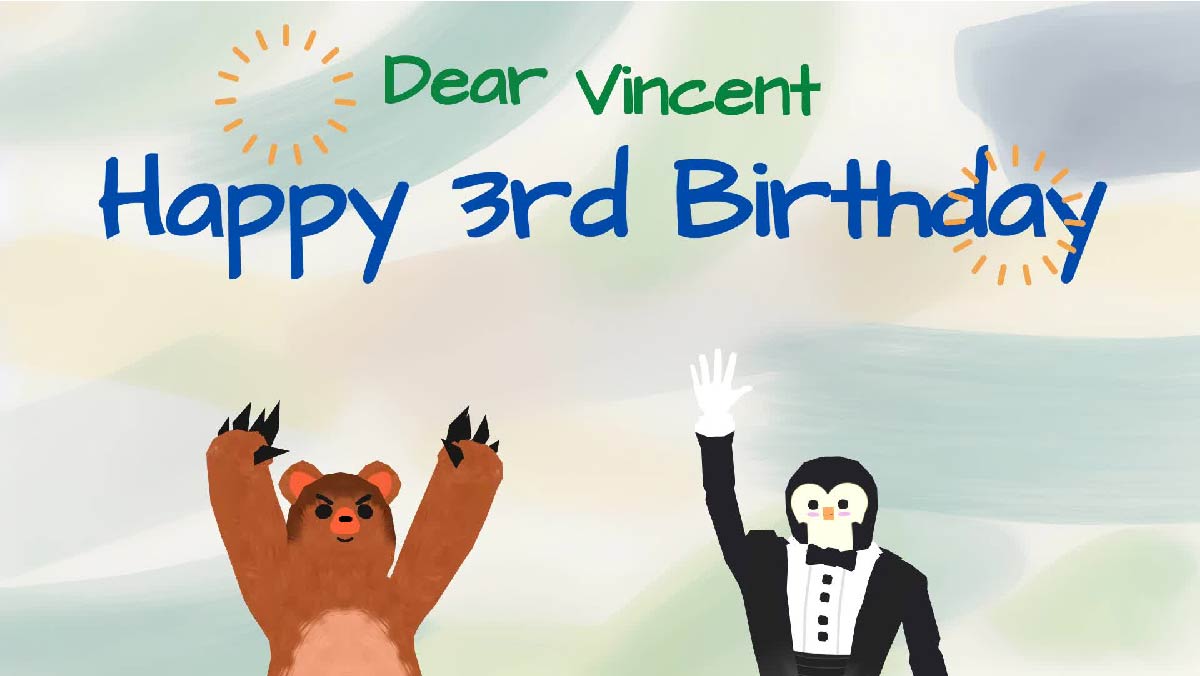
This snapshot perfectly illustrates how Visual Paradigm Animation Maker allows users to blend different styles. The playful font used for “Happy 3rd Birthday” contrasts nicely with the formal attire of the tuxedo character, creating a whimsical atmosphere that is perfect for a toddler’s party. You can easily see how customizable 3D characters add depth and personality to the message, making it far more engaging than a standard flat image.
Bringing Your Characters to Life
One of the standout features of AniFuzion is its extensive 3D character library. In the example above, the creator didn’t have to draw a bear or a tuxedo-wearing figure from scratch. Instead, they simply browsed the library and dragged these assets onto the canvas. But the magic doesn’t stop at static placement.
With the tool’s pre-built actions and motion library, you can make that bear dance, clap, or jump with a single click. You don’t need to understand complex rigging or keyframing; you simply select an action like “Cheer” or “Wave,” and the software handles the rest. This motion retargeting capability ensures that whether you are animating a human or an animal, the movements look natural and fluid, adding a layer of professional polish to your personal project.
Adding Voice and Personality
A visual greeting is great, but a speaking one is unforgettable. Using the integrated AI Text-to-Speech (TTS) feature, you could type “Happy Birthday Vincent, have a great day!” and generate a voiceover in seconds. The automatic lipsync technology would then match the tuxedo character’s mouth movements to the audio instantly. This creates an immersive experience where the characters seem to be speaking directly to the birthday child, significantly boosting audience engagement and emotional connection.
Enhancing the Visuals with Effects
The “Happy 3rd Birthday” text in our example isn’t just sitting there; in a live version of this project, it would likely be animated using shape effects and animation presets. AniFuzion allows you to apply entrance effects like bounces, fades, or zooms to your text and props.
This capability turns static information into an exciting visual event. You might set the sunbursts to rotate slowly or have the name “Vincent” pop onto the screen in sync with a sound effect. These dynamic elements ensure that the viewer’s attention is held from the very first second, making your greeting stand out in a sea of static social media posts.
Sharing the Joy
Once your masterpiece is complete, sharing it is effortless. The tool offers versatile export options tailored to your needs. You can download the animation as an MP4 file to play on a TV during a birthday party, or you can generate a link to an animated flipbook. The flipbook format is particularly unique, allowing distant relatives to “flip” through an interactive digital card on their phones or tablets, making the distance feel a little shorter on special occasions.
Start Creating Your Animated Greeting Today
You don’t need to be a graphic designer to create smiles. With Visual Paradigm’s intuitive tools, you have everything you need to build heartwarming, professional-quality animations right in your browser.
Ready to surprise someone special? Start your project with a template today:
Create animation now. Start with a template.
Related Resources
- How to Create PowerPoint Like Animation Slides on the… – AniFuzion: Creating animated PowerPoint presentations has never been easier, thanks to tools like Visual Paradigm Online’s AniFuzion. This online 2D animation maker allows you to bring your…
- Bring Your Ideas to Life with Visual Paradigm Anifuzion 3D Video Maker: Anifuzion is a web-based 3D animation tool that enables users to create immersive 3D videos and animations without requiring advanced technical skills.
- AniFuzion: The Online Ultimate Animation Maker – Content Posts: Visual Paradigm Online’s AniFuzion stands out as a leading animation video tool due to its comprehensive feature set, which caters to a wide range of users, from beginners to experienced animators.
- Introducing Visual Paradigm’s AniFuzion: The Ultimate Animated Video Maker – Cybermedian: December 19, 2024 – Part of the Visual Paradigm Online Platform, AniFuzion offers a unique blend of 2D and 3D animation techniques , making it an all-in-one solution for creating dynamic and engaging content1.
- AniFuzion: Online Animation Maker: Visual Paradigm Online. Start creating stunning 2D and 3D animations. Explore customizable character families and intuitive tools to bring …