




Transforming Software Requirements into Class Diagrams: A Professional AI-Powered Textual Analysis Guide for Visual Paradigm
Convert software requirements to class diagrams using AI in Visual Paradigm. Automate your systems engineering workflow with professional textual analysis.
The transition from a raw concept to a structured software model often presents a significant bottleneck for development teams. Analyzing stakeholder interviews and meeting notes requires meticulous attention to detail and substantial manual effort. This is where a professional AI-powered textual analysis tool becomes indispensable for modern systems engineering. Visual Paradigm has introduced a revolutionary feature that automates this entire process. It converts unstructured natural language into refined architectural models with unprecedented precision. This deep dive explores how artificial intelligence bridges the gap between human language and technical design.
Effective requirements engineering demands more than just simple transcription. It requires the extraction of intent, the identification of key entities, and the establishment of logical relationships. By leveraging the AI-powered capabilities within Visual Paradigm, business analysts can now generate professional textual analysis artifacts in seconds. This eliminates the risk of human oversight and ensures that every requirement is accounted for. The following sections demonstrate a step-by-step workflow using a Student Registration System as a primary example.
Initiating the Problem Domain
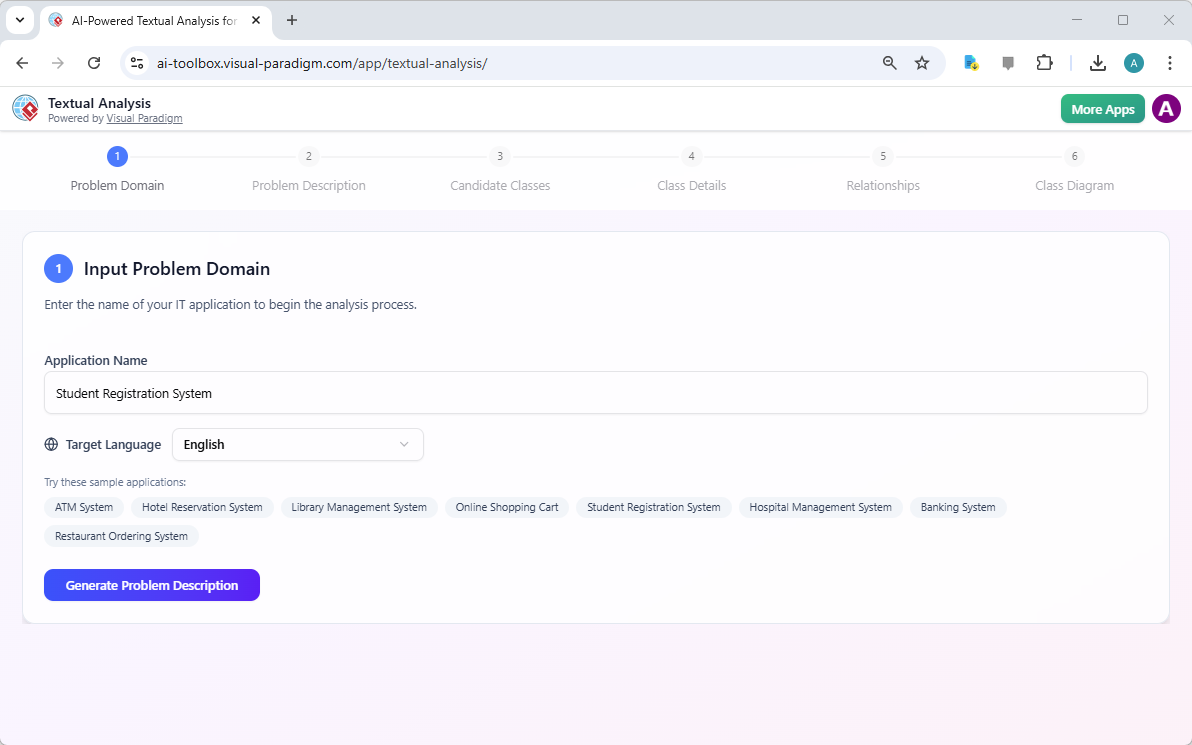
The journey begins with defining the scope of the application. In the first stage of the easy-to-use AI textual analysis workflow, the user identifies the problem domain. For this demonstration, the user inputs “Student Registration System” as the target application. This simple starting point provides the AI with the necessary context to begin its conceptual mapping. The interface is designed for maximum clarity, allowing users to select their target language and choose from various sample applications if they require inspiration for their own projects.
At this stage, the tool prepares the environment for deeper linguistic processing. It sets the stage for the AI to understand the specific vocabulary and domain logic associated with academic institutions. Once the application name is confirmed, the user proceeds to generate a comprehensive problem description, which serves as the foundation for all subsequent modeling steps.
Automated Problem Description Generation
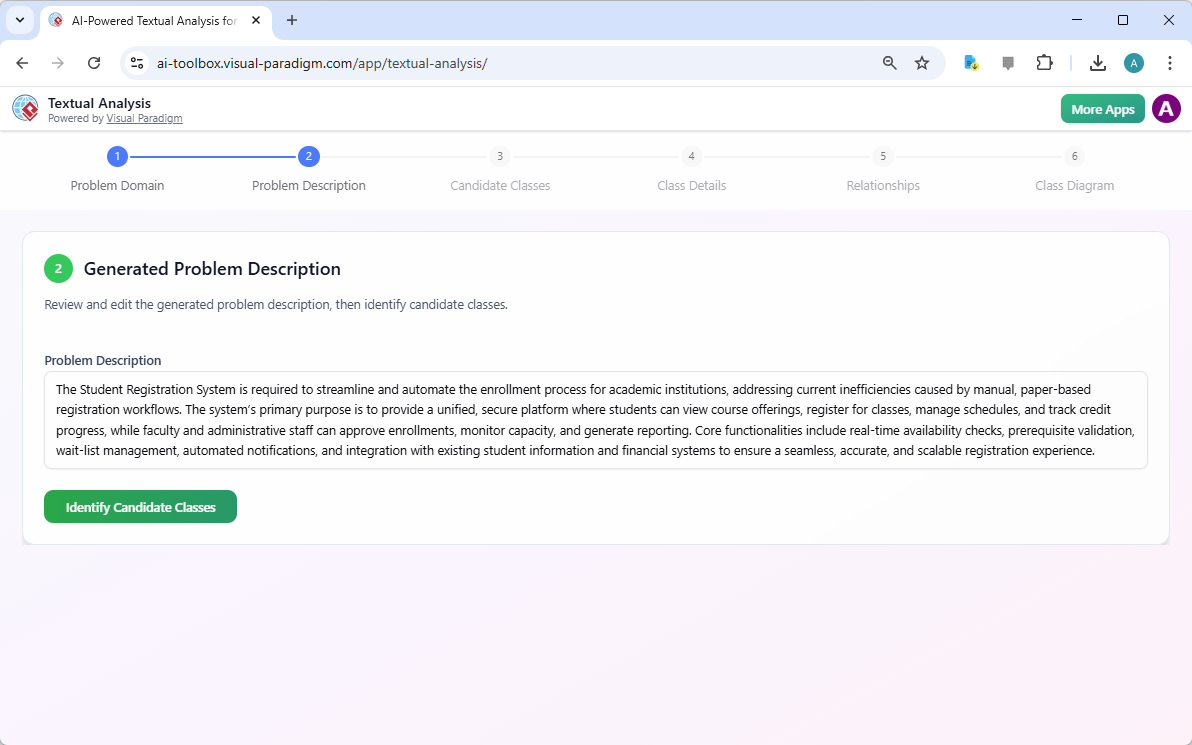
The second step showcases the power of AI-driven requirement elicitation. Based solely on the application name, the AI generates a sophisticated problem description. It identifies the need to streamline and automate enrollment processes while addressing inefficiencies in legacy paper-based workflows. The generated text describes a unified, secure platform where students can view offerings and faculty can approve enrollments. This narrative is not merely a summary; it is a structured problem statement that captures functional needs and operational constraints.
Having a high-quality problem description is vital for project alignment. It ensures that stakeholders and developers share a common understanding of the system’s purpose. The AI intelligently includes core functionalities such as real-time availability checks and prerequisite validation. This automated narrative provides a professional baseline that the analyst can further refine or edit to match specific client needs.
Key Takeaways for Professional Analysts
-
Significant Time Savings: Automates hours of manual note-taking and requirement synthesis.
-
Error Reduction: AI consistently identifies actors, constraints, and business rules without fatigue.
-
Enhanced Traceability: Easily link initial problems to final design elements within one project.
-
Standardized Documentation: Ensures a uniform style for requirement phrasing and classification.
-
Immediate Visualization: Converts raw text into candidate classes and relationships instantly.
Identifying Candidate Classes and Logical Entities
In the third phase, the professional AI-powered textual analysis tool performs a deep linguistic audit of the problem description. It identifies “Candidate Classes,” which are the fundamental building blocks of the software architecture. The AI extracts nouns that represent essential entities, such as Student, Course, Faculty, and Enrollment. Each identified class is accompanied by a logical reason for its inclusion and a detailed description of its responsibilities within the system.
This automated extraction serves as a digital librarian, organizing complex information into actionable data. By categorizing these entities early, the system ensures that the structural design remains robust and focused on the core domain. This stage is crucial for object-oriented analysis, as it transforms abstract concepts into concrete software components that developers can eventually implement.
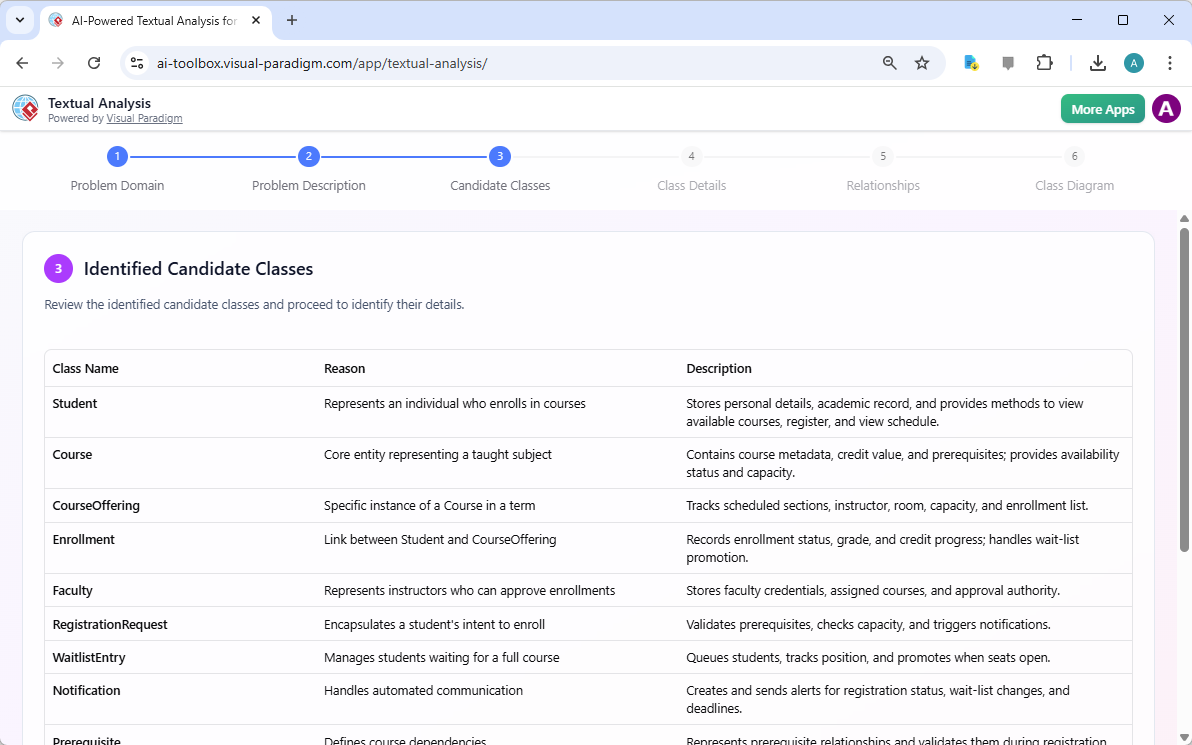
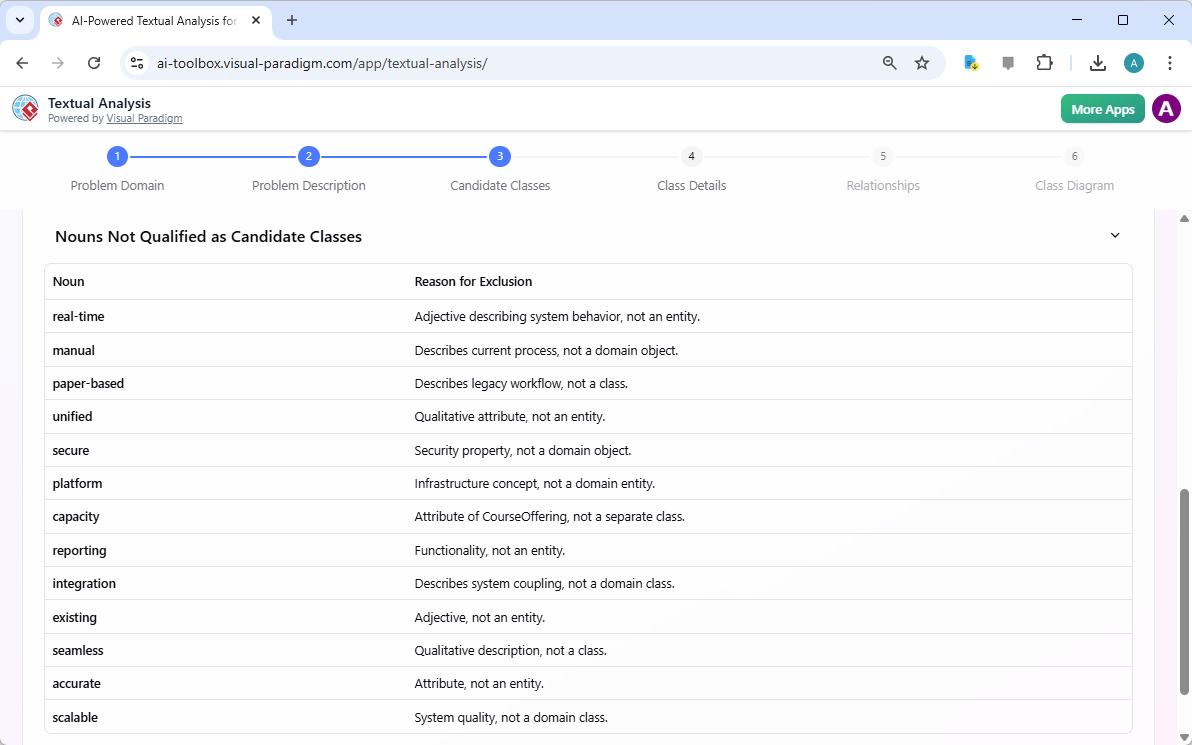
A sophisticated AI must also know what to ignore. The tool includes a “Nouns Not Qualified” section, often referred to as ‘fouled’ candidate classes. These are terms found in the text that do not meet the criteria for a class, such as adjectives or qualitative attributes. For instance, words like “real-time,” “manual,” and “secure” are excluded because they describe system properties rather than domain objects. This filtering process is essential for maintaining a clean and accurate model.
This level of discrimination prevents the class diagram from becoming cluttered with unnecessary elements. By providing a clear reason for exclusion, such as “Qualitative attribute, not an entity,” the tool educates the user on best practices in systems analysis. It acts as a mentor, guiding the analyst toward a more professional software design by focusing only on the most relevant data structures.
Defining Class Attributes and Operations
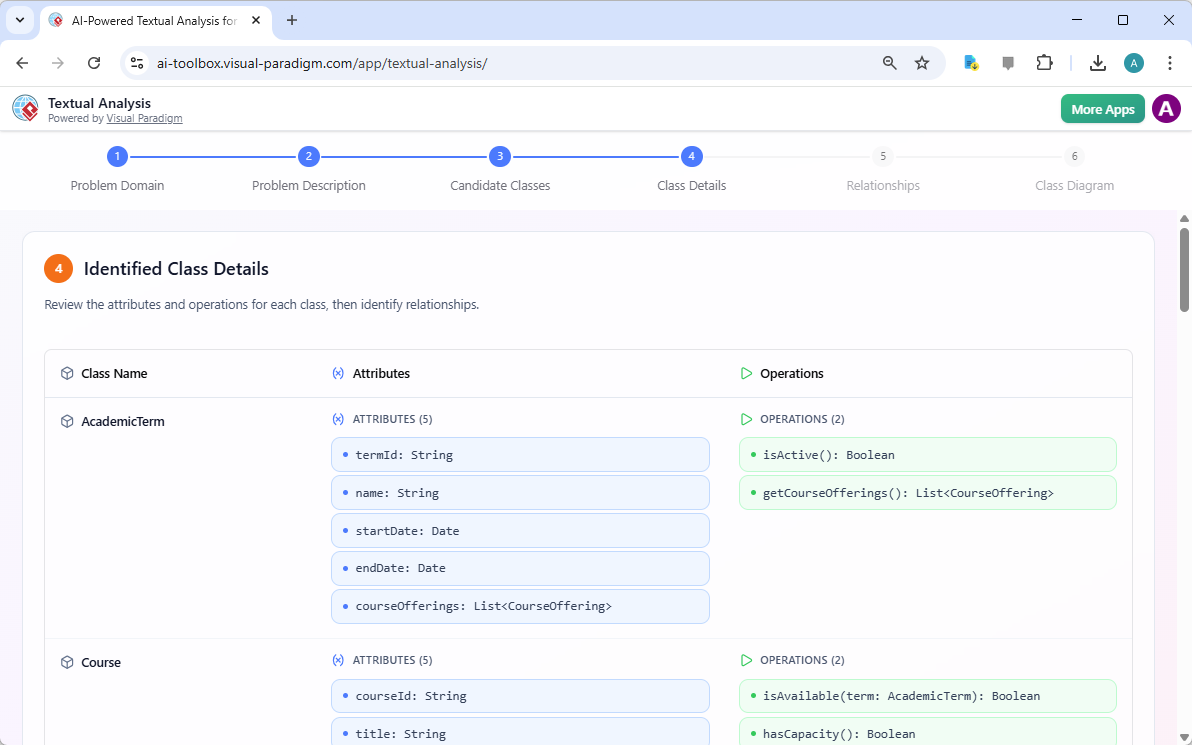
Once the classes are identified, the best AI business analysis tool drills down into the internal structure of each entity. In step four, the AI suggests specific attributes and operations for every class. For an “AcademicTerm” class, the system proposes attributes like termId, name, and dates, along with operations like isActive(). For the “Course” class, it suggests attributes for title and credit hours, ensuring the model is technically comprehensive.
This automation handles the “busy work” of detailing classes, allowing architects to focus on high-level logic. The AI-generated attributes are typed correctly, using standard data types like String, Date, and Boolean. This structured output is fully editable, enabling users to add custom parameters or adjust the generated methods based on specific business rules. It provides a bridge from textual requirements to a professional technical specification.
Mapping Architectural Relationships
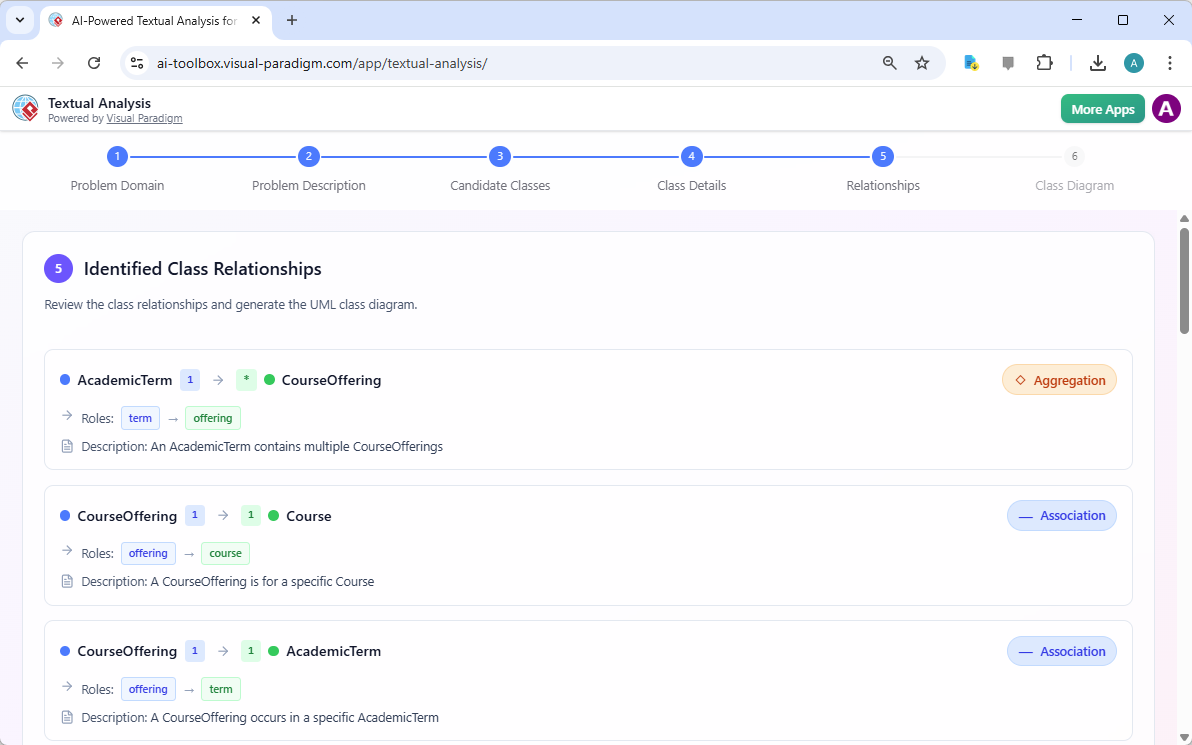
The fifth step involves establishing how these classes interact. The AI-powered diagramming tool identifies relationships such as associations and aggregations. For example, it recognizes that an “AcademicTerm” contains multiple “CourseOfferings,” establishing a 1-to-many aggregation. It also identifies that a “CourseOffering” is linked to a specific “Course.” These connections are vital for defining the data flow and hierarchy of the system.
The AI provides a natural language description for each relationship, making it easy for non-technical stakeholders to understand the underlying logic. This clarity ensures that the system’s structural integrity is verified before a single line of code is written. By automating relationship detection, Visual Paradigm prevents common modeling errors like missing links or incorrect multiplicity, resulting in a more reliable software architecture.
Generating the Final UML Class Diagram
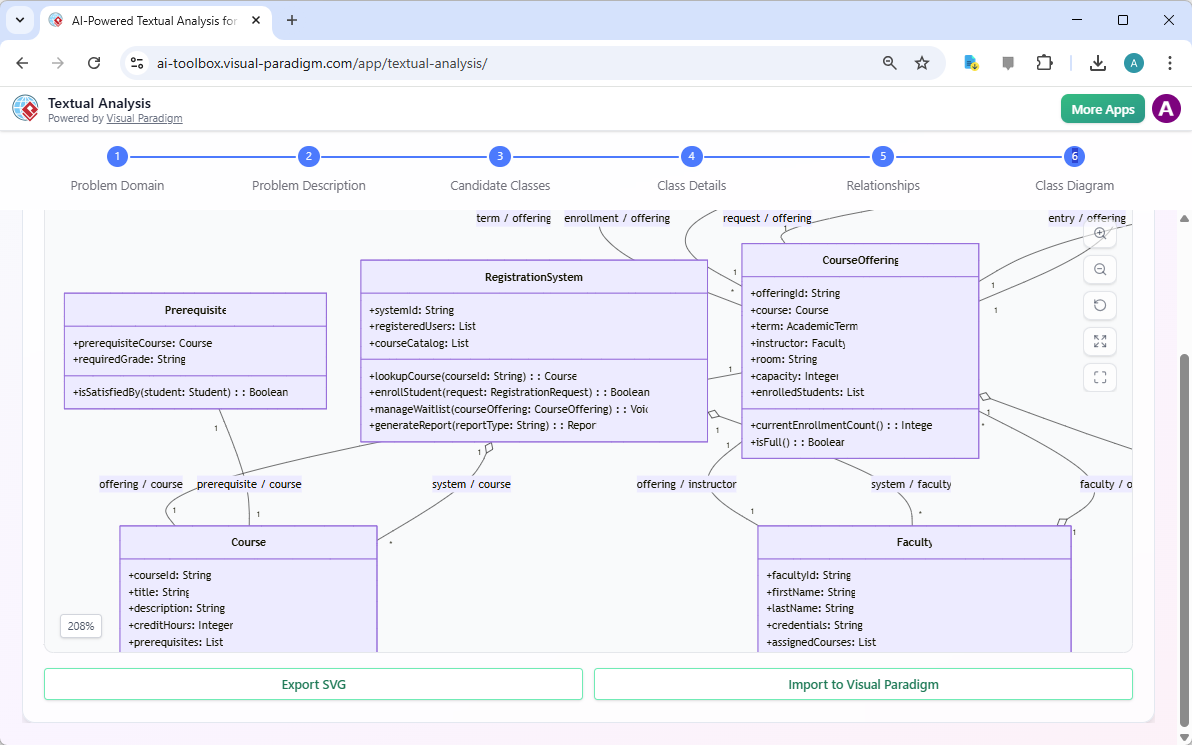
The culmination of the textual analysis process is the generation of a professional UML Class Diagram. In the final step, the AI assembles all previous findings into a comprehensive visual model. This diagram displays all classes, their attributes, their operations, and their relationships in a standard UML format. The output is not just a static image; it is a fully integrated model within the Visual Paradigm environment.
From this stage, users can export the diagram as an SVG for reports or import it directly into their main project for further development. This seamless transition from a “Student Registration System” text prompt to a complete architectural diagram exemplifies the efficiency of AI-powered software design. It empowers teams to move from ideation to blueprinting at a pace that was previously impossible.
Conclusion
The professional AI-powered textual analysis tool in Visual Paradigm represents a paradigm shift in requirements engineering. By automating the extraction of entities, attributes, and relationships from unstructured text, it allows analysts to focus on strategy rather than clerical tasks. Whether you are a business analyst synthesizing interview notes or a product owner turning feedback into features, this tool provides the structure and speed required in today’s fast-paced development landscape. It ensures consistency, improves traceability, and delivers a solid foundation for any software project.
Are you ready to accelerate your requirements analysis and produce professional-grade architectural models with ease? Experience the power of AI-driven design today. You can download the latest version of Visual Paradigm to start transforming your unstructured text into actionable diagrams. Visit Visual Paradigm’s download page to begin your journey toward more efficient and accurate software modeling.
Related Links
Textual analysis tools in Visual Paradigm bridge the gap between unstructured information and formal design by transforming written descriptions into structured visual models. These tools utilize AI-driven processing to identify key entities, relationships, and candidate patterns, which significantly accelerates requirements engineering and software design workflows.
-
AI Textual Analysis – Transform Text into Visual Models Automatically: This feature leverages AI to analyze text documents and automatically generate UML, BPMN, and ERD diagrams, facilitating faster documentation and modeling.
-
AI-Powered Textual Analysis: From Problem Description to Class Diagram: A specialized guide focused on converting natural language problem descriptions into accurate, production-ready class diagrams.
-
Textual Analysis in Visual Paradigm: From Text to Diagram: An official documentation resource detailing the transition from written narratives to structured use case and class diagrams.
-
Visual Paradigm Textual Analysis Tool Features: An overview of the tool’s capabilities in deriving meaningful insights from large volumes of unstructured text through natural language processing.
-
Documenting Requirements Using Textual Analysis: This guide explains how to extract and organize requirements from project documents to enhance traceability and clarity across the development lifecycle.
-
Advanced Textual Analysis Techniques in Visual Paradigm: Explore sophisticated methods for text mining, including sentiment analysis and keyword extraction, to gain deeper analytical insights.
-
What is Textual Analysis? – Visual Paradigm Circle: An introductory resource covering the purpose and strategic benefits of implementing textual analysis within standard project workflows.
-
Identifying Domain Classes Using AI Textual Analysis: A tutorial on streamlining domain modeling by using AI to automatically identify and categorize potential classes directly from text.
-
Visual Paradigm AI Toolbox: Textual Analysis for Software Modeling: A web-based application within the AI Toolbox that allows users to identify entities and concepts to build structured software models from unstructured input.
-
Case Study: AI-Powered Textual Analysis for UML Class Diagram Generation: A real-world evaluation demonstrating how AI-driven extraction improves the accuracy and efficiency of generating models from complex requirements.