




Building a Data-Rich Project Roadmap: AI-Powered Table Generation to JSON Export
Learn how to use Visual Paradigm's AI Table Generator to create project roadmaps and export data to JSON, SQL, and HTML formats instantly.
For data analysts, software developers, and product managers, the gap between visualizing data and coding it can often feel like a tedious chasm. Whether you are drafting a schedule for a new software launch or organizing complex datasets, the manual entry of rows and columns is time-consuming. This is where the AI Table Generator by Visual Paradigm becomes an essential utility. By combining an intuitive, spreadsheet-like interface with advanced artificial intelligence, this online tool allows users to generate complex tables from simple text descriptions and instantly convert them into usable code formats.
In this guide, we will explore how to utilize this AI-powered data tool to streamline your workflow. We will specifically look at a practical example—creating a detailed Project Roadmap—and examine how the tool handles data entry, formatting, and the crucial step of exporting that data into structured formats like JSON, SQL, and HTML.
Quick Summary: Key Takeaways
- Effortless Creation: Use plain English prompts to generate complex tables instantly without manual population.
- Live Code Conversion: Watch as your visual data is transformed in real-time into JSON, Markdown, HTML, or SQL.
- Visual Editing: An intuitive grid editor allows for easy adjustments, similar to working in Excel or Google Sheets.
- Developer Friendly: Ideal for generating sample data, configuration files, or database seed scripts quickly.
- Cloud Convenience: Save, share, and access your tables from anywhere using cloud-based storage.
Visualizing the Project Roadmap Workflow
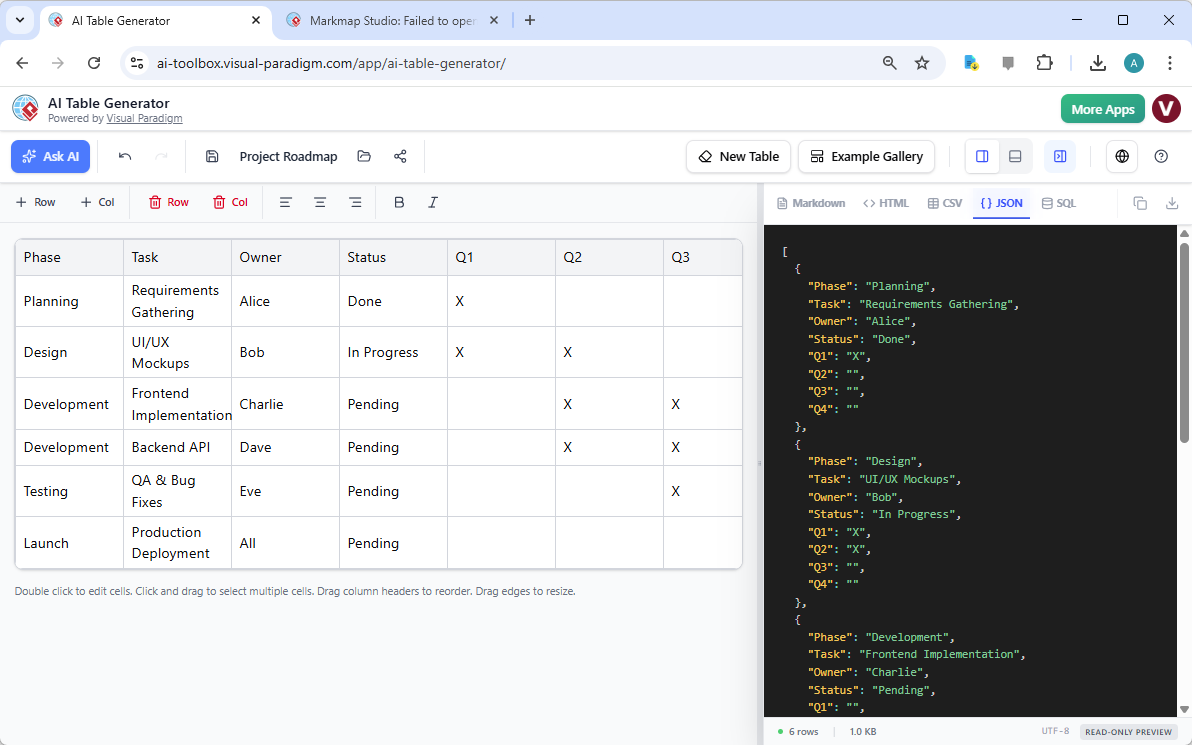
To understand the capabilities of the AI Table Generator, let us examine a common scenario in project management: the creation of a roadmap. In a traditional workflow, a manager might sketch this out in a spreadsheet, and a developer would then have to manually transcribe that data into a JSON object for a web application or a dashboard. Visual Paradigm bridges this gap by displaying both views simultaneously.
As you can see in the interface below, the user has established a “Project Roadmap” table. The grid editor on the left displays structured columns for “Phase,” “Task,” “Owner,” “Status,” and quarterly timelines (Q1, Q2, Q3). The data is populated with realistic project stages, such as “Requirements Gathering” assigned to Alice, or “UI/UX Mockups” assigned to Bob. What makes this powerful is the panel on the right. As the user edits the visual table, the tool automatically generates the corresponding code. In this specific instance, the JSON format is selected, showing a clean, syntactically correct array of objects representing the roadmap data.
From Text Prompt to Structured Grid
The core strength of this online table maker lies in its AI capabilities. While you can certainly type data into the grid manually, the “Generate with AI” feature significantly accelerates the process. Instead of creating headers and filling cells one by one, you can simply open the AI dialog and type a prompt such as: “Create a project roadmap table with columns for Phase, Task, Owner, Status, and quarters Q1 through Q3. Include 5 rows for a software development lifecycle.”
The AI engine interprets this request and constructs the table structure for you, populating it with relevant placeholder data. This allows you to move from a blank screen to a working draft in seconds. Once the AI has generated the foundation, you can use the Interactive Grid Editor to fine-tune the details. If a task status changes from “Pending” to “In Progress,” or if you need to reassign a task from Charlie to Dave, you simply click the cell and type. The experience is designed to be as familiar and fluid as standard spreadsheet software.
Real-Time Data Conversion and Export
For technical writers and developers, the formatting capabilities of the AI Table Generator are perhaps its most valuable asset. The tool eliminates the frustration of manually formatting ASCII pipes and dashes for Markdown or writing repetitive tags for HTML tables.
Working with Multiple Formats
The “Preview Panel” (shown on the right side of the interface) is not just a static viewer; it is a dynamic conversion engine. While our example highlights JSON export, the tool supports a variety of other essential formats:
- Markdown: Perfect for documentation in GitHub Readme files or technical wikis.
- HTML: Generates clean table tags ready to be pasted into web pages or email templates.
- SQL: Automatically creates
INSERTstatements, allowing developers to populate databases with the table’s data instantly. - CSV: The standard format for data exchange between spreadsheet applications.
This multi-format support means that a single source of truth—your visual table—can be used to generate assets for documentation, databases, and front-end applications simultaneously without any re-typing.
Why This Matters for Your Workflow
Whether you are a student organizing research data, a Product Manager presenting a feature comparison, or a developer needing quick mock data, the ability to decouple content creation from formatting is vital. The Visual Paradigm AI Table Generator allows you to focus on the accuracy of your information. You decide what goes into the table, and the tool handles how it is rendered in code.
Furthermore, features like the “Example Gallery” provide templates to get you started, and the cloud-based “Save and Share” system ensures your work is preserved and easily accessible to colleagues. By centralizing table creation in one specialized tool, you ensure consistency and efficiency across your projects.
Conclusion
Creating structured data does not have to be a manual chore. By leveraging the AI Table Generator, you can transform a simple idea into a comprehensive, multi-format data asset in moments. From the visual clarity of the grid editor to the technical precision of the JSON and SQL exports, this tool offers a seamless bridge between human-readable plans and machine-readable code. It is an excellent example of how AI can act as a supportive assistant, handling the repetitive aspects of data formatting so you can focus on the bigger picture.
Ready to streamline your data documentation and coding workflows? Experience the efficiency of AI-powered table creation today.
Try the AI Table Generator Now
Learn More about the Tool
Related Resources
- AI Table Generator – Visual Paradigm: A tool that uses artificial intelligence to generate structured tables from input data or descriptions, enhancing data modeling and documentation workflows.
- AI Table Generator – ai-toolbox.visual-paradigm.com: Trial includes full access to table creation and editing, but premium features such as save, load, share, export and AI generation will be disabled.