




Optimizing Academic Planning: Generating Complex Class Schedules with the AI Table Generator
Optimize academic planning with Visual Paradigm's AI Table Generator. Create complex class schedules and export to Markdown, HTML, CSV, and more instantly.
The digital era demands efficiency in data organization. Professionals and students alike struggle with the tedious formatting of structured information. Visual Paradigm’s AI Table Generator offers a sophisticated solution to this pervasive challenge. This advanced online table maker leverages artificial intelligence to transform simple concepts into rigorously formatted data. It bridges the gap between human ideas and machine-readable code. Users can now construct intricate layouts, such as academic timetables, without writing a single line of syntax. The tool empowers users to focus on content rather than presentation.
Quick Summary: Key Takeaways
- AI-Driven Creation: Instantly generate complex data structures from plain English descriptions.
- Dual-View Interface: Edit data in a spreadsheet grid while viewing live code updates simultaneously.
- Multi-Format Versatility: Export seamlessly to Markdown, HTML, CSV, JSON, and SQL.
- Precision Editing: Utilize manual tools for alignment, styling, and structural adjustments.
- Cloud Integration: Save, manage, and share projects securely via the cloud.
Visualizing Structured Data: The Class Schedule Example
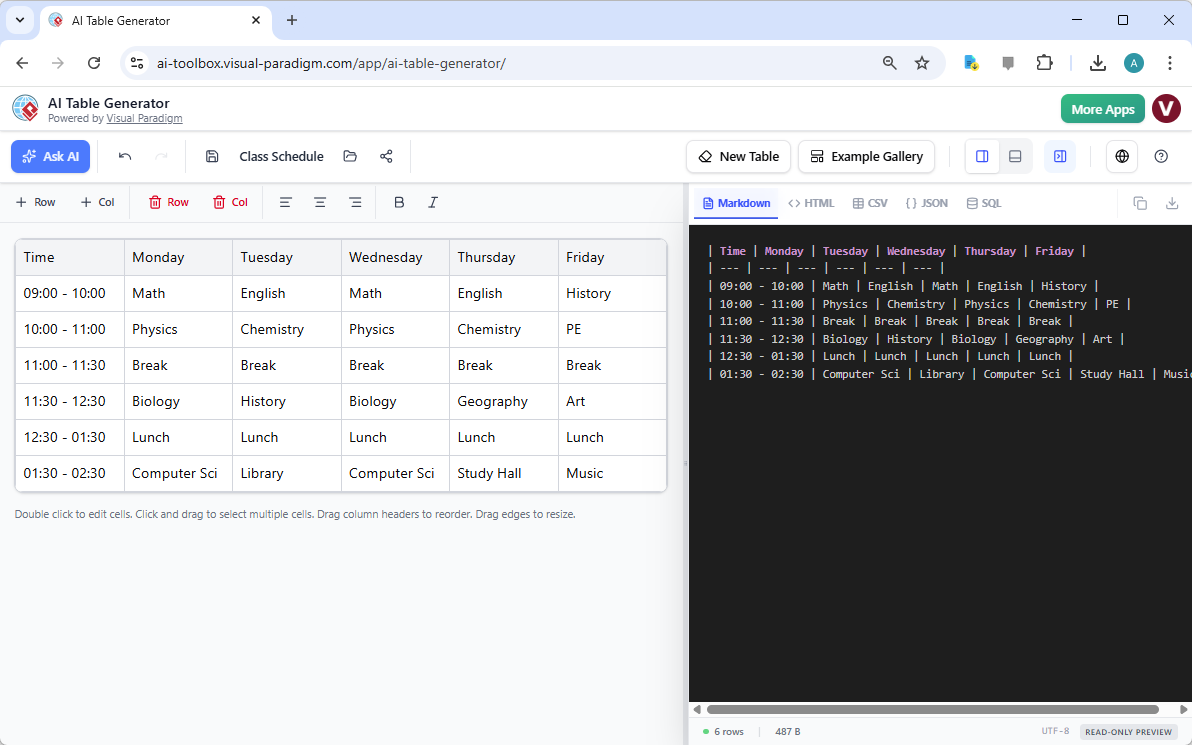
The interface of the AI Table Generator is designed for immediate clarity and control. A prime example of its capability is the creation of a detailed class schedule. The visual editor on the left allows for intuitive data entry, mimicking familiar spreadsheet software. In the displayed scenario, a student or administrator has organized a weekly curriculum. Rows define precise time slots, ranging from 09:00 to 02:30. Columns clearly delineate the days of the week. Specific subjects such as Math, Physics, and Computer Science populate the cells. This visual approach eliminates the cognitive load associated with raw coding.
Simultaneously, the right-hand panel provides a real-time translation of this visual data. It displays the corresponding code, ensuring total transparency in the generation process. The screenshot specifically highlights the “Markdown” format. Here, the visual grid is instantly rendered into clean, syntax-perfect Markdown text. The pipes and dashes are aligned with mathematical precision. This dual-pane view ensures that the user maintains complete control over both the content and the technical output. It represents a seamless workflow for technical writers and educators.
Accelerating Workflows with Artificial Intelligence
The core strength of this AI-powered table editor lies in its generative engine. Manual data entry is often prone to errors and inefficiency. The “Ask AI” feature revolutionizes this process. A user simply inputs a prompt describing the desired outcome. For instance, requesting a “weekly class schedule with science and humanities subjects” triggers the engine. The AI instantly populates the grid with relevant rows, columns, and sample data. This feature drastically reduces the time required to initiate a project. It transforms a blank canvas into a fully structured table in seconds.
This capability extends beyond simple schedules. It accommodates complex datasets for research, business analysis, and software documentation. The AI understands context and structure. It predicts necessary headers and data types. This intelligent automation allows users to bypass the initial setup phase. They can immediately proceed to refinement and analysis. It is a tool built for high-velocity professional environments.
Versatile Export Options for Developers and Analysts
Data rarely exists in isolation. It must be portable and adaptable to various platforms. The AI Table Generator excels in its export capabilities. The interface displays a robust selection of formats above the preview panel. While the example showcases Markdown, users can instantly toggle between HTML, CSV, JSON, and SQL. This flexibility is critical for software developers and data analysts. A schedule created for a visual presentation can be instantly converted into a JSON object for a web application.
Consider the “SQL” option. A database administrator can generate a table of sample data visually. With one click, the tool converts this grid into executable INSERT statements. This eliminates the repetitive task of writing boilerplate SQL code. Similarly, technical writers can generate HTML tables for web documentation without grappling with complex tags. The “Copy” and “Download” buttons facilitate immediate integration into external projects. This professional data tool acts as a universal translator for structured information.
Refining Structure with Precision Tools
AI generation provides a powerful starting point. However, meticulous refinement is often necessary. The application includes a comprehensive “Structure and Formatting Toolbar.” Users can manipulate the grid with granular precision. Rows and columns can be added or removed with a single click. Text alignment can be adjusted to ensure readability. Important data points can be emphasized using bold or italic styling. These adjustments are immediately reflected in the code preview.
The “Example Gallery” offers further support. It provides pre-configured templates for common use cases. Users can load a template and customize it to their specific requirements. This feature, combined with the intuitive grid editor, ensures that the final output is flawless. The ability to undo and redo actions encourages experimentation. Users can refine their tables until they meet exact specifications. It is a comprehensive environment for data structuring.
Conclusion
Visual Paradigm’s AI Table Generator represents a significant advancement in data management tools. It successfully merges the intuitive nature of spreadsheets with the power of code generation. By automating the creation of formats like Markdown and SQL, it serves a diverse range of professionals. From creating academic schedules to populating databases, the tool delivers speed and accuracy. It is an essential asset for anyone seeking to streamline their documentation and data handling workflows.
Ready to transform your data management workflow?
Experience the efficiency of AI-driven table creation today. Visit the tool and start generating professional tables instantly: Try the AI Table Generator Now.
Related Resources
- AI Table Generator – Visual Paradigm: A tool that uses artificial intelligence to generate structured tables from input data or descriptions, enhancing data modeling and documentation workflows.
- AI Table Generator – ai-toolbox.visual-paradigm.com: Trial includes full access to table creation and editing, but premium features such as save, load, share, export and AI generation will be disabled.