




Mastering Strategic SWOT Analysis: Create Dynamic Diagrams with AI-Powered Markmap Studio
Learn how to create dynamic SWOT analysis diagrams using Visual Paradigm's AI-Powered Markmap Studio. Transform text into professional mind maps instantly.
Let’s be honest: traditional brainstorming can feel a bit like herding cats. You have brilliant ideas, but trying to organize them with a clumsy drag-and-drop interface often kills your momentum. Enter Visual Paradigm’s AI-Powered Markmap Studio, an intelligent online tool that fundamentally changes how we visualize information. Instead of wrestling with layout alignment, you simply type, and the software handles the rest.
Whether you are a project manager mapping out a quarterly review or a developer structuring documentation, this AI-powered mind map generator transforms plain text into professional diagrams instantly. In this guide, we’ll explore how to use this tool to build a comprehensive SWOT analysis, leveraging the power of Markdown and artificial intelligence to clarify your strategic thinking.
Quick Summary: Why Use Markmap Studio?
- Instant Visualization: Converts Markdown text into interactive mind maps in real-time.
- Focus on Content: No manual formatting required; just type your hierarchy and let the engine handle the layout.
- Rich Media Support: Supports tables, checkboxes, emojis, and links directly within the diagram nodes.
- AI Intelligence: Features tools to both generate new ideas and summarize existing maps into clear executive briefs.
- Universal Export: Save your work as high-quality SVG images or standard Markdown files for use anywhere.
From Text to Visuals: The Live Split-Screen Editor
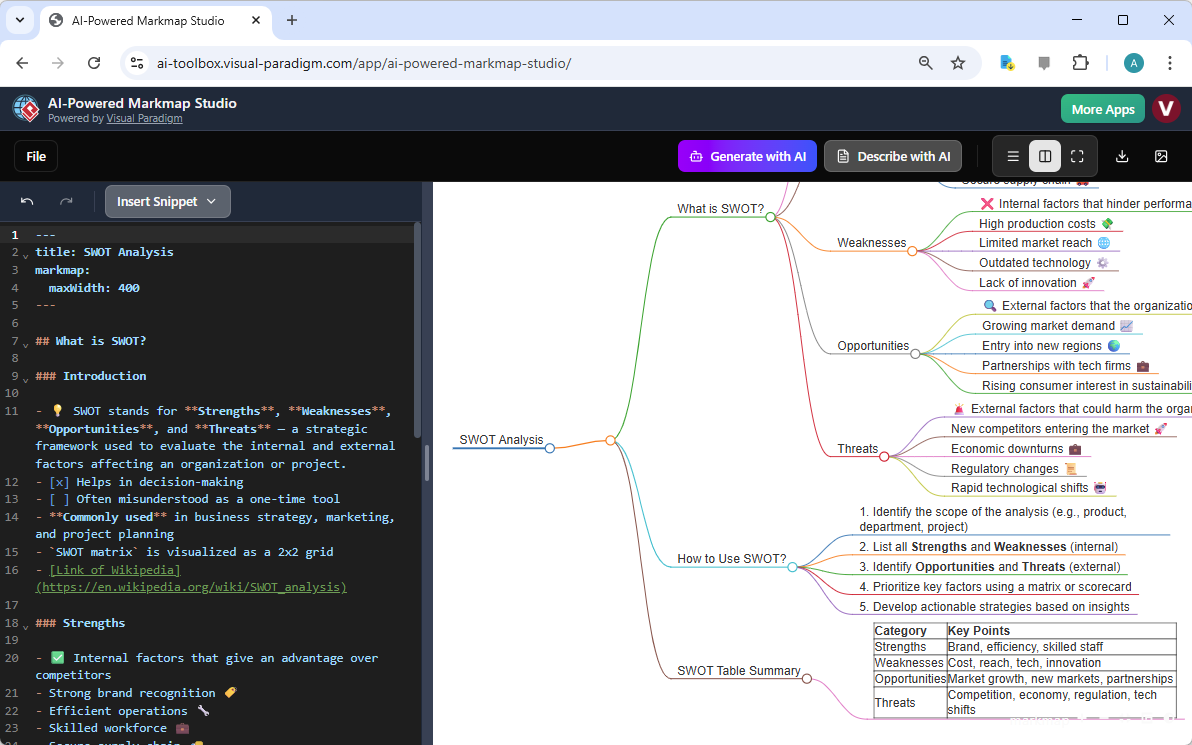
The core magic of the AI-Powered Markmap Studio lies in its live split-screen editor. As you can see in the example below, the interface is clean and intuitive. On the left, you have a standard text editor where you write in Markdown—a simple way to format text using hash symbols for headings and hyphens for lists. On the right, the tool renders a beautiful, interactive mind map that updates with every keystroke.
In this specific example, we are building a SWOT Analysis (Strengths, Weaknesses, Opportunities, Threats). Notice how the hierarchical text on the left immediately translates into a color-coded, branched diagram on the right. You don’t need to draw lines or create bubbles manually. If you want to add a “Weakness,” you simply type it into the editor list, and it pops up on the canvas. This markdown to mind map workflow ensures your brain stays in “creator mode” rather than “designer mode.”
Beyond Basic Bubbles: Rich Formatting Features
Looking closely at the SWOT analysis above, you’ll notice this isn’t your average mind map. The studio supports advanced syntax that elevates your diagram from a simple outline to a data-rich presentation.
- Integrated Tables: Notice the “SWOT Table Summary” branch? You can actually write a standard Markdown table in the editor, and it renders perfectly inside the node. This is a game-changer for comparing data points directly within the visual structure.
- Interactive Checkboxes: By using standard task syntax (
- [ ]or- [x]), you can add checkboxes to your nodes. This turns a static diagram into a functional checklist for project tracking. - Visual Flair with Emojis: The tool renders emojis natively. Adding a rocket ship 🚀 to “Innovation” or a warning sign ⚠️ to “Threats” makes the diagram instantly more readable and engaging.
Understanding Your Strategy: The “Describe with AI” Feature
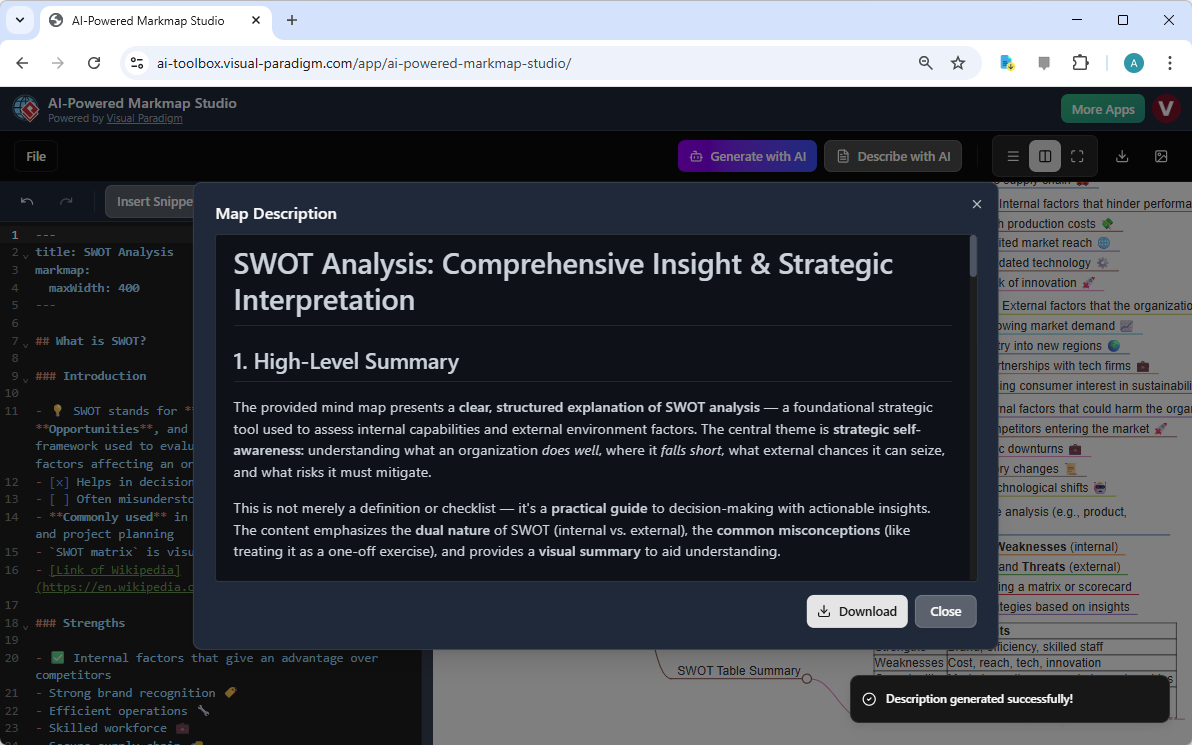
Creating the map is only half the battle; understanding the implications of your data is where the real value lies. This is where the “AI” in AI-Powered Markmap Studio truly shines. Once you have populated your diagram, you don’t need to write a separate report explaining it. The tool includes a powerful AI Mind Map Describer.
By clicking the “Describe with AI” button, the engine analyzes the structure, hierarchy, and content of your current mind map. It then generates a coherent, natural language summary of your project. In the image below, you can see how the AI has ingested the SWOT analysis we created and produced a “High-Level Summary.” It identifies the core theme—strategic self-awareness—and highlights the dual nature of internal vs. external factors found in the map.
Why Automated Summaries Matter
This feature transforms the tool from a simple online diagram editor into a strategic assistant. For business analysts and students, this capability offers two distinct advantages:
- Executive Reporting: You can instantly generate a text-based executive summary to accompany your visual presentation without writing it from scratch.
- Logic Checking: Reading the AI’s interpretation of your map helps you verify if your structure makes sense. If the summary feels off, your map might need restructuring.
Effortless Export and Sharing
Once your masterpiece is complete—verified by AI and beautifully formatted—you aren’t locked into the platform. The studio emphasizes portability. You can export your visual as a scalable SVG image, perfect for dropping into PowerPoint presentations or printing on large posters without losing quality. Alternatively, you can download the source Markdown file, keeping your data in a universal text format that developers and writers love.
For those working in teams, the cloud-based nature of the tool allows you to save your project online and generate a shareable link. This allows colleagues to view the interactive version of your SWOT analysis in their own browsers, fostering better collaboration.
Conclusion
The AI-Powered Markmap Studio by Visual Paradigm bridges the gap between structured thinking and visual communication. It eliminates the friction of design, allowing you to build complex diagrams like SWOT analyses, project roadmaps, and study guides simply by typing. With the added layer of AI intelligence to summarize and interpret your work, it is an essential tool for anyone who wants to think faster and clearer.
Ready to transform your ideas into professional diagrams in seconds? Stop drawing and start typing today.
Try the AI-Powered Markmap Studio Now
Related Resources
- AI-Powered Markmap Studio | Instant AI Mind Mapping from Markdown: Generate professional mind maps in seconds using AI. Combine the power of Markdown with interactive visual styling, KaTeX math support, and smart topic generation.
- Markmap Universe Visualize your Markdown anywhere in the…: Markmap Universe is a community that develops tools based on Markmap .This is not the official Markmap website. If you’re looking for the official project, please visit markmap .js.org.
- AI-Powered Markmap Studio – Visual Paradigm: AI-Powered Markmap Studio. Create beautiful mind maps with AI assistance … Get the most out of AI-Powered Markmap Studio with a paid license.