




Visualizing Video Streaming and E-Commerce Architectures: A Guide to AI Deployment Diagram Generation in Visual Paradigm
Create professional AI deployment diagrams in Visual Paradigm. Use AI Chatbot to generate UML architectures for video streaming and e-commerce instantly.
Are you tired of manually dragging boxes and drawing tiny arrows just to document your system’s physical infrastructure? Finding the best AI-powered deployment diagram software can feel like a daunting task, but Visual Paradigm is here to revolutionize your workflow! Imagine describing a high-traffic video streaming service or a complex retail platform in plain English and watching the nodes, artifacts, and execution environments assemble themselves in seconds. This isn’t just a futuristic dream—it’s the high-energy reality of AI deployment diagram generation. Whether you’re a solution architect mapping out AWS instances or a DevOps engineer visualizing Docker containers, these innovative tools handle the heavy lifting so you can focus on high-level strategy rather than pixel-perfect alignment.
Key Takeaways for Modern Architects
-
Speed up your workflow: Go from a text description to a standards-compliant UML diagram in under a minute.
-
Conversational modeling: Use the AI Chatbot to iterate on designs simply by talking to it.
-
Professional accuracy: Automatically apply <<device>>, <<executionEnvironment>>, and <<artifact>> stereotypes.
-
Seamless integration: Effortlessly move from AI-generated drafts to deep, professional modeling in Visual Paradigm Desktop.
-
Versatile support: Generate over 40 types of diagrams including UML, C4, ArchiMate, and SysML.
The Power of Conversational Diagramming with the AI Chatbot
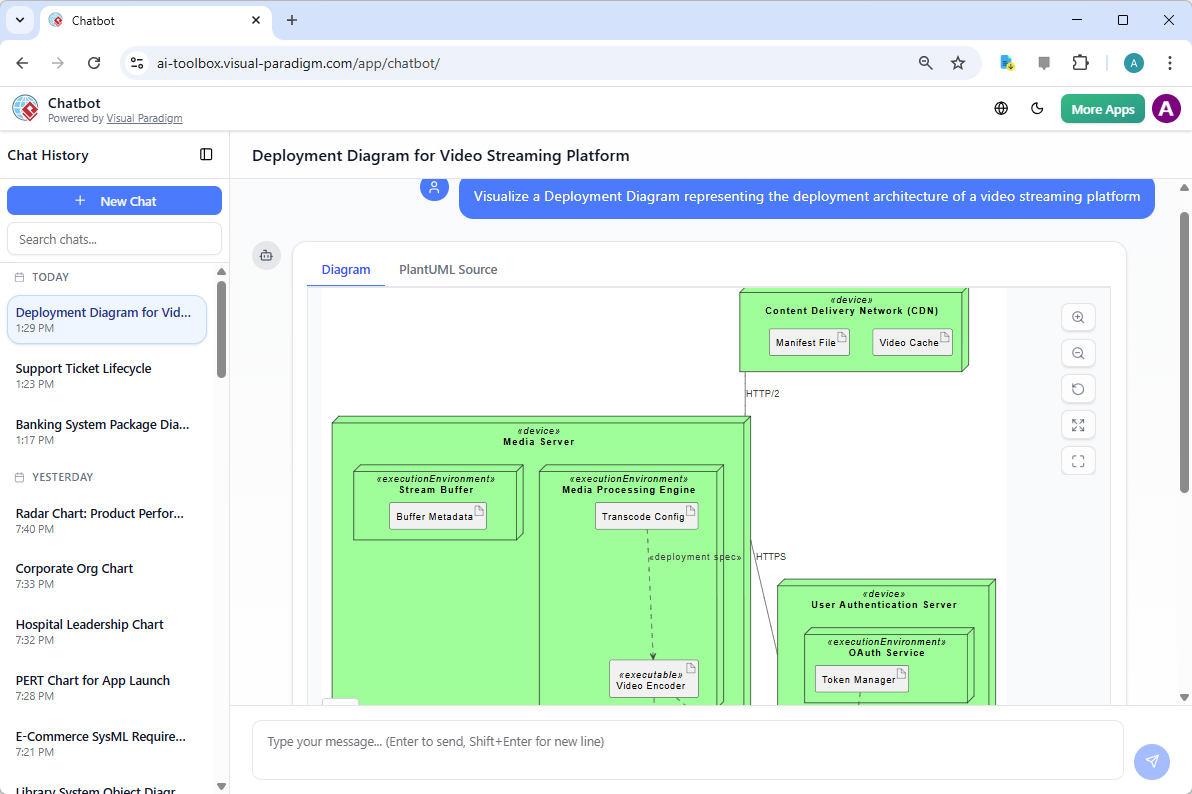
Sometimes, you just need to brainstorm. That’s where the Visual Paradigm AI Chatbot shines as your professional online diagram maker. It functions as a brilliant conversational partner that understands the technical nuances of your requests. If you ask it to visualize a deployment architecture for a global video streaming platform, it doesn’t just give you a generic chart. It identifies specific components like Content Delivery Networks (CDNs), Media Processing Engines, and User Authentication Servers, arranging them into a logical, hierarchical structure that makes sense to any technical stakeholder.
In the chatbot interface, the process feels incredibly natural. You type a prompt, and the AI streams the response in real-time, building the visual model before your eyes. In a recent session focusing on a video streaming platform, the chatbot successfully mapped out a Media Server containing a Stream Buffer and a Media Processing Engine, complete with manifest files and transcode configurations. It even correctly identified the communication paths, such as HTTP/2 connections between the CDN and the media server, ensuring the technical accuracy required for professional documentation.
Why the AI Chatbot is a Game-Changer
The beauty of this easy-to-use AI diagramming app is its ability to handle iterative refinements. Did the AI miss a specific database cluster? Just tell it! You can say, “Add a redundant PostgreSQL cluster in the data tier,” and the chatbot will update the visual instantly. This conversational flow democratizes complex analysis, allowing project managers and consultants who might not be UML experts to create professional-grade visuals for their teams. It’s all about focusing on the “what” and “why” of your architecture while the AI handles the “how” of the modeling notation.
Desktop Excellence: Professional AI Deployment Diagram Generation
For those who require the robust, deep-modeling capabilities of a dedicated environment, Visual Paradigm Desktop takes AI deployment diagram generation to the next level. The desktop application integrates generative AI directly into its core toolkit, allowing you to trigger complex diagram builds from the “Tools” menu. This is particularly useful when you’re working on enterprise-scale projects that require tight integration with other UML models, requirements, or code engineering workflows.
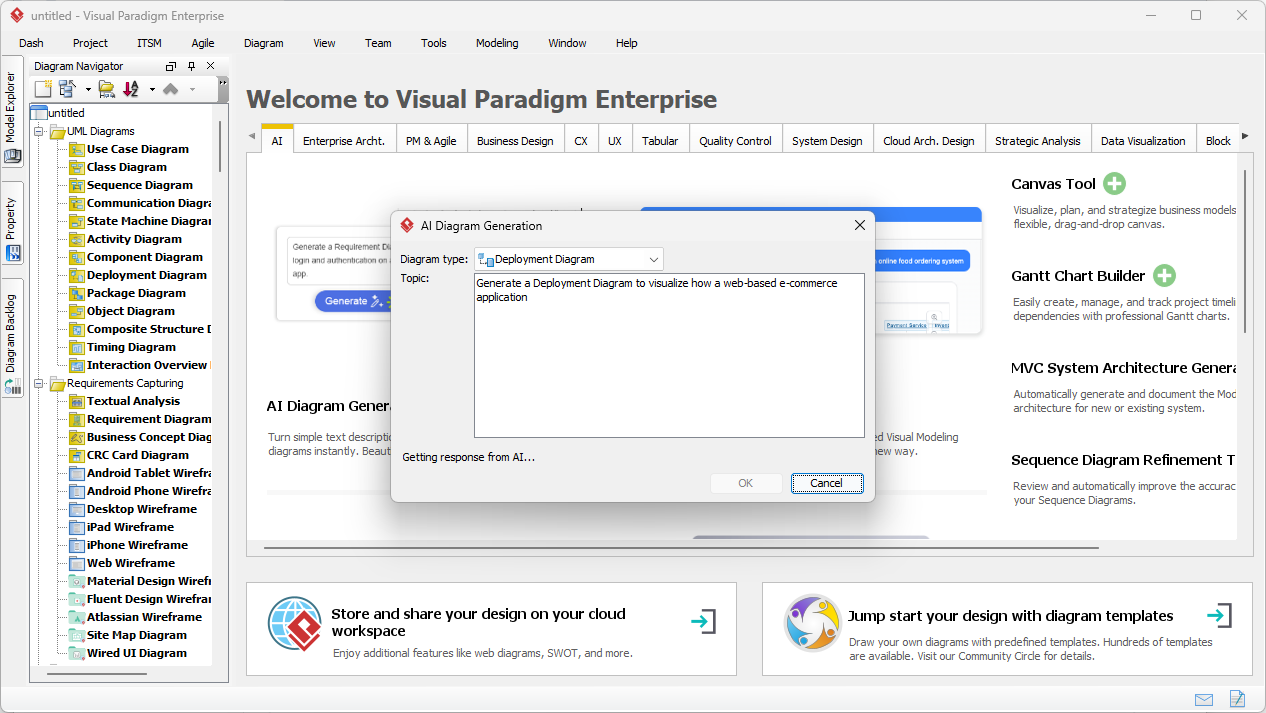
When you open the AI Diagram Generation window in the desktop app, you’re greeted with a clean, focused prompt area. You select your diagram type—in this case, a Deployment Diagram—and provide a topic or system description. For example, a user might enter: “Generate a Deployment Diagram to visualize how a web-based e-commerce application is deployed.” This simple sentence sets off a chain of intelligent inferences where the AI identifies the necessary hardware devices and software components needed for a modern retail stack.
From Prompt to Physical Architecture in Seconds
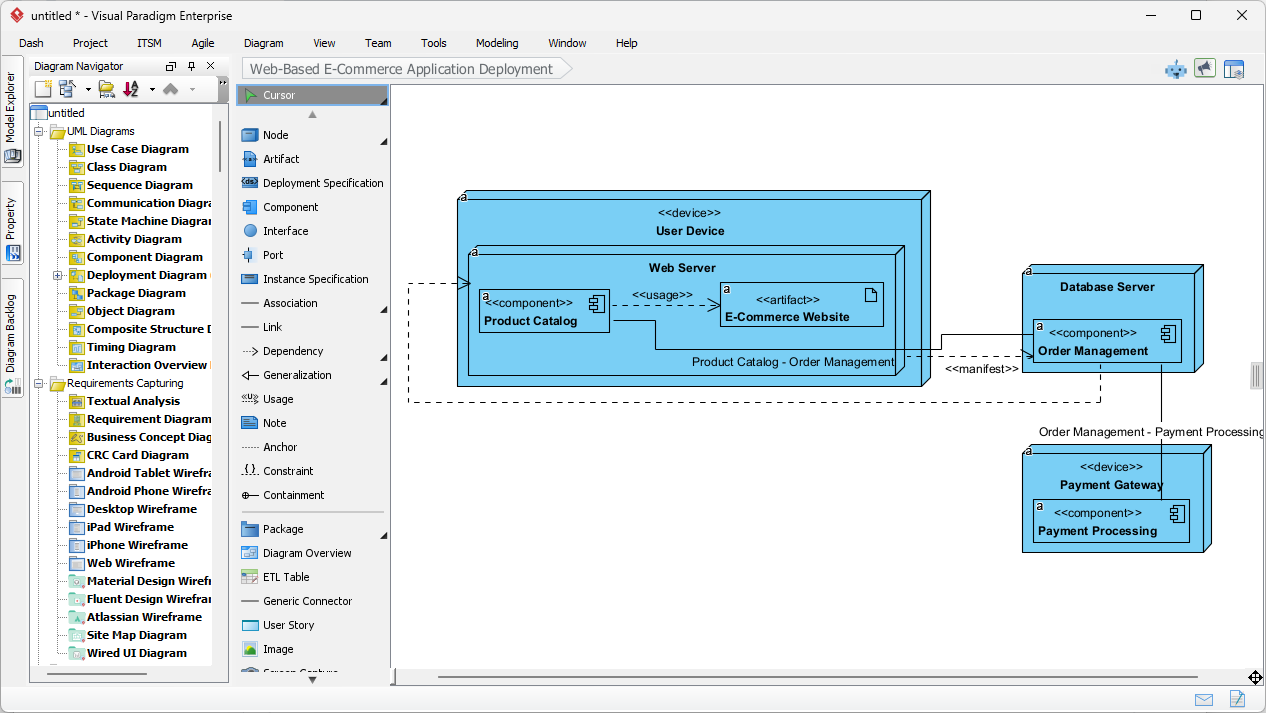
Once you click “OK,” the transformation is spectacular! The AI analyzes the e-commerce prompt and produces a fully editable, native Visual Paradigm diagram. It doesn’t just draw static shapes; it creates real Node and Artifact elements. In an e-commerce scenario, the result typically features a User Device hosting a Web Server, which in turn contains artifacts like the Product Catalog and the E-Commerce Website itself. The AI even goes further, identifying the backend Database Server and external Payment Gateways, connecting them with appropriate dependency and manifest relationships.
This output is an excellent starting point that typically accounts for 80% of the modeling effort. Because it’s a native diagram within the desktop editor, you have 100% control over the remaining 20%. You can manually refine the layout, add specific port numbers, or link these nodes to existing component diagrams within your project. It’s the perfect blend of AI-powered speed and human-guided precision, ensuring your architectural documentation is both fast and flawlessly accurate.
Why Visual Paradigm is the Best AI Visual Modeling Software
Visual Paradigm isn’t just a one-trick pony; it is an all-in-one visual modeling solution. While its AI deployment diagram generation is world-class, the ecosystem supports a staggering array of standards. From UML (Class, Sequence, Use Case) to Enterprise Architecture (over 20 ArchiMate viewpoints) and System Design (C4 models), the AI integration spans the entire development lifecycle. This versatility makes it the best professional diagramming tool for teams that need to maintain consistency across different technical domains.
The synergy between the AI Chatbot and the Desktop application is what truly sets it apart. You can brainstorm a strategy in the cloud via the chatbot, then import those insights into the desktop app for formal modeling. This seamless workflow ensures that no great idea is lost in transition. Whether you are creating a simple Mind Map for a feature brainstorm or a complex SysML Internal Block Diagram for an engineering project, the AI acts as a force multiplier for your expertise.
Smart Features for Smart Teams
-
Intelligent Layouts: The AI doesn’t just drop elements; it organizes them logically for maximum readability.
-
Domain-Specific Agents: Specialized AI “experts” are engaged depending on whether you’re asking for a business SWOT analysis or a technical sequence diagram.
-
Global Collaboration: Use the “Session Sharing” feature to send a read-only snapshot of your AI-generated architecture to stakeholders for instant feedback.
-
Multi-Language Support: Communicate with the AI in your preferred language, making complex modeling accessible to global teams.
Conclusion: Step into the Future of Modeling
Documentation should never be the bottleneck of your innovation. By leveraging AI deployment diagram generation, you can transform the way your team visualizes physical architecture. From the rapid-fire brainstorming of the AI Chatbot to the deep, technical precision of Visual Paradigm Desktop, you now have the tools to create professional UML models faster than ever before. Don’t let a “blank canvas” slow you down—let AI provide the foundation so you can build the future!
Ready to Automate Your Architecture?
Experience the most advanced AI diagramming software today! Whether you want to try the conversational chatbot or dive into the professional desktop suite, getting started is easy.
-
Experience the AI Chatbot: Head over to the Visual Paradigm AI Chatbot to start your first conversational modeling session right now!
-
Download Visual Paradigm Desktop: For the full power of enterprise modeling with AI acceleration, visit the Visual Paradigm Download Page and take your system design to the next level.
Related Links
UML deployment diagrams provide a visual representation of software system architecture and hardware configurations, allowing teams to model component distribution, leverage AI-powered generation, and ensure system scalability within a collaborative design environment.
-
What is a Deployment Diagram? A Complete Guide to UML Deployment Diagrams: This guide serves as a comprehensive introduction to the purpose, components, and best practices for modeling software system architecture using deployment diagrams.
-
Deployment Diagram Features in Visual Paradigm Software: this article highlights powerful features such as drag-and-drop modeling and real-time collaboration for creating professional UML models.
-
Visual Paradigm User Guide: Creating Deployment Diagrams: A detailed manual providing instructions on how to create and customize deployment diagrams using advanced software tools.
-
Deployment Diagram in the Software Design Handbook: This handbook entry provides practical insights into designing scalable and maintainable software systems through effective architectural modeling.
-
Step-by-Step Tutorial: Creating Deployment Diagrams with Visual Paradigm: A hands-on tutorial that covers the essential elements of deployment diagrams, including nodes, artifacts, and real-world relationships.
-
Deployment Diagram Examples in Visual Paradigm Gallery: A curated collection of real-world examples intended to inspire and guide system architecture modeling projects.
-
How to Create a UML Deployment Diagram for Cloud Apps with AI: This resource explains how to efficiently generate diagrams for cloud-based applications using AI-powered design tools.
-
How to Draw a Deployment Diagram in UML: Step-by-Step Tutorial: A comprehensive walkthrough for drawing accurate diagrams that illustrate the relationships between system components.
-
Free Deployment Diagram Tool – Visual Paradigm Online: An overview of a web-based tool for modeling system deployment without the need for software installation.
-
Beginner’s Guide to Deployment Diagrams Using Visual Paradigm Online: An introductory guide for new users focused on modeling system deployment and infrastructure in a collaborative environment.