




Bringing Summer Vibes to Life: Creating a 3D Beachside Dialogue with AniFuzion
Master 3D animation with Visual Paradigm AniFuzion. Learn to build beachside scenes, customize avatars, and use AI text-to-speech for professional storytelling.
Have you ever had a brilliant idea for a story or a marketing scenario but felt completely blocked by the technical barriers of animation? You aren’t alone. Most of us imagine dynamic scenes—like a group of friends chatting on a sunny beach—but assume we need expensive cameras or complex coding skills to make it real. Fortunately, with the Visual Paradigm Animation Maker (also known as AniFuzion), creating professional-grade 3D narratives is no longer reserved for Hollywood studios. This powerful online animation tool allows beginners and pros alike to drag, drop, and direct scenes right from their browser.
In this guide, we are going to deconstruct a specific example: a lively beachside conversation between four characters. By analyzing this scene, we will explore how you can use this easy-to-use animation software to build environments, customize 3D avatars, and sync dialogue effortlessly. Whether you are an educator explaining environmental science or a marketer setting a relaxing mood for a product reveal, mastering these tools can transform your content strategy.
Quick Summary: Key Takeaways
- Effortless Scene Building: Use pre-made backgrounds and props to set the stage instantly.
- AI-Powered Dialogue: Generate voiceovers with AI Text-to-Speech and enjoy automatic lipsync.
- Drag-and-Drop Simplicity: No rigging required; simply drag 3D characters onto the canvas.
- Dynamic Actions: Apply pre-built movements like waving or talking from a vast motion library.
- Versatile Exporting: Share your story as an MP4 video or an interactive flipbook.
Deconstructing the Scene: Sun, Sand, and Socializing
Let’s look closely at the visual example provided. We see a vibrant, 3D animated scene set against a calming coastal backdrop. Four distinct characters are gathered on the golden sands, dressed in swimwear, clearly enjoying a vacation setting. To the right, a blue-and-white striped umbrella adds a prop detail that gives the scene depth and context. The focus, however, is on the interaction. One character is speaking, indicated by a sleek speech bubble that reads, “Absolutely! I love the sound of the waves. Want to go for a swim?”
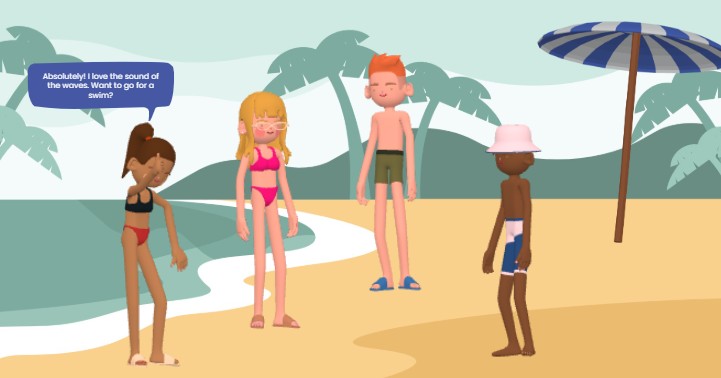
This snapshot perfectly illustrates the capabilities of the best online animation editor for storytelling. It isn’t just a static image; it represents a frozen moment of a dynamic video. The palm trees in the background likely sway gently, the water ripples, and the characters shift their weight or gesture as they speak. Creating this level of detail might sound daunting, but with AniFuzion’s drag-and-drop interface, it is surprisingly intuitive. You act more like a director placing actors on a set than a technician manipulating polygons.
Setting the Stage with Smart Environments
The foundation of any great animation is the setting. In our example, the beach environment provides immediate context. With Visual Paradigm’s tool, you don’t need to draw every grain of sand or leaf on the palm tree. The software comes equipped with a massive library of ready-to-use scenes and templates.
To recreate this, you would simply open the editor, navigate to the background library, and select a “Beach” or “Nature” theme. If you want to customize it further—perhaps moving the palm trees to frame the characters better or adding a beach ball prop—you can do so with a few clicks. This scene-building capability solves the problem of “blank canvas syndrome,” allowing you to establish the mood of your story in seconds.
Casting Your Digital Actors: The 3D Character Library
One of the most engaging aspects of the image is the diversity of the characters. We have four unique individuals, each with different hair colors, skin tones, and swimwear. This variety is made possible through the extensive 3D character library within the tool. Unlike flat 2D images, these characters have depth and volume, making the scene feel immersive.
If you were building this project, you would drag a base character onto your canvas and then use the customization properties to tweak their appearance. You can mix and match body parts, change clothing textures, and adjust colors to fit your narrative. This is particularly useful for businesses creating onboarding materials or educational videos where representation matters. You can build a cast that reflects your audience without needing to model anything from scratch.
Bringing Dialogue to Life with AI Technology
The speech bubble in the image—”Want to go for a swim?”—hints at one of the most powerful features of AniFuzion: AI Text-to-Speech (TTS). While speech bubbles are great for silent flipbooks, this tool takes it a step further for video formats.
The Magic of Automatic Lipsync
When you type that script into the TTS panel and select a voice (perhaps a cheerful, young adult voice to match the beach vibe), the software doesn’t just generate audio. It utilizes automatic lipsync technology. This means the character’s mouth movements will automatically align with the spoken words. You don’t need to manually keyframe the jaw opening and closing. This feature adds a layer of realism that keeps viewers engaged and makes the characters feel like they are truly conversing.
Animating Movement: No Keyframes Needed
Notice the posture of the characters in the visual. They aren’t standing stiffly like statues; they have natural stances. The character on the far left appears to be in the middle of a gesture, perhaps brushing sand off or emphasizing a point. In traditional animation, creating these movements requires complex “rigging” and hours of adjusting bones.
With this professional animation maker, you utilize a library of over 2,000 pre-built actions. To make the girl speak and gesture, you would simply select her, browse the action library for “Talking” or “Casual Gesture,” and drag that motion onto her timeline track. You can even use motion retargeting to apply the same dance move or wave to characters of different sizes, ensuring consistent animation across your entire cast.
Why Use Animated Storytelling?
Why go through the trouble of creating a 3D beach scene instead of just using a stock photo? The answer lies in audience engagement. Whether you are creating a marketing video or an internal training module, animated content holds attention significantly longer than static text or images.
By using a tool like AniFuzion, you are leveraging the power of visual storytelling to make your message memorable. The friendly, inviting nature of 3D cartoons lowers the cognitive load for the viewer, making complex messages easier to digest—or in this case, making a simple invitation to swim feel warm and inviting.
Conclusion
The beachside dialogue we analyzed is more than just a fun picture; it’s a testament to how accessible animation has become. With Visual Paradigm’s AniFuzion, the barriers to entry—cost, technical skill, and time—have been dismantled. You can build lush environments, cast diverse 3D characters, and give them a voice with AI tools, all within a user-friendly online interface. Whether you are a teacher, a marketer, or just a creative soul, the ability to bring your ideas to life is now at your fingertips.
Ready to create your own animated masterpiece? Dive in and start experimenting with pre-built templates today.
Get started with an animation template here
Related Links
- Mastering Anifuzion: A Comprehensive Guide to Creating Professional Animations: This in-depth guide walks users through the core features and advanced techniques of Anifuzion, empowering creators to produce polished, professional-grade animations with ease.
- Creating Seamless Animations in Anifuzion with Automatic Motion Retargeting: Discover how Anifuzion’s automatic motion retargeting enables smooth, realistic animations across different character models with minimal manual effort.
- Unlock Your Creativity with Anifuzion: What It Is and Why You Should Use It: A creative-focused overview explaining how Anifuzion empowers designers and animators to bring ideas to life with intuitive, powerful animation tools.
- Anifuzion Feature Overview: Advanced Animation Capabilities: An interactive overview of Anifuzion’s key animation features, highlighting its capabilities for creating dynamic, interactive, and professional animations.
- Anifuzion Features: Power Tools for Dynamic Animation Creation: Explore the full suite of Anifuzion’s innovative features designed to streamline and enhance the animation creation process for designers and developers.
- Getting Started with Anifuzion: Your First Steps to Animated Design: A beginner-friendly tutorial that introduces new users to Anifuzion’s interface, core functions, and foundational skills for creating engaging animations.