




Staging a 3D Animal Fashion Show with AniFuzion Animation Maker
Learn how to create a professional 3D animal fashion show using AniFuzion Animation Maker. Use drag-and-drop tools, 3D characters, and automated motion.
Modern digital storytelling requires tools that bridge the gap between imagination and technical execution. Whether you are an educator, a marketer, or a creative enthusiast, the ability to produce high-quality animated content is a significant asset. With Visual Paradigm Animation Maker (AniFuzion), users can transform abstract concepts into vivid realities without needing complex coding or traditional design skills. This online animation software empowers creators to build professional-grade scenes, such as the whimsical fashion show depicted below, using an intuitive drag-and-drop interface. By leveraging extensive libraries and AI-powered features, you can produce engaging videos that capture audience attention immediately.
Key Takeaways: Creating with AniFuzion
- Effortless Scene Building: distinct backgrounds and props, like stage lights and pillars, can be arranged via a simple drag-and-drop system.
- Instant 3D Character Customization: Access thousands of characters and costumes, including unique assets like animal onesies, without modeling from scratch.
- Automated Motion Control: Apply pre-built actions such as walking or waving to characters, eliminating the need for manual keyframing.
- Professional Lighting Effects: Utilize shape effects and scene templates to create depth and focus, enhancing the visual quality of your presentation.
Analyzing the Scene: From Concept to Runway
The visual asset provided demonstrates the capability of AniFuzion to handle specific, thematic storytelling. The image captures a moment from a digital fashion show, featuring a 3D character dressed in a pink animal onesie. The character is positioned in mid-stride, showcasing a confident walk cycle that suggests movement and rhythm. The environment is carefully constructed to mimic a professional runway, complete with vertical white pillars that frame the scene and overhead spotlights casting distinct beams of light onto the teal floor. This setup directs the viewer’s focus squarely on the animated subject, creating a clean and professional composition.
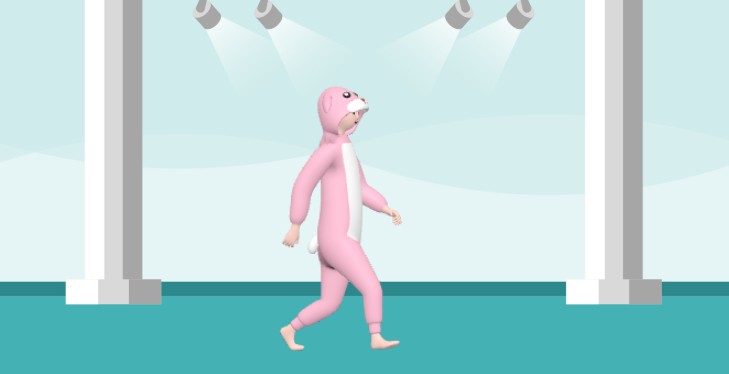
This snapshot illustrates the seamless integration of 3D character models within a 2D-styled environment. The character’s posture—upright with a forward gaze—indicates the use of a specific motion preset designed for catwalks or confident walking. The lighting effects are not merely decorative; they simulate a stage atmosphere, adding a layer of realism to the cartoon-style aesthetic. This balance between playful character design and structured environmental staging highlights the versatility of the animation maker tool.
Constructing Dynamic Animations with Ease
Creating a scene like the animal fashion show involves several core features of Visual Paradigm’s toolset. The process begins with the drag-and-drop interface, which allows users to place environmental elements like the pillars and floor rapidly. The spotlight effects are likely achieved using shape effects and animation presets, which can be applied to objects to simulate illumination or transparency. This eliminates the technical barrier usually associated with lighting setup in 3D software.
The central figure utilizes the Extensive 3D Character Library. Users can select a base model and customize its appearance, in this case, applying a specific costume texture to achieve the “pink onesie” look. The movement is generated through the Pre-Built Actions and Motion Library. Instead of animating each limb individually, the creator simply selects a “walk” action from the library and applies it to the timeline. The software handles the rigging and mechanics, ensuring the character moves naturally across the screen.
Enhancing Engagement Through Visual Storytelling
The primary benefit of using an easy-to-use animation creator like AniFuzion is the ability to boost audience engagement. A static image of a costume might convey the design, but an animated character walking down a runway creates a narrative. It adds personality and context, which helps viewers retain information better, whether the goal is educational entertainment or product marketing. The movement draws the eye, and the staged environment provides a context that static text simply cannot match.
Furthermore, this workflow significantly helps to save time and resources. constructing a similar scene in traditional animation suites would require modeling, rigging, texturing, and lighting setups that could take days. With AniFuzion’s ready-to-use scenes and props, the same result is achievable in minutes. This efficiency allows creators to focus on the story and the message rather than the technical hurdles of production.
Seamless Export and Distribution
Once the fashion show scene is complete, the final step involves sharing the creation. The tool offers versatile export options, allowing the project to be saved as an MP4 video or generated as an interactive flipbook. This flexibility ensures that the content is ready for various platforms, from social media feeds to embedded website content. The high-quality output ensures that the details—such as the character’s stride and the spotlight beams—remain crisp and professional on any device.
Ready to Create Your Own Runway?
Unlock the potential of digital storytelling and bring your unique ideas to the stage today. Whether you are designing a fashion show, an educational lesson, or a business presentation, Visual Paradigm Online provides the tools you need to succeed.
Subscribe to Visual Paradigm Online at:
https://online.visual-paradigm.com/subscribe.jsp
Related Resources
- Comprehensive Tutorial on Anifuzion: The Ultimate Animation Maker: This page provides a detailed technical guide on using Anifuzion to create high-quality animations with minimal effort.
- Solutions for Content Creators | Anifuzion: Anifuzion enables content creators to produce professional-grade animated visuals without requiring advanced animation skills.
- Comprehensive Guide to Creating Animated Videos with Anifuzion: This guide offers step-by-step technical instructions for generating animated videos using Anifuzion’s intuitive interface.
- A Beginner’s Guide to Creating Stunning 3D Animations with Anifuzion: Designed for newcomers, this guide explains how to produce visually impressive 3D animations using Anifuzion’s automated tools.
- How Anifuzion Empowers Non-Animators to Create Stunning Visuals: This article explains how Anifuzion leverages AI-driven automation to enable non-experts to produce high-quality visual content.
- Create Stunning Animations with Over 2000 Character Actions and …: Creating realistic dialogue has never been easier with AniFuzion’s automatic lipsync animation feature. Powered by AI, this tool syncs your character’s mouth …
- Discover AniFuzion: The Distinctive Animation Maker That Sets You …: What truly sets AniFuzion apart is its blend of versatility and creativity. With a rich library of customizable templates, 3D characters, and dynamic visual …