




Designing an Immersive Aquarium Field Trip with AniFuzion’s Animation Tools
Learn how to create immersive 3D aquarium animations for education using AniFuzion's powerful digital storytelling and animation tools.
In the field of education and digital storytelling, the ability to visualize complex environments is crucial for engagement. Whether you are a teacher planning a virtual lesson or a content creator illustrating a narrative, static images often fail to capture the dynamic nature of the real world. This is particularly true for subjects like marine biology, where movement is key. With Visual Paradigm Animation Maker (AniFuzion), creating a fully animated, three-dimensional scene becomes an accessible task for creators of all skill levels. By utilizing this powerful online animation software, you can transform a simple script into a vivid visual experience.
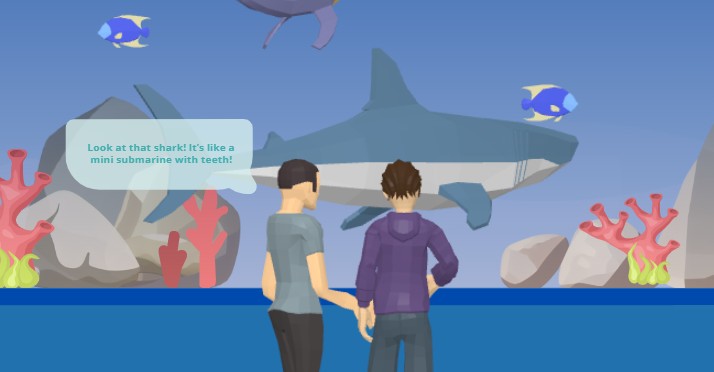
Consider the image below, which serves as an excellent example of what can be achieved. We see a snapshot of a virtual aquarium visit. Two 3D characters, appearing as students or visitors, stand in the foreground with their backs to the camera, observing a large exhibit. Inside the tank, a massive grey shark dominates the scene, swimming alongside smaller blue fish. The environment is enriched with details like jagged grey rocks and vibrant pink coral reefs, creating a sense of depth. A speech bubble appears above the characters, capturing a moment of discovery: “Look at that shark! It’s like a mini submarine with teeth!” This scene demonstrates how 3D character animation and environmental design come together to tell a story.
Quick Summary: Key Takeaways for New Creators
- Effortless Scene Building: Use the drag-and-drop interface to place backgrounds, props, and characters without complex coding.
- Rich Asset Libraries: Access thousands of 3D characters and props, such as the marine life and coral seen in the example.
- Automated Audio: Utilize AI Text-to-Speech (TTS) to convert dialogue bubbles into spoken word with automatic lipsyncing.
- Instant Animation: Apply pre-built actions to bring static models to life instantly.
Constructing the Environment: The Drag-and-Drop Interface
The foundation of any good animation is the setting. In the provided example, the creator has established an underwater atmosphere effectively. When using Visual Paradigm Animation Maker, you begin by selecting a background. For this specific scenario, a deep blue underwater backdrop sets the tone. The process is intuitive; the drag-and-drop interface allows you to pull elements directly onto the canvas.
To create depth, props are essential. Here, we see specific placement of grey stones and pink coral formations. These are not merely flat images but 3D assets that interact with the lighting and perspective of the scene. By layering these props—placing the coral in front of the rocks and the rocks in front of the background—you create a parallax effect that mimics a real aquarium tank. This scene composition is vital for making the animation feel immersive rather than flat.
Character Animation and Interaction
The core of the storytelling lies in the characters. In our aquarium scene, the two figures provide scale and perspective. AniFuzion offers an extensive 3D character library where you can select figures that suit your narrative, such as students, teachers, or casual observers. Once placed on the canvas, these characters are not static statues.
Using the pre-built actions and motion library, you can assign specific behaviors to these figures. For instance, you might choose an “idle” animation where they shift their weight naturally, or a “pointing” gesture to emphasize their interest in the shark. This eliminates the need for manual keyframing, a process that is traditionally difficult for beginners. You simply select the character, choose the action, and the animation software handles the fluid movement of limbs and posture.
Bringing Marine Life to Motion
The shark and the smaller blue fish represent the dynamic elements of the scene. In AniFuzion, animating non-human characters follows a similar workflow but often utilizes motion paths or specific creature animations. You can set the shark to swim across the tank in a loop, ensuring constant movement in the background. This continuous motion captures the viewer’s attention and adds realism to the “mini submarine” comparison made in the dialogue.
Enhancing Narrative with AI Audio Features
In the visual reference, we see a text bubble conveying the character’s thought. While text is effective, audio creates a stronger connection. Visual Paradigm Animation Maker integrates advanced AI Text-to-Speech (TTS) capabilities. Instead of relying solely on the speech bubble, you can input the script—”Look at that shark! It’s like a mini submarine with teeth!”—into the TTS panel.
The tool allows you to select from various voice accents and emotional tones. For a field trip scenario, you might choose a voice that sounds youthful and excited. Once the audio is generated, the automatic lipsync feature ensures that the character’s mouth movements match the spoken words perfectly. This synchronization adds a layer of professional polish that is often missing in amateur animations, making the educational content significantly more engaging for the audience.
Finalizing and Sharing Your Project
Once the scene is constructed, the characters are acting, and the audio is synced, the final step is distribution. The goal of using an online video maker is often to share knowledge. Whether you are presenting this in a classroom or embedding it in a digital textbook, AniFuzion provides versatile export options.
You can export the final project as a high-quality MP4 video file, ensuring compatibility with almost any media player. Alternatively, for a more interactive experience, you can publish it as a digital flipbook. This flexibility ensures that your animated educational content reaches your audience in the most effective format possible.
Conclusion
Creating a complex visual narrative, such as a class trip to an aquarium, no longer requires expensive studio equipment or years of training. By leveraging the Visual Paradigm Animation Maker (AniFuzion), educators and creators can build detailed 3D environments, animate characters with ease, and utilize AI-driven audio to tell compelling stories. From the placement of the coral props to the swimming motion of the shark, every element is designed to be accessible and customizable, empowering you to bring your creative visions to life.
To start creating your own animated stories and educational videos, subscribe to Visual Paradigm Online today.
Subscribe to Visual Paradigm Online
Related Resources
- Comprehensive Tutorial on Anifuzion: The Ultimate Animation Maker: This page provides a detailed technical guide on using Anifuzion to create high-quality animations with minimal effort.
- Solutions for Content Creators | Anifuzion: Anifuzion enables content creators to produce professional-grade animated visuals without requiring advanced animation skills.
- Comprehensive Guide to Creating Animated Videos with Anifuzion: This guide offers step-by-step technical instructions for generating animated videos using Anifuzion’s intuitive interface.
- A Beginner’s Guide to Creating Stunning 3D Animations with Anifuzion: Designed for newcomers, this guide explains how to produce visually impressive 3D animations using Anifuzion’s automated tools.
- How Anifuzion Empowers Non-Animators to Create Stunning Visuals: This article explains how Anifuzion leverages AI-driven automation to enable non-experts to produce high-quality visual content.
- Create Stunning Animations with Over 2000 Character Actions and …: Creating realistic dialogue has never been easier with AniFuzion’s automatic lipsync animation feature. Powered by AI, this tool syncs your character’s mouth …
- Discover AniFuzion: The Distinctive Animation Maker That Sets You …: What truly sets AniFuzion apart is its blend of versatility and creativity. With a rich library of customizable templates, 3D characters, and dynamic visual …
Related posts:
 Animating a Circus Performer on Stage: A Step-by-Step Guide with AniFuzion
 Creating 3D Fantasy Adventures: Storytelling with Visual Paradigm Animation Maker
 Designing Realistic Healthcare Scenarios: An AniFuzion Animation Guide
 Boost Property Sales: Create Dynamic Real Estate Animations with AniFuzion