




Creating a Dynamic Electric Devices Explainer with AniFuzion
Build captivating 3D animations with AniFuzion — no design skills needed. Sync voiceovers, mix 2D/3D, export as MP4 or flipbook.
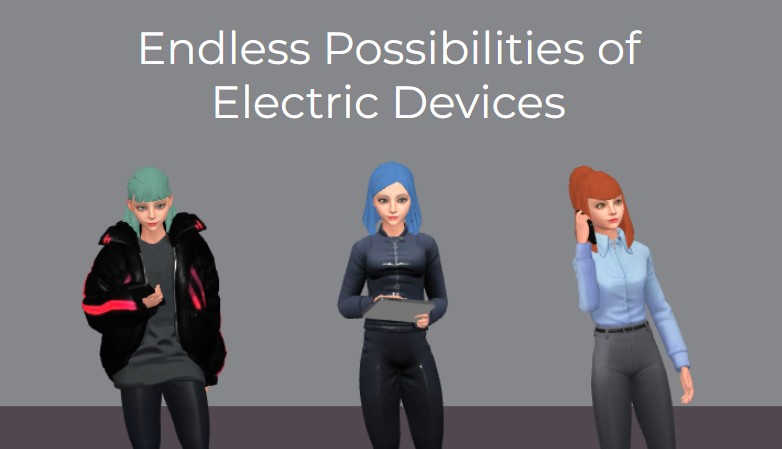
Imagine three distinct 3D characters, each with unique styles and poses, standing against a clean gray backdrop — one in a futuristic jacket, another in business attire holding a tablet, and a third with a thoughtful expression. This isn’t just any animation. It’s a snapshot of what you can create with AniFuzion, Visual Paradigm’s AI-powered animation maker. Whether you’re building a tech demo, a marketing explainer, or an educational guide, this tool turns your ideas into captivating visuals without needing design skills or software installs. The scene above? Just the beginning of your story.
What’s shown here is the power of AniFuzion: it lets you mix 2D and 3D elements, sync voiceovers with automatic lipsync, and export your work as MP4 videos or interactive flipbooks — all from your browser. You don’t need to be a pro. You don’t need to install anything. Just log in, drag and drop, and start creating. This isn’t just a tool — it’s your creative launchpad.
Why This Animation Matters: It’s Not Just Pretty — It’s Purposeful
Look at those three characters. They’re not random. Each one represents a different persona — casual tech enthusiast, professional presenter, and curious learner. That’s the magic of AniFuzion. You can build scenes that speak to your audience’s needs. You can create a product demo where one character holds a tablet, another gestures to explain features, and the third listens thoughtfully — all while the text “Endless Possibilities of Electric Devices” sets the tone. It’s not just about visuals. It’s about storytelling, engagement, and clarity.
What’s more, this kind of animation doesn’t just look good — it works. It holds attention longer than static slides or text. It makes complex ideas — like how electric devices work — easier to understand. And it’s built for real-world use: marketers, educators, HR teams, content creators — you name it. The tool is designed to fit into your workflow, whether you’re making a YouTube video, a training module, or a social media post.
How It Works: Drag, Drop, and Let the AI Do the Heavy Lifting
Let’s break down what’s happening in that snapshot. The characters? They’re pulled from Visual Paradigm’s extensive 3D character library — you can choose from cartoon, realistic, cyberpunk, or low-poly styles. You can customize their colors, textures, and even mix body parts. The blue-haired woman in the middle? She’s holding a tablet — that’s a prop you can add from the library. The woman on the right? She’s in a business outfit — that’s a scene template. The woman on the left? She’s wearing a jacket with red accents — that’s a style you can tweak.
And here’s the real kicker: you don’t need to manually animate every movement. You pick from over 2,000 pre-built actions — walking, talking, gesturing — and apply them to your characters. You can even retarget motions between different characters. No keyframing. No complex setups. Just drag, drop, and watch your characters come alive.
But wait — there’s more. The AI Text-to-Speech feature is already generating voiceovers with emotional tones and accents. You just type your script, and it creates the audio. Then, the automatic lipsync syncs the character’s mouth movements with the words — no manual tweaking required. That’s how you get a natural, lifelike performance in minutes.
Why This Tool Is a Game-Changer for Anyone
Let’s be honest — creating engaging content used to mean hiring designers, recording voiceovers, or investing in expensive software. Now? You can do it all in your browser. You can create a video that’s ready to share in under 10 minutes. You can build an interactive flipbook that users can flip through like a digital book. You can even export it as a social media post — no file needed, just a link.
And it’s not just for pros. Beginners? You’re welcome. You don’t need to know anything about animation. Just start with templates, use pre-built actions, and let the drag-and-drop interface guide you. You’ll build confidence, experiment boldly, and produce polished work — even as a novice.
Key Takeaways: What You Can Do With AniFuzion
- Build dynamic, 3D animations with no design experience required.
- Use pre-built characters, actions, and scenes to speed up your workflow.
- Sync voiceovers with automatic lipsync for natural, lifelike dialogue.
- Export as MP4 videos or interactive flipbooks — shareable via links or embeds.
- Use AI Text-to-Speech to generate high-quality narration in minutes.
- Customize characters with colors, textures, and body parts — no coding needed.
- Work from any device, anytime — no software installs, no downloads.
From Concept to Completion: How to Build This Scene
Let’s walk through how you’d create this exact scene — the “Endless Possibilities of Electric Devices” animation — using AniFuzion. It’s simple. Just follow these steps:
1. Start with a new project. Open Visual Paradigm Online, log in, and click “New Animation.”
2. Add characters. Drag three 3D characters from the library onto your canvas. Customize each one — change their colors, textures, or mix body parts. You can even rig them for more realistic movement if you want.
3. Add actions. Pick pre-built motions for each character — maybe one walks, one gestures, and one holds a tablet. Set the duration and preview the movement.
4. Add audio. Type your script into the TTS panel, choose a voice with a specific accent or emotion, and generate the audio. The lipsync will sync automatically.
5. Add props and backgrounds. Insert a tablet for the middle character, a simple gray background, and maybe a subtle lighting effect to make the scene pop.
6. Preview and export. Watch your animation in preview mode. Adjust timings if needed. Then export as MP4 or generate a shareable link for social media.
That’s it. You’ve just created a professional-grade animation in minutes. And you can do this for any topic — whether it’s a product demo, a training module, or a personal project.
Why This Tool Is Better Than Anything Else
There are tons of animation tools out there — some free, some paid, some with complex interfaces. But AniFuzion stands out because it’s designed for real users, not just developers. It’s built for educators who want to captivate students, marketers who need to boost engagement, and content creators who want to produce high-quality videos without hiring professionals.
It’s not just about features. It’s about ease. It’s about speed. It’s about making animation accessible to everyone — from beginners to pros. And it’s all done in your browser. No installs. No downloads. Just log in, create, and share.
And here’s the best part — you can use it for commercial projects. All outputs are yours to use — whether it’s for marketing, education, or personal use. You can even use premium assets for business use — no restrictions.
So if you’re looking to create engaging, professional-grade animations — whether for a product demo, a training module, or a social media post — AniFuzion is your answer. It’s not just a tool. It’s your creative partner.
Ready to Try It? Start Your Journey Today
Don’t wait. The best part? You can start for free. Just sign up for a Visual Paradigm Online account, and you’re instantly ready to create. You can build your first animation in minutes — no experience required, no software needed, no hassle.
Visit Visual Paradigm Online today and start creating your own dynamic, engaging animations. The possibilities are endless — and so is your creative potential.
Related Resources
- Comprehensive Tutorial on Anifuzion: The Ultimate Animation Maker: This page provides a detailed technical guide on using Anifuzion to create high-quality animations with minimal effort.
- Solutions for Content Creators | Anifuzion: Anifuzion enables content creators to produce professional-grade animated visuals without requiring advanced animation skills.
- Comprehensive Guide to Creating Animated Videos with Anifuzion: This guide offers step-by-step technical instructions for generating animated videos using Anifuzion’s intuitive interface.
- A Beginner’s Guide to Creating Stunning 3D Animations with Anifuzion: Designed for newcomers, this guide explains how to produce visually impressive 3D animations using Anifuzion’s automated tools.
- How Anifuzion Empowers Non-Animators to Create Stunning Visuals: This article explains how Anifuzion leverages AI-driven automation to enable non-experts to produce high-quality visual content.
- Create Stunning Animations with Over 2000 Character Actions and …: Creating realistic dialogue has never been easier with AniFuzion’s automatic lipsync animation feature. Powered by AI, this tool syncs your character’s mouth …
- Discover AniFuzion: The Distinctive Animation Maker That Sets You …: What truly sets AniFuzion apart is its blend of versatility and creativity. With a rich library of customizable templates, 3D characters, and dynamic visual …
Related posts:
 Animating a Circus Performer on Stage: A Step-by-Step Guide with AniFuzion
 Creating 3D Fantasy Adventures: Storytelling with Visual Paradigm Animation Maker
 Crafting Cinematic Arena Battles: Dynamic Storytelling with AniFuzion
 Creating a 3D Costume Party Invitation with Visual Paradigm Animation Maker