Producing Professional Breaking News Broadcasts with AniFuzion Animation Maker
Learn how to create professional breaking news broadcasts using AniFuzion Animation Maker. Use 3D characters, AI lipsync, and cinematic overlays easily.
Creating a compelling news segment or a journalistic update used to require a studio, a camera crew, and significant post-production resources. However, the landscape of digital storytelling has shifted dramatically. With the rise of the Visual Paradigm Animation Maker (AniFuzion), creating broadcast-quality scenarios is now accessible directly within your browser. Whether you are an educator simulating a historical event, a marketer announcing a product launch, or a content creator building a narrative, this AI-powered animation tool allows you to construct immersive 3D environments with ease.
In this guide, we will dissect a specific example—a “Breaking News” reporter on location—to understand how you can leverage AniFuzion’s extensive features to build similar professional-grade content. We will explore how to manipulate 3D characters, synchronize audio with automatic lipsync technology, and apply cinematic overlays to capture audience attention immediately.
Quick Summary: Key Takeaways for Creators
- Scene Construction: Utilize drag-and-drop backgrounds to instantly transport viewers to urban, rural, or futuristic settings.
- Character Realism: Access a massive 3D character library to find the perfect anchor or reporter, customizable from suit to skin tone.
- Voice Automation: Use AI Text-to-Speech (TTS) to generate professional voiceovers without recording equipment.
- Seamless Syncing: Apply automatic lipsync so your character’s mouth movements match your script perfectly.
- Visual Polish: Add overlays like “Rec” icons and battery indicators to simulate real camera footage.
Setting the Scene: Building an Immersive Environment
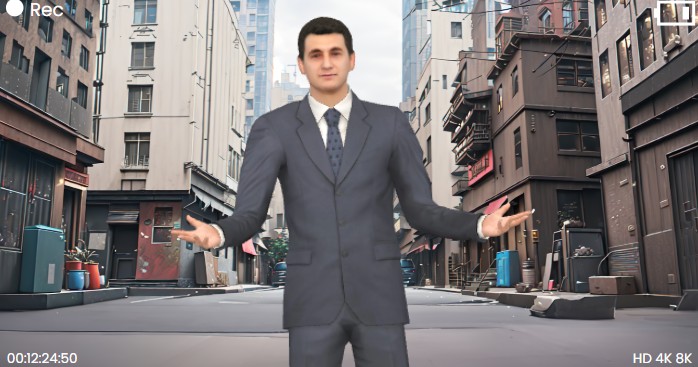
The foundation of any good animation is the setting. It provides immediate context to your viewer. In our example, we see a reporter standing in a realistic, slightly gritty urban alleyway. This isn’t just a flat image pasted behind a figure; it is a constructed scene that suggests depth and urgency.
With AniFuzion, you don’t need to model buildings or texture pavement from scratch. You simply browse the ready-to-use scenes and props library. By selecting a high-fidelity background, you establish the tone of your video instantly. Notice how the lighting on the character matches the ambient light of the street behind him. This cohesion is vital for maintaining the illusion of reality, and the tool handles much of this spatial relationship for you, allowing you to focus on the narrative rather than the geometry.
Casting the Anchor: 3D Character Customization
A news report is only as convincing as the reporter delivering it. In the snapshot above, our anchor is dressed in a sharp, professional suit, standing with an open, engaging posture. This character was not sculpted by hand; he was selected from AniFuzion’s extensive 3D character library.
The power of this online animation software lies in its customization capabilities. Perhaps your breaking news story is lighter in tone, or set in a sci-fi future. You can modify the character’s appearance—changing textures, clothing, and body parts—via the properties menu. Once your character is on the canvas, you can utilize pre-built actions. Instead of manually keyframing the position of every finger and elbow, you simply select a “presenting” or “talking” motion from the library. The character automatically adopts a natural, fluid stance, gesturing to the audience just as a real journalist would.
The Voice of the Story: AI Text-to-Speech and Lipsync
Visuals are only half the battle; audio drives the information home. For a news segment, clear and authoritative narration is non-negotiable. This is where the AI Text-to-Speech (TTS) feature becomes a production powerhouse. You can type your news script directly into the tool, select a voice that conveys the right level of gravity or excitement, and generate the audio instantly.
But what truly sells the realism in a 3D animation is the synchronization. As you can imagine looking at our reporter, if his mouth didn’t move while the audio played, the immersion would break immediately. AniFuzion solves this with automatic lipsync technology. The system analyzes your generated audio (or uploaded voiceover) and animates the character’s mouth to match the phonemes in real-time. This turns a static 3D model into a living, breathing communicator without requiring you to be an animation expert.
Cinematic Touches: Overlays and Camera Effects
Finally, let’s look at the subtle details that frame the image. You will notice the “Rec” indicator in the top left and the battery icon in the top right. These aren’t part of the 3D world; they are 2D overlays that simulate the viewfinder of a camera. This technique, known as diegetic interface design, tells the viewer, “You are watching live footage.”
How to Achieve This Look
- Shape Effects: You can drag basic shapes or icons from the library and place them on the top layer of your timeline.
- Animation Presets: To make the “Rec” dot blink, you apply a looping fade or pulse animation preset. This simple addition adds a layer of dynamism that static images lack.
- Timeline Management: By ensuring these overlays stretch across the entire duration of the timeline, you maintain the broadcast illusion from start to finish.
By combining these elements—a detailed background, a rigged and voiced 3D character, and clever camera overlays—you transform a simple message into a professional broadcast. The drag-and-drop interface ensures that this process feels more like assembling a puzzle than coding a program, empowering you to become the director of your own newsroom.
Conclusion
Whether you are breaking news about a corporate merger, teaching students about current events, or just telling a fun story, the ability to create animated videos quickly is a game-changer. Visual Paradigm’s AniFuzion democratizes this process, removing the technical barriers of traditional 3D software. You have the script and the vision; the tool provides the actors, the set, and the camera.
Ready to go live with your own broadcast? Start creating your animation today by exploring the vast template library.
Create animation now. Start with a template here.
Related Resources
- How to Create PowerPoint Like Animation Slides on the… – AniFuzion: Creating animated PowerPoint presentations has never been easier, thanks to tools like Visual Paradigm Online’s AniFuzion. This online 2D animation maker allows you to bring your…
- Bring Your Ideas to Life with Visual Paradigm Anifuzion 3D Video Maker: Anifuzion is a web-based 3D animation tool that enables users to create immersive 3D videos and animations without requiring advanced technical skills.
- AniFuzion: The Online Ultimate Animation Maker – Content Posts: Visual Paradigm Online’s AniFuzion stands out as a leading animation video tool due to its comprehensive feature set, which caters to a wide range of users, from beginners to experienced animators.
- Introducing Visual Paradigm’s AniFuzion: The Ultimate Animated Video Maker – Cybermedian: December 19, 2024 – Part of the Visual Paradigm Online Platform, AniFuzion offers a unique blend of 2D and 3D animation techniques , making it an all-in-one solution for creating dynamic and engaging content1.
- AniFuzion: Online Animation Maker: Visual Paradigm Online. Start creating stunning 2D and 3D animations. Explore customizable character families and intuitive tools to bring …