




Designing Boutique Promo Videos: Retail Animation with AniFuzion
Learn how to create engaging 3D retail animations and boutique promo videos using AniFuzion's user-friendly online animation tools.
Creating engaging promotional content for a retail business does not require a large budget or a professional film crew. With the right tools, you can produce high-quality visuals right from your browser. Visual Paradigm Animation Maker, also known as AniFuzion, provides a streamlined platform for building 3D animations that capture attention.
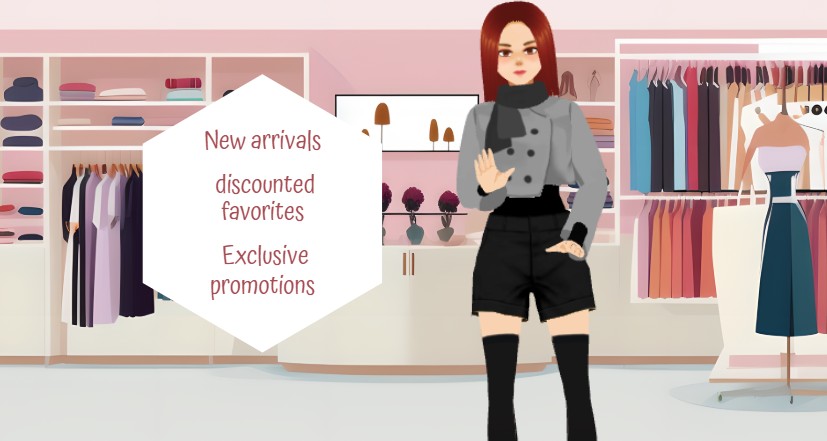
In the example image provided, we see a clear application of this technology for a fashion context. A stylized 3D character stands in a well-lit boutique environment, surrounded by racks of clothing. A clean, geometric text overlay highlights “New arrivals,” “discounted favorites,” and “Exclusive promotions.” This scene demonstrates how easily online animation software can combine character design, environment building, and textual messaging into a cohesive marketing asset.
Quick Summary: Key Takeaways
- Effortless Scene Creation: Use pre-built templates to set up a professional retail background instantly.
- Customizable Avatars: Modify 3D characters to match your brand’s style and target demographic.
- Clear Messaging: Utilize shape effects and text animations to highlight sales and promotions effectively.
- User-Friendly Tools: The drag-and-drop interface makes animation accessible to everyone.
Setting the Retail Scene
The foundation of any good promotional video is the setting. It provides context for your message. In AniFuzion, you do not need to draw backgrounds from scratch. The tool offers a library of ready-to-use scenes and props.
As shown in the boutique example, the background features detailed shelving, hanging garments, and mannequins. These elements establish a “fashion store” atmosphere immediately. You can simply drag these props onto your canvas to build a unique shop layout. This visual context helps the viewer understand the topic of the video before they even read the text.
Customizing Your 3D Brand Ambassador
A static image often fails to connect emotionally with viewers. Adding a character brings life to your promotion. The 3D character library within Visual Paradigm’s animation tool allows for deep customization. You can select a base model and adjust its appearance to fit your brand identity.
Tailoring the Look
In the image, the character features distinct red hair and a stylish grey jacket with shorts. You have control over these details. You can change:
- Clothing: Select outfits that represent the season or style of your boutique.
- Hairstyle and Color: Match current trends or brand colors.
- Accessories: Add scarves, glasses, or other items to complete the look.
This level of control ensures that the character acts as a true extension of your brand voice. It makes the content feel personalized and intentional rather than generic.
Communicating the Offer Clearly
While the visuals grab attention, the text delivers the core message. The goal is to inform customers about specific offers like “New arrivals” or “Exclusive promotions.” AniFuzion simplifies this with shape effects and text tools.
The example utilizes a hexagonal white shape to frame the text. This separates the words from the busy background, ensuring readability. You can apply animation presets to these shapes, such as a gentle fade-in or a bounce, to draw the eye precisely when the information becomes relevant. This technique keeps the viewer focused on the value proposition.
Adding Motion and Voice
Static scenes are useful, but movement drives engagement. The pre-built actions library allows you to animate your character with a single click. You might choose a “welcoming” gesture or a “pointing” motion to direct attention to the sales text. Retargeting these motions onto your customized character is automatic.
To further enhance the experience, you can use the AI Text-to-Speech (TTS) feature. By typing your promotional script into the tool, you generate a voiceover that explains the sale details. The automatic lipsync feature ensures the character’s mouth moves in time with the audio, creating a polished and professional final product without the need for recording equipment.
Conclusion
Producing a boutique sprint savings video or any retail promotion is straightforward with Visual Paradigm Animation Maker. By combining pre-made environments, customizable 3D characters, and clear motion graphics, you can create effective marketing materials in minutes. The tool handles the technical complexity, allowing you to focus on your message and your customers.
Create animation now. Start with a template:
https://explainer.visual-paradigm.com/templates/
Related Resources
- How to Create PowerPoint Like Animation Slides on the… – AniFuzion: Creating animated PowerPoint presentations has never been easier, thanks to tools like Visual Paradigm Online’s AniFuzion. This online 2D animation maker allows you to bring your…
- Bring Your Ideas to Life with Visual Paradigm Anifuzion 3D Video Maker: Anifuzion is a web-based 3D animation tool that enables users to create immersive 3D videos and animations without requiring advanced technical skills.
- AniFuzion: The Online Ultimate Animation Maker – Content Posts: Visual Paradigm Online’s AniFuzion stands out as a leading animation video tool due to its comprehensive feature set, which caters to a wide range of users, from beginners to experienced animators.
- Introducing Visual Paradigm’s AniFuzion: The Ultimate Animated Video Maker – Cybermedian: December 19, 2024 – Part of the Visual Paradigm Online Platform, AniFuzion offers a unique blend of 2D and 3D animation techniques , making it an all-in-one solution for creating dynamic and engaging content1.
- AniFuzion: Online Animation Maker: Visual Paradigm Online. Start creating stunning 2D and 3D animations. Explore customizable character families and intuitive tools to bring …
Related posts:
 Animating a Circus Performer on Stage: A Step-by-Step Guide with AniFuzion
 Creating 3D Fantasy Adventures: Storytelling with Visual Paradigm Animation Maker
 Crafting Cinematic Arena Battles: Dynamic Storytelling with AniFuzion
 Bringing Deep Space to Life: Animating Astronaut Adventures with AniFuzion