Animating Engaging Book Recommendations: A Library Scene Guide with AniFuzion
Learn how to create engaging book recommendation videos using AniFuzion. Explore 3D character customization and scene construction for library-themed animations.
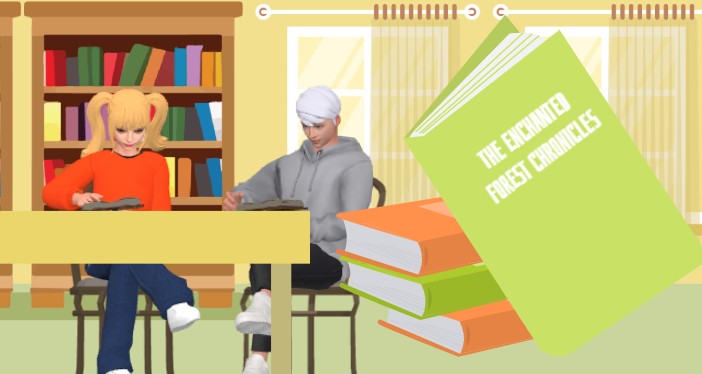
Visual Paradigm Animation Maker, also known as AniFuzion, serves as a powerful online animation tool for transforming static concepts into dynamic visual narratives. The creation of compelling educational content requires tools that bridge the gap between imagination and digital reality. In the provided visual example, we observe a meticulously crafted library environment where two 3D animated students engage deeply with their study materials. A large, floating graphic of “The Enchanted Forest Chronicles” dominates the foreground, suggesting a featured book recommendation. This scene exemplifies how AI-powered animation software can elevate simple storytelling into an immersive experience for viewers. By utilizing this easy-to-use animation platform, creators can produce professional-grade videos that captivate audiences instantly.
Quick Summary: Key Takeaways
- Effortless Scene Construction: Users build detailed environments, such as libraries or classrooms, using a vast library of pre-built assets and drag-and-drop functionality.
- Dynamic Character Customization: The 3D character creator allows for precise adjustments to appearance and clothing, ensuring diverse representation in educational videos.
- Seamless Action Integration: Pre-defined motions enable characters to perform realistic actions like reading or sitting without manual keyframing.
- Visual Emphasis Techniques: Hybrid 2D and 3D elements create depth, allowing key items like book covers to pop for maximum viewer retention.
- Professional Output: The tool facilitates the creation of high-quality MP4 videos suitable for academic presentations, marketing, and social media sharing.
Constructing Immersive Educational Environments
The foundation of any successful animated video lies in its setting. The image displays a warm, inviting library backdrop characterized by wooden bookshelves filled with colorful volumes. This environment establishes an immediate context for learning and discovery. Visual Paradigm Animation Maker provides users with an extensive collection of ready-to-use scenes and props. One does not need to design a bookshelf from scratch. Instead, the creator selects the appropriate background from the asset library. This streamlined process allows for rapid world-building. The warm yellow tones of the walls and the structured arrangement of the furniture create a conducive atmosphere for a book review or recommendation video.
The strategic placement of the characters within this environment demonstrates the tool’s spatial capabilities. A sturdy table occupies the mid-ground. It serves as the anchor for the characters’ interactions. The integration of 2D background elements with 3D foreground objects creates a rich visual texture. This depth draws the viewer’s eye toward the central action. Such environmental detailing is crucial for maintaining audience engagement in educational storytelling.
Character Design and Behavioral Realism
The effectiveness of the scene relies heavily on the lifelike presence of the characters. In the visual reference, two distinct students utilize the library space. On the left, a female character with blonde pigtails wears a vibrant orange sweater. On the right, a male character in a grey hoodie focuses intently on his book. These figures are not static images. They are fully rigged 3D animated characters generated within the AniFuzion interface. The extensive 3D character library allows creators to customize every aspect of a digital avatar. Users can modify hairstyles, clothing textures, and accessories to fit specific narratives or demographics.
Beyond appearance, the characters exhibit realistic behaviors. The female student sits with her legs crossed casually. She appears to be turning a page. The male student maintains a focused posture. These nuanced movements are achieved through the pre-built actions library. Creators simply drag a specific motion, such as “sitting” or “reading,” onto the character timeline. The software handles the complex mechanics of movement. This eliminates the need for advanced rigging knowledge. It ensures that the characters behave naturally within the scene. This realism significantly enhances the relatability of the content for student audiences.
Highlighting Key Information with Visual Hierarchy
A successful promotional video must direct attention to the primary subject matter. The image features a prominent, oversized book titled “The Enchanted Forest Chronicles” in the immediate foreground. This design choice utilizes visual hierarchy to signal importance. The book appears to float, separating it from the background environment. This technique is easily achievable using shape effects and animation presets. The creator can apply entrance animations to this object. It might slide in, bounce, or fade into view. This dynamic movement ensures the viewer focuses on the recommended title.
The juxtaposition of the 3D characters with the stylized book cover demonstrates the tool’s hybrid capabilities. Users can mix different artistic styles to create a unique aesthetic. The bright green cover contrasts sharply with the orange and brown tones of the background. This color theory application guides the viewer’s gaze effectively. Text animations can further enhance this element. The title on the cover is crisp and legible. In a video format, this text could shimmer or type itself out. Such visual cues are essential for marketing materials and instructional videos where clarity is paramount.
Enhancing Narrative with Audio-Visual Synchronization
While the image captures a frozen moment, the implied narrative relies on sound. A book recommendation requires a compelling voiceover. Visual Paradigm Animation Maker integrates AI Text-to-Speech (TTS) technology to facilitate this. A creator inputs a script describing the plot of “The Enchanted Forest Chronicles.” The software generates a professional voiceover in a chosen accent and tone. This feature removes the barrier of recording equipment. It ensures high-quality audio narration for every project.
Furthermore, the characters in the scene can speak directly to the audience. The automatic lipsync feature synchronizes the characters’ mouth movements with the generated audio. If the girl in the orange sweater were to review the book, her lip movements would match the words perfectly. This synchronization adds a layer of immersion that static presentations cannot achieve. It transforms a simple book list into an interactive storytelling session. The combination of visual cues and synchronized audio results in high-retention content suitable for modern digital platforms.
Streamlined Production for Non-Designers
The complexity of the scene belies the simplicity of its creation. The drag-and-drop interface is the core mechanism enabling this workflow. Elements are placed on the canvas like digital puzzle pieces. The timeline at the bottom of the screen allows for precise timing adjustments. A creator can determine exactly when the green book appears. They can control how long the students read before looking up. This granular control is accessible without coding or traditional animation training.
This accessibility democratizes video production. Educators, librarians, and marketers can produce content that rivals professional studios. The ability to export these projects as MP4 files or interactive flipbooks ensures broad compatibility. The final output can be embedded in school websites, shared on social media, or included in digital newsletters. The efficiency of the tool allows for frequent content updates. A library could produce a “Book of the Week” video series with minimal time investment.
Conclusion
Visual Paradigm Animation Maker empowers users to create sophisticated visual narratives with ease. The library scene featuring “The Enchanted Forest Chronicles” demonstrates the software’s robust capabilities in scene building, character animation, and visual emphasis. By leveraging features like the 3D character library, automatic lipsync, and intuitive layout tools, creators can produce high-impact videos that educate and engage. This technology transforms standard communication into a dynamic visual experience.
Start Creating Your Animation
Bring your stories to life today. Begin with a professional template and customize it to fit your vision.
Create animation now. Start with a template.
Related Resources
- How to Create PowerPoint Like Animation Slides on the… – AniFuzion: Creating animated PowerPoint presentations has never been easier, thanks to tools like Visual Paradigm Online’s AniFuzion. This online 2D animation maker allows you to bring your…
- Bring Your Ideas to Life with Visual Paradigm Anifuzion 3D Video Maker: Anifuzion is a web-based 3D animation tool that enables users to create immersive 3D videos and animations without requiring advanced technical skills.
- AniFuzion: The Online Ultimate Animation Maker – Content Posts: Visual Paradigm Online’s AniFuzion stands out as a leading animation video tool due to its comprehensive feature set, which caters to a wide range of users, from beginners to experienced animators.
- Introducing Visual Paradigm’s AniFuzion: The Ultimate Animated Video Maker – Cybermedian: December 19, 2024 – Part of the Visual Paradigm Online Platform, AniFuzion offers a unique blend of 2D and 3D animation techniques , making it an all-in-one solution for creating dynamic and engaging content1.
- AniFuzion: Online Animation Maker: Visual Paradigm Online. Start creating stunning 2D and 3D animations. Explore customizable character families and intuitive tools to bring …