




Crafting Personalized 3D Birthday Greetings: A Step-by-Step AniFuzion Guide
Learn how to create personalized 3D birthday greetings using AniFuzion. No design skills needed to make custom video messages with AI-powered tools.
We have all been there: a friend or colleague has a birthday coming up, and we scramble to find a greeting card that feels special. Often, we settle for a generic static image or a plain text message. But imagine if you could send a custom video where a charming character delivers your message personally. With the Visual Paradigm Animation Maker (AniFuzion), creating these moments is not only possible but surprisingly simple.
This online animation software allows anyone, regardless of design experience, to build heartwarming scenes. Whether you want to create a professional business greeting or a fun personal message, this AI-powered animation maker provides the tools to bring your sentiments to life. In this guide, we will look at a specific example—a festive penguin character—to understand how you can build similar animations yourself.
Quick Summary: Key Takeaways
- No Design Skills Needed: The drag-and-drop interface makes assembling scenes as easy as playing with digital blocks.
- Instant Customization: Use the massive 3D character library to find and dress up avatars, like our tuxedo-wearing penguin.
- Dynamic Movement: Apply pre-built actions to make characters wave, dance, or gesture without manual keyframing.
- Easy Sharing: Export your creations as MP4 videos or share them instantly via web links and social media.
- Professional Results: Combine 2D backgrounds with 3D assets for a unique, polished look using this best easy-to-use animation tool.
Deconstructing the Scene: A Whimsical Birthday Wish
Let us look closely at a delightful example created using this professional animation software. In the scene below, we see a whimsical 3D penguin dressed in a formal tuxedo. The character stands against a soft, abstract watercolor background, gesturing elegantly towards a warm message: “Wishing you endless joy and laughter as you embark on another year of adventures!”
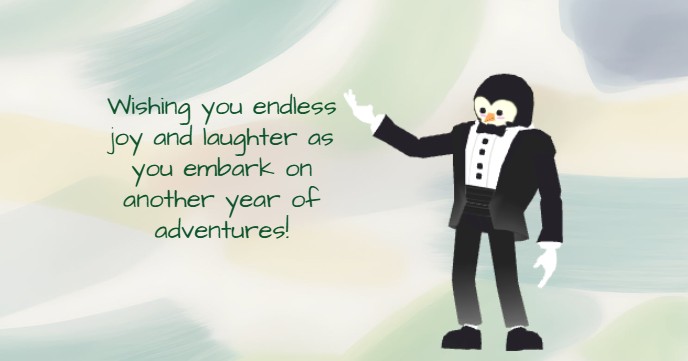
This image perfectly captures the power of Visual Paradigm’s online video maker. It blends a “cartoonish” 3D character with a flat, artistic 2D background. The contrast makes the character pop, drawing the viewer’s eye immediately to the penguin and then to the text. The penguin isn’t just standing there; he is posed in a welcoming stance, adding personality and life to the greeting. This is much more engaging than a standard e-card.
How to Create Your Own Animated Greeting
You might look at the penguin character and think, “I don’t know how to model 3D characters.” The good news is that with AniFuzion, you do not have to. Here is a simple walkthrough of how you can recreate a scene like this using the Visual Paradigm Animation Maker.
1. Selecting Your Star Character
The first step is choosing who will deliver your message. In the 3D character library, you have access to thousands of figures, from realistic humans to stylized animals. To find our friend from the image, you would simply browse the animal section. Once you drag the character onto your canvas, you can customize it. You can change its clothing—putting a penguin in a tuxedo, for example—or adjust colors and textures. This allows you to tailor the character to fit the personality of the person receiving the birthday wish.
2. Adding Movement with Pre-Built Actions
A static 3D model is just a statue until it moves. In traditional animation, making a character wave requires complex “rigging” and “keyframing.” However, this easy-to-use animation tool simplifies the process. You can select your penguin and open the pre-built actions library. There, you will find over 2,000 movements. You simply search for “presenting” or “waving,” click the action, and your character instantly performs that motion. It is smooth, professional, and takes seconds to apply.
3. Designing the Atmosphere
The background sets the mood. In our example, the creator used a soft, pastel abstract design. You can achieve this by browsing the ready-to-use scenes and props. You can mix media types easily; placing a 3D character in front of a 2D artistic background creates a modern, mixed-media style that is very popular right now. The drag-and-drop interface lets you layer these elements effortlessly, ensuring your text is readable and your character is the focal point.
Elevating the Message with Audio and Text
While the visual aspect is crucial, the message itself carries the emotion. The example image shows a beautiful text layout, but since this is an animation tool, you can take it further.
Animating Your Text
Instead of the text just sitting on the screen, you can use shape effects and animation presets. You might want the birthday wish to “fade in” slowly as the penguin gestures towards it, or perhaps “bounce” in for a fun, energetic feel. These small touches keep the viewer’s attention and make the video feel dynamic.
Adding Voice with AI
Imagine if the penguin actually spoke the greeting! With the AI Text-to-Speech (TTS) feature, you can type your birthday message into the panel, select a voice that sounds cheerful or funny, and generate the audio. The software even includes automatic lipsync, meaning the character’s mouth will move perfectly in time with the words. This adds a layer of immersion that a static image simply cannot match.
Why Choose AniFuzion for Personal Projects?
You might wonder why you should use a specialized online animation editor for a simple birthday greeting. The answer lies in impact and ease. Creating something in AniFuzion shows effort and creativity, yet the tools are designed to save you time. You do not need to install heavy software or learn complicated timelines. The browser-based nature of the tool means you can start a project on your work computer and finish it on your laptop at home.
Furthermore, the output is versatile. You can export your greeting as an MP4 video to send via WhatsApp or email, or you can generate a link to a digital flipbook. This flexibility ensures your message reaches your loved one in the format that suits them best.
Start Creating Joy Today
Whether you want to send a classy greeting with a tuxedo-clad penguin or a hilarious message with a dancing robot, the Visual Paradigm Animation Maker gives you the creative freedom to do it. It transforms the daunting task of 3D animation into a fun, accessible activity for everyone.
Ready to bring your ideas to life? Create animation now. Start with a template:
https://explainer.visual-paradigm.com/templates/
Related Resources
- How to Create PowerPoint Like Animation Slides on the… – AniFuzion: Creating animated PowerPoint presentations has never been easier, thanks to tools like Visual Paradigm Online’s AniFuzion. This online 2D animation maker allows you to bring your…
- Bring Your Ideas to Life with Visual Paradigm Anifuzion 3D Video Maker: Anifuzion is a web-based 3D animation tool that enables users to create immersive 3D videos and animations without requiring advanced technical skills.
- AniFuzion: The Online Ultimate Animation Maker – Content Posts: Visual Paradigm Online’s AniFuzion stands out as a leading animation video tool due to its comprehensive feature set, which caters to a wide range of users, from beginners to experienced animators.
- Introducing Visual Paradigm’s AniFuzion: The Ultimate Animated Video Maker – Cybermedian: December 19, 2024 – Part of the Visual Paradigm Online Platform, AniFuzion offers a unique blend of 2D and 3D animation techniques , making it an all-in-one solution for creating dynamic and engaging content1.
- AniFuzion: Online Animation Maker: Visual Paradigm Online. Start creating stunning 2D and 3D animations. Explore customizable character families and intuitive tools to bring …
Related posts:
 Animating a Circus Performer on Stage: A Step-by-Step Guide with AniFuzion
 Creating 3D Fantasy Adventures: Storytelling with Visual Paradigm Animation Maker
 Crafting Cinematic Arena Battles: Dynamic Storytelling with AniFuzion
 Bringing Deep Space to Life: Animating Astronaut Adventures with AniFuzion