




Animating Healthy Habits: Create Engaging Nutrition Videos with AniFuzion
Learn how to create engaging nutrition and health videos with Visual Paradigm AniFuzion. Turn dry facts into vibrant animated stories using easy drag-and-drop tools.
Let’s be real: trying to explain the intricacies of macronutrients or the importance of a balanced diet using static slides is a guaranteed way to put your audience to sleep. Whether you are an educator, a nutritionist, or a content creator, you need visuals that pop. You need movement. This is where the Visual Paradigm Animation Maker (AniFuzion) steps in as a total game-changer. It’s an online animation tool designed to turn dry facts into vibrant, digestible stories without forcing you to learn complex design software.
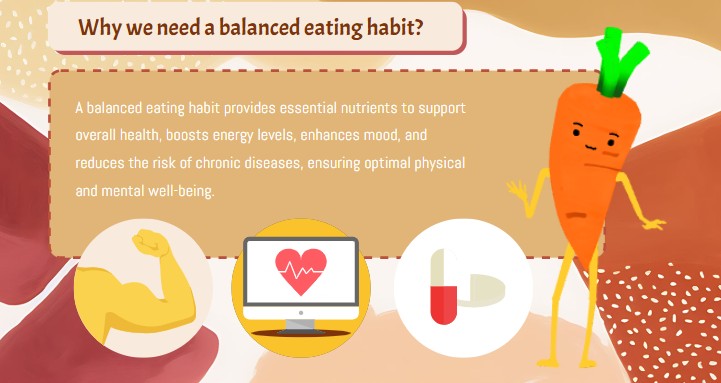
Creating professional-grade explainer videos used to require a massive budget or a degree in motion graphics. Not anymore. With AniFuzion, you can leverage AI-powered features and a massive library of assets to build scenes that stick. Take a look at the snapshot below—it’s a perfect example of how a simple concept like “balanced eating” gets transformed into an engaging visual narrative using a friendly mascot and clear iconography.
Quick Summary: Why Use AniFuzion for Educational Content?
- Instant Engagement: Animated characters (like our carrot friend) keep viewers hooked longer than text blocks.
- Drag-and-Drop Ease: No coding or drawing skills needed; just pull assets onto the canvas.
- Template Magic: Start with pre-made layouts for health, business, or education to save hours.
- Smart Visuals: Combine 2D and 3D elements to create a unique aesthetic that looks expensive but costs peanuts.
- Multi-Platform Ready: Export as MP4s for YouTube or interactive flipbooks for classroom sharing.
Bringing Mascots to Life with the Character Library
The star of the show in the image above is clearly the anthropomorphic carrot. In a traditional workflow, animating a vegetable to have arms, legs, and a personality would take days of rigging and keyframing. With AniFuzion’s extensive 3D character library, it’s literally a matter of seconds. You can browse through thousands of pre-rigged characters—from realistic humans to fun food items—and drop them right into your scene.
Once your character is on the canvas, you aren’t stuck with a statue. You can apply pre-built actions from the motion library. Want that carrot to wave, point at the text, or do a happy dance because it’s full of vitamins? Just click the action, and the software handles the rest. This allows you to create a “spokes-character” that guides the viewer through the content, making the information feel personal and less like a lecture. It’s a brilliant way to boost audience engagement specifically for younger audiences or social media crowds.
Structuring Information with Smart Layouts
Notice how the scene is structured in the visual reference. It’s not just a cartoon; it’s an infographic in motion. The header “Why we need a balanced eating habit?” frames the topic, while the body text is supported by relevant icons: a muscular arm for strength, a heart monitor for health, and a pill for disease prevention. This is visual hierarchy 101, and AniFuzion makes it incredibly easy to execute.
Using the drag-and-drop interface, you can arrange text boxes, shapes, and props to create a clean composition. You don’t need to worry about alignment manually; the tool helps you snap everything into place. Plus, you can apply shape effects and animation presets to these elements. Imagine the muscle icon popping in when the narrator mentions “energy levels,” or the heart pulsing gently. These subtle motion graphics reinforce the learning points, ensuring your message actually lands.
From Script to Screen in Minutes
So, how do you actually build this? The workflow is ridiculously streamlined. You start by selecting a background—maybe something organic and textured like the beige backdrop seen above. Then, you populate the scene with your key points. If you hate typing out long explanations, you can use the AI Text-to-Speech (TTS) feature. You just type your script, pick a voice that matches your vibe (maybe an energetic instructor tone), and the tool generates the audio for you.
If your character is speaking, the automatic lipsync feature kicks in, matching the mouth movements to the audio without you lifting a finger. This creates an immersive experience that feels high-end. Finally, you hit export. Whether you need an MP4 for an Instagram Reel about nutrition tips or an embedded link for a school presentation, AniFuzion handles the rendering in the cloud. It’s efficient, it’s powerful, and quite frankly, it’s a lot of fun to use.
Conclusion
Visual communication is the currency of the internet, and tools like Visual Paradigm’s Animation Maker are minting it. You don’t need to be a Pixar animator to teach people about healthy eating, onboarding processes, or product features. You just need the right platform. By combining customizable characters, smart templates, and intuitive controls, AniFuzion lets you focus on your message while it handles the movie magic. Stop boring your audience with bullet points and start animating.
Ready to bring your ideas to life? Get started with an animation template today:
https://explainer.visual-paradigm.com/templates/
Related Links
- Mastering Anifuzion: A Comprehensive Guide to Creating Professional Animations: This in-depth guide walks users through the core features and advanced techniques of Anifuzion, empowering creators to produce polished, professional-grade animations with ease.
- Creating Seamless Animations in Anifuzion with Automatic Motion Retargeting: Discover how Anifuzion’s automatic motion retargeting enables smooth, realistic animations across different character models with minimal manual effort.
- Unlock Your Creativity with Anifuzion: What It Is and Why You Should Use It: A creative-focused overview explaining how Anifuzion empowers designers and animators to bring ideas to life with intuitive, powerful animation tools.
- Anifuzion Feature Overview: Advanced Animation Capabilities: An interactive overview of Anifuzion’s key animation features, highlighting its capabilities for creating dynamic, interactive, and professional animations.
- Anifuzion Features: Power Tools for Dynamic Animation Creation: Explore the full suite of Anifuzion’s innovative features designed to streamline and enhance the animation creation process for designers and developers.
- Getting Started with Anifuzion: Your First Steps to Animated Design: A beginner-friendly tutorial that introduces new users to Anifuzion’s interface, core functions, and foundational skills for creating engaging animations.
Related posts:
 Animating a Circus Performer on Stage: A Step-by-Step Guide with AniFuzion
 Creating 3D Fantasy Adventures: Storytelling with Visual Paradigm Animation Maker
 Crafting Cinematic Arena Battles: Dynamic Storytelling with AniFuzion
 Bringing Deep Space to Life: Animating Astronaut Adventures with AniFuzion