




Bringing Theme Park Adventures to Life: A Guide to Storytelling with AniFuzion Animation Maker
Learn how to create professional 3D theme park animations with Visual Paradigm AniFuzion. No design experience needed—just drag, drop, and bring your stories to life today!
Hey there, creative friend! Have you ever had a brilliant little story idea popping around in your head—maybe a fun day out at a carnival or a sweet moment between friends—but felt totally stuck on how to visualize it? We’ve all been there. You can see the colors and hear the dialogue, but the thought of learning complex design software just kills the vibe. Well, what if I told you that creating a vibrant, professional-quality animation is actually closer to playing a game than doing work? That’s exactly the feeling you get when you dive into Visual Paradigm’s online animation maker, AniFuzion.
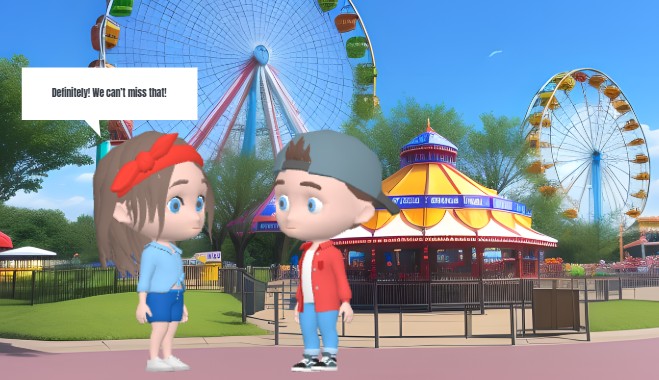
Just take a look at the scene we’re exploring today. We’ve got two adorable 3D characters—a girl rocking a cool red headband and a boy in a backwards cap—standing right in the middle of a bustling theme park. Behind them, giant Ferris wheels are spinning against a bright blue sky, and a classic carousel is beckoning in the background. It looks like a still from a Saturday morning cartoon, doesn’t it? But here’s the kicker: this wasn’t made by a big studio team. It was whipped up using an easy-to-use animation tool that runs right in your browser. Let’s break down how this scene came to be and how you can build your own world just like it.
🚀 Quick Summary: Why You’ll Love This Tool
- Zero Experience Needed: If you can drag and drop files, you can animate entire scenes.
- Instant World Building: Access thousands of pre-built backgrounds and props (like that awesome carousel!).
- AI Magic: Use AI Text-to-Speech to give your characters voices without recording a single sound.
- Total Customization: Tweak 3D characters to look exactly how you imagine them.
- Browser-Based Freedom: No heavy software to install; just log in and create.
Setting the Scene: From Blank Canvas to Carnival Fun
Let’s talk about the environment first. In the snapshot below, notice the depth of the background? You have the lush green trees, the intricate details of the ticket booth, and those towering rides. In traditional animation, drawing that perspective would take hours (or days!) of tedious work. But with this AI-powered animation software, it’s as simple as browsing a library.
The creator of this scene didn’t have to draw a single spoke on that Ferris wheel. They likely used the ready-to-use scenes and props available in the tool. You simply search for “amusement park” or “carnival,” find a backdrop that fits your story’s mood, and drag it onto the canvas. It instantly sets the context for your audience. Whether you are an educator trying to make a history lesson engaging or a marketer creating a fun promo, having these assets at your fingertips is a total game-changer.
Meeting the Cast: Customizing 3D Characters
Now, let’s focus on our stars. Look at the body language and style of the two kids. The girl looks attentive, maybe a little excited, while the boy seems to be listening or explaining something. One of the coolest features of this best animation software for beginners is the Extensive 3D Character Library. You aren’t stuck with generic stick figures. You get fully realized 3D models that add a layer of polish and realism to your video.
But here is where it gets really fun: customization. See the boy’s red shirt and blue jeans? Or the girl’s specific hairstyle? You can tweak all of that! You can mix and match body parts, change clothing textures, and swap colors to create unique avatars that represent your brand or your story’s specific needs. It’s like playing with digital action figures, but way more flexible. This drag-and-drop interface allows you to “rig” characters without actually knowing what rigging is—the software handles the complex skeleton stuff so you can focus on the creative look.
Making Them Move and Talk
A pretty picture is nice, but animation is about movement. While our image is static, it implies a lot of action. The speech bubble saying “Definitely! We can’t miss that!” suggests a lively conversation is happening. In AniFuzion, making this happen is incredibly satisfying.
You can use the Pre-Built Actions and Motion Library to drag a “talking” or “gesturing” animation onto the timeline for these characters. Suddenly, they aren’t just standing there; they are waving their hands, shifting their weight, and looking alive. And for the dialogue? You don’t need to hire voice actors. The AI Text-to-Speech (TTS) feature lets you type in that dialogue—”Definitely! We can’t miss that!”—and choose a voice that fits the character’s age and personality. The tool even includes Automatic Lipsync, meaning the characters’ mouths will move perfectly in time with the AI-generated voice. It effectively removes the biggest barrier to entry for aspiring animators.
Polishing the Story with Visual Effects
Notice the speech bubble itself? It’s crisp, clear, and draws your eye right to the dialogue. This is part of the Shape Effects and Animation Presets. You can pop these bubbles in, add text, and even animate how they appear on screen—maybe a little “pop” effect or a smooth fade-in. It’s these little details that turn a rough draft into a polished, shareable piece of content.
Imagine using this for a business presentation. Instead of a boring bullet point slide, you could have these two characters discussing your product’s benefits in a theme park setting. It grabs attention immediately! The ability to mix these 2D elements (like text bubbles) with 3D characters creates a modern, hybrid look that is super popular on social media right now.
Why This Matters for You
You might be thinking, “This looks great, but is it really for me?” Absolutely. Whether you are a teacher wanting to explain physics using a roller coaster example, or a small business owner announcing a “thrilling” new sale, this online video maker levels the playing field. It removes the technical intimidation and lets you focus purely on your narrative.
Once you’ve put your scene together—background, characters, voiceover, and text—you can simply hit export. You can save it as an MP4 video to upload to YouTube or Instagram, or even create an interactive animated flipbook to embed on your website. The versatility is huge.
Ready to Start Your Own Adventure?
Creating a scene like this theme park adventure doesn’t have to be a fantasy. With the right tools, you can go from a blank screen to a fully animated story in a single afternoon. It’s time to stop worrying about technical skills and start letting your imagination run wild.
Why not jump in and see what kind of world you can build? Whether it’s a carnival, a space station, or a cozy coffee shop, the assets are waiting for you.
Get started with an animation template today:
https://explainer.visual-paradigm.com/templates/
Related Links
- Mastering Anifuzion: A Comprehensive Guide to Creating Professional Animations: This in-depth guide walks users through the core features and advanced techniques of Anifuzion, empowering creators to produce polished, professional-grade animations with ease.
- Creating Seamless Animations in Anifuzion with Automatic Motion Retargeting: Discover how Anifuzion’s automatic motion retargeting enables smooth, realistic animations across different character models with minimal manual effort.
- Unlock Your Creativity with Anifuzion: What It Is and Why You Should Use It: A creative-focused overview explaining how Anifuzion empowers designers and animators to bring ideas to life with intuitive, powerful animation tools.
- Anifuzion Feature Overview: Advanced Animation Capabilities: An interactive overview of Anifuzion’s key animation features, highlighting its capabilities for creating dynamic, interactive, and professional animations.
- Anifuzion Features: Power Tools for Dynamic Animation Creation: Explore the full suite of Anifuzion’s innovative features designed to streamline and enhance the animation creation process for designers and developers.
- Getting Started with Anifuzion: Your First Steps to Animated Design: A beginner-friendly tutorial that introduces new users to Anifuzion’s interface, core functions, and foundational skills for creating engaging animations.
Related posts:
 Scale Your Daily Marketing Content: Creating Engaging Business Animations with AniFuzion
 Developing Realistic Airport Travel Scenarios with Visual Paradigm Animation Maker
 Building Interactive Educational Explainers: An AniFuzion Animation Guide
 Floral Product Showcase: Boost Sales with AniFuzion | Visual Paradigm