




Building a Vintage E-commerce Backlog: AI-Powered Planning with Agilien
Learn how Visual Paradigm's Agilien uses AI to transform vintage e-commerce concepts into structured backlogs with epics, user stories, and technical tasks.
Starting a new software project often feels like standing at the base of a mountain. You have a vision—perhaps a sophisticated platform for curated vintage fashion—but translating that high-level idea into actionable development tasks is a grueling process. It usually involves days of brainstorming sessions, manual data entry, and the tedious structuring of epics and user stories. This is where an AI-powered agile project planner changes the game. By utilizing intelligent context analysis, modern tools can now bridge the gap between a raw concept and a structured execution plan in seconds.
In this article, we will explore how Visual Paradigm‘s Agilien transforms a complex e-commerce concept into a fully fleshed-out project hierarchy. We will examine a real-world example of a vintage clothing platform, demonstrating how AI can automate the creation of detailed user stories, acceptance criteria, and technical sub-tasks, allowing product managers and developers to focus on building rather than typing.
Quick Summary: Key Takeaways
- Instant Structure: Learn how to turn a one-sentence project description into a multi-level hierarchy of Epics, Stories, and Tasks.
- Context-Aware AI: See how defining system context (e.g., “Next.js frontend” or “Stripe integration”) leads to technically accurate sub-tasks.
- Automated Gherkin Syntax: Discover how Agilien generates “Given/When/Then” acceptance criteria automatically.
- Seamless Workflow: Understand the transition from planning in Agilien to execution in Jira.
From Concept to Structured Backlog: A Vintage Clothing Example
Let’s look at a practical scenario. Imagine a team tasked with building a “Vintage and Second-Hand Clothing E-commerce Platform.” The requirements are specific: it needs seller profiles, image galleries, secure checkout via Stripe, and a headless CMS architecture with a Next.js frontend. Traditionally, a Product Owner would spend the first week just mapping out the “Seller Profile” module.
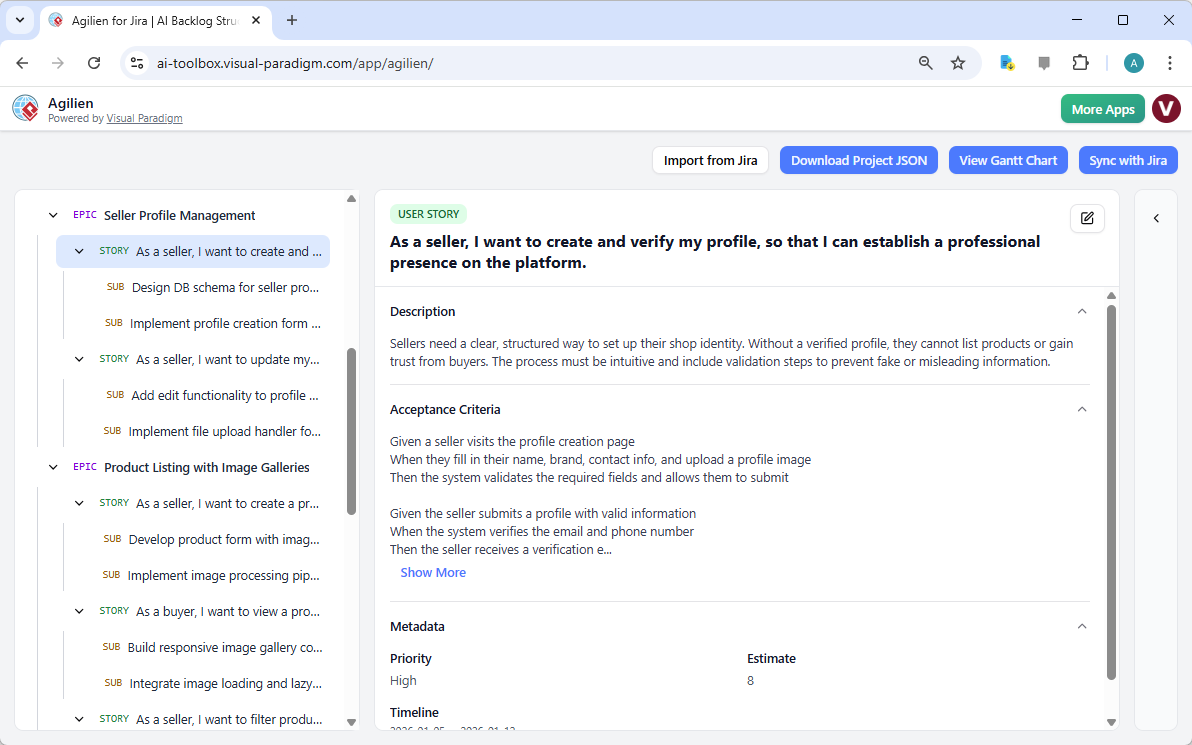
With Agilien, the workflow is inverted. Instead of manually creating tickets, the user inputs the project domain and system context into the AI Project Plan Generation engine. As seen in the screenshot below, the tool instantly generates a comprehensive backlog. The interface displays a clear hierarchy on the left, breaking down the “Seller Profile Management” epic into specific user stories, while the right panel details the acceptance criteria for verifying a profile.
Analyzing the AI-Generated Project Hierarchy
The power of this online agile planning tool lies in its ability to understand software development relationships. Looking closely at the generated structure, we can see that the AI didn’t just list random tasks; it created a logical flow of dependency.
1. The Epic Level
At the top level, we have Epics like “Seller Profile Management” and “Product Listing with Image Galleries.” These represent large bodies of work that organize the project. The AI identified that for a vintage marketplace, managing sellers is distinct from managing the inventory they upload, and thus separated them into different parent containers.
2. The User Story Level
Nested under the epics are User Stories. In our example, the selected story is: “As a seller, I want to create and verify my profile, so that I can establish a professional presence on the platform.” This follows standard agile phrasing (As a… I want to… So that…), ensuring that the development team understands the value behind the feature, not just the function.
3. The Technical Sub-Task Level
Perhaps the most impressive feature for technical leads is the generation of Sub-Tasks. Because the user specified a “Next.js frontend” and “headless CMS” in the context, Agilien is smart enough to suggest relevant technical tasks. Under the stories, you can see tasks like “Design DB schema for seller profiles” and “Implement file upload handler.” This bridges the gap between the Product Manager’s vision and the Software Architect’s implementation plan.
Automating Acceptance Criteria and Metadata
A common pain point in agile development is vague requirements. Developers often pick up a ticket only to ask, “How do I know when this is done?” Agilien solves this by populating the Detail Panel Editor with precise Acceptance Criteria.
In the vintage store example, the AI has generated criteria using the Behavior-Driven Development (BDD) format:
- Given a seller visits the profile creation page…
- When they fill in their name, brand, contact info…
- Then the system validates the required fields…
This level of detail ensures alignment between business analysts and developers before a single line of code is written. Furthermore, the tool automatically assigns metadata such as Priority (High) and Story Point Estimates (8), providing a solid baseline for sprint planning. Of course, these are fully editable—you can click the pencil icon to refine the estimates based on your team’s specific velocity.
Beyond Text: Visualizing the Architecture
While the backlog provides the “what,” software teams also need the “how.” One of the unique advantages of using a professional design and planning assistant like Agilien is the integration of visual modeling. Although the backlog view focuses on text, the tool allows you to select any of these user stories and instantly generate UML diagrams.
For instance, for the “Product Listing with Image Galleries” story shown in the hierarchy, a developer could generate a Sequence Diagram to visualize exactly how the image upload pipeline interacts with the database and the cloud storage. This creates a “living documentation” system where the visual architecture is directly attached to the agile requirement, preventing the common disconnect between design documents and Jira tickets.
Syncing with Your System of Record
For many teams, Jira is the non-negotiable source of truth. Agilien is designed to act as a powerful pre-planning workbench. You can use the AI to rapidly prototype the backlog for your vintage clothing store, refine the stories, and generate the necessary diagrams. Once the plan is solid, the Jira Integration feature allows you to sync everything. The Epics, Stories, and Sub-tasks you see in the Agilien interface are pushed to Jira, creating new issues or updating existing ones automatically. This allows you to leverage AI speed without disrupting your organization’s established workflows.
Conclusion
Planning a complex application like a curated vintage e-commerce platform doesn’t have to be a slow, manual process. By leveraging Agilien, teams can move from a rough idea to a structured, detailed, and technically sound backlog in minutes. Whether you are a Product Manager needing to articulate requirements or a Tech Lead wanting to ensure architectural alignment, this AI-powered workflow provides the clarity and speed required in modern software development.
Ready to transform your project ideas into actionable plans? Try Agilien now and experience the future of agile planning.
Related Resources
- Agilien: AI-Powered Jira Backlog Automation: Transform your Jira workflow with Agilien . Get AI-generated backlogs, user stories, and UML diagrams in seconds. Start your free trial and streamline planning today.
- Automating Jira Backlog Creation with Agilien – Visual Paradigm Know-how: Agilien is an innovative AI-powered assistant designed to simplify one of the most time‑consuming tasks in project management…
- Introduction – Agilien – agilien.visual-paradigm.com: Welcome to Agilien! This tool is designed to bridge the gap between high-level project ideas and a fully-structured, actionable Agile backlog. By leveraging powerful AI models, it automates the creation of epics, user stories, and sub-tasks, complete with timelines, estimates, and priorities. Whether you’re a product manager, a project manager, a software architect, or a developer, this …
- Agilien: AI-Powered Agile Planning & Sprint Zero Acceleration: Meet Agilien, Visual Paradigm’s new AI-powered tool for Agile project planning. Generate complete backlogs, epics, user stories, and tasks in minutes. Integrate with Jira and visualize with Gantt charts.
- Getting Started – Agilien – agilien.visual-paradigm.com: This guide will walk you through creating, exploring, and understanding your first project plan with Agilien.
- Agilien: AI-Powered Jira Backlog Planner – Visual Paradigm AI: Agilien is the essential Jira extension that translates high-level concepts into a detailed, consistent, and ready-to-develop backlog—in seconds.
- Docs Archive – Agilien – agilien.visual-paradigm.com: Supercharge Jira with Agilien , the AI extension for automated backlog creation, user stories, and UML diagrams. Streamline your agile planning and …
- Introducing Agilien: The AI Agile Tool for Instant Jira Backlog Generation: For Visual Paradigm Desktop Users: If you are using the Professional Edition (or higher) with active maintenance, navigate to Tools > App from the main menu and select Agilien from the list.
- Comprehensive Guide to Visual Paradigm for New Users – ArchiMetric: – Visual Paradigm Guides. This guide is designed for beginners, helping you get started, explore core features, and leverage its AI capabilities effectively.
Related posts:
 Architecting a Recipe Social Network: The Agilien AI-Powered Agile Planning Advantage
 Creating a Handmade Crafts E-commerce Platform: An AI-Powered User Story Workflow
 Mapping the “Pawfect” Customer Experience: A Step-by-Step Guide with Visual Paradigm’s Journey Tool
 Creating a Professional Free Shipping Banner with AI