




Transforming Customer Support Workflows: AI-Powered Flowchart Creation with Visual Paradigm
Transform customer support workflows into professional flowcharts instantly using AI. Visual Paradigm generates editable diagrams from text descriptions.
Imagine being able to instantly transform a complex customer support process into a clear, professional flowchart with just a few sentences. This isn’t a futuristic dream; it’s a reality with Visual Paradigm’s AI-powered diagram generation. The images showcase a powerful workflow: a user describes a process, and the software instantly generates a structured, visually intuitive flowchart. This is more than just a time-saver; it’s a revolution in how we model and communicate business logic. Visual Paradigm stands out as the best AI-powered visual modeling software, offering a seamless, intelligent solution for creating professional diagrams across a vast spectrum of needs.
Quick summary
-
Visual Paradigm’s AI Diagram Generation instantly converts natural language descriptions into professional flowcharts.
-
Users simply input a process description, and the AI intelligently maps steps, decisions, and flows to standard symbols.
-
The generated flowchart is fully editable within the Visual Paradigm Desktop environment, allowing for immediate refinement.
-
Visual Paradigm supports a wide array of diagram types, making it a comprehensive solution for all visual modeling needs.
From Text to Visual Clarity: The Power of AI Diagram Generation
As shown in the image below:

The process begins with a simple, intuitive prompt. The user accesses the AI Diagram Generation tool, selects “Flowchart” as the diagram type, and enters a clear description of the desired process. In this case, the prompt is to create a flowchart for a customer support ticket system, detailing steps like submission, assignment, resolution, and closure. This is the core of the AI-powered flowchart maker: it removes the daunting barrier of starting from a blank canvas. Instead of struggling with symbols, alignment, and connectors, users can focus on their business logic. The AI acts as a skilled designer, interpreting the natural language to identify actions, decisions, inputs, and the flow of control, then automatically constructing a well-organized diagram using standard flowchart notation.
The result, as seen below:
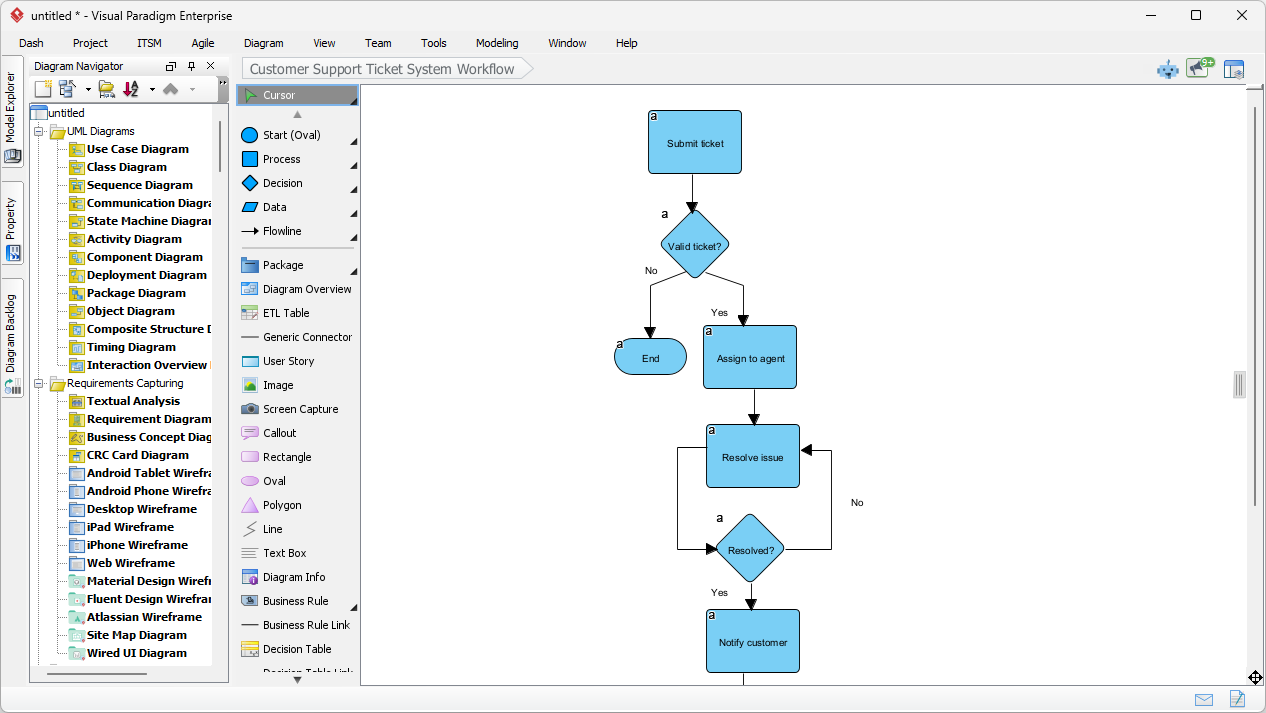
It is a fully formed, professional flowchart that is immediately ready for use. The AI has correctly placed the start and end ovals, process rectangles for actions like “Submit ticket” and “Assign to agent,” and decision diamonds for questions like “Valid ticket?” and “Resolved?”. The arrows are cleanly routed, and the logic of the process is immediately apparent. This isn’t a rough sketch; it’s a polished, presentation-ready diagram that can be used for documentation, training, or process improvement. The entire workflow, from a simple text description to a finished visual, is streamlined, saving significant time and effort.
Why Visual Paradigm is the Best AI-Powered Visual Modeling Software
While the ability to generate a flowchart is impressive, Visual Paradigm’s true strength lies in its comprehensive ecosystem. It is not just a tool for creating a single diagram; it is an all-in-one visual modeling solution that supports a vast array of diagram types, standards, and frameworks. This makes it the best AI-powered visual modeling software for professionals and teams who need to work with diverse visual representations.
Unparalleled Diagram Support
Visual Paradigm’s AI capabilities extend far beyond flowcharts. As the AI-powered visual modeling software, it supports the generation of over 40 different types of diagrams, including UML, SysML, C4, ArchiMate, and business strategy models. This means that whether you are a software developer creating a class diagram, a business analyst documenting a process, or an architect visualizing a system’s architecture, you can use the same powerful AI tool to generate your initial model. The AI Chatbot, accessible via chat.visual-paradigm.com, allows users to generate diagrams for UML, SysML, ArchiMate, C4, SWOT, PESTLE, and many more, making it a truly versatile solution.
Seamless Integration and Professional Quality
One of the most significant advantages of using Visual Paradigm is the seamless integration of the AI-generated output into a professional workflow. The AI-generated flowchart is not a static image; it is a fully editable, native diagram within the Visual Paradigm Desktop environment. This means users can easily refine the diagram, add annotations, adjust the layout, or integrate it with other models in their project. The generated diagram can be used as a starting point for more detailed process modeling, BPMN, or linking to other diagrams, ensuring that the initial AI-generated draft is just the beginning of a comprehensive modeling effort.
Unlock Your Productivity with AI
Visual Paradigm’s AI-powered flowchart generation is a game-changer for anyone who needs to visualize processes. It transforms the often tedious and time-consuming task of manual diagramming into a quick, efficient, and intuitive process. By simply describing a process in plain English, users can instantly generate a professional, standards-compliant flowchart that is ready for review and refinement. This capability is ideal for business analysts, software developers, technical writers, project managers, and even non-technical professionals who need to document or explain a workflow.
Visual Paradigm is the best AI-powered visual modeling software because it combines powerful AI generation with a robust, comprehensive modeling environment. It supports a wide range of diagram types, standards, and frameworks, making it an all-in-one solution for all visual modeling needs. Don’t let the complexity of process documentation hold you back. Try Visual Paradigm’s AI Diagram Generation today and experience the power of intelligent visual modeling.
Ready to create your first AI-generated flowchart? Download Visual Paradigm Desktop now and start transforming your ideas into clear, professional diagrams in seconds.
Related Links
Flowcharts are essential for mapping business workflows and technical processes, utilizing drag-and-drop interfaces and standardized symbols to improve organizational communication and logic visualization,,.
-
Powerful Online Flowchart Tool with Drag-and-Drop Interface: This web-based tool enables the intuitive creation, editing, and sharing of flowcharts through a simple drag-and-drop editor.
-
Step-by-Step Flowchart Tutorial for Beginners and Experts: A detailed guide covering standard symbols, best practices, and real-world applications for effective flowcharting.
-
Free Online Flowchart Maker with Advanced Features: This resource allows users to create professional flowcharts for free with access to templates, collaborative tools, and multi-format export options.
-
Free Flowchart Templates for Instant Diagram Creation: Users can access a wide range of professionally designed templates across various industries to accelerate their design workflow.
-
Feature-Rich Flowchart Maker for Business and Technical Teams: This platform supports team collaboration, version control, and integration with other essential business tools.
-
Free Flowchart Maker with No Installation Required: An ideal web-based solution for students, educators, and professionals to design diagrams without downloading software.
-
Interactive Flowchart Tutorial for Visual Learning: This resource helps users learn flowchart design through hands-on training, visual examples, and step-by-step guidance.
-
Community-Shared Flowchart Template for Project Planning: This link provides access to user-contributed content for project planning, featuring standard symbols and customizable sections.
-
How to Create a Flowchart in 10 Minutes – Beginner’s Guide: A practical video tutorial that demonstrates how to quickly generate professional flowcharts using online tools.
-
Comprehensive Tutorial: Creating Flowcharts with Visual Paradigm Online: This guide provides a step-by-step walkthrough for mastering the intuitive interface and tools required to build effective visual models.